How to Run a Small Business: A Complete Guide


SMALL BUSINESS INTEL, IN YOUR INBOX
Table of contents
Opening a business takes a plan. Running one takes a system.
Once you're past the launch phase, managing a small business becomes the real work: scheduling, payroll, compliance, cash flow, hiring, and marketing, often all at once, often just you.
This guide covers small business operations from the ground up and how to successfully run a small business at every stage: what areas you need to manage, how to build systems that hold up over time, and how to put together a weekly rhythm that keeps you in control without burning you out.

Your workday, your way.
Every day, more small businesses use Homebase to build the exact workflows their teams need.
What It Really Takes to Run a Small Business
Most of what determines whether a small business survives comes down to a handful of operational habits. Here's the short version:
- Running a small business means managing several jobs at once: scheduling, payroll, compliance, hiring, finances, and marketing, on top of the actual work.
- The owners who survive year five aren't the ones who worked the hardest. They built repeatable systems early.
- Cash flow and labor cost percentage are the two numbers that matter most. Review them weekly, not at month-end.
- A 30-minute daily check-in and a weekly 1-to-2-hour review prevent most operational surprises before they become crises.
- You're ready to grow when the business runs the same whether you're there or not.
Your Four Core Operating Systems
According to a 2026 LendingTree analysis of BLS data, about 22% of new businesses close within their first year and roughly half don't make it to year five. The ones that do tend to share one trait: they built systems the business could run on, rather than holding everything together personally.
The goal is to understand how to efficiently run a small business without it running you, and that starts with formalizing four core operational areas before things get chaotic.
A small business needs four core operational areas to run without the owner carrying everything personally:
- Team management: who's working, when, and how their hours are tracked
- Finances: cash flow, payroll, and bookkeeping
- Compliance: what the law requires and how you prove you're doing it
- Customer experience: how your product or service gets delivered consistently
Most owners handle all four manually at first. Once you have a team depending on you, each area needs a consistent system in place, and the sections below cover each one.
1. Team Management: Scheduling, Time Tracking, and Communication
Managing employees as a small business owner comes down to three things: building schedules that actually work, tracking hours accurately so payroll isn't a guessing game, and keeping communication from falling through the cracks.
For most small business owners, this is where the most time disappears. A well-run scheduling and time tracking system saves you hours, protects your payroll accuracy, keeps your team accountable, and gives you visibility into your labor costs before they get out of hand.
Scheduling
Build your schedule around your team's real availability. A few things that make schedules work:
- Publish a week ahead, at minimum. Your team plans their lives around your schedule. More lead time means fewer last-minute conflicts.
- Use open shifts for flexibility. When coverage is uncertain, post an open shift and let your team claim it. You fill the gap; they get the hours.
- Send a notification when the schedule is posted. "I didn't see it" stops being a valid excuse.
Different types of work schedules suit different operations: a restaurant needs rotating shifts, a retail store might run fixed weekly schedules, a salon books by appointment. Once you've settled on your format, building a work schedule takes about 20 minutes with a template.
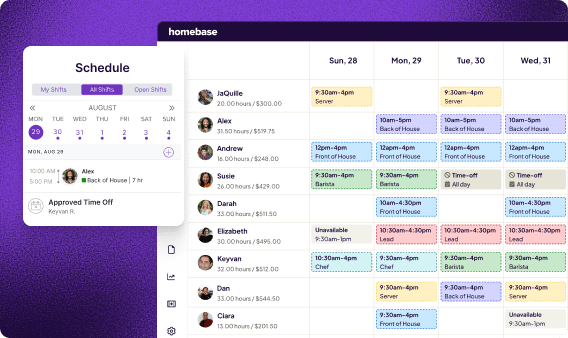
With an employee scheduling app like Homebase, you can publish from that template with a single tap and have your whole team notified by text, email, and in-app alert. Team members can swap shifts and cover each other without coming to you first.
Time tracking
Manual timesheets are slow and error-prone. When someone writes in their own hours, mistakes happen: rounding up, forgetting a break, or punching in for a teammate who isn't there.
Time tracking software for small businesses solves this by tying clock-in to something verifiable: your team member's phone GPS, a photo, or a PIN at the register. Homebase Time Clock tracks hours, breaks, and overtime automatically, then syncs directly to timesheets and payroll.
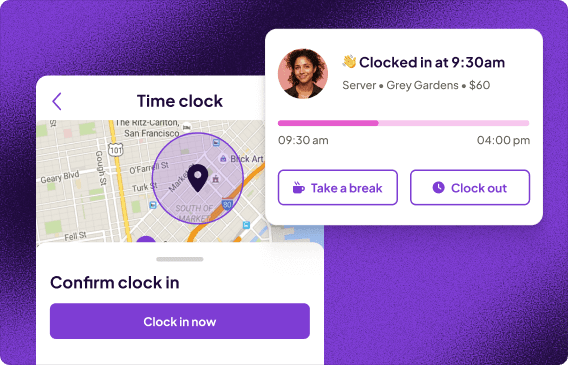
Three things automated time tracking handles that manual timesheets can't:
- Overtime alerts. Get notified before someone crosses the threshold so you can adjust staffing before it hits your payroll.
- Break compliance. Required breaks are logged and stored, which matters if you're ever subject to a wage audit.
- Buddy punching. GPS or photo verification stops team members from clocking in for each other.
Team communication
Work communication needs its own channel, separate from personal texts. A group chat works fine when a team is two or three people. Once you're at five or more, things get missed, coverage gaps happen, and important messages scroll off the screen.
Homebase keeps work communication in one place: shift reminders, announcements, direct messages, and shift notes. And because it's separate from personal texts, a message sent at an off hour doesn't land in someone's personal space.
Amber, owner of Tare Market and one of Homebase's customers, uses it for both scheduling and payroll: "I love how easy it is to use. Staff can easily log in/out for their shifts, whether they are working on or off site. I also like that staff can request time off through the software or swap shifts with other employees."
2. Managing Your Small Business Finances
Running small business finances is the area most owners feel least prepared for. It means tracking more than revenue: understanding cash flow, separating business and personal money, running payroll without errors, and staying ahead of tax obligations.
According to the Federal Reserve's 2025 Small Business Credit Survey, 75% of small businesses cite rising costs as their top financial challenge, 56% struggle to cover operating expenses, and 51% face uneven cash flows. For most small business owners, all three are baseline conditions, not warning signs.
Cash flow vs. profit
Profit is what's left after expenses on paper. Cash flow is whether money is actually in your account when you need it. Effective small business cash flow management is the difference between a business that looks good on paper and one that can make payroll on Friday.
A few habits that help:
- Review your cash position weekly, not monthly. Look at what's coming in, what's going out, and what the next two weeks look like.
- Build a cash reserve. Three to six months of operating expenses is the target. Most owners don't get there overnight. Start with one month.
- Know your labor cost percentage. For most retail and food service businesses, payroll runs between 25 to 35 percent of revenue. If you don't know your number, you're making staffing decisions in the dark.
Payroll
Understanding how to run payroll for a small business correctly is one of the most important operational decisions you'll make. Manual payroll is one of the most common places small business owners lose both time and money. Calculating hours by hand, guessing at overtime, missing a tax deadline: each one costs you. And once an error reaches a team member's paycheck, it erodes trust quickly.
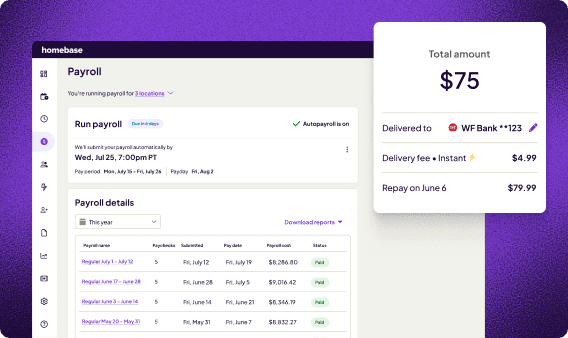
Make sure you set up your small business's payroll to run automatically, with hours that pull directly from your time tracking records. Taxes should calculate, file, and pay on their own. Most small business payroll tools can automate all of this. Homebase Payroll syncs directly to timesheets with no manual re-entry, calculates wages, tips, and overtime, files taxes automatically, and deposits pay directly.
Bookkeeping and taxes
Keep a separate bank account for the business from day one. Mixing personal and business money makes bookkeeping a nightmare and creates real liability risk.
Make sure you get the basics right:
- Reconcile your accounts once a month
- Set aside 25 to 30 percent of net profit for taxes if you're self-employed or running a pass-through entity
- Make quarterly estimated tax payments to the IRS (due in April, June, September, and January)
- Bring in an accountant for tax season and before any major financial decision
If bookkeeping feels overwhelming, start simple. A spreadsheet that tracks income and expenses by category is enough to begin. You can migrate to accounting tools later.
3. HR and Compliance
Every small business with employees has HR responsibilities. You don't need a large team or an in-house HR department to handle them. But you do need to know what's required and have a system for keeping up with it. A small business compliance checklist is the simplest way to make sure nothing gets missed.
Before you hire your first employee, set up:
- Your Employer Identification Number (EIN) from the IRS
- A business bank account, if you don't have one already
- A workers' compensation policy (required in most states)
- Your state's new hire reporting process
- A process for I-9 employment eligibility verification
Ongoing compliance requirements include:
- FLSA record keeping: You're required to keep accurate time records for non-exempt employees for at least two years under the Fair Labor Standards Act (FLSA).
- Overtime: Team members working more than 40 hours in a week are entitled to overtime pay under federal law. Some states set lower thresholds.
- Break requirements: These vary by state. Know what yours requires.
- Payroll tax filing: Federal and state payroll taxes must be filed and paid on schedule.
One of the most common compliance mistakes small business owners make is misclassifying employees as independent contractors. If someone works regular hours under your direction and uses your equipment, they're likely an employee. Getting that wrong carries significant penalties.
Homebase handles HR and compliance for small businesses automatically, including FLSA-compliant timecard storage, labor-law alerts, and break and overtime compliance rules by jurisdiction. Requirements vary significantly by location, and knowing the state labor laws for your jurisdiction is the first step in knowing what you're responsible for.
Your workday, your way.
Every day, more small businesses use Homebase to build the exact workflows their teams need.
Hiring and Onboarding
Hiring is one of the highest-impact decisions you make as a small business owner. A good hire contributes quickly and creates momentum. A bad one costs more than their wages: it costs your time, your team's morale, and sometimes your customers.
Good small business hiring tips all point in the same direction: clarity upfront means fewer wasted interviews and faster time to a working hire. Labor quality consistently ranks among the top reported concerns for small business owners, regularly cited by NFIB members as one of their single most important problems. The figure shifts month to month, but the challenge is persistent.
Writing a job post that works
A good job post attracts applicants and screens for the ones who will actually show up and do the work. In your post, include:
- Pay range. Candidates looking for more will self-select out.
- Schedule expectations. If the role requires Saturdays, say so in the post.
- Physical demands. Relevant for kitchen, warehouse, and field roles.
For hourly roles, post on Indeed, ZipRecruiter, Glassdoor, and Google. If you're hiring your first employee, Homebase posts to all four from a single job description at no charge for the basic listing.
The interview and offer
In hourly hiring, move fast. The best candidates are typically off the market within a day or two. A week-long hiring process costs you good people.
Three things worth covering in every interview:
- Actual availability. Ask specifically about the next 90 days, not just "I'm flexible."
- How they've handled a last-minute call-out. Reliability shows up in past behavior, not self-description.
- Days or hours they can't work. More useful than what they can: it surfaces conflicts before day one.
Make a verbal offer the same day when you can, and follow up in writing with the offer details and a start date.
Onboarding in under an hour
With digital onboarding, new hires can work through a new employee onboarding checklist covering their W-4, I-9, direct deposit setup, and policy acknowledgments before they even walk in the door.
Lee Hartley, Director of Operations at Active Education, cut his onboarding time dramatically. "Zenits used to take about 15 to 20 minutes to onboard somebody," he says. "With Homebase it's like less than a minute. You literally just put that information in."
4. Marketing Your Small Business
Small business marketing doesn't require an agency or a 30-post content calendar. It requires consistency in three places: your Google Business Profile, your online reviews, and one channel where your customers actually spend time.
Most small business owners overestimate how much marketing they need to do and underestimate how much a strong reputation does on its own.
Google Business Profile
Your Google Business Profile is the most important local marketing action available to a small business. When someone searches for what you do near them, this is what shows up. Keep your profile up to date by:
- Updating your hours when they change, including holidays and seasonal shifts.
- Adding new photos regularly. Businesses with photos get significantly more engagement.
- Responding to every review, positive or negative.
Online reviews
Ask for reviews, plainly and directly. After a good interaction: "It would mean a lot if you left us a review on Google. It only takes a minute." Most customers who have a good experience are willing to leave one. Most won't think to unless you ask.
Respond to negative reviews within 24 hours. Keep it professional, acknowledge the issue, and offer to resolve it offline. Future customers read your response as closely as they read the complaint.
Social media
How to run social media for a small business is a question with a simple answer: pick one channel where your customers actually are, and commit to it. For food and beverage, that's usually Instagram. For home services, it might be Facebook or Nextdoor. For retail, it varies.
Posting three times a week on one channel beats posting everywhere once. Consistency and a clear voice matter more than production value.
And existing customers are your best marketing asset. A repeat customer costs a fraction of what it takes to acquire a new one. Email is one of the cheapest ways to stay in front of them between visits.
Daily, Weekly, and Monthly Operating Rhythms
The owners who feel least overwhelmed aren't the ones doing less. They're the ones doing the same things at the same time, week after week.
Understanding how to run a small business better often has less to do with working harder and more to do with building a rhythm around your small business daily operations. When those routines are in place, the business feels less reactive. You start the week knowing what you're doing instead of figuring it out as you go.
Calvin Su, co-owner of Butter Baker, structures his day around it. "I still work in the store, managing the team in the morning until noon or so," he says. "In the afternoon that's when I do my marketing and check how my campaigns are doing."
Daily (about 30 minutes)
- Check yesterday's labor costs vs. your sales target
- Review today's schedule and confirm coverage
- Respond to any team messages or time-off requests
- Scan for anything that needs same-day attention
Weekly (1 to 2 hours)
- Build and publish next week's schedule
- Review timesheet accuracy before payroll runs
- Check your cash position: what's in, what's due, what payroll will cost
- Handle one marketing task: respond to reviews, post once, or send one email to your customer list
Monthly
- Run payroll, or confirm it ran correctly if you've automated it
- Review your P&L against last month's numbers
- Check labor as a percentage of revenue. Is it where you want it?
- Do at least one team touchpoint: a check-in with your managers or a brief team meeting. Managing employees well means staying connected even when operations are running smoothly.
Annually
- Full financial review with your accountant
- Update your employee handbook if anything has changed
- Re-verify compliance requirements: minimum wage updates, benefits thresholds, state law changes
- Set both revenue targets and operational goals for the next year: the system you're going to build, the process you're going to fix.
Managing a Small Business: When and How to Scale
Small business growth strategies all start with the same question: is the current operation ready for more volume? Growth works a lot better when your current operation is already running well.
Anyone looking at how to run and grow a small business sustainably needs to answer one question honestly first: can this business run without me holding it together? The right time to scale is when your systems are solid enough that adding volume doesn't add chaos. When things run the same whether you're there or not. When your team can onboard a new hire without you walking them through each step.
Signs your operation is ready to grow:
- Your schedule runs each week without you rebuilding it from scratch
- Your team manages time-off requests and shift swaps without coming to you first
- Your cash position is predictable month over month
- You have a clear picture of your labor cost by role and department
Signs you're not ready:
- You're regularly filling in on shifts because coverage keeps falling through
- Payroll requires manual calculation or takes meaningful owner time
- You don't have a clear sense of which roles or hours are profitable
If you're thinking about a second location specifically, the operational complexity multiplies. Every system that's shaky in one location becomes a harder problem in two. When you're ready to grow your small business beyond what you've built so far, those systems get tested in ways a single location never reveals.
Frequently Asked Questions About Running a Small Business
How do you run a small business successfully?
How to run a small business successfully comes down to three habits: knowing your numbers weekly, building a team you can trust without constant supervision, and making decisions from data. The owners who figure out how to run a successful small business long-term aren't working harder—instead, they've built better systems that work for themselves.
What is the hardest part of running a small business?
For most owners, it's getting out of the day-to-day long enough to work on the business itself. When you're scheduling, covering shifts, and processing payroll in the same week, strategic thinking gets pushed out. Systems that handle recurring tasks are what create the time to lead.
What is the #1 reason small businesses fail?
Cash flow problems and lack of market demand are the two most common causes. A 2026 LendingTree analysis of BLS data found that roughly half of new businesses don't make it to year five. The businesses that survive track cash weekly and build a reserve before they need it.
What business makes $1,000 a day?
Restaurants, retail, home services, and e-commerce can all hit $1,000 a day in revenue. Whether that's profitable depends on your margins. A restaurant at $1,000 daily might net five to ten percent after food and labor. A solo service business at the same revenue might net 30 to 50 percent.
What business has a 90% success rate?
No business category reliably hits a 90% success rate. Service businesses with recurring revenue, like cleaning, bookkeeping, and pest control, tend to survive at higher rates than product startups. The bigger predictor is whether the owner has strong cash flow habits, a clear market, and repeatable systems.
What is the most successful small business to start?
Service-based businesses with low overhead, such as cleaning, landscaping, bookkeeping, and tutoring, are consistently among the most profitable. "Most successful" depends on your market and skills. A business that works in one city may be oversaturated in the next. Execution matters more than category.
How much does it cost to run a small business per month?
It varies widely. A retail store might spend $8,000 to $20,000 a month on rent, payroll, and inventory. A service business might operate under $5,000. Payroll is almost always the largest line item, and most owners underestimate it as a percentage of revenue when starting out.
What tools do I need to run a small business?
At minimum: a scheduling tool, a time tracking app, a payroll processor, a bookkeeping tool, and a point-of-sale system if you sell in person. Homebase handles scheduling, time tracking, payroll, and HR in one app. If you want to learn how to run a small business more systematically, a course through SCORE or your local Small Business Development Center is free.
Running a Business Is a Skill You Build
The owners who run a small business successfully aren't a different kind of person. They've just built better systems.
They don't personally know every labor law. They have a tool that flags when something changes. They don't rebuild the schedule from scratch every week. They have a template that takes them 20 minutes. They don't stay up Sunday nights calculating payroll. It runs automatically.
Running a small business gets more manageable as you systematize it. Every operational area in this guide is something you can set up, step back from, and trust to run consistently. Whether you're running a business from a storefront, working out how to run a small business from home, or managing a team across multiple locations, the same principles apply: build the system once, then let it work.
You've already done the hard part. This is the part you can get good at.
Your workday, your way.
Every day, more small businesses use Homebase to build the exact workflows their teams need.