9 Best Deputy Alternatives for Small Businesses in 2026


SMALL BUSINESS INTEL, IN YOUR INBOX
Table of contents
You hired five seasonal employees for the summer. Good news, business is picking up. Bad news, your Deputy bill just jumped from $162/month to $195/month, and you didn't change a single thing about how you run your schedule. That's the per-user model in action: every new hire is a line item, whether you're ready for it or not. If that math is sending you looking for deputy alternatives, you're not alone.
Deputy is strong for complex, multi-location operations — but for a 10-person retail shop or a café that just needs clean shift scheduling and a time clock, it can feel like more tool than the job requires. This guide compares nine deputy alternatives across every price point and use case, from free tools with generous caps to purpose-built options for restaurants, seasonal businesses, and mobile teams.
The Best Deputy Alternatives at a Glance
Not ready to read the full guide? Here's a quick look at the best deputy alternatives for small businesses — with pricing and who each tool is built for. Jump to any deputy alternative below or use the comparison table to find your fit.
- Homebase: best all-in-one Deputy alternative; free for up to 10 employees; scheduling, time tracking, payroll, and team messaging in one app
- When I Work: best for simple scheduling at low cost; $2.50/user/month, no free plan
- Connecteam: best for mobile and deskless teams; free for up to 10 users, hub-based paid plans from $29/month
- 7shifts: best for restaurants; free Comp plan for 1 location, paid plans from $39.99/month/location
- ZoomShift: best for seasonal businesses; plan pause feature, $2–$4/employee/month
- Sling: best free scheduling option; free for up to 30 users, time tracking on paid plans from $1.70/user/month (annual)
- QuickBooks Time: best for teams already using QuickBooks; $20/month + $10/user/month, no free plan
- Skedulo: best for healthcare and mobile teams; quote-based pricing
- SocialSchedules: best budget option; free for up to 10 workers, from $15.99/month (annual) for unlimited workers (formerly OpenSimSim)
What Is Deputy? Workforce Management for Shift-Based Teams
Deputy is a workforce management app covering shift scheduling, time and attendance, labor compliance, HR, and team communication.
- Core products: Deputy Scheduling, Time & Attendance, HR, Payroll (via Paycor, US-only on annual Core and Pro plans), and Deputy AI
- Integrations: 300+ tools including Gusto, ADP, QuickBooks, Xero, Lightspeed, Square, and Shopify
- Who it's built for: Businesses with 50+ employees and compliance-heavy shift structures. For a 5–15 person team that just needs scheduling and a time clock, it's often more than the job requires.
Why Small Businesses Leave Deputy for Alternative Scheduling Tools
The per-user model becomes a tax on growth. Deputy charges per active employee, admins included. A 40-person team on Core pays $260/month (annual billing) — every seasonal hire pushes that higher automatically. Per-location tools like Homebase and 7shifts cap the cost regardless of headcount, making labor costs easier to predict as you grow.
Payroll requires an add-on, and it's US-only. Deputy Payroll (via Paycor) runs $8/user/month + $49/month base, available only on annual Core and Pro plans in the US. For a 20-person team, that's $209/month on top of scheduling.
The learning curve doesn't match small business reality. Pay rules, award interpretation, compliance settings — the admin setup requires real investment. Multiple Capterra reviewers cite complexity as a barrier.
No meaningful free tier. The free trial runs for a limited period, then billing begins — at $5–$9 per person. There's no ongoing free plan.
The minimum spend catches small teams off guard. Deputy applies a $30/month minimum per invoice on all plans, buried in the pricing FAQ, not on the rate card.
If per-user pricing is the problem, Homebase charges per location — not per head. Scheduling and time tracking start free for up to 10 employees, and paid plans cover unlimited employees at one location. Try Homebase free →

Why Trust Homebase? Our Approach to Shift Scheduling Reviews
We're Homebase — we make scheduling software for small businesses with hourly workers, which means we spend a lot of time thinking about what makes a good deputy alternative. We know what the per-user pricing wall feels like when your headcount grows. We know which free plans are actually functional and which ones gate the features you need on day one.
- Why Homebase is #1: It's the most relevant all-in-one option for teams leaving Deputy over pricing or complexity — not because it's ours. Every other tool was evaluated on its own merits.
- How we evaluated: Pricing pulled directly from each vendor's live pricing page. Ratings sourced from G2 and Capterra, not third-party summaries. We never accept payment or backlinks for tool mentions.
- Honest limitation: Homebase isn't the right fit for large enterprises or businesses outside the US that need multi-entity payroll.
How We Chose the Best Deputy Alternatives
The most common reason people search for deputy alternatives is pricing — specifically, Deputy's per-user model and $30/month minimum. So we weighted our evaluation toward tools that offer a meaningfully different cost structure for small teams. Here's what shaped each pick:
- Pricing model: per-user vs. per-location vs. free tier — and what the real monthly cost looks like for a 10- or 25-person team
- Free plan reality: what the free plan actually covers, not just that one exists
- Payroll availability: whether payroll is built in, an add-on, or not available at all
- Ratings and review counts: sourced directly from G2 and Capterra — a 4.8 from 12 reviews reads differently than a 4.5 from 1,200
- Small business fit: all tools weighted toward single-location and few-location teams under 100 employees
Deputy Alternatives Compared
| Deputy | Homebase | When I Work | Connecteam | 7shifts | ZoomShift | Sling | QuickBooks Time | Skedulo | SocialSchedules | |
|---|---|---|---|---|---|---|---|---|---|---|
| Starting price | $5/user/mo | Free | $2.50/user/mo | Free (10 users) | Free (1 location) | $2/employee/mo | Free (30 users) | $20/mo + $10/user | Quote | Free (10 workers) |
| Free tier | No (free trial) | Yes — 10 employees | No (14-day trial) | Yes — 10 users, all hubs | Yes — 1 location | No | Yes — 30 users | No | No | Yes — 10 workers |
| Scheduling | ✅ | ✅ | ✅ | ✅ | ✅ | ✅ | ✅ | ✅ | ✅ | ✅ |
| Time tracking | ✅ | ✅ | ✅ | ✅ | Comp+ (verify) | ✅ | Paid plans only | ✅ | ✅ | ✅ |
| Built-in payroll | Add-on (via Paycor, US only) | Add-on ($39/mo + $6/employee) | ❌ | ❌ | Add-on ($39.99/mo + $6/employee) | ❌ | ❌ | Via QuickBooks | ❌ | ❌ |
| Best for | Complex multi-location compliance | All-in-one for hourly teams | Simple small-team scheduling | Mobile/deskless teams | Restaurants | Seasonal businesses | Free scheduling | QuickBooks users | Healthcare/field dispatch |
The 9 Best Deputy Alternatives for Small Businesses
Every deputy alternative below was evaluated for real-world fit with small businesses managing hourly teams. Pricing is current as of September 2026.
1. Homebase: Best all-in-one scheduling and payroll app for small businesses.
Best for: Small businesses and front line workers that want scheduling, time tracking, and payroll in one app, without managing separate subscriptions.
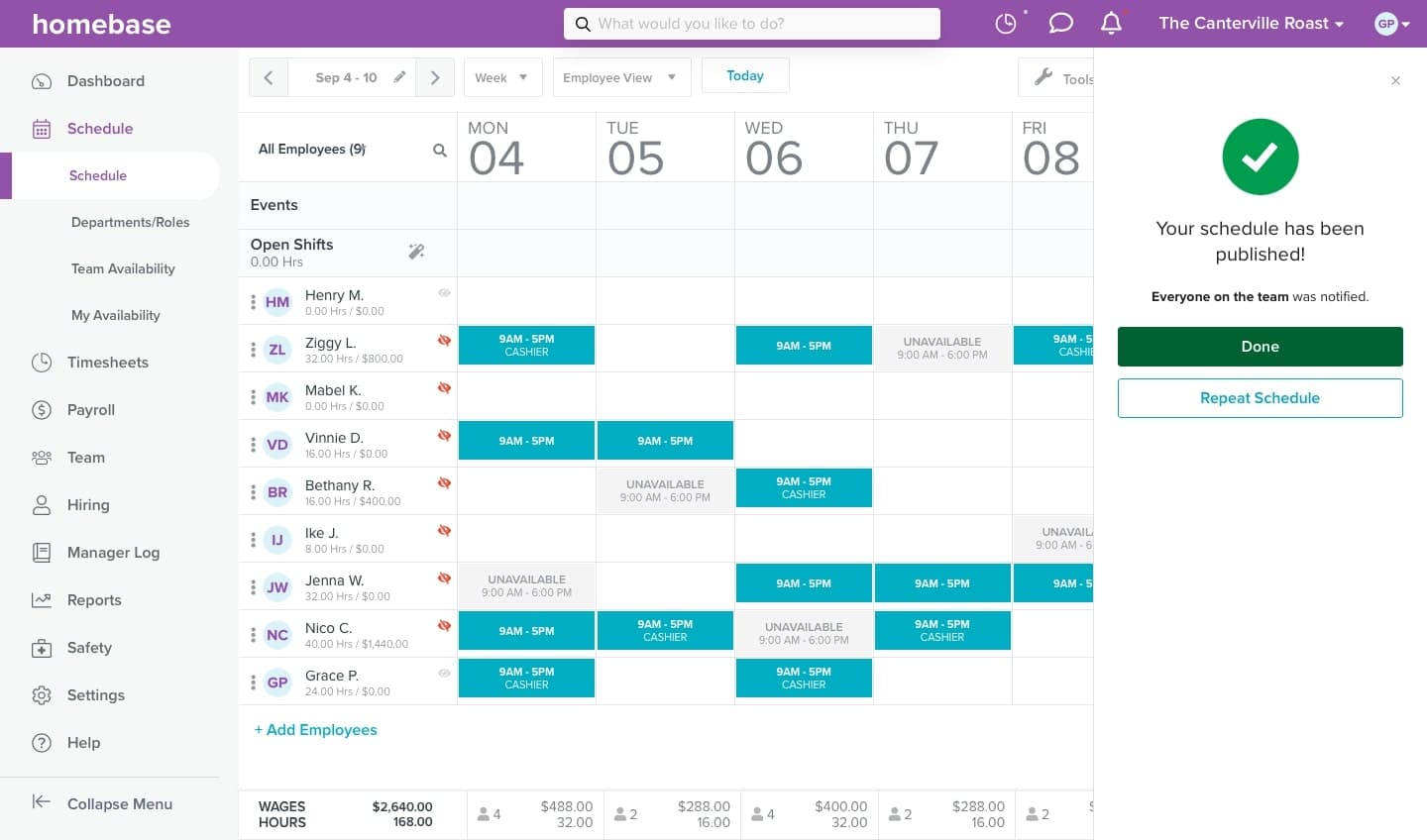
Homebase covers the full shift-based workflow in one app: scheduling, time tracking, team messaging, hiring, HR compliance, and payroll as an add-on. Unlike Deputy's per-user model, Homebase charges per location with unlimited employees on paid plans. The free Basic plan covers scheduling and time tracking for one location and up to 10 employees.
Key features:
- Drag-and-drop employee scheduling with templates, auto-scheduling, and conflict detection
- GPS and photo capture time clock, works on any device — prevents buddy punch without dedicated hardware
- Payroll add-on ($39/month + $6/employee) — hours flow to paychecks without re-entry
- Free (Basic): up to 10 employees, 1 location
- Essentials: $24/location/month (annual) / $30 monthly — unlimited employees
- Plus: $56/location/month (annual) / $70 monthly
- All-in-One: $96/location/month (annual) / $120 monthly
- Payroll add-on: $39/month + $6/employee paid (all plans)
What users say: G2 reviewers highlight scheduling ease and a low learning curve — new employees pick it up within a day. The free plan earns praise for being functional, not feature-gated. Support responsiveness and billing issue resolution are the most common complaints.
"Homebase is the best scheduling software that I've used." — Alec Deske, General Manager (Times Square), The Escape Game (60+ locations, 1,500+ team members)
Our take: Deputy's Paycor payroll add-on costs $209/month for a 20-person team; Homebase payroll runs $159/month for the same team. No other tool on this list puts scheduling, time tracking, and payroll in one workflow. If that's what you need, Homebase is the deputy alternative to start with.
Tired of exporting hours to a separate payroll tool every pay period? Homebase keeps the full clock-in-to-paycheck workflow in one place. See how Homebase Payroll works →
2. When I Work: Best for simple, small-team scheduling.
Best for: Teams of 5–25 people who need clean scheduling and time tracking without complexity.
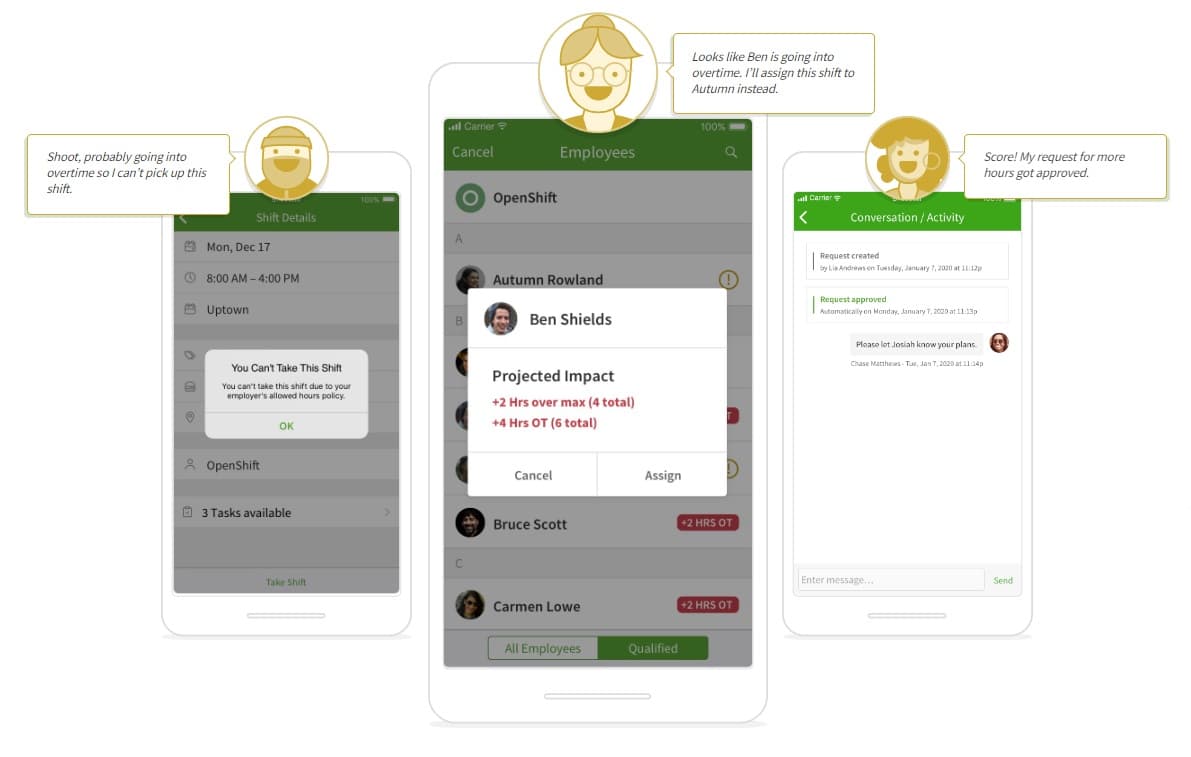
When I Work keeps the interface clean and the learning curve flat. As a deputy alternative, it covers scheduling, time tracking, shift swapping, and team messaging at a lower per-user price than Deputy across all tiers. The trade-offs: no payroll, limited HR tools, no free plan.
Key features:
- Drag-and-drop scheduling with shift swapping, open shifts, and labor cost controls
- Time tracking included in advertised plan pricing — verify current status at wheniwork.com/pricing
- WorkChat messaging and auto-scheduling on higher tiers
- Single location: $2.50/user/month — scheduling, time tracking, messaging
- Multiple locations: $5.00/user/month
- No free plan; 14-day free trial
What users say: Ease of use and the mobile app earn consistent praise. No built-in payroll and occasional notification overload are the common complaints.
Our take: At $25/month for a 10-person team, it's the lowest-cost per-user option that includes both scheduling and time tracking. As headcount grows, the per-user model will eventually overtake Homebase's per-location flat rate.
3. QuickBooks Time: Best for teams already in the QuickBooks ecosystem.
Best for: Small businesses already using QuickBooks for accounting or payroll.
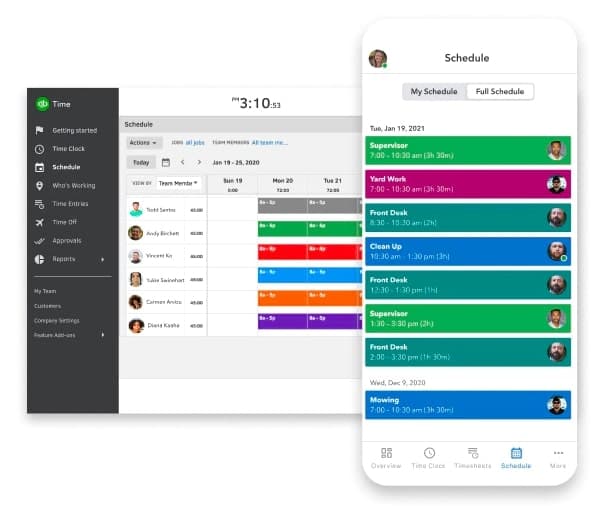
QuickBooks Time connects time tracking and scheduling directly to Intuit's accounting and payroll stack — hours go to payroll with one click. Outside that ecosystem, the value weakens: no team communication tools, no standalone payroll.
Key features:
- Time tracking with GPS, mobile clock-in, and geofencing
- Direct sync with QuickBooks Payroll and QuickBooks Online
- Project tracking and job costing for service businesses
- Premium: $20/month + $10/user/month
- Elite: $40/month + $12/user/month
What users say: The seamless QuickBooks sync is the headline benefit — reviewers cite one-click payroll export as the reason they switched. Outside the Intuit stack, reviewers note limited standalone value.
Our take: Only worth it if your accounting already runs through Intuit. A 10-person team not on QuickBooks pays $120/month before any other fees.
4. Skedulo: Best for healthcare and mobile teams.
Best for: Businesses dispatching workers to client locations — home healthcare, HVAC, security services.
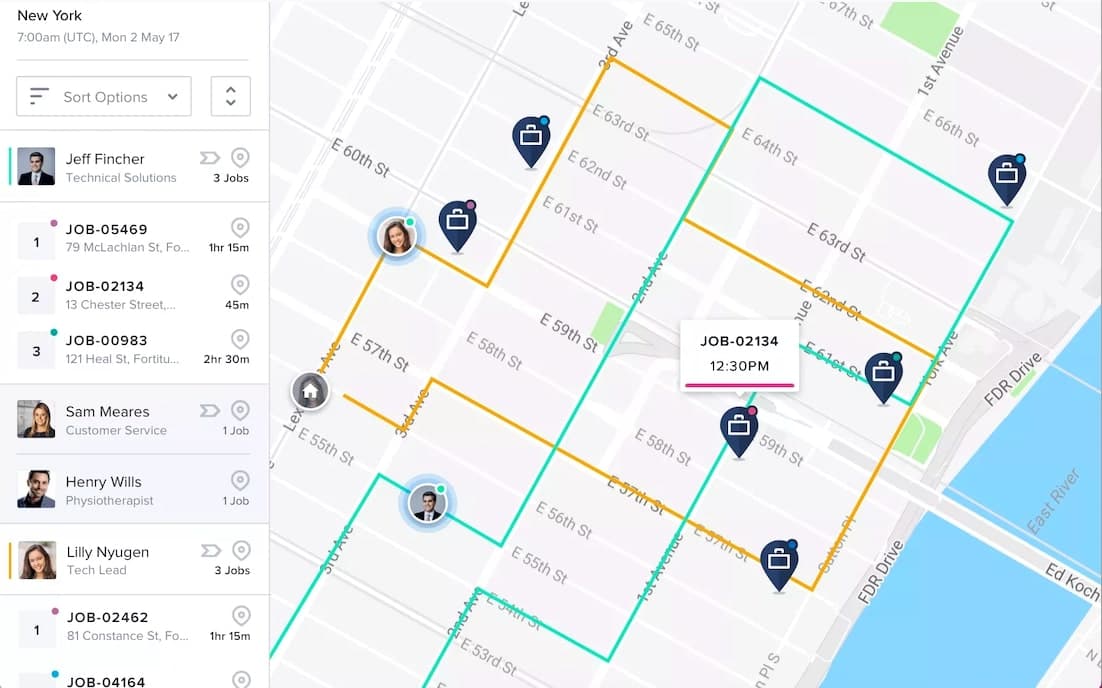
Skedulo matches employees to jobs by proximity, skill set, and availability in real time. It's the only tool on this list purpose-built for field dispatch rather than fixed-location shift scheduling.
Key features:
- AI optimizer matching workers to jobs by location, skills, and availability
- On-call designation, real-time dispatch tracking, and mobile forms for field workers
- API and Power Automate integration
Pricing: Quote-based — see skedulo.com/pricing.
What users say: G2 reviewers in healthcare and field services praise the AI optimizer for handling location, skill tags, and availability without manual inputs. Pricing opacity — no public rate card — is the most common frustration.
Our take: If you're a home healthcare agency or service dispatch operation, it's worth the conversation. If you run a café or boutique, it's more than you need.
5. Connecteam: Best for mobile and deskless teams.
Best for: Businesses with distributed, non-desk teams where communication and GPS tracking matter as much as scheduling.
Ratings: G2: 4.6/5 (3,497 reviews) · Capterra: 4.6/5

Connecteam is a deputy alternative built for distributed teams — it bundles scheduling, GPS time tracking, team messaging, training, rewards, and onboarding into one app. The hub-based pricing model — Operations, Communications, and HR hubs sold separately — keeps the entry price low but adds up when you need all three.
Key features:
- Scheduling with GPS clock-in verification and breadcrumb tracking — reduces time theft for distributed teams
- Training courses, quizzes, knowledge management, and employee rewards
- Internal newsfeed and direct messaging (no built-in payroll on any plan)
- Free (Small Business): up to 10 users, all hubs — payroll integration excluded
- Basic: $29/hub/month → all 3 hubs: $87/month (up to 30 users, annual)
- Advanced: $49/hub/month → all 3 hubs: $147/month
- Expert: $99/hub/month → all 3 hubs: $297/month
- 31+ users: additional per-user fee per hub
What users say: The communications tools stand out — newsfeed and shift feedback replace disconnected group texts. GPS tracking gets consistent accuracy praise. Hub pricing catching users off guard when they need more than one module is the main complaint.
Our take: The free plan for up to 10 users is one of the most generous in this category. Beyond 10 users, run the full math — all three hubs at Basic costs $87/month, and it climbs fast.
6. ZoomShift: Best for seasonal businesses.
Best for: Seasonal businesses — ski resorts, waterparks, summer camps, beach bars — that need to pause billing during the off-season.
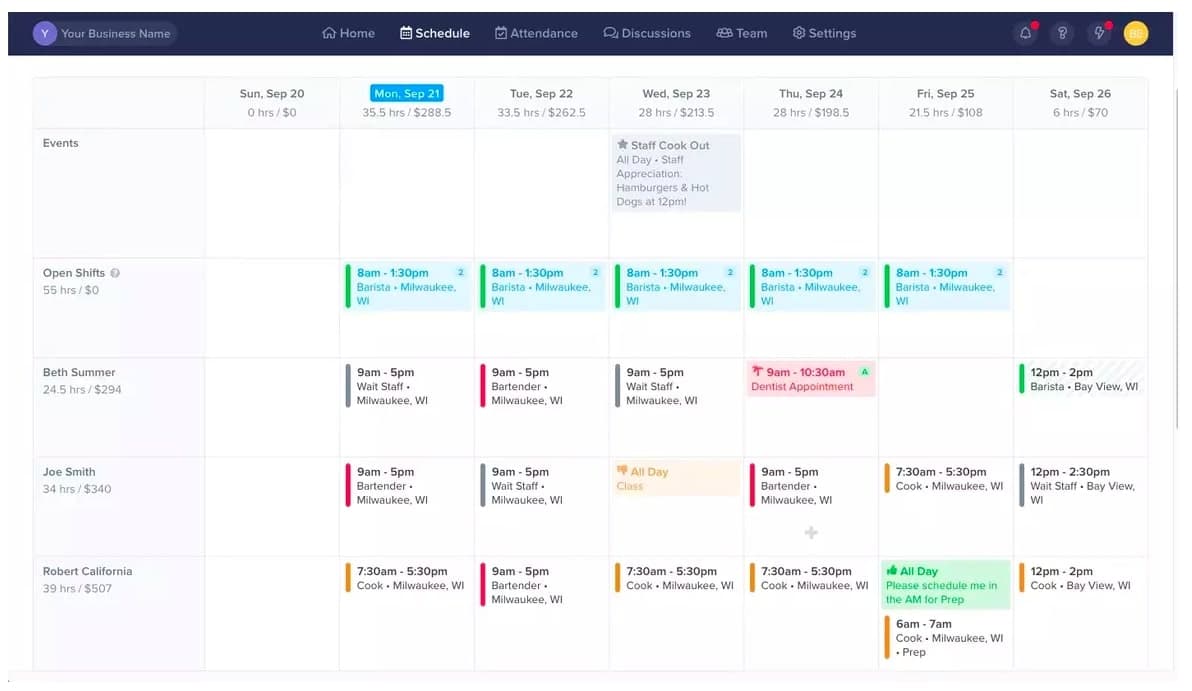
Most scheduling tools charge every month whether or not you're running shifts. ZoomShift lets you pause your plan or deactivate employees during the off-season. Covers scheduling and time tracking for most small teams. No payroll, no built-in messaging, limited integrations.
Key features:
- Scheduling with reusable templates and employee self-scheduling
- Time tracking via desktop and mobile kiosk
- Plan hold/pause feature — freeze billing during off-season
- Shift confirmations and blackout date management (Starter and above)
- Starter: $2/employee/month
- Premium: $4/employee/month
- No free plan; free trial available
What users say: 41 of 46 G2 reviews are 5-star — ease of use and fast employee adoption are the most common themes. Limited payroll integration depth and the replacement of live chat with AI chatbot support are the main complaints.
Our take: ZoomShift is the only deputy alternative on this list built for businesses that go dark seasonally — pause the plan, stop paying, pick back up when the season starts. For year-round operations, the per-employee pricing doesn't justify the limited feature set.
7. 7shifts: Best for restaurant scheduling.
Best for: Food service businesses, from single-location cafés to multi-unit restaurant groups.
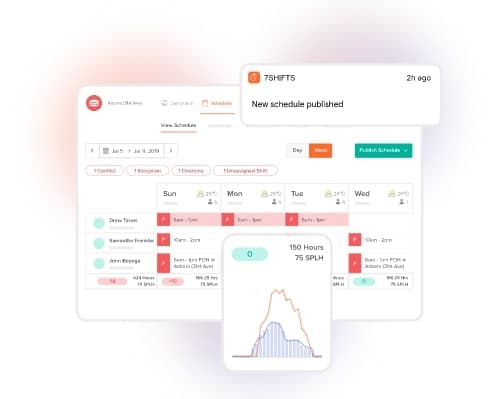
7shifts is the deputy alternative purpose-built for restaurants: tip pooling, POS integrations with Toast and Square, sales-based demand forecasting, and food service labor compliance. Outside F&B, the restaurant-specific role structures feel clunky.
Key features:
- Restaurant scheduling with labor cost and sales forecasting
- Tip pooling, POS integrations (Toast, Square, Clover, Lightspeed), and fair workweek compliance
- Payroll add-on on paid plans
- Comp (free): 1 location — scheduling, time clocking, and messaging (employee cap and full feature set: verify at 7shifts.com/pricing)
- Essentials: $39.99/month per location (annual) / $44.99 monthly — up to 30 employees
- Pro: $79.99/month per location (annual) / $89.99 monthly — up to 60 employees
- Premium: $134.99/month per location (annual) / $149.99 monthly — unlimited employees
- Payroll add-on: $39.99/month + $6/employee paid
What users say: POS integration quality and the free Comp plan earn consistent Capterra praise. A r/BarOwners user with a 40–50 person team recommended 7shifts unprompted — citing labor visibility and POS integration. The per-location pricing can scale quickly for multi-unit restaurant groups.
Our take: The free Comp plan is one of the most accessible on this list for single-location restaurants. The payroll add-on ($39.99/month + $6/employee) is close to Homebase's ($39/month + $6/employee), so both land at similar monthly costs when payroll is in the equation.
8. Sling: Best free scheduling for growing teams.
Best for: Teams that need free scheduling and messaging at any size, and can manage time tracking separately.
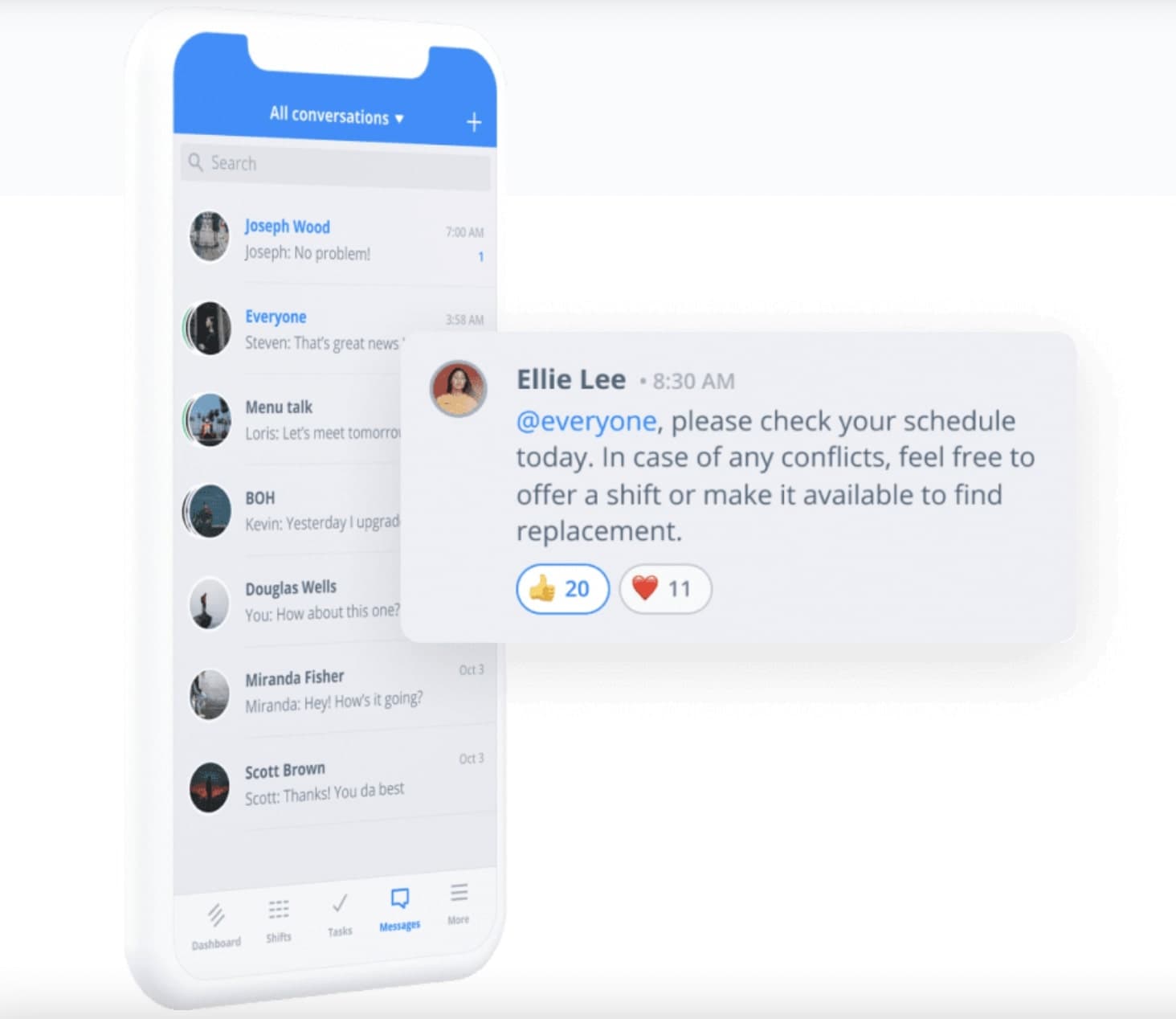
Sling is the strongest free deputy alternative on this list, covering scheduling, shift swapping, and team messaging for up to 30 users. Time tracking requires a paid plan. No payroll on any tier. Owned by Toast, it has strong POS compatibility for food service.
Key features:
- Scheduling with shift swapping and open shift management (free, up to 30 users)
- Team messaging and newsfeed (free and paid)
- Time tracking with geofencing and labor cost controls (paid plans only)
- Free: scheduling, shift swapping, messaging — up to 30 users
- Premium: $1.70/user/month (annual) / $2.00/user/month (monthly) — adds time tracking, geofencing, overtime tracking
- Business: $3.40/user/month (annual) / $4.00/user/month (monthly) — adds leave management and advanced reports
What users say: The generous free cap and clean interface earn consistent Capterra praise for multi-location food and beverage operations. Time tracking locked behind a paid plan and occasional notification failures are the top complaints.
Our take: Right call when budget is the hard constraint and scheduling is all you need. Once you add time tracking, the math shifts: 20 employees on Premium is $34/month — Homebase Essentials covers scheduling and time tracking for unlimited employees at one location for $24/month.
9. SocialSchedules: Best free scheduling option for tight budgets.
Best for: Small teams on tight budgets that need scheduling, time tracking, and messaging without payroll or advanced features.
Note: SocialSchedules is the rebranded name for OpenSimSim.
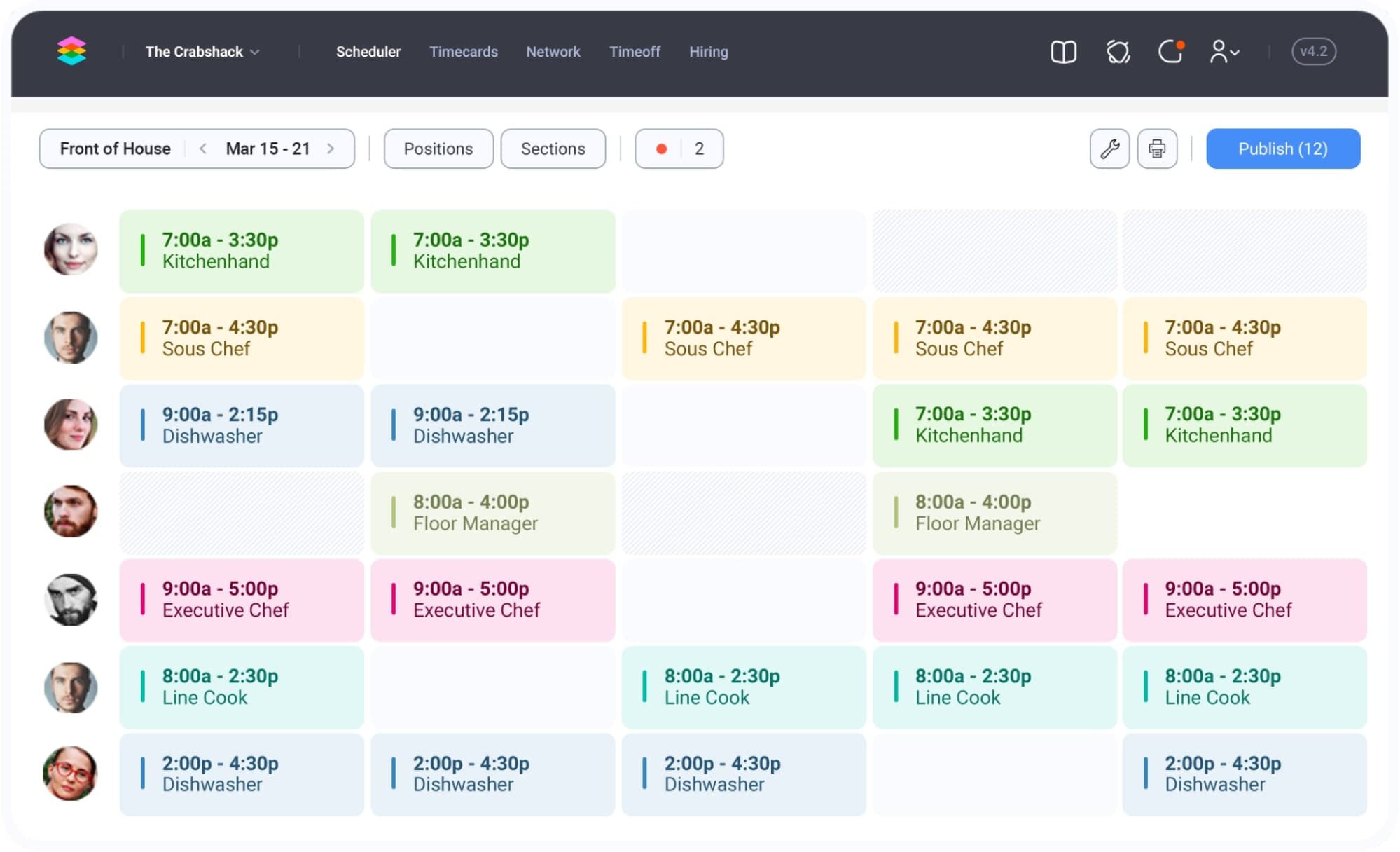
SocialSchedules is a deputy alternative built for teams on tight budgets, covering scheduling, time tracking, team messaging, and shift management in a clean, low-cost package. With 558 Capterra reviews at 4.5/5, it has a larger verified review base than several better-known tools here.
Key features:
- Scheduling with drag-and-drop builder, templates, and shift confirmations
- Time clock via mobile app or tablet kiosk; team messaging included
- Sales forecasting, POS integration, and labor compliance (Premium plan)
- Multi-location support (Starter and above)
- Basic (free): 1 location, up to 10 workers — scheduling, time clock, messaging, time off
- Starter: $15.99/month per location (annual billing) — unlimited workers, overtime tracking, multi-location
- Premium: per location — POS/payroll integration, sales forecasting, labor compliance (verify current rate at socialschedules.com/pricing)
- Enterprise: custom
What users say: 92% positive Capterra sentiment — ease of use and fast employee adoption top the list. Two r/BarOwners users recommended SocialSchedules unprompted, citing clock-in/out, schedule sharing, and time-off requests as the core workflow. Frequent glitches are the main complaint (65% of negative reviews).
Our take: At $15.99/month (annual billing) for unlimited workers at one location, SocialSchedules punches above its price point. For teams that need payroll or deeper integrations, the Premium plan is where those live — verify the current rate at socialschedules.com/pricing.
How to Choose the Right Deputy Alternative
Not sure which deputy alternative fits your situation? We've evaluated the best scheduling tools for small businesses — match your need to the right pick.
- If you want scheduling, time tracking, and payroll in one app → Homebase is the only option here with all three
- If scheduling is all you need and you want to keep costs low → Sling (free, up to 30 users) or When I Work ($2.50/user/month)
- If you run a restaurant → 7shifts (tip management, POS integrations, free Comp plan)
- If you have a mobile or field team → Connecteam (GPS tracking, communication) or Skedulo (field dispatch)
- If demand-based scheduling matters → Deputy or 7shifts (sales forecasting)
- If your team is seasonal → ZoomShift (plan pause feature)
- If payroll already lives in QuickBooks → QuickBooks Time (native sync)
- If free is the hard constraint → Sling (up to 30 users) or 7shifts Comp plan (1 location, free — verify employee cap)
Use the compare scheduling tools page to run a side-by-side for your team size and needs.
Find the Right Deputy Alternative for Your Team
You came here because something about Deputy isn't working — the price climbed, the complexity got in the way, or the tool does more than you need. The right deputy alternative depends on your situation. For scheduling and messaging only, Sling or When I Work cost less. For restaurants, 7shifts was built for you. For seasonal operations, ZoomShift has the pause feature nobody else does.
And if you need scheduling, time tracking, and payroll without juggling three logins and three monthly bills — that's what we built Homebase for.
"I would spend an hour each week making the schedule from scratch. Now, with Homebase, I can do it in 20 or 25 minutes." — Bryan Tublin, Co-Founder, Kitava Kitchen
Frequently Asked Questions About Deputy Alternatives
What is the free alternative to Deputy?
The best free alternatives to Deputy are Homebase, Sling, and 7shifts. Homebase's Basic plan is free for up to 10 employees and covers scheduling and time tracking. Sling offers free scheduling and messaging for up to 30 users. 7shifts' Comp plan is free for one restaurant location (verify current employee cap at 7shifts.com/pricing).
What's the best scheduling tool for small businesses?
For most small businesses with hourly teams looking for a deputy alternative, Homebase covers the full workflow — scheduling, time tracking, and payroll — in one app. Restaurant owners should consider 7shifts. Teams with mobile employees often prefer Connecteam for GPS tracking and communication. The right pick depends on whether you need payroll included.
How much does Deputy cost? Monthly and annual pricing explained
Deputy costs $5–$9/user/month on annual billing, depending on the plan — Lite at $5, Core at $6.50, and Pro at $9. A $30/month minimum applies per invoice across all plans. There's no free plan, only a free trial. Verify current pricing at deputy.com/pricing.
Is there a Deputy alternative with built-in payroll?
The only Deputy alternative on this list with built-in payroll is Homebase, which offers it as an add-on for $39/month + $6 per employee paid. Hours flow directly from timesheets to paychecks without re-entry or a separate login. Deputy, When I Work, Sling, and ZoomShift all rely on external payroll integrations.
Why do small businesses leave Deputy for other scheduling software?
Most small businesses leave Deputy because of per-user pricing that grows with headcount — at $6.50/user/month on Core (annual billing), a 40-person team pays $260/month just for scheduling. Other common reasons: no free plan after the trial ends, a steeper setup than simpler tools, and a $30/month minimum spend that catches small teams off guard.