Time Mapping Guide: How to Plan Your Schedule (With Examples)


SMALL BUSINESS INTEL, IN YOUR INBOX
Table of contents
Busy doesn't always mean productive. As a small business owner or manager, you can pack every hour of your day and still feel like you're falling behind — because busyness and progress aren't the same thing. The problem usually isn't effort. It's that time isn't being allocated to the right things.
That's where a time mapping guide comes in. Time mapping is a visual planning system that helps you see exactly how your hours are being spent — across work, operations, and personal responsibilities — so you can make deliberate decisions about where your time actually goes. Unlike a to-do list, a time map shows you the full picture before the week begins.

What is a time mapping guide?
A time mapping guide is a visual system for planning how you spend your time — across work, operations, and personal responsibilities — so you can make intentional decisions before the week begins rather than reacting to whatever comes up next. Here's what to know:
- Time mapping is a big-picture planning method, not a to-do list — you're allocating categories of time, not tracking individual tasks
- It works alongside time blocking: map your priorities first, then use time blocks to execute them day by day
- Creating a time map takes six steps: track current habits, identify priorities, group tasks into categories, assign realistic time blocks, build the visual map, and review weekly
- For managers, time mapping applies directly to team scheduling — mapping coverage needs before building a shift schedule helps catch gaps and overtime risk early
What is time mapping?
Time mapping is a planning method that helps you see how your hours are actually being spent — and redesign them around what matters most. Here's how to think about it.
A visual system for your time
Time mapping is a systematic approach to organizing how you allocate your time. Instead of reacting to whatever comes up next, you map out your hours visually — across an entire day, week, or month — to see where your time is going before it disappears.
Think of it like a geographical map
A map doesn't move you from one place to another — it shows you the full picture so you can plan the most effective route. A time map does the same thing for your schedule. You plot out every category of activity: work tasks, team management, personal commitments, and recovery time. Once it's all visible in one place, you can see what's eating your hours and start making better calls about where they go.
It's not a calendar or a to-do list
A time map is big-picture and visual. You're not tracking individual tasks — you're mapping categories of time. That 30-minute window you thought you had for admin work? Your time map might show you it's actually getting absorbed by unplanned team check-ins every single day.
Time mapping vs. time blocking (and other methods)
Time mapping and time blocking are related but distinct — and confusing the two leads to using the wrong tool for the job.
- Time blocking is tactical and task-level: you assign specific tasks to specific time slots (9–11am for focused work, 11am–12pm for email, 2–4pm for calls). It tells you what to do and when.
- Time mapping is the strategic layer underneath it. It helps you understand how your time is distributed across major categories — work, operations, team management, personal — and how it should be, based on your priorities. It tells you how much time each area of your life deserves, so your time blocks are actually grounded in something.
In practice, most people benefit from using both. Build your time map first to get the big picture right, then use time blocking to execute it day by day.
How to create a time map (step by step)
Getting started with time mapping doesn't require a special app or a complicated system. A spreadsheet, a notebook, or a digital calendar all work. What matters is the thinking behind it.
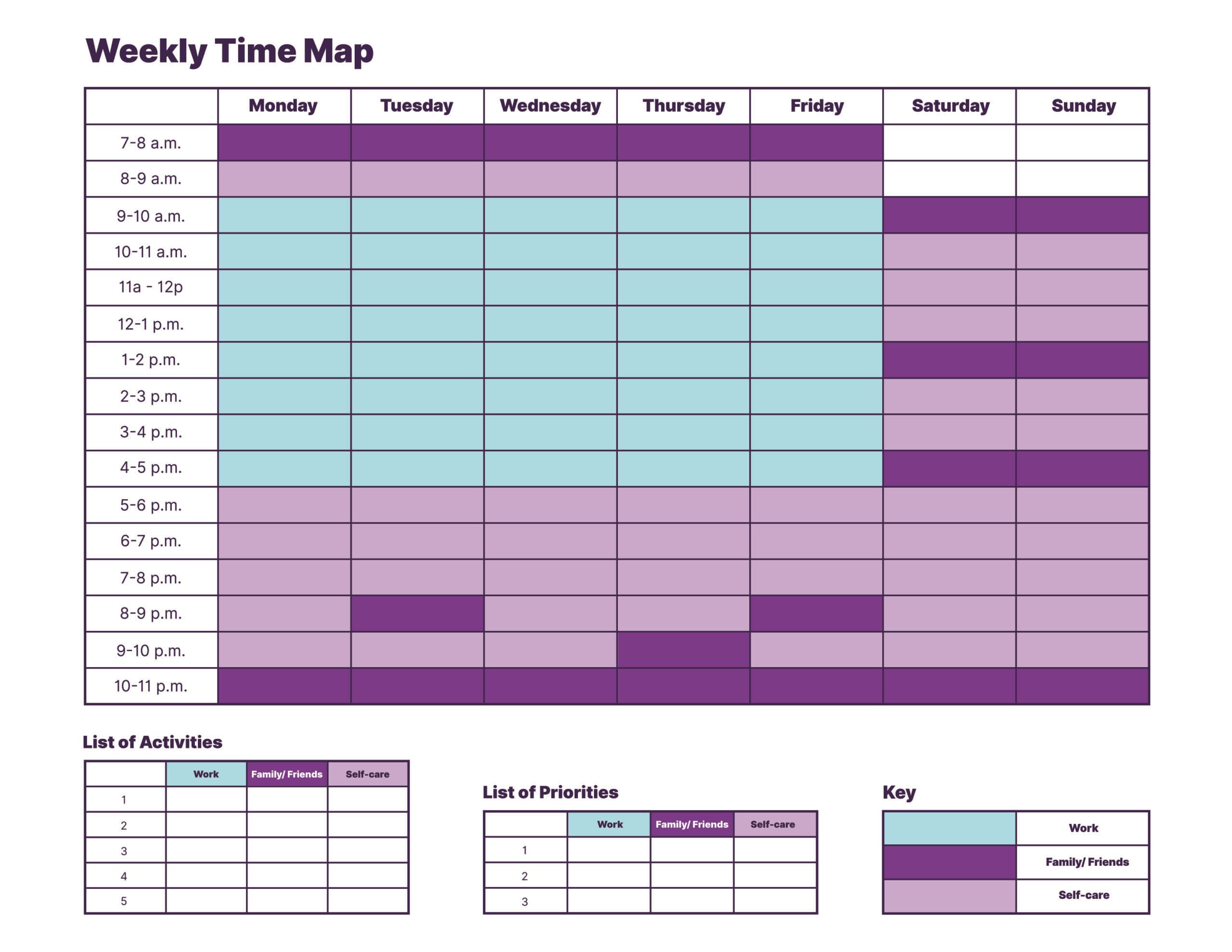
Step 1: Track how you currently spend your time
This step is uncomfortable for most people — because the numbers rarely match the story we tell ourselves. Keep a time log for two or three days, nothing elaborate. Just note what you're doing in rough 30-minute intervals.
Most owners discover that administrative tasks take twice as long as expected, informal team conversations quietly eat into focused work, or a morning routine has slowly expanded into prime working hours.
Step 2: Identify your priorities and goals
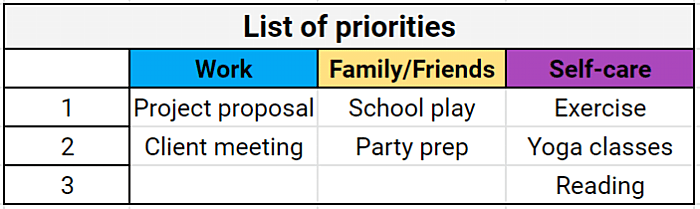
With your time log in hand, ask yourself: what actually matters most this week? Consider both professional priorities (hitting a revenue target, getting the schedule done, onboarding a new hire) and personal ones (making it to your kid's game, getting enough sleep). Time mapping only works if it reflects your real life, not an idealized version of it.
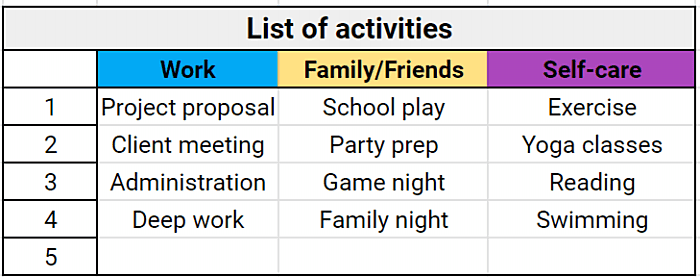
Step 3: Group tasks into categories
Rather than listing every individual task, organize your responsibilities into broader categories — operations, team management, customer-facing work, admin, personal, and so on. These categories become the building blocks of your time map. Grouping tasks also helps you see which areas are getting crowded and which ones you're quietly neglecting.
Step 4: Assign realistic time blocks
Now estimate how much time each category actually needs in a given week. Be honest — this is where most people sandbag. If responding to messages takes an hour a day in reality, don't block 20 minutes. Include buffer time. Include recovery. A time management map that assumes perfect conditions is a time map that falls apart by Tuesday.
Time mapping examples (schedules you can model)
Understanding the method is one thing. Seeing what a finished time map looks like in practice is another. Here are two examples grounded in common small business scenarios.
Example 1: Weekly time map (restaurant or retail manager)
A restaurant manager planning around a Friday dinner service might build a weekly map that batches similar tasks together:
- Monday: Labor cost analysis — ordering, vendor calls
- Tuesday–Wednesday: Team-heavy — shift check-ins, training, performance conversations
- Thursday: Prep day — menu review, schedule finalization, pre-service logistics
- Friday–Sunday: Floor time, minimal admin
Mapping the week this way prevents the all-too-familiar Saturday afternoon moment when you're trying to chase down invoices while running a full house — and losing at both.
Example 2: Team schedule map (shift-based business)
For a manager building a weekly staff schedule, time mapping starts before the schedule does. First, map out when your business actually needs coverage — broken down by time of day, not just by day of the week. A coffee shop might need four staff from 7–10am, two from 10am–2pm, and three from 2–6pm on weekdays, with a different pattern entirely on weekends.
Mapping these demand windows visually reveals coverage gaps and overtime risks before you've assigned a single shift. It also makes workload distribution across your team much easier to balance — you can see at a glance who's carrying too much and who has room for more hours.
Time mapping templates: What to include in each format
The right time map format depends on what you're trying to manage. Here's a breakdown of the three most common formats and what goes in each one.
Daily time mapping template (24-hour schedule)
A daily time map is the most granular format and works best for individuals who need tight control over a single day. If you're a solo owner wearing every hat in the building, this one's for you. A solid daily template includes:
- Wake and wind-down anchors at either end
- Two or three deep work blocks (no more — sustained focus has limits)
- A dedicated admin block
- Personal commitments
- At least one buffer window to absorb the unexpected
If your daily map has no buffer, it's not a map — it's a wish.
Weekly time mapping template
A weekly template gives managers and business owners the format they usually need most. It spans seven days and organizes time by category rather than by task. A good weekly map includes:
- Recurring operational responsibilities (scheduling, payroll review, ordering)
- Team management windows
- Customer-facing time
- At least one protected personal block per day
- A weekly review slot on Friday or Sunday
Color-coding by category is especially useful here — you should be able to scan the whole week in under ten seconds and immediately see whether work and personal time are balanced.
Work schedule template (for teams)
A team-facing time map looks different from a personal one. Instead of individual categories, you're mapping coverage needs: which roles need to be filled, in what numbers, during which windows. A solid team schedule template includes:
- Shift slots organized by day part
- Role-specific coverage requirements
- Handoff windows between shifts
- Overtime guardrails so you can see at a glance when someone's approaching their weekly limit
This is the format that turns your time map into an actual published schedule — not just a planning document.
How to use time mapping for scheduling your team
Planning your own time is one thing. Using time mapping to build and manage a team schedule is where the approach gets its real leverage for small business owners and managers.
Balance workloads across your team
A time map makes it easy to see workload distribution at a glance. If one employee is covering five shifts while another is getting two, that imbalance is obvious on a visual map in a way it often isn't when you're building a schedule row by row. Balancing hours across your team reduces burnout, improves morale, and — practically speaking — gives you more scheduling flexibility when someone calls out.
Avoid gaps, overlaps, and overtime
Gaps are obvious when you can see them — a stretch of time with no one assigned to a role. Overtime risk becomes visible when you track cumulative hours per employee across the week. Catching these problems on a map takes minutes. Fixing them after the fact takes much more.
Scrambling to fill last-minute gaps or rework a schedule mid-week costs more than the extra hours — it costs your team's trust in the system. When coverage plans are clear from the start, Homebase scheduling helps you publish shifts your team can actually rely on.
Common time mapping mistakes (and how to fix them)
Even with a solid system, it's easy to undermine yourself. Here's where most people go wrong — and what to do instead.
Overpacking the day. No buffer, no recovery, no margin for the thing that always comes up. Real days don't run like calendars. Build at least one unscheduled block per half-day into every map, or you'll be behind by 10am wondering where the morning went.
Ignoring breaks. This one matters especially for managers of hourly teams, where break compliance isn't just good practice — it's a legal requirement in many states. If breaks aren't on the map, they'll get skipped. Build them in explicitly, for yourself and your team.
Treating the map as a static document. A time map you build once and never revisit is just a document gathering digital dust. The value is in the weekly review — what actually happened vs. what you planned, and what you'll adjust for next week. Without that loop, the map stops reflecting reality fast.
Confusing time mapping with a to-do list. A to-do list tells you what to do. A time map tells you when — and for how long — you'll do it. If your map is just a list of tasks with boxes next to them, you've built a to-do list with extra steps. The point is the visual allocation of time to categories, not the enumeration of individual tasks.
Make your time map work for your whole team
A good time map gets you halfway there. The other half is making sure your team actually shows up, stays on schedule, and doesn't quietly tip into overtime before you notice.
That's where your time map needs a real system behind it. With Homebase scheduling, you can:
- Build and publish shifts directly from your coverage plan
- Send instant schedule notifications so no one's caught off guard
- Let employees claim open shifts, request time off, and swap shifts without the back-and-forth
- Get overtime alerts before hours become a payroll problem
- Track labor costs against your targets in real time
Build your free schedule with Homebase and turn your time map into a schedule your hourly team can actually run on.
FAQs about time mapping
What is time mapping?
Time mapping is a visual planning system for organizing how you allocate your time across work, operations, and personal responsibilities. Unlike a to-do list or a standard calendar, a time map gives you a big-picture view of your entire week or day, broken down by category — so you can see where your time is actually going and make better decisions about where it should go.
What is the difference between time mapping and time blocking?
Time mapping is the strategic layer: it shows you how your time should be distributed across major categories of your life and work. Time blocking is the tactical execution: it assigns specific tasks to specific time slots within those categories. Most people benefit from using both — map first, then block.
How do I create a time map?
Creating a time map starts with tracking how you currently spend your time for two or three days, then grouping your responsibilities into categories and estimating how much time each one realistically needs. From there, lay out your categories visually across a daily or weekly grid, color-code by category, and review your map at the end of each week to adjust.
What is the best tool for time mapping?
The best tool for time mapping depends on what you're managing — a spreadsheet or digital calendar like Google Sheets or Google Calendar works well for individuals. If you're managing a team, you'll want a tool that connects your time map to actual scheduling and time tracking so your plan translates directly into published shifts and tracked hours.
Can time mapping work for managing a team?
Time mapping works well for managing a team — and for managers of hourly or shift-based teams, it's one of the most underused planning tools out there. Mapping your coverage needs visually before building a schedule helps you identify gaps, balance workloads, and catch overtime risk before it hits.