Calendar year
A calendar year is the 12-month period that starts on January 1 and ends on December 31.
- Read time3 min read
- Filed underPayroll · 105 terms
- Written byHomebase Team
Related terms
SMALL BUSINESS INTEL, IN YOUR INBOX
Contents8 sections
What is a calendar year?
A calendar year is the 12-month period that starts on January 1 and ends on December 31. It is the standard year used for most legal, financial, and administrative purposes in the U.S., including IRS reporting, payroll cycles, employee benefits, and business planning.
For small business employers, the calendar year serves as the default structure for tracking wages, calculating taxes, managing time off, and evaluating business performance. Many labor, tax, and HR obligations are based on the calendar year—even if your company operates on a different fiscal schedule.
Why the calendar year matters to employers
The calendar year forms the foundation for:
- Annual tax reporting (W-2s, 1099s, Form 940, etc.)
- Tracking year-to-date (YTD) payroll totals
- Managing annual PTO or sick leave accruals
- Reviewing employee performance and issuing raises/bonuses
- Filing year-end forms with the IRS and state agencies
- Planning labor budgets and hiring strategies
Because government agencies follow the calendar year for reporting and compliance, you should ensure your records can be accurately reconciled to calendar-year totals, even if your internal systems use different formats.
Calendar year vs. fiscal year
A calendar year runs from January 1 to December 31, while a fiscal year is a 12-month period a business chooses for its own accounting cycle, which can begin in any month.
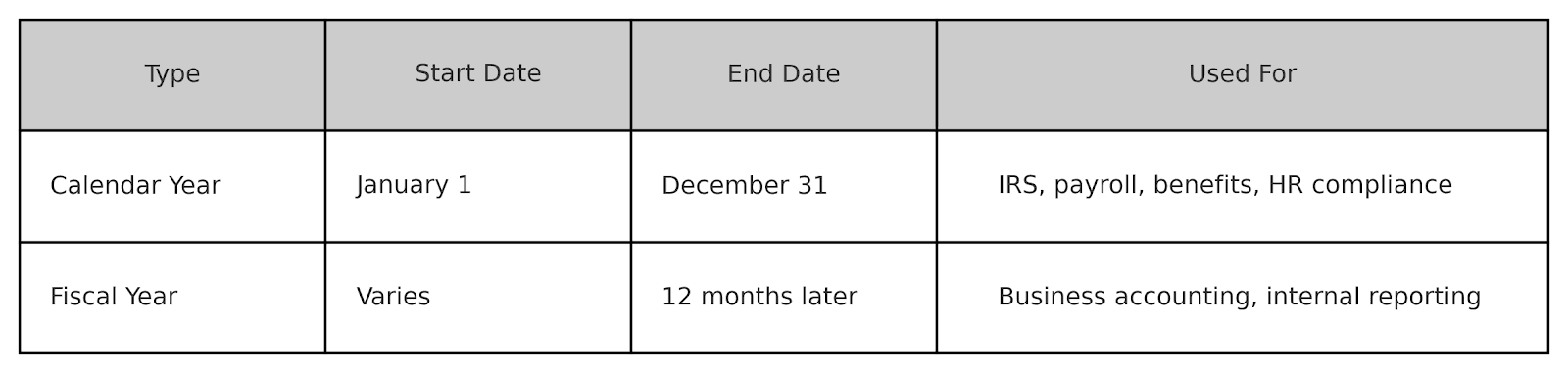
Most small businesses use the calendar year as both their financial and reporting year because it aligns with tax season and simplifies compliance.
How a calendar year matters to payroll and taxes
The calendar year governs how businesses handle payroll taxes and year-end reporting. Key requirements include:
- Withholding federal and state payroll taxes each pay period
- Issuing Form W-2s to employees for total earnings and taxes withheld in the calendar year
- Filing Form 941 quarterly for payroll tax returns
- Filing Form 940 annually for federal unemployment taxes
- Tracking year-to-date gross pay, deductions, and benefits contributions
If your business uses payroll software, all tax forms and summaries will automatically reference the calendar year.
How the calendar year affects employee benefits
Many benefits and accruals are based on the calendar year, including:
- PTO and vacation resets: Some companies reset unused paid time off on January 1
- Sick leave accrual tracking: Some state-mandated sick leave policies use the calendar year
- Health insurance plan coverage and deductibles: Annual limits often reset on January 1
- 401(k) contribution limits: IRS contribution caps apply per calendar year
- FSA (Flexible Spending Account) usage: Unused funds often expire at year-end
Employers must clearly communicate calendar-year benefit timelines so employees can take full advantage.
Common year-end responsibilities for employers
The end of the calendar year is a busy time for small business owners. Key responsibilities include:
- Reconciling year-to-date payroll totals
- Verifying employee addresses and Social Security numbers
- Filing and distributing W-2 and 1099 forms
- Closing out PTO or benefit accruals
- Preparing year-end bonuses and adjustments
- Reviewing employee performance and compensation changes
Starting early and using time tracking software to automate reporting can make year-end tasks more manageable.
How Homebase helps you manage the calendar year
Homebase helps small businesses stay on top of payroll, time tracking, and labor compliance throughout the calendar year—so there are no surprises in December. With Homebase, you can:
- Track employee hours and wages from January 1 to December 31
- Monitor year-to-date payroll data, tips, overtime, and PTO
- Prepare for year-end tax filing with clean, exportable reports
- Automate compliance with federal, state, and local labor laws
- Keep your team’s time and pay history organized and audit-ready
Whether you need to track hours across shifts or prepare accurate year-end wage statements, Homebase helps simplify operations all year long. Sign up for Homebase today to stay organized, reduce admin stress, and keep your business on track throughout the calendar year.
Keep going
Related terms
6 more entries that share this one’s vocabulary.
Year to date
Year-to-date (YTD) refers to the total earnings, deductions, and expenses accumulated from the start of a calendar or fiscal year up to the current date.
PayrollCalendar quarter
A calendar quarter is a three-month period used to divide the year into four equal parts for financial, tax, and business reporting purposes.
PayrollCalendar week
A calendar week is a seven-day period that runs from Sunday through Saturday, based on the standard calendar format used in the United States.
Timesheets1099 Contractor
A 1099 contractor, also known as an independent contractor, is a self-employed individual hired to perform work or services for a business, typically under a contract or project-based agreement.
Payroll401(k) deduction
A 401(k) deduction is the portion of an employee’s wages that is withheld from their paycheck and contributed to their 401(k) retirement savings plan.
PayrollAccount balance
An account balance is the total amount of money available in a financial account at a specific point in time.
Payroll
The everything app for hourly teams.
Spend less time wrangling logins and transferring data. Homebase comes with everything else you need to manage your team.