Top 3 Toast POS Alternatives for Restaurant Owners


SMALL BUSINESS INTEL, IN YOUR INBOX
Table of contents
Toast sent you a notice. Processing fees are going up again.
You're already paying for the base plan, the kitchen display module, the online ordering add-on, and the loyalty program. The monthly total is higher than what was quoted at signup, and the contract locking you in still has time to run.
You're not the only one running these numbers. Restaurant owners have been asking the same question across communities like r/restaurantowners for years: what actually works better than Toast, and is the switch worth the disruption? For independent restaurants on thin margins, it's a real question. Toast is a capable system with genuine depth, but the business model makes it hard to leave, and harder to stay.
This guide covers the three strongest Toast POS alternatives in 2026. For each one, we walk through what it does well, which restaurant type it fits best, and what to watch for before you sign anything new.

Your workday, your way.
Every day, more small businesses use Homebase to build the exact workflows their teams need.
The Best Toast POS Alternatives at a Glance
A quick note on Homebase before the list: we're not a Point of Sale (POS) system and we're not in the ranked entries below.
The three alternatives were chosen for their fit with independent and small-chain restaurants, their pricing transparency, and their structural differences from Toast's bundled model. The right pick depends on your service style, your volume, and how much processor lock-in matters to you.
- Square for Restaurants — Best for counter-service, cafés, and operators who want no contract and a free starting plan
- SpotOn — Best for full-service restaurants that want marketing and loyalty built into the plan, not priced separately
- Lightspeed Restaurant — Best for multi-location operators and data-driven restaurants that need inventory and analytics depth
Why Look for a Toast POS Alternative?
The complaints about Toast tend to follow a pattern. They surface 12 to 24 months in, once the real monthly total comes into focus. Here's where the frustration tends to cluster:
According to Christofer Peralta, a Customer Success Manager at Homebase, "A lot of platforms give you a discount but don't give you the insights. Even without a discount, the insights pay for themselves, because you can see last week's sales while you're building this week's schedule and staff accordingly. Homebase integrates with Clover, Square, and Toast, and we have a flexible API for other systems, so you can still get your labor data in and plan around it."
- Processing lock-in. Toast requires you to use its own payment processing. You can't bring your own processor or negotiate on rates. Independent sources Merchant Insiders and Restaurantify used to report typical rates of 2.49% + $0.15 per card-present transaction on the $69/month plan and 3.50% + $0.15 for online orders, but Toast no longer publishes its processing rates publicly. Your actual rate depends on your volume and what Toast quotes you directly. Either way, you can't shop for it.
- Multi-year contracts with auto-renewal. Toast agreements commonly run two to three years with automatic renewal clauses. Walking away early can cost thousands in termination fees. User reviews on Capterra and G2 consistently name this as the single biggest barrier to switching.
- Hardware you can't repurpose. Toast terminals, printers, and kitchen display screens are proprietary. They don't work with any other system. Once you've built out a full setup, that hardware investment goes to zero the moment you leave. Factor that into any cost comparison.
- Per-module billing that adds up. Loyalty, online ordering, reservations, and scheduling each carry their own monthly cost. Operators on r/restaurantowners consistently describe their real Toast bills as significantly higher than what was quoted at signup.
- Billing changes mid-contract. Restaurant owners report unannounced fee increases and added line items before their contracts end.
- Support for escalated issues. Toast gets fair marks for resolving simple problems quickly. For anything that needs escalation, reviews across G2, Capterra, and the BBB describe multi-day wait times and incomplete fixes. Operators on r/restaurantowners specifically flag issues with online ordering, integrations, and payroll-POS sync as recurring pain points that take too long to resolve.
What Is Toast POS and Who Is It for?
Toast is a cloud-based restaurant POS system built specifically for food service. It handles payment processing, order management, kitchen display systems, online ordering, and a range of add-on modules for loyalty, marketing, scheduling, and payroll. As of Q1 2026, Toast operates in approximately 171,000 U.S. restaurant locations.
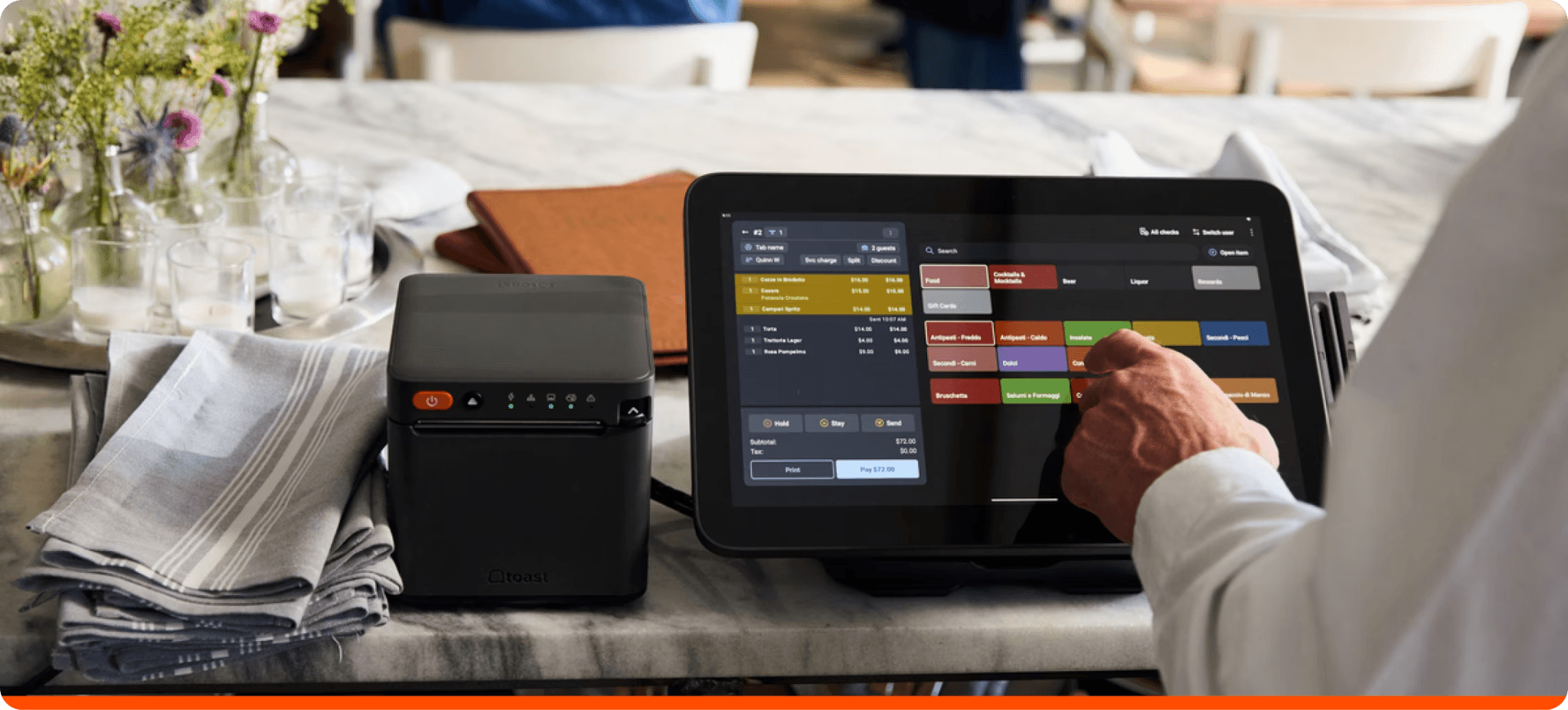
The main products are:
- Toast POS — the core system and payment processing
- Toast Payroll & Team Management — scheduling via Sling, plus payroll
- Toast Online Ordering — direct ordering without third-party commissions
- Toast Marketing & Loyalty — guest engagement, email, and loyalty programs (sold as add-ons)
Toast is built for restaurants that want a single vendor handling the full tech stack. It delivers its strongest value when you're fully inside the ecosystem. The friction starts when you realize that staying inside is also your only realistic option, once you've committed to the hardware and the contract.
It's a strong fit for mid-to-large restaurants and multi-location groups where the feature depth justifies the cost structure. For independent restaurants watching monthly costs closely, the options below tend to make more sense.
How We Evaluated These Toast POS Alternatives
We looked at each system the way an independent restaurant owner would: starting with the real monthly cost and working outward. Our criteria include:
- Pricing transparency — is the full cost visible before you sign?
- Contract terms — month-to-month or multi-year?
- Hardware flexibility — proprietary, or can you repurpose it?
- Restaurant feature depth — table service, kitchen display, modifiers, online ordering
- Payment processing — bundled, or can you bring your own processor?
- Support quality — hours, channels, and how escalations are handled
- User reviews — aggregated from G2, Capterra, Reddit and other sites, verified at time of publication
Pricing was verified against each vendor's own page at time of writing. Verify again before you sign anything, since rates change.
Why some well-known names aren't here
A few alternatives come up often in conversations about leaving Toast, and they're worth addressing directly.
Clover POS has hardware flexibility and lets you shop processing rates through third-party resellers, which sounds like a meaningful structural difference from Toast. The problem is consistency. The experience varies so dramatically depending on who sells it to you that it's difficult to recommend as a category. G2 and Capterra both rate it at 3.8/5, and the most common complaints mirror the ones that drive operators away from Toast in the first place: billing surprises, unreliable support, and complex menus that break down under pressure.
TouchBistro's offline processing is a genuine technical differentiator, and its iPad-based design earns consistent praise for ease of use. But its Capterra rating sits at 3.8/5 across 414 reviews, and the most recent reviews describe 24-month contracts with automatic renewal, early termination fees quoted at $15,000 to $30,000, and continued billing after cancellation. Those are the same structural complaints that lead operators to search for Toast alternatives in the first place. Recommending it here would be replacing one locked-in system with another.
Other alternatives we evaluated—including Lavu, Revel Systems, Aloha Cloud, and SkyTab—all fell short on ratings, review volume, contract transparency, or some combination of the three. The restaurant POS category broadly scores lower on independent review platforms than most software categories. The three alternatives below represent the strongest options we found for independent and small-chain restaurants specifically evaluating a move away from Toast.
Why Trust Homebase
We're Homebase. We build scheduling, time tracking, payroll, and HR tools for small businesses with hourly teams, including tens of thousands of restaurants across the US.
Christofer Peralta, a Customer Success Manager at Homebase, explains: "A typical restaurant tech stack is a point-of-sale system with a built-in time clock, a separate scheduling app, a payroll provider, a task manager — which is usually a whiteboard for the longest time — and a tip manager, which often gets put off longest because it means paying someone extra to stay and allocate tips."
We're not a POS system. We don't process payments or take orders. And that's exactly what makes this guide worth reading: we have no stake in which POS you choose. What we do have is a business relationship with the same operators this article is written for. We want restaurants to trust us as a resource, which means we need to be honest with you about how we put this guide together.
Homebase integrates with Square and Lightspeed on this list, so your scheduling, timecards, and payroll stay connected if you go in either of those directions. Whichever of the three you choose, Homebase still runs your scheduling, time tracking, and payroll independently.
Every alternative in this guide was evaluated on its own merits, against the same criteria, with no paid placements and no backlinks. (See our full methodology here.)
Once you've landed on a POS, Homebase is what connects it to your schedule, timecards, and payroll. Your team's operations don't have to start over just because your POS does.
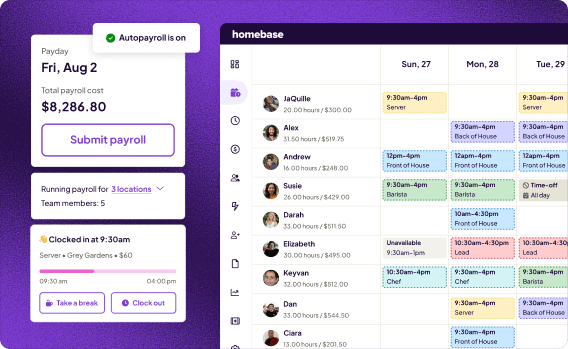
Best for: Independent restaurants and small chains who want labor costs, scheduling, and payroll connected to real sales data without complexity
What it is: Homebase gives hourly restaurant teams one place to schedule, track time, run payroll, and manage HR. When you connect your POS, Homebase pulls in your sales data so you can see labor cost as a percentage of revenue, by shift, before and after it happens.
Key features:
- POS sync — sales data from Square, Lightspeed, Toast, and others flows automatically into your schedule, so labor-to-sales visibility updates in real time
- Time tracking — team members clock in and out from their phones, a tablet, or a connected device; hours, breaks, and overtime calculate automatically
- Scheduling — build and publish schedules in minutes with labor cost projections visible before you publish; team members get notified by text, in-app, or email
- Payroll — timesheets flow directly into payroll with wages, tips, taxes, and overtime calculated automatically, without manual re-entry
Pricing: Free plan available for one location, up to 10 team members. Paid plans start from $24/month per location. Payroll is available as an add-on.
What users say: Luanne Ronquillo, owner of Ruru Baked, on what she needed from a scheduling and payroll tool: "It needs to have reporting so I can see our labor costs per day. And it needs to have things like availability that we can plug in. I want to be able to log in from multiple locations and have multiple locations within the same database. And then it needs to connect to QuickBooks so I can do payroll. Homebase had everything that I needed and was a good price."
Our take: The POS you choose affects your front-of-house experience, your payment processing costs, and your contract terms. Homebase is the piece of your stack that none of those decisions have to touch. Connect your new POS, and your team's schedule, timecards, and labor cost reporting stay exactly where they were. It's free to start.
Your workday, your way.
Every day, more small businesses use Homebase to build the exact workflows their teams need.
How the Top Toast POS Alternatives Compare
Before getting into the detail on each alternative, here's how they stack up on the factors that matter most when switching from Toast: cost, contract flexibility, and fit.
| Toast POS (Baseline) | Square for Restaurants | SpotOn | Lightspeed Restaurant | |
|---|---|---|---|---|
| Starting price | $0/mo (Starter Kit — higher processing rate applies) or $69/mo (Point of Sale plan) | Free plan available. Square Plus: $49/mo per location. Square Premium: $149/mo per location. | $0/station (All-In Plan, 2-year minimum term). POS Essentials: $55/station per month, month-to-month. | From $69/mo (Starter). Essential: $189/mo. Premium: $399/mo. |
| Processing rate model | Bundled only. Rates not publicly listed. Independent sources report ~2.49% + $0.15 in-person on the $69/mo plan. Verify directly with Toast. | Bundled flat rate. 2.6% + $0.15 in-person (free plan); 2.5% + $0.15 (Plus); 2.4% + $0.15 (Premium). | Bundled only. 2.79% + $0.20 in-person (All-In); 2.45% + $0.15 (POS Essentials). | Lightspeed Payments. Rates not publicly listed. Custom rates on Essential and Premium plans. Verify before signing. |
| Free plan | With caveats — Starter Kit is $0/mo software but carries a higher processing rate in exchange. | Yes — no expiration, no long-term contract required. | With contract — All-In Plan is $0/station but requires a 2-year minimum term. | No |
| Contract terms | 1–3 years, auto-renewal. Early termination can cost thousands. | Month-to-month on all plans. No long-term contracts. | Varies by plan. POS Essentials: month-to-month. All-In Plan: 2-year minimum term required. | Month-to-month. Verify contract terms directly with Lightspeed before signing. |
| Best for | Mid-to-large restaurants committed to a single-vendor stack | Counter-service restaurants and cafés who want no contract and a free starting plan | Full-service restaurants, bars, and fast-casual operators who want bundled pricing and strong support | Multi-location operators and data-driven restaurants that need deep reporting and inventory visibility |
The Best Three Toast POS Alternatives
The three alternatives below cover the full range of reasons operators typically leave Toast: Square for the clearest exit from the contract model, SpotOn for more predictable monthly costs in full-service environments, and Lightspeed for operators who need deeper visibility into what their business is actually doing
1. Square for Restaurants.
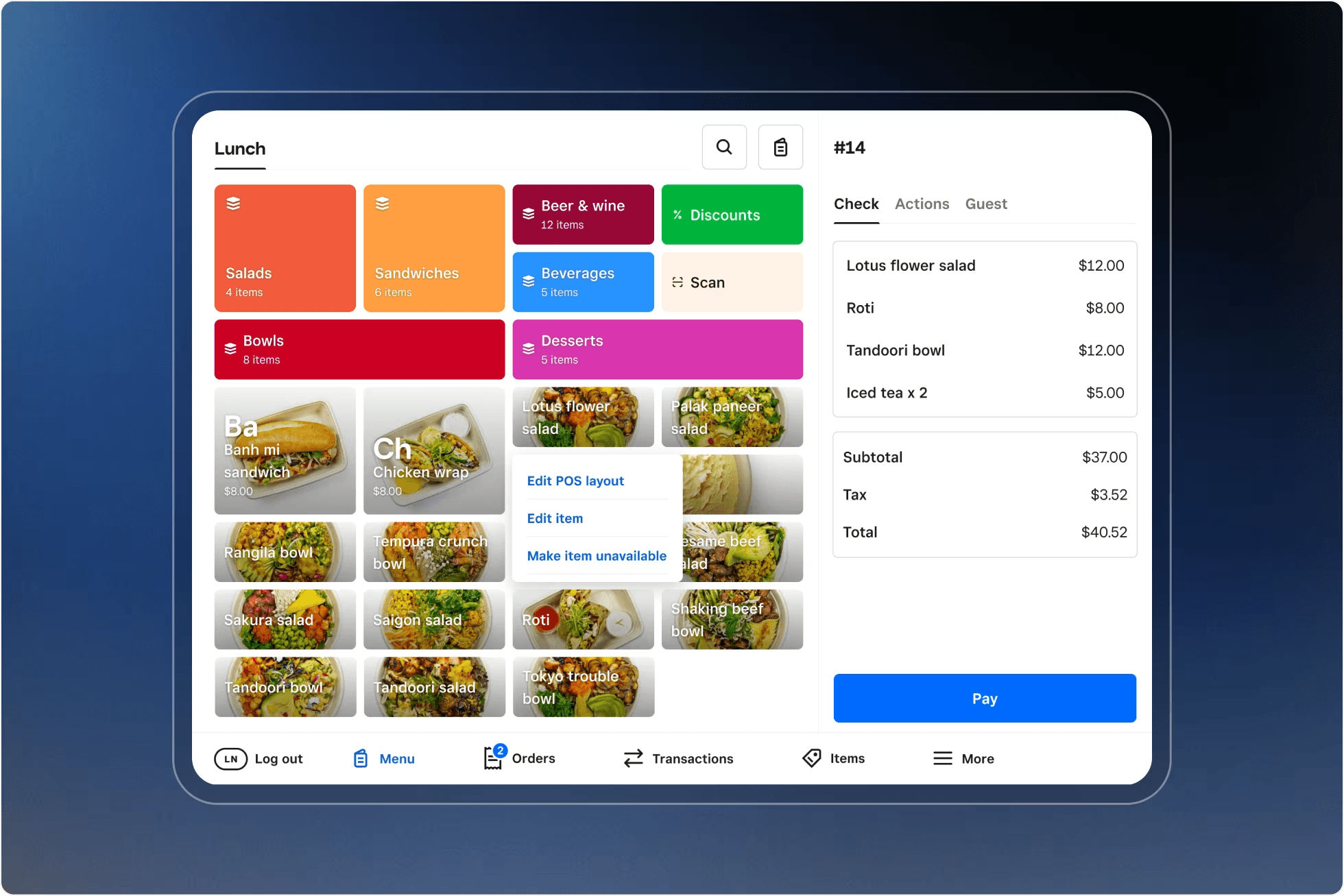
Best for: Counter-service restaurants, cafés, and operators who want to leave Toast's contract without leaving their stack behind
Rating: G2 4.6 · Capterra 4.4
What it is: Square for Restaurants is Square's food-service-specific POS tier, covering counter service, full service, quick service, and bar environments. Unlike Toast, it runs on hardware you own, carries no long-term contract, and lets you start for free.
Key features:
- Free plan with no expiration and no long-term contract
- Offline payments: transactions can be processed without internet for up to 24 hours
- Table and floor plan management, course management, and pre-authorized bar tabs on paid plans
- Integrates directly with Homebase to sync sales data into scheduling and timecards
Pricing: Free plan available (2.6% + $0.15 per in-person transaction). Square Plus: $49/month per location (2.5% + $0.15 in-person). Square Premium: $149/month per location (2.4% + $0.15 in-person). KDS app: $30/month per device on Plus or $20/month per device on Premium. No long-term contracts on any plan. 30-day free trial available.
What users like: In a recent r/restaurantowners discussion from within the last three months, quick-service operators and café owners tend to be positive, particularly on value and ease of setup. A recurring point: Square has improved meaningfully in recent years and works well when menu complexity is low.
"Staff can get up to speed quickly, which reduces training time and keeps operations running smoothly." — Jean R. on G2 (April 2026)
What users criticize: Some consistent criticisms for Square are that complicated modifier setups remain a weak point and check splitting can feel clunky. One commenter in an older r/restaurantowners thread noted that some bar and tab criticisms of Square predate its modernization as a restaurant-specific product.
“The tap feature requires internet access, and even though I had great internet access on my mobile device and access to Wi-Fi, the tap function wasn't the best.” — Amber B. on G2 (April 2026)
Our take: If your main reason for leaving Toast is the contract, Square is the lowest-friction way out. Flat-rate processing gets expensive at high volume, and support can be slow on complex issues, but for counter-service restaurants and cafés that have been overpaying for features they don't use, the starting price is hard to argue with.
2. SpotOn.
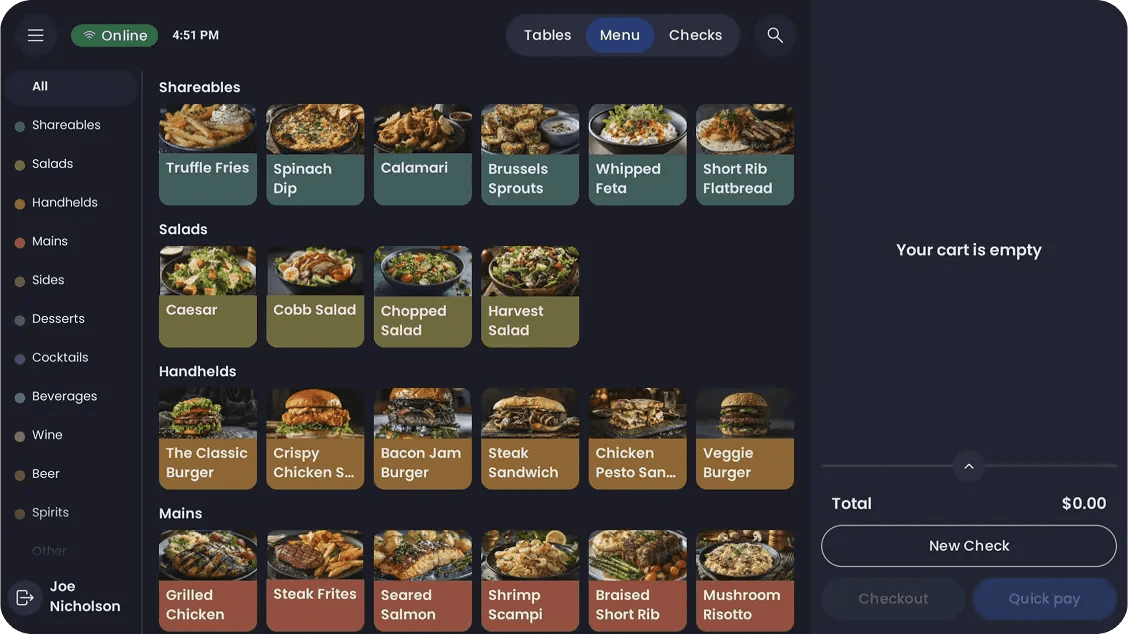
Best for: Full-service restaurants, bars, and fast-casual operators who want an all-in-one system with strong support and no-contract flexibility
Rating: G2 4.4 · Capterra 4.2
What it is: SpotOn is a restaurant-specific POS covering full service, counter service, bars, and fast casual. It competes with Toast on features while offering a month-to-month plan, competitive processing rates, and 24/7 support at no extra cost.
Key features:
- Automatic offline mode that keeps all stations, handhelds, and KDS connected and orders firing to the kitchen when internet drops
- Table layouts, advanced modifiers, course management, and QR pay built in across service styles
- Handheld devices for tableside ordering and payment (6.5" screen, full-shift battery)
- Integrates with DoorDash, Uber Eats, Gusto, ADP, Paylocity, and MarginEdge, among others
Pricing: All-In Plan: $0/station per month with hardware included—card-present 2.79% + $0.20, but requires a 2-year minimum term. POS Essentials: $55/station per month, month-to-month, with card-present at 2.45% + $0.15. Hardware (Station 15) is $750 on POS Essentials. Online ordering and marketing automation are available as an add-on Core Bundle ($50/month + 20bps of GPV).
What users like: Restaurant operators who've switched from Toast are among SpotOn's most vocal advocates. In an r/restaurantowners thread, one bar owner described saving thousands monthly on processing fees after switching, with no regrets.
"We've had a great experience using SpotOn across our multiple locations. The cloud-based platform, online ordering, and integration features make operations smooth and efficient." — Maria Guadalupe C. on G2 (May 2025)
What users criticize: The most consistent criticisms are handheld reliability and pricing complexity as add-ons accumulate, which is worth noting given that per-module billing is one of the main reasons operators leave Toast. In a recent r/restaurantowners discussion, one operator described the experience as supportive while another flagged support quality varying by day of the week.
"Implementations. Online ordering as you can't add a discount to one food item as it will take a discount of all items. Weekend support needs attention as they are not helpful as I usually wait until Monday." — Verified User on G2 (May 2025)
Our take: SpotOn is the strongest like-for-like replacement for Toast in this list—it's restaurant-specific, goes deep on service workflows, and the POS Essentials plan gives you month-to-month flexibility that Toast doesn't. Just watch the All-In Plan closely: the $0 upfront is appealing, but the 2-year minimum term means you're signing a contract, which is one of the main reasons people leave Toast in the first place. Ask for references before you sign.
3. Lightspeed Restaurant.
Best for: Full-service restaurants, bars, and hospitality operators who want deep reporting and a system built to grow with them
Rating: G2 4.3 · Capterra 4.4
What it is: Lightspeed Restaurant is a cloud-based POS built for full-service dining, bars, breweries, cafés, and hotel F&B. It covers order management, table layouts, reporting, inventory, and online ordering, with multi-location visibility on higher-tier plans.
Key features:
- Advanced Insights with AI-powered analytics and real-time reporting across all locations and revenue streams
- Ingredient-level inventory tracking and supplier management (Essential and Premium plans; add-on on Starter)
- Offline mode—processes locally when internet drops, syncs when connectivity returns
- Integrates directly with Homebase, OpenTable, Deliverect, MarginEdge, and accounting tools including QuickBooks
Pricing: Starter: $69/month. Essential: $189/month. Premium: $399/month. KDS: $30/screen per month on all plans. Reservations are an add-on on all plans. Processing rates are not publicly listed.
What users like: Operators who need data depth tend to be satisfied. In a recent r/restaurantowners discussion, one operator described Lightspeed as a solid option with fees that can undercut Toast on comparable setups, though noted costs rise once loyalty and advanced features are added.
"We recently switched from Square to Lightspeed and have been impressed by the hardware performance. The POS and printers are significantly faster, and once you master the menu-building logic, it offers more flexibility than our previous setup." — Imtiaz A. on Capterra (May 2026)
What users criticize: Setup and onboarding are the most consistently flagged issues. In an r/restaurantowners thread on multi-unit alternatives, feedback was sharply divided: one operator called it "awful" while another reported having great luck across multiple locations.
"It is not personalizable; if it doesn't include functions that you need, it is VERY hard to have them implemented. They also add and remove functions without communicating it.” — Giovanni P. on Capterra (January 2026)
Our take: Lightspeed's reporting depth and inventory tools are genuinely stronger than most alternatives on this list, and the $69 Starter plan makes it accessible for smaller operations that want to grow into those features later. The trade-off is implementation: onboarding is largely self-directed, and multiple reviewers describe a steep learning curve and slow support response during setup. If you have the patience for configuration, the payoff in visibility is real. If you need to be up and running in a week, Square or SpotOn are lower-friction starting points.
Frequently Asked Questions About Toast POS Alternatives
What POS system is better than Toast?
It depends on your restaurant type. Square for Restaurants works better for counter-service operators who want no contract and transparent pricing. SpotOn and Lightspeed are stronger for full-service and multi-location operations. Plus, consider what your restaurant needs. If the contract structure is the main problem, the right alternative is one with month-to-month terms and hardware you own outright. If per-module billing is the issue, look for systems that bundle features rather than pricing them separately.
Who is Toast's biggest competitor?
Square for Restaurants is Toast's most direct competitor by market reach, particularly among small and independent restaurants. Its no-contract, free-plan structure is the sharpest contrast to Toast's bundled, long-term approach. For full-service dining, several alternatives like SpotOn and Lightspeed compete on feature depth and support quality, each with different trade-offs on processing rates and contract terms.
What POS does Chick-fil-A use?
Chick-fil-A uses PAR Technology POS hardware paired with proprietary in-house software, not a commercial system available to independent operators. Their setup is built for enterprise-scale operations across thousands of locations, which is a different category than what independent restaurants evaluate. For small to mid-size restaurants looking for a scalable Toast alternative, the options in this guide are more relevant to your size and budget.
Can I use Toast hardware with a different POS?
No. Toast hardware, including terminals, printers, and kitchen displays, is proprietary and won't work with any other system. This is one of the most commonly reported friction points from operators considering a switch. Factor hardware replacement costs into your total switching budget before you decide.
Is there a free alternative to Toast POS?
Yes. Square for Restaurants, for example, has a free plan covering basic POS functionality, online ordering, and team management. The free plan has limits on advanced restaurant features, but it's a workable starting point for counter-service operations and cafés that don't need full table-service tools.
Which Toast POS Alternative Is Right for Your Restaurant?
Start with why you're leaving Toast. That question almost always narrows the field quickly.
If the contract is the problem, rule out any alternative that requires a multi-year commitment, including the $0 plans that bundle a term into the hardware deal.
If the monthly bill is the problem, compare the full cost including add-ons, not just the entry price.
If it's the processing rate, look for systems that let you bring your own processor or at least publish their rates upfront.
And if it's customer support, prioritize alternatives with a strong account management track record, not just a phone number.
Whatever you choose, verify current pricing on the vendor's website before signing, read the full contract terms, and build hardware replacement costs into your switching budget. Rates and plan structures in this guide are accurate as of publication but change frequently.
And when you're ready to connect your new POS, Homebase is waiting on the other side. Your team's schedule, timecards, and labor cost reporting stay exactly where they were. It's free to start and takes minutes to set up. Try Homebase for free.
Your workday, your way.
Every day, more small businesses use Homebase to build the exact workflows their teams need.