Homebase vs. BambooHR (2026)
Discover how Homebase stands out against competitors in team management solutions for your business.
Compare
See How We Stack Up
Discover the advantages of Homebase over BambooHR.
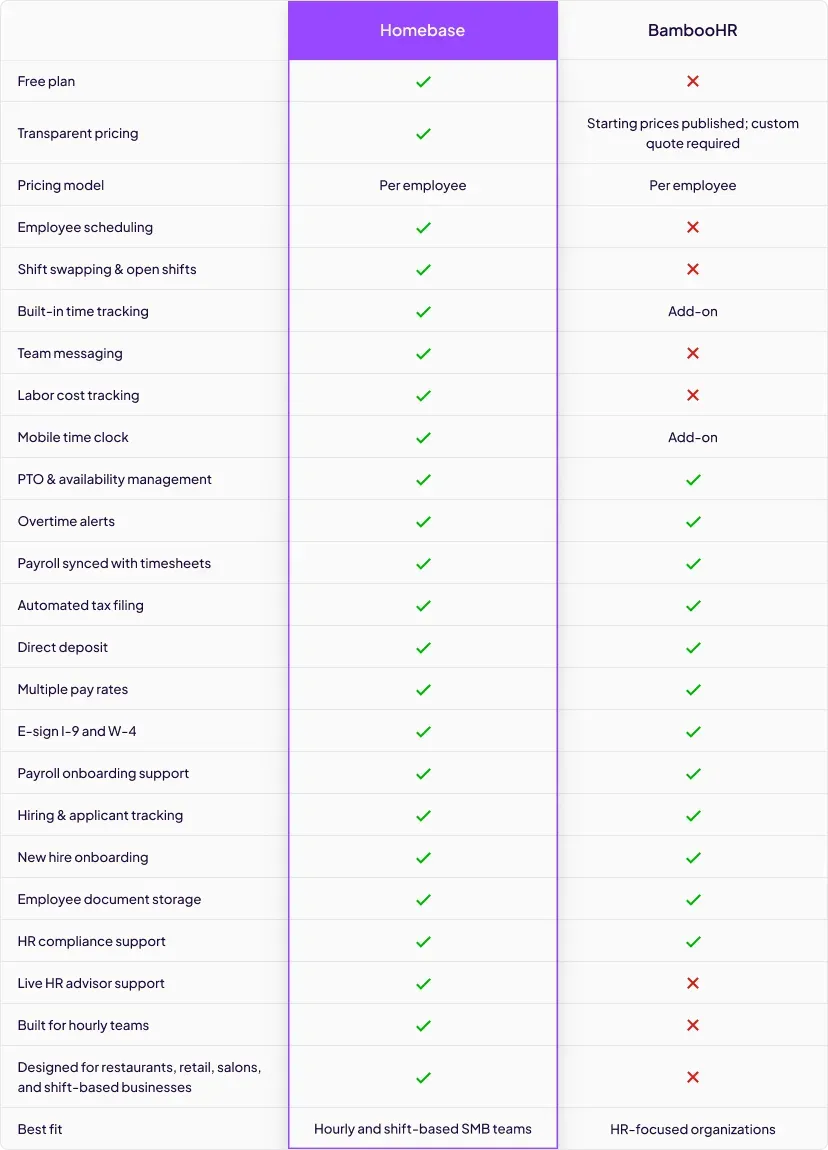
| Homebase | BambooHR | |
|---|---|---|
| Employee scheduling | Included in Homebase | Not included in BambooHR |
| Shift swapping & open shifts | Included in Homebase | Not included in BambooHR |
| Team messaging | Included in Homebase | Not included in BambooHR |
| Built-in time tracking | Included in Homebase | Included in BambooHR |
| Payroll synced with timesheets | Included in Homebase | Included in BambooHR |
| Hiring & applicant tracking | Included in Homebase | Included in BambooHR |
| PTO & overtime tracking | Included in Homebase | Included in BambooHR |
| HR onboarding & e-signatures | Included in Homebase | Included in BambooHR |
| Free plan available | Included in Homebase | Not included in BambooHR |
| Transparent pricing | Included in Homebase | Not included in BambooHR |
| Built for hourly teams | Included in Homebase | Not included in BambooHR |
| Live HR advisor support | Included in Homebase | Not included in BambooHR |
Trusted by 150,000+ small businesses and their teams.














Why businesses choose Homebase over BambooHR
Real numbers, real results. Hourly teams thrive with Homebase.

Scheduling
275 Million
Shifts logged on Homebase Scheduling

Time Clock
1 Billion
Hours tracked with Homebase Time Clock

Payroll
4 Million
Paychecks processed with Homebase Payroll
Table of contents

Conquer your workday.
Join the 150K+ small businesses using Homebase for time clocks, schedules, payroll, and HR.
Homebase vs. Bamboohr (2026): Which Is Right For Your Team?
If you manage a restaurant, retail shop, salon, or any business built around hourly workers, you've probably run into BambooHR in your software search. It's a well-known name in HR. But "well-known" doesn't mean "right fit."
BambooHR is an HR platform built for businesses with a dedicated HR function — strong on employee records, onboarding, and performance management. It doesn't include employee scheduling, and payroll and time tracking are separate paid add-ons.
Homebase is built for shift-based hourly teams — scheduling, time tracking, team messaging, and payroll all connected in one app, starting free. This comparison breaks down how they stack up on features, pricing, and fit so you can make the right call for your team.
TL;DR: Homebase vs. BambooHR in 30 seconds.
Homebase wins for hourly, shift-based teams. BambooHR wins for businesses with a dedicated HR department that don't manage shift workers.
Choose Homebase when:
- Shifts and scheduling are central to how your business runs
- You want to start free — scheduling, time tracking, and POS integration included at no cost for up to 10 team members
- You need scheduling, time tracking, and payroll connected in one workflow without manual data transfer
- You want per-location pricing that stays flat as you hire
- You want live HR advisor access without a full-time HR hire
Choose BambooHR when:
- Your team is primarily salaried or office-based and doesn't work shifts
- You have a dedicated HR manager running formal performance and onboarding programs
- Structured reviews, goal cycles, and people analytics are central priorities
- Benefits administration and workforce trend reporting are core to your HR function
Homebase vs. BambooHR at a glance
The gaps between these two tools are significant — especially for hourly businesses. Here's the full feature comparison before we break each one down.
What is Homebase?
Homebase is a workforce management app built specifically for small businesses with hourly teams. Over 150,000 small businesses run their teams on Homebase — restaurants, retailers, salons, healthcare offices, and more.
Scheduling, time tracking, team messaging, payroll, and hiring all connect in one place. You can get started on the free plan without a credit card, a sales call, or an implementation period.
What makes Homebase different:
- Free plan with no expiration — scheduling, time tracking, and POS integration for up to 10 employees at one location
- Scheduling, time tracking, and payroll connected in one workflow — no re-entry, no exports
- Labor costs visible in real time as the schedule is built
- Built-in team messaging — not an integration with another tool
- Per-location pricing that stays flat as you hire
- 4.8 stars on the App Store (90K+ ratings)
Homebase is best for: Restaurants, retailers, salons, and other hourly businesses where the owner or manager handles scheduling, time tracking, and payroll without dedicated HR support.
What is BambooHR?
BambooHR is an HR platform built for businesses with a dedicated HR function. It excels at employee records, structured onboarding workflows, performance management, and HR reporting. Its tools give HR teams visibility into PTO trends, engagement data, and workforce analytics over time.
It's built for a specific kind of business — one with an HR manager, salaried employees, and formal people programs. It doesn't include scheduling, and time tracking and payroll come as separate add-ons.
What BambooHR does well:
- Structured performance reviews (self, manager, and 360° peer assessments on Pro+)
- Employee satisfaction and wellbeing tracking
- Benefits administration capabilities and integrations
- Applicant tracking with trend reporting for data-driven hiring
- Onboarding task workflows with new hire progress visibility
BambooHR is best for: Mid-sized businesses with a dedicated HR manager, primarily salaried or office-based employees, and organizations where performance management and people analytics are operational priorities.
Pros and cons
Homebase
Pros:
- Free plan with no expiration (1 location, up to 10 employees)
- Scheduling built for shift-based teams — included on every plan
- All-in-one workflow: schedule → clock-in → timesheets → payroll
- Labor cost tracking tied to the schedule and POS
- Transparent, location-based pricing
- Built-in team messaging
- Live HR advisor access on All-in-One plan
Cons:
- Performance management tools are limited compared to BambooHR
- Benefits administration available as payroll add-ons, not built into the base app
- Advanced workforce analytics and HR reporting aren't core features
- Free plan capped at one location and 10 employees
BambooHR
Pros:
- Robust, structured performance management (self, peer, and manager reviews on Pro+)
- Benefits administration capabilities and integrations
- Onboarding task tracking with new hire progress visibility
- PTO and workforce trend reporting
- Strong for HR teams managing formal people programs
Cons:
- No employee scheduling — at all
- No free plan; flat $250/month minimum for teams of 25 or fewer
- Per-employee pricing grows with every hire
- Team messaging relies on third-party integrations like Slack or Microsoft Teams
- Time tracking, payroll, and benefits administration are separate paid add-ons
- Not designed for hourly or shift-based teams
Feature breakdown
Here's how Homebase and BambooHR compare across the features that matter most to hourly teams.
Breakdown: Homebase Scheduling vs BambooHR Scheduling
Homebase has it. BambooHR doesn't.
BambooHR doesn't include scheduling. Most businesses would need a separate scheduling platform alongside it — which means additional cost, another login, and data that doesn't flow between tools.
Homebase scheduling is included on every plan. What you get:
- AI-assisted schedule builder — drafts the week based on availability, roles, and past patterns
- Labor costs update in real time as shifts are added
- Overtime flags and compliance warnings surface before you publish
- Team members get instant shift notifications on their phones
- Open shift claiming, shift swap requests, and time off — all with manager approval in the app
For shift-based businesses, this is often the biggest functional difference between the two tools.
Breakdown: Homebase Time Tracking vs BambooHR Time Tracking
Both tools support employee time tracking, but the scope and structure differ significantly.
Homebase time tracking:
- Clock-ins tied to the schedule — attendance visible against shifts in real time
- Alerts for late clock-ins, missed punches, and early clock-outs as they happen
- GPS and geofencing confirm on-site arrival before employees can punch in
- Early clock-in prevention built in
- Break tracking and compliance alerts automated
- Included on every plan
BambooHR time tracking:
- Available as a paid add-on, not included in base plans
- Employees can log shift notes alongside hours
- Project-based time tracking for billable hours — useful for agencies, less relevant for hourly teams
- Managers can grant team members direct timesheet access
Breakdown: Homebase Payroll vs BambooHR Payroll
Both tools handle direct deposit, automated tax filing, and timesheet-to-payroll sync. The meaningful differences are in depth, workflow, and cost structure.
Homebase payroll:
- Built for hourly complexity — tips, blended overtime, break premiums, and variable hours handled automatically
- Hours flow from timesheets to payroll without re-entry or manual exports
- Catches missed punches, unapproved hours, and compliance issues before payday
- Transparent pricing: $49/month + $6/month per active employee, added to any plan including free
- Payroll, time tracking, and scheduling are all part of one connected workflow
BambooHR payroll:
- A paid add-on on top of a paid base plan — time tracking also requires its own add-on
- Pricing not published; requires contacting BambooHR for a quote
- Better aligned to traditional HR and salaried workforce management than to the operational complexity of hourly scheduling workflows
Breakdown: Homebase Hiring and Onboarding vs BambooHR Hiring
Both tools post to major job boards, manage candidate communications, and collect e-signed onboarding documents before day one.
Homebase hiring:
- AI generates job descriptions from a few quick inputs
- AI screener evaluates applicants in real time, ranks top candidates automatically
- New hires sync directly to scheduling and payroll — no separate setup
- Available on free plan for basic job posting
BambooHR hiring:
- Posts to LinkedIn, Facebook, and Twitter in addition to job boards
- Structured onboarding task tracking with new hire progress visibility
- Applicant trend reporting for more data-driven decisions
- Onboarding features and advanced ATS tools gated behind higher-tier plans
Breakdown: Homebase HR and compliance vs BambooHR
Homebase:
- Live HR advisors available on All-in-One plan — answer questions about payroll taxes, labor laws, and policy
- Advisors review internal policies for compliance with federal and state regulations
- Customized employee handbook built for your business
- Compliance alerts built into the scheduling and time tracking workflow
- Homebase helps you stay compliant with labor laws — no tool can guarantee full compliance
BambooHR:
- Deeper HR reporting: PTO usage trends, workforce engagement data, and analytics
- Benefits administration capabilities and integrations (health, dental, vision, retirement)
- Compliance training library — 1 course on Core, 15 on Pro, 300+ on Elite
- No live HR advisor access
For small business owners managing compliance without a dedicated HR team, Homebase's advisor access and workflow-level alerts are more practically useful. BambooHR's reporting and analytics depth serves HR managers running formal programs.
Breakdown: Homebase Team Messaging vs BambooHR Team Messaging
Homebase: Built-in messaging. The whole team communicates in one place — individual messages, group chats, shift-specific notes — without a separate app account.
BambooHR: No native messaging. Teams typically rely on integrations like Slack or Microsoft Teams for communication — adding another layer outside the workforce management workflow.
For hourly teams coordinating coverage and shift changes, messaging built into the same app everyone uses for their schedule is a meaningful day-to-day advantage.
Breakdown: Homebase Performance Management vs BambooHR Performance Management
This is where BambooHR has a genuine advantage.
BambooHR's performance tools are more structured and comprehensive:
- Three evaluation types: manager assessments, self-assessments, and 360° peer reviews (Pro+)
- Individual goal setting with automated reminders
- Aggregate performance reports with organization-wide visibility
- Employee community and satisfaction tracking tools
Homebase lets you collect shift-end feedback, recognize team members for strong attendance and punctuality, and track milestones. That works well for day-to-day engagement. For formal review cycles, goal tracking, and people analytics, BambooHR is the stronger tool.
For many hourly small businesses, formal review cycles may not be a primary operational priority. But if they are, acknowledge it honestly in your evaluation.
Breakdown: Homebase Mobile App vs BambooHR Mobile App
Homebase: 4.8 stars on the App Store (90,000+ ratings). Managers build schedules, review timesheets, approve time off, run payroll, and message the team from their phone. Employees view schedules, clock in and out, swap shifts, and request time off in the same app.
BambooHR: Mobile app lets employees request time off, view team availability, access pay stubs, and sign documents. Manager capabilities on mobile are more limited than the web version.
Pricing
Homebase pricing is public and available at joinhomebase.com/pricing. Plans are priced per location — so your cost stays flat whether you have 8 team members or 28.
- Basic — $0/month (1 location, up to 10 employees): Basic scheduling, time tracking, and POS integration.
- Essentials — $30/month per location (unlimited employees): Advanced scheduling, advanced time tracking, and team messaging.
- Plus — $70/month per location (unlimited employees): Adds AI-assisted scheduling, PTO management, and departments and permissions.
- All-in-One — $120/month per location (unlimited employees): Adds employee onboarding, labor cost management, HR and compliance, and live HR advisor access.
- Payroll add-on — $49/month + $6/month per active employee: Unlimited payroll runs and automated tax filing, available on any plan.
Annual billing saves 20%: Essentials drops to $24/month, Plus to $56/month, All-in-One to $96/month per location.
Pricing verified May 2026. Visit joinhomebase.com/pricing for current details.
BambooHR pricing is per employee per month, with starting prices published on their website. Full quotes require contacting their sales team.
- Core — ~$10/employee/month: Employee records, reporting, hiring, onboarding, and time-off tracking.
- Pro — ~$17/employee/month: Adds performance management, employee community, and an AI assistant.
- Elite — ~$25/employee/month: Adds compensation planning, advanced analytics, and salary benchmarking.
- Time tracking, payroll, and benefits administration are each priced as separate add-ons.
One important note: BambooHR charges a flat $250/month minimum for businesses with 25 or fewer employees, regardless of plan tier. Prices above are based on third-party review site data — exact pricing requires a custom quote from their sales team.
Pricing reality check: For a single location with 20 employees, Homebase All-in-One runs $120/month. BambooHR's minimum for a team that size starts at $250/month — before adding payroll or time tracking. And because BambooHR charges per employee, the bill grows with every hire. With Homebase, it doesn't.
Integrations
Homebase integrates with the POS systems that matter to hourly businesses. BambooHR's integrations lean toward enterprise HR tooling.
Homebase integrations cover the tools shift-based businesses already run on — POS systems, payroll providers, and job boards:
- POS: Square, Clover, Toast, Shopify, Lightspeed Retail, Lightspeed Restaurant, Restaurant 365, Revel
- Payroll and accounting: QuickBooks Online, Gusto, ADP Run, Paychex, Rippling
- Hiring: Indeed
BambooHR integrations are stronger on the HR and talent side:
- Hiring and talent: Indeed, Checkr, Greenhouse, BreezyHR
- People and culture: Culture Amp, Carta
Who is each tool right for?
Choose Homebase if:
- You run a restaurant, retail shop, salon, healthcare office, or any business with hourly shift workers
- You build and publish a team schedule every week
- You want scheduling, time tracking, and payroll in one connected workflow
- You're managing your team without a dedicated HR professional
- Transparent, predictable pricing that doesn't grow with your headcount matters to you
- Starting free is important
Choose BambooHR if:
- Your team is primarily salaried or office-based and doesn't work shifts
- You have a dedicated HR manager or HR team running formal programs
- Structured performance reviews, goal tracking, and people analytics are priorities
- Benefits administration within your HR platform is a requirement
- Your organization is large enough that per-employee pricing and enterprise HR workflow depth are justified
Final verdict
For hourly, shift-based businesses: Homebase.
BambooHR is a well-built HR platform — for businesses that need HR software in the traditional sense. If you have a dedicated HR team running performance cycles, managing benefits, and doing workforce analytics, it earns its place. But it's an HR-focused tool built for businesses with a dedicated HR function. It doesn't include scheduling, and time tracking and payroll are add-ons that require their own budget line.
Homebase is purpose-built for the operational reality of running a restaurant, retail store, salon, or similar business. The schedule connects to the time clock. The time clock connects to timesheets. Timesheets connect to payroll. The whole workflow runs in one app, and you can start free.
If your team clocks in, works shifts, and counts on a published schedule every week — Homebase is the right tool. BambooHR is built for a different kind of business.
Ready to see how Homebase works for your team? Get started free — no credit card required.
The information above is based on our research on Homebase and BambooHR as of May 2026. Pricing and features may change — visit joinhomebase.com/pricing for current Homebase plan details.
Our customers love us
"Homebase simplifies scheduling, payroll, and HR in a way that is easy to navigate and understand. We highly recommend it."
Mandana Shabani
Owner, Zood Restaurant
"As a small business I want to leverage tools that will help me with systems AND make things easier for my team."
Cadence Kidwell
Owner, Fuzzy Goat
"Our team members love using Homebase. It's user-friendly and has significantly improved communication and collaboration"
Jamila Wright
Owner, Brooklyn Tea
Related Posts


Top-rated app built for small business teams.
Best Payroll for Hourly Teams
2024

Best in Business for Best AI Implementation
2025

Best Employee Scheduling
2025

Best HR & Employee App
2025