








Table of contents

Square vs. Homebase (2026): Which Platform Fits Your Team?
If your business runs on shifts, the choice between Homebase and Square comes down to one question: where does your operation actually start?
Homebase is built for hourly teams first — scheduling, time tracking, payroll, and labor costs all in one app. Square is built around its POS, with scheduling and payroll extending outward from the register.
Neither is wrong. But if staffing and shifts drive your day, you'll want a scheduling-first tool. If Square POS is already your hub, Square's native stack keeps everything close to your sales data — though some teams find they need more scheduling depth or HR support than Square's workforce tools offer.
TL;DR: Homebase vs. Square in 30 seconds.
Homebase is built for shift-based hourly teams that need scheduling, time tracking, and payroll in one app — with a free tier to start and per-location pricing that doesn't scale with headcount. Square is built around its POS, with scheduling and payroll that work best when Square is already your operational hub.
Choose Homebase when:
- Shifts and scheduling drive your week, not sales transactions
- You want to start free — scheduling and time tracking included at no cost for up to 10 team members
- Labor cost as a percentage of sales needs active monitoring
- You want payroll, tips, and hours in one workflow without exporting data
- You're paying for one location, not per person
Choose Square when:
- Square POS is already central to how you run the business
- You need payroll for both W-2 and 1099 workers in one run
- Tip pooling tied directly to POS sales matters more than scheduling depth
- Your team is under 5 — Shifts Free covers the basics at no cost (note: the 5-member cap doesn't apply to Square Payroll subscribers)
- You're comfortable with per-employee pricing: $35/month base + $6 per person for payroll
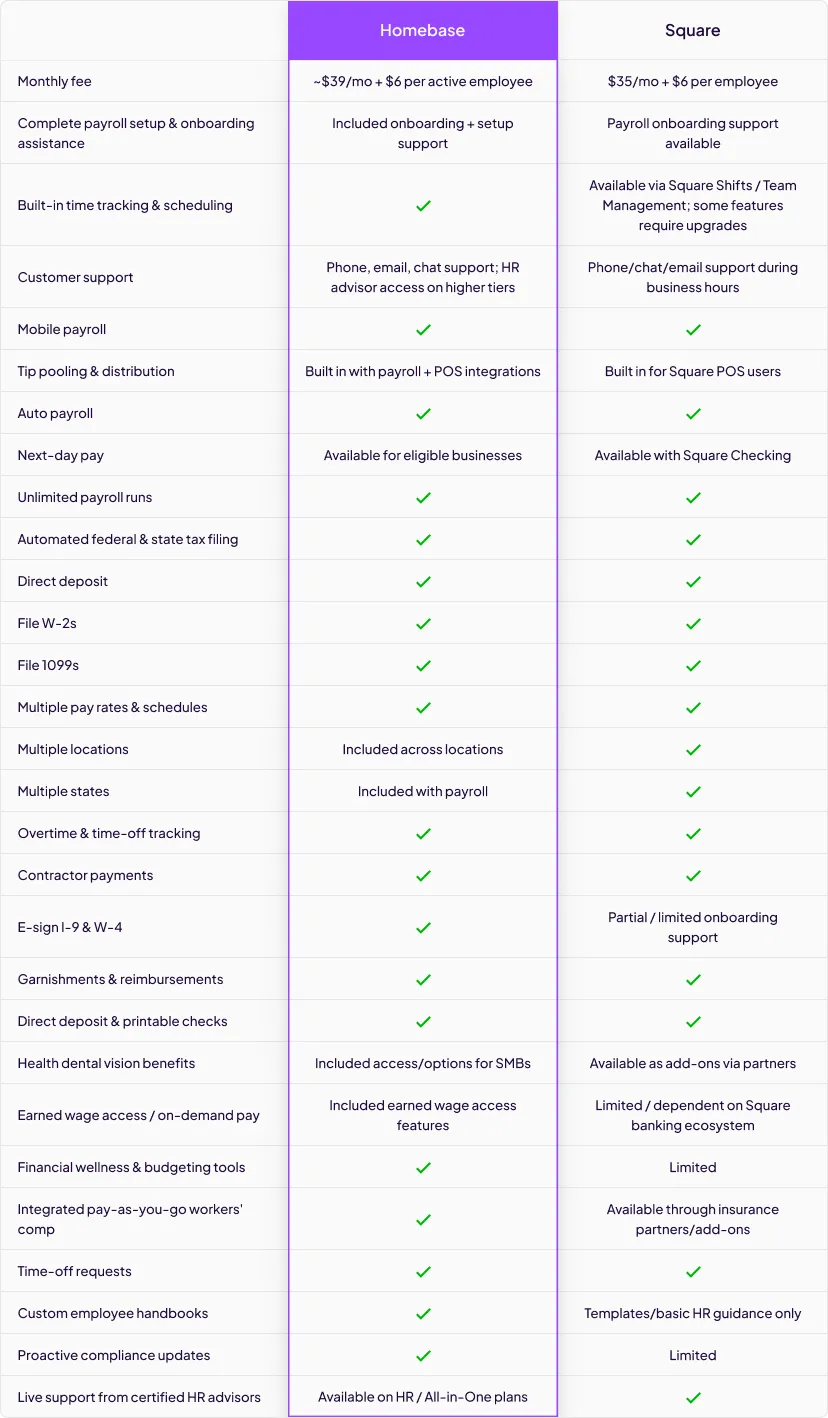
Homebase vs. Square at a glance
See exactly what you get with each platform—from free tiers and payroll costs to tip pooling, HR support, and earned wage access. Compare the full feature set to find the right fit for your hourly team.
What is Homebase?
Homebase brings employee scheduling, time clocks, team messaging, payroll, and HR help into one unified system for small, hourly teams. Managers build schedules in minutes, track hours with GPS and geofencing, and turn timesheets into payroll without spreadsheets. The platform tracks labor as a percent of sales and integrates with major POS systems—including Square POS. Predictable per-location pricing and a free Basic tier to get started.
What makes Homebase different:
- Start free with scheduling & time tracking
- Payroll built for hourly teams
- Built-in team chat & shift notes
- Track labor costs vs. sales
- Strong mobile apps for staff
- Optional Homebase Tip Manager add-on
150,000+ small businesses rely on Homebase. The free Basic tier provides full employee scheduling, time tracking, team messaging, and POS system connections for up to 10 employees at a single location.
What is Square?
Square is a POS-first platform for taking payments, managing items, and running your storefront. Square Shifts handles employee scheduling, timecards, labor vs. sales reporting, and tip pooling features. Square Payroll runs W-2 and 1099 payroll with automated tax filings and optional benefits partners. Shifts and Payroll live inside the Square ecosystem, creating native data flow from Square POS to timecards to pay.
What Square does well:
- Native to Square POS & payouts
- Tip pooling in Plus & Premium tiers
- Labor vs. sales and team reports
- W-2/1099 payroll with e-filings
- Partnered 401(k) via Guideline and health benefits via SimplyInsured
- Shifts Free for ≤5 team members; Shifts included with Square Plus/Premium
Square Payroll starts at $35/mo + $6 per person (contractor-only plans at $6 with no base). Shifts Free caps teams at five; advanced features require Shifts Plus or a Square POS Plus/Premium subscription.
Pricing
Homebase and Square price their tools differently — and for growing teams, that difference adds up fast. Homebase bills by location, so your cost stays flat whether you have 8 team members or 28. Square Payroll bills per person, so costs scale with headcount.
Homebase pricing
Homebase bills per location, with unlimited team members on all paid tiers.
- Basic — $0/month (1 location, up to 10 team members): Core scheduling, time tracking, team messaging, and POS connections.
- Essentials — $30/month per location: Adds GPS time tracking, late arrival alerts, and enhanced scheduling tools.
- Plus — $70/month per location: Adds AI-assisted scheduling, PTO policy management, and departmental organization.
- All-in-One — $120/month per location: Adds onboarding workflows, labor cost analytics, compliance resources, and HR Pro advisor access.
- Homebase payroll — $39/month + $6 per team member: Unlimited payroll runs, multi-state filings, earned wage access, and automated tax submissions.
- Add-ons: Tip Manager at $25/location, Task Manager at $13/location, and background checks at $30 each.
All paid tiers are also available at a discount on annual billing — Essentials drops to $24/month, Plus to $56/month, and All-in-One to $96/month per location.
Pricing verified May 2026. For the latest, visit joinhomebase.com/pricing.
Square pricing
Square Shifts and Square Payroll are priced separately.
- Shifts Free: Core scheduling and time tracking for up to 5 team members at no cost. The 5-member cap doesn't apply if you're a Square Payroll subscriber.
- Shifts Plus: Unlocks open shift scheduling, geofenced clock-ins, time-off management, and tip pooling. Included with some Square POS Plus and Premium subscriptions — check your Square Dashboard for your specific price.
- Square Payroll — $35/month + $6 per person: Covers W-2 and 1099 workers. Contractor-only payroll is $6 per contractor with no base fee.
Square doesn't publish a universal US price for Shifts Plus outside of POS bundles. Confirm your cost directly in your Square Dashboard.
Cost Comparisons
Real costs depend on your team size, your Square POS plan, and whether Shifts Plus is bundled into what you're already paying. Here's how the numbers compare across three common scenarios.
12-person coffee shop (with payroll)
Homebase (Plus + payroll): $70 + $39 + (12 × $6) = $181/month.
Square (Shifts + payroll): $35 + (12 × $6) = $107 for payroll. Shifts Plus pricing for US customers isn't published outside of POS bundles — if it's included in your Square POS Plus or Premium plan, your incremental cost may be $0. If not, check your Square Dashboard for your price.
20-person retail store (with payroll)
Homebase (All-in-One + payroll): $120 + $39 + (20 × $6) = $279/month.
Square (Shifts + payroll): $35 + (20 × $6) = $155 for payroll. Add Shifts Plus at your confirmed rate, or $0 if bundled with your POS plan.
10-person shop (scheduling and time tracking only, no payroll)
Homebase (Essentials): $30/month — unlimited team members, all scheduling and time tracking tools included.
Square (Shifts): $0 on Shifts Free if your team is 5 or under. For a full team of 10, you'll need Shifts Plus — confirm your rate in your Square Dashboard or check whether it's bundled with your POS plan.
The bottom line: Homebase pricing is predictable — one flat rate per location regardless of how many people are on your roster. Square's total cost depends on which POS plan you're on and whether Shifts Plus is already included. If it is, Square can be the more cost-efficient option for smaller teams. But as your roster grows or your scheduling needs get more complex, per-employee pricing and limited workforce tools can start to work against you.
Breakdown: Homebase Payroll vs. Square Payroll
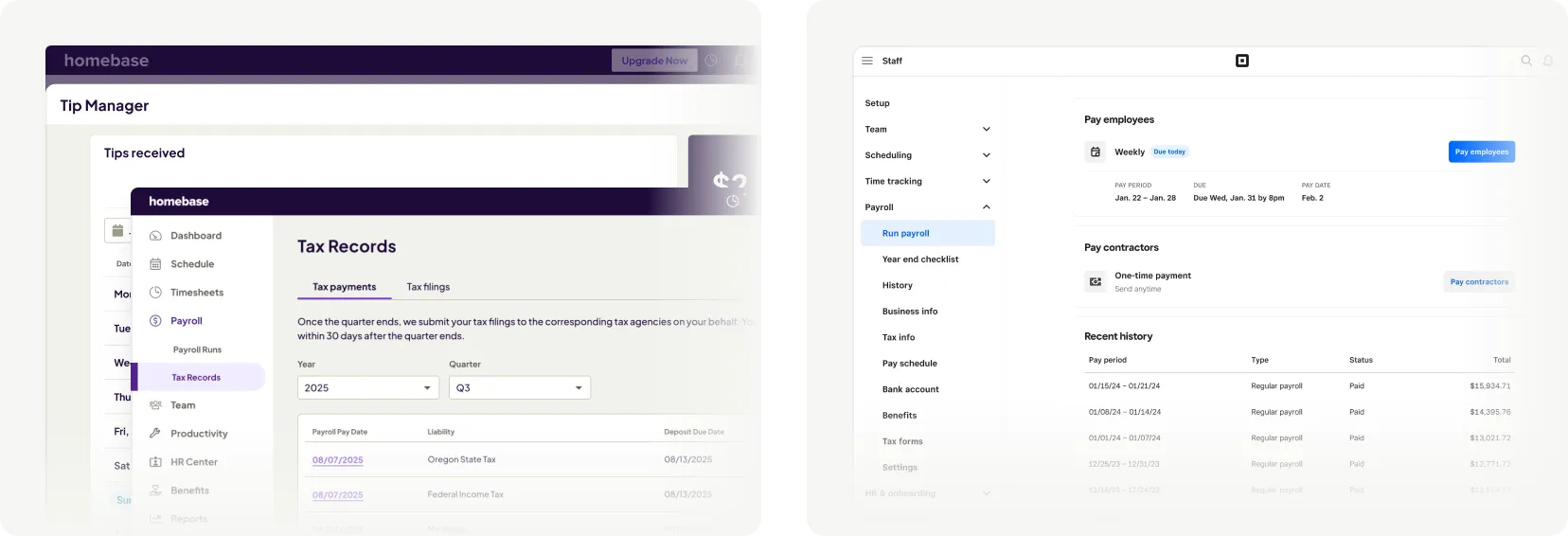
Homebase Payroll is optimized for hourly operations: import timesheets, pay across locations, file taxes automatically. It's priced as a base + per employee and works alongside any Homebase plan. Homebase's AI Payroll Assistant catches and corrects timecard errors automatically — flagging lateness, missed breaks, and overtime with clear steps to fix them before payday.
Homebase features:
- Unlimited payroll runs, no per-run fees
- Multi-state filings and year-end tax forms
- Syncs timesheets; fewer manual edits
- Supports multiple locations & roles
- Earned wage access (EWA) option via Cash Out
- Tip outs from Tip Manager (add-on) flow into payroll
Square Payroll handles W-2 and 1099 workers, files federal/state taxes, and syncs natively with Square POS for tips and timecards. Benefits available via partners like Guideline (401k) and SimplyInsured (health).
Square features:
- W-2/1099 support in one run
- Automated tax filings & payments
- Direct tip imports from Square POS
- Digital W-2/1099 distribution
- 401(k) via Guideline integration
- Health benefits via SimplyInsured
Which platform fits your payroll needs? Homebase Payroll fits when operations start with schedules, tip distribution, and hourly compliance. Square Payroll fits when you already run Square POS and want payroll inside the same stack.
Breakdown: Homebase Scheduling vs. Square Shifts Scheduling
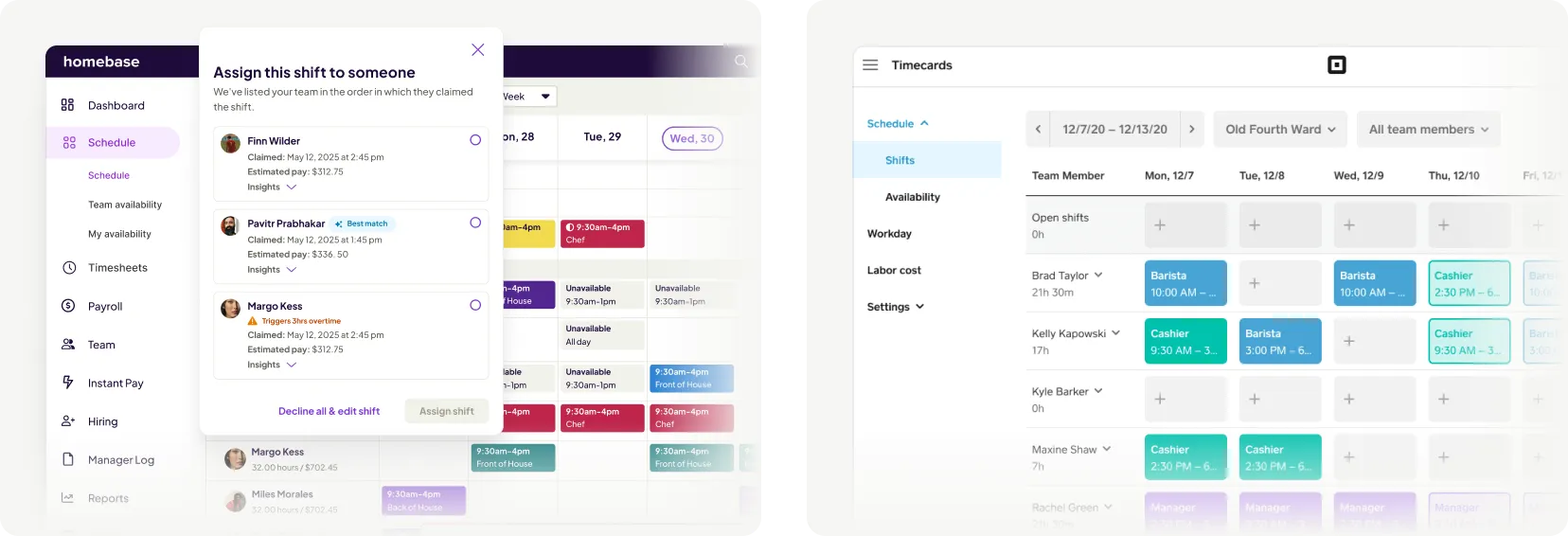
Homebase Scheduling prioritizes speed and control: AI-assisted schedules, availability and PTO rules, labor forecasts vs. sales. Homebase's AI Scheduling Assistant builds optimized schedules instantly — matching the right people to shifts using availability, work history, and time-off data, and resolving conflicts before you publish.
Homebase features:
- AI schedule builder resolves conflicts
- Predictive scheduling & PTO rules
- Labor % of sales in the planner
- Open shifts, shift swaps, shift notes
- Mobile publish with instant alerts
- POS integrations update labor view
Square Shifts scheduling is tightly coupled to your POS: publish schedules, handle availability, swap and claim open shifts, see labor vs. sales. Advanced scheduling requires Shifts Plus or POS Plus/Premium tiers.
Square features:
- Shift publishing with app/email alerts
- Availability & time-off requests
- Open-shift posting and shift swaps
- Schedule duplication week to week
- Labor-vs-sales schedule reporting
- Team-initiated shift covers (Plus)
Which platform matches your scheduling flow? Homebase Scheduling serves teams that live in the schedule and need AI help, cost controls, and deep PTO rules. Square Shifts serves sellers who want schedules beside POS sales data.
Breakdown: Homebase Time Clock vs. Square Shifts Timecards
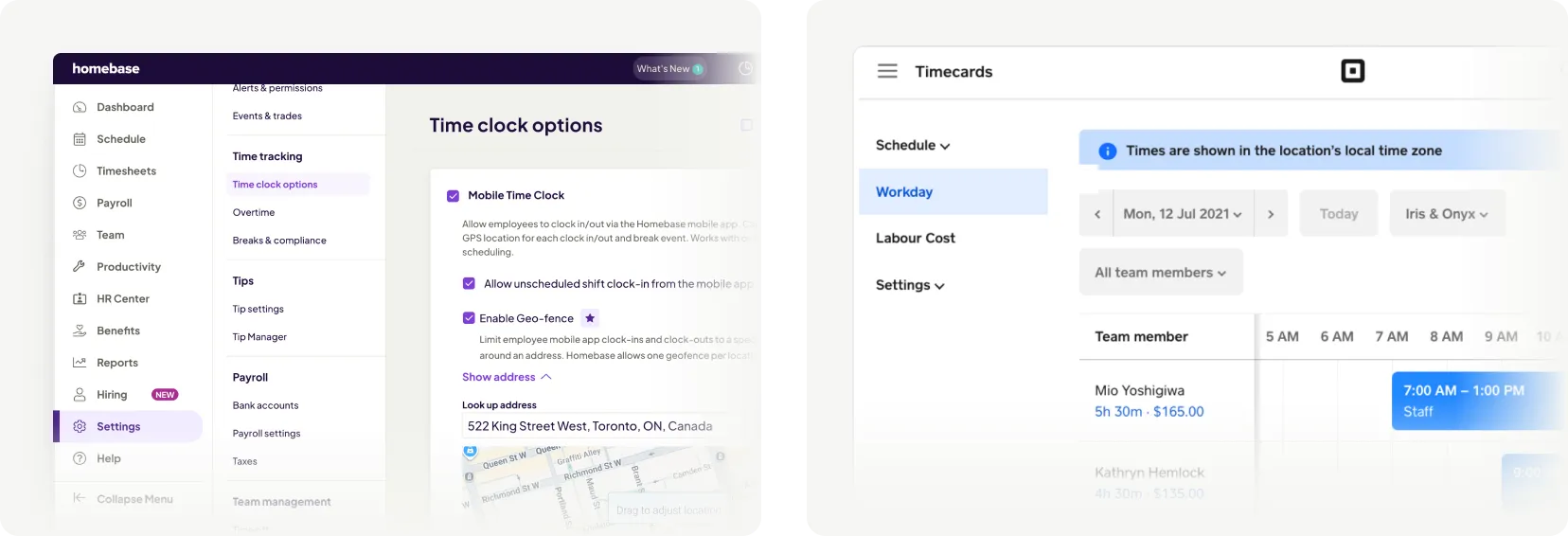
Homebase Time Clock turns phones, tablets, and POS devices into time clocks with GPS, geofencing, and photo verification. Break tracking and compliance settings help enforce local rules and reduce timesheet fixes.
Homebase features:
- GPS snapshots & geofenced clock-ins
- Photo verification on shared devices
- Missed break rules and alerts
- Late/early clock-in notifications
- Overtime warnings in real time
- Timesheets flow into payroll
Square Shifts tracks time from Square POS or the Square Team App, generates timecards automatically, and supports geofencing, overtime and break tracking, and clock-in protection on the Plus tier.
Square features:
- POS and mobile time clocks
- Auto-generated timecards
- Geofenced clock-in/out (Plus)
- Overtime and break tracking
- Clock-in protections (geofencing, passcodes) and scheduling alerts
- Sync timecards to Square Payroll
Which platform addresses time tracking? Choose Homebase Time Clock for robust mobile GPS/geofence controls and compliance tooling. Choose Square Shifts for timecards native to the Square stack and tied to your registers.
Breakdown: Homebase HR vs. Square HR
Homebase adds onboarding, document storage, policy templates, and Homebase HR Pro—live access to HR advisors and a resource library—on the All-in-One plan. Designed to help small businesses handle day-to-day HR without a full-time hire. Homebase's AI Hiring Assistant is an add-on starting at $30/post — acting as a built-in first-round interviewer that screens applicants, surfaces top candidates, and pre-schedules interviews with your best matches so you're not buried in applications.
Homebase features:
- New-hire onboarding workflows
- Policy templates & handbook help
- Compliance alerts and guidance
- PTO policies and approvals
- Centralize docs & acknowledgments
- HR Pro advisor access (All-in-One)
Square's HR-adjacent features sit inside Square Payroll (tax filings, forms) and Square Shifts (time-off, breaks). Benefits run through partners; broader HR advisory or compliance libraries are not Square's focus.
Square features:
- Automated tax filings & year-end forms
- Time-off tracking via Shifts Plus
- Break policy tracking in Shifts
- Benefits via partners (401k, health)
- Multi-state payroll capabilities
Which platform serves HR & compliance? Homebase fits when you want HR guidance and templates alongside employee scheduling and payroll. Square fits when payroll compliance and benefit connectivity are enough.
Pros and Cons of Homebase and Square
Here's a quick look at what each platform does best and where trade-offs exist.
Homebase — Pros:
- Free tier for one location, up to 10 staff
- Built for shift-based, hourly operations
- Strong mobile apps for staff & managers
- Payroll tuned to hourly teams' needs
- GPS/geofencing without per-user fees
Homebase — Cons:
- Optimized for hourly vs. salaried roles
- Payroll is an add-on cost line
- Per-location pricing scales by sites
Square — Pros:
- Native to Square POS and payouts
- Tip pooling available on Plus/Premium
- Labor-vs-sales reporting built-in
- Simple W-2/1099 payroll + e-filings
- Benefits via partners in one stack
Square — Cons:
- No true all-in-one HR advisory suite
- Shifts Free caps teams at five members
- Advanced features gated by Plus/Premium
- Payroll cost scales per employee
- Some features vary by region/plan
The Bottom Line
Homebase is built for hourly, shift-driven teams where schedules change weekly and labor costs matter. It's free to start, mobile-first, and designed for managers who want employee scheduling, time tracking, payroll, and HR guidance to work like one system.
Square Shifts and Square Payroll fit when you run Square POS as your operational hub. Just watch Shifts tier requirements and per-employee pricing.
Select the platform that matches how your team works. If shifts and labor cost controls drive your business, start with Homebase. If Square POS is the center, Square keeps schedules, timecards, and pay close to sales.
Tired of schedules, timesheets, and payroll living in three different places? Homebase brings them together in one app — and you can start today without a credit card.