Gusto vs. TriNet: Which Is Better for Small Business in 2026?


SMALL BUSINESS INTEL, IN YOUR INBOX
Table of contents
The Gusto vs. TriNet decision is one of the more confusing comparisons in the payroll software for small business space, and not because either tool is bad. These are two well-reviewed products built for genuinely different jobs, and the gap matters.
This post breaks down Gusto vs. TriNet on payroll, HR features, pricing, time tracking, and real user experience. The goal isn't to declare a winner. It's to help you figure out which one fits.
Gusto vs. TriNet Payroll and HR — the Short Version
If you're comparing Gusto vs. TriNet and want the quick read:
- Gusto is a payroll-first tool with transparent, published pricing. The Simple plan starts at $49/mo + $6/employee. Best for small teams that want clean payroll and light HR without complexity.
- TriNet HR Plus is a broader HR management system combining HR, payroll, benefits, and HR support. Pricing is custom-quoted; contact TriNet for a quote.
- TriNet PEO is a separate product entirely: a co-employment arrangement where TriNet and the client share specified employer responsibilities. Also custom-quoted, with pricing that varies by company characteristics and selected services.
- Both tools have real trade-offs. Gusto's Simple plan now starts at $49/mo. Some TriNet customers flag support inconsistency and the complexity of understanding total costs before signing.
- Both tools support hourly work features, but scheduling, tip management, and time-clock integration differ in depth from a tool built ground-up for hourly teams.
Why Trust Homebase? Our HR Tools and Payroll Expertise Explained
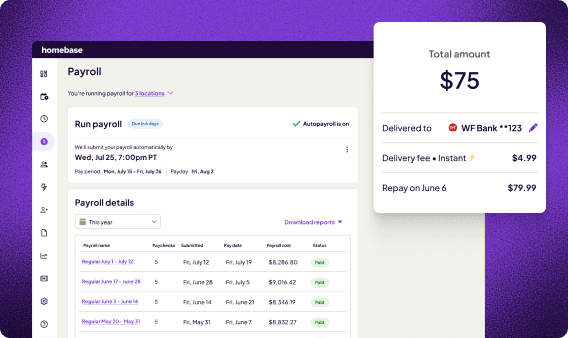
This guide is published by Homebase. We build scheduling, time tracking, payroll, and team communication tools for hourly teams: restaurants, retail, healthcare, hospitality, and service businesses.
We're not in the ranked comparison below. Every tool was evaluated on its own merits. Homebase did not accept payment for placement in this comparison.
What shapes our perspective: more than 150,000 small businesses use Homebase for hourly-work operations. That gives us a front-row view of what hr tools actually need to do when hours aren't predictable and every dollar of labor cost lands directly on your bottom line.
We also offer automated tip pooling through our paid Tip Manager add-on, which gives us direct experience with one of the trickier parts of hourly payroll.
"Homebase helps us keep track of all our hours and staffing, helps us get our labor under control and keep our team in contact with each other, we couldn't imagine life without them." — Connor Ward, Owner, Altona Hotel
How We Chose These Payroll and HR Software Picks
We evaluated both tools against the criteria small businesses actually care about. See our full methodology for the complete approach.
Here's what we looked at:
- Payroll processing capability: automation, tax filing (federal, state, local), direct deposit, and year-end handling
- Pricing transparency: what's published vs. what requires a sales call
- Time tracking: built-in or third-party only, and which plans include it
- HR feature depth: compliance monitoring, benefits administration, performance management
- User ratings: verified against current Capterra and G2 listings (checked August 2026)
- Real user sentiment: patterns across review sites, not just aggregate scores
- Setup time and ease of use: how long does it actually take to get running
Gusto vs. TriNet Payroll and HR Features Compared
Here's how the three products compare at a glance: Gusto, TriNet HR Plus, and TriNet PEO.
Gusto
- Starting price: $49/mo + $6/employee
- Payroll included: Yes, on all plans
- Time tracking: Included in Plus and Premium; available as a $6/employee/mo add-on on Simple
- HR features: Basic, including hiring, onboarding, and compliance alerts
- Setup time: Gusto offers guided setup and payroll migration tools
- Best for: Simple payroll with transparent, predictable pricing
TriNet HR Plus
- Starting price: Custom-quoted (contact TriNet for a quote)
- Payroll included: Integrated into the current HR Plus platform
- Time tracking: Time and attendance included in the current platform; confirm exact scope in your quote
- HR features: Moderate to full, including performance management, compliance tools, and benefits administration
- Setup time: Varies by company size, data readiness, and benefits enrollment
- Best for: HR-focused growing teams that need compliance support and benefits flexibility
TriNet PEO
- Starting price: Custom-quoted (pricing varies by company size, industry, and selected services)
- Payroll included: Yes
- Time tracking: Via HR platform
- HR features: Full-service HR administration with access to HR, payroll, benefits, and compliance support
- Setup time: Varies by company size, data readiness, benefits enrollment, and selected services
- Best for: Businesses wanting shared HR administration, multi-state compliance coverage, and access to larger-employer benefit plans
If payroll is the priority and HR is secondary, Gusto is the cleaner choice in this Gusto vs. TriNet comparison. If you need multi-state compliance coverage, performance management, or benefits flexibility at scale, TriNet HR Plus or PEO may be the right fit, but get the full quote before you compare it to Gusto's published prices.
How Homebase Payroll Processing Compares to Gusto and TriNet
If you only need HR software, Homebase isn't a direct swap for either tool. It's built for a different use case.
For small businesses with hourly teams (restaurants, retail, hospitality, healthcare), the real problem is that scheduling, time tracking, and payroll often live in separate systems, and someone has to reconcile them every payday. Homebase connects all three in one app, so hours flow from the clock straight to payroll without re-entry.
A few specific differences worth knowing:
- Time tracking is gated in Gusto behind the Plus plan or a $6/employee/mo add-on on Simple. In Homebase, it's included at the base level.
- In TriNet HR Plus, the full cost of payroll and HR is determined by quote. Homebase Payroll is a paid add-on ($49/month + $6/employee) that connects directly to your Homebase schedules and timesheets.
- Homebase handles hourly-team workflows that aren't central to either Gusto or TriNet: shift scheduling, tip distribution (via the paid Tip Manager add-on), break tracking, and overtime that varies week to week.
If keeping track of variable hours across scheduling, time tracking, and payroll is eating up time you'd rather spend elsewhere, see how Homebase Payroll works and whether it fits your team.
"With Homebase and Clover, I found it incredibly simple to be able to do everything from scheduling, to time off management to onboarding — all through one service. It was a game-changer in terms of time." — Emily Goodell, Co-Owner, Amoritas Vineyards

Gusto — Best Automated Payroll Processing for Small Business
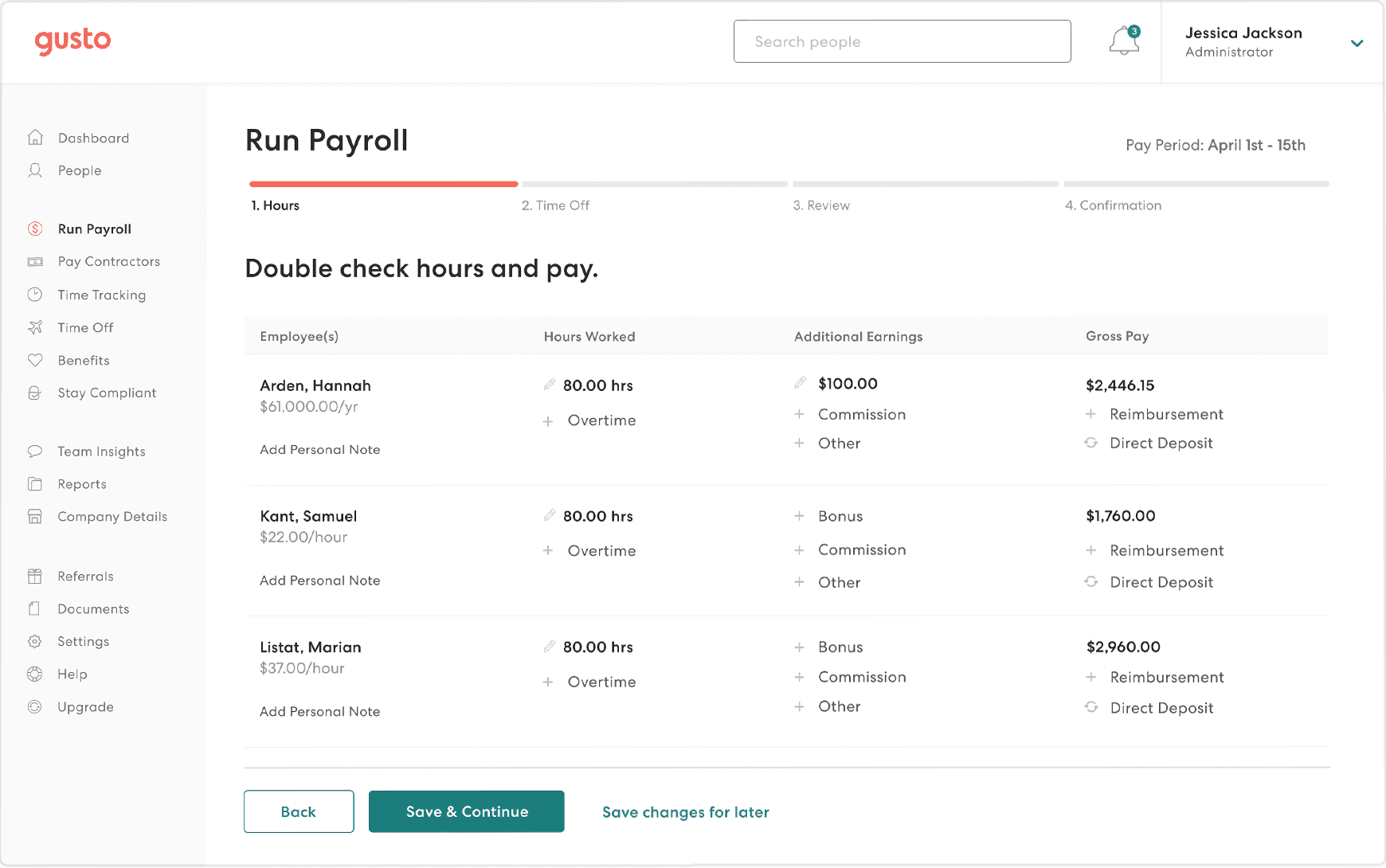
Best for: Small businesses and startups that want clean, transparent payroll with basic HR and don't need complex HR automation.
Gusto was founded in 2011 as a payroll-first tool for small businesses, and that focus shows. It automates payroll, handles federal and state payroll tax filing, manages benefits, and gives employees self-service access to their own pay stubs and W-2s.
The interface is clean, setup is guided, and pricing is published upfront with no sales call required.
What Gusto's payroll processing includes.
Gusto is a cloud-based payroll and HR tool for small to mid-size businesses. It handles payroll processing, payroll tax filing, benefits administration, and basic onboarding in one dashboard.
Gusto's key HR software features.
- Automated payroll processing with federal, state, and local payroll tax filing, plus W-2 and 1099 distribution
- Health, dental, vision, retirement, workers' compensation, and other benefits through Gusto and its partners, subject to availability and additional fees
- Employee self service portal for pay stubs, direct deposit management, and W-2 access
- Time tracking included in Plus and Premium; available as a $6/employee/mo add-on on Simple
- Integrations with QuickBooks, Xero, Slack, and other business tools
Gusto's payroll processing and pricing.
- Simple: $49/mo + $6/employee (single-state payroll; time tracking available as add-on)
- Plus: $80/mo + $12/employee (multi-state payroll, time tracking included, next-day deposit)
- Premium: $180/mo + $22/employee (dedicated service advisor, certified HR experts, priority support)
Also see: Gusto vs. ADP | Gusto vs. Rippling
What users like about Gusto's automated payroll processing.
Gusto's strongest reviews center on setup ease and the employee self service portal. Employees can manage their own pay stubs, direct deposit, and W-2s without going through HR. That comes up over and over across 12,000+ G2 reviews as something teams genuinely appreciate.
Gusto's own data reports 72% of customers run payroll in five minutes or less.
The price-to-value point comes up a lot too. In a discussion on r/Entrepreneur, one small business owner with 60 employees described switching to Gusto after their previous payroll provider raised prices threefold. Five months in, they reported no complaints and said the pricing was right for their team.
Gusto was also the most commonly recommended option throughout that thread, with multiple business owners citing its ease of use and cost compared to alternatives.
What users criticize about Gusto's employee self service and support.
The recurring friction points in recent reviews: support can slow down meaningfully during tax season, with some customers waiting multiple days for resolution. Per-employee costs have increased, and time tracking requires either the Plus plan or an add-on on Simple. Mobile app limitations also come up across Capterra reviews.
Our take on Gusto's payroll tax filing and HR features.
Gusto is a strong candidate for small businesses that want payroll-first workflows, published pricing, and light-to-moderate HR needs. The pricing is honest, the product is well-rated, and setup is approachable. The friction starts when your team works variable hours and you want time tracking without upgrading to Plus, or when compliance support matters and you're not on Premium.
TriNet — Best HR Management Software for Growing Small Businesses
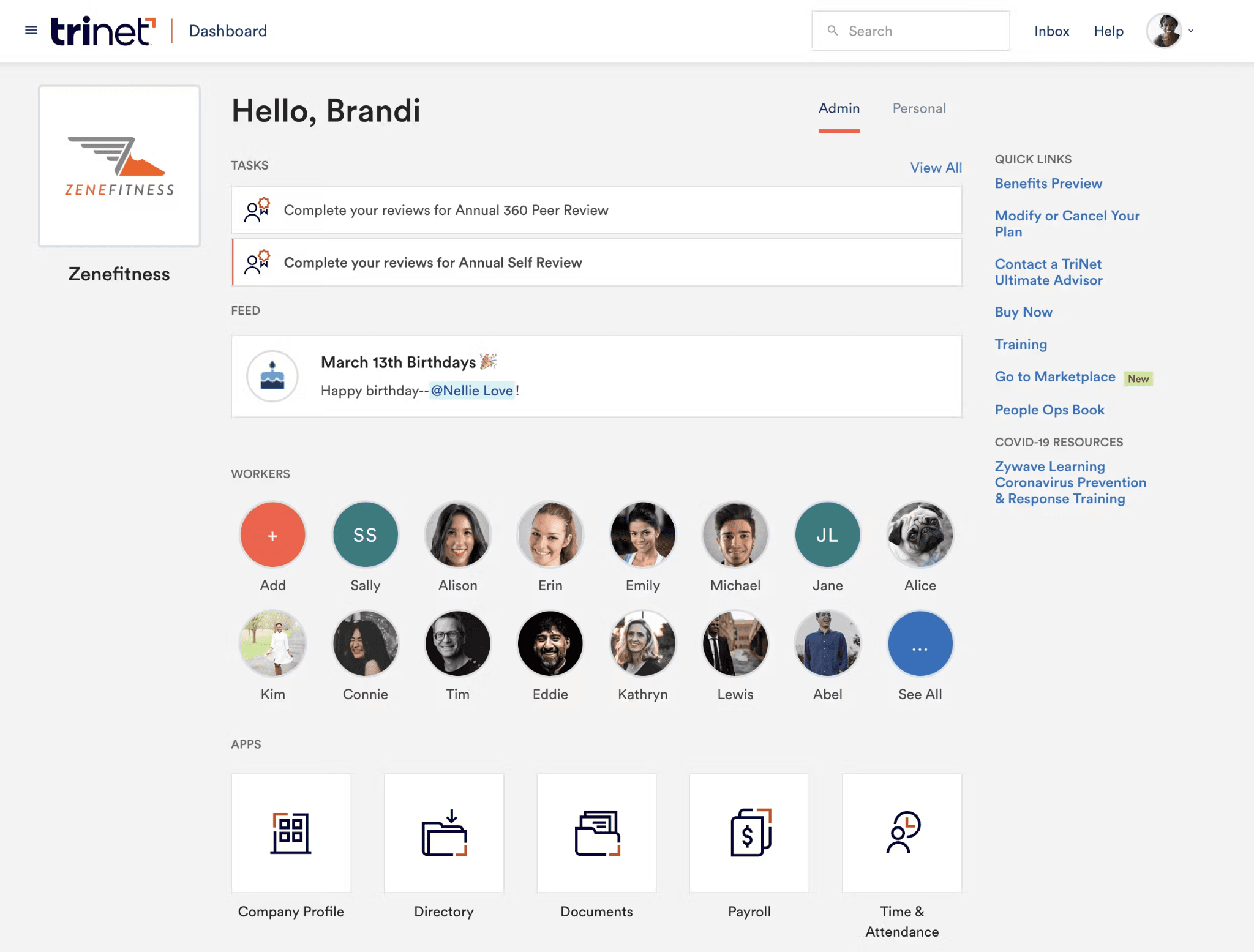
Best for: Growing businesses that need multi-state compliance monitoring, performance management, and flexible benefits, and can navigate custom pricing.
TriNet HR Plus: G2 4.2/5 (823 reviews) · Capterra 4.2/5 (823 reviews) TriNet PEO: G2 4.2/5 (1,956 reviews) · Capterra 4.0/5 (174 reviews)
One of the most common sticking points in the Gusto vs. TriNet comparison is that buyers don't realize TriNet operates two distinct products. TriNet HR Plus is an ASO offering that combines TriNet's HR Platform (also known as TriNet Zenefits) with payroll, benefits administration, and HR support.
TriNet PEO is a co-employment arrangement with a fundamentally different scope, pricing structure, and legal arrangement.
What the TriNet HR management products actually are.
This is the most important thing to understand before making a Gusto vs. TriNet decision. TriNet HR Plus is a software and services model where the business stays the employer while TriNet handles HR administration. TriNet PEO is a co-employment arrangement where TriNet and the client share specified employer responsibilities, while the client retains day-to-day control and continuing employer obligations.
For a deeper explanation, see what is a PEO.
Most comparison posts treat TriNet as one product. Understanding the distinction is how you avoid a buying decision you'll need to undo.
TriNet HR Plus features and benefits administration.
- Automated onboarding, scheduling, time and attendance, and time-off tracking
- ACA compliance monitoring, compliance tools, and deadline tracking, plus access to HR experts; confirm state-specific coverage in the service proposal
- Performance reviews and performance management tools, with access to optional compensation benchmarking
- Option to use your own benefits broker or TriNet's network
- Payroll processing integrated into the current HR Plus platform; confirm full scope in your quote
TriNet PEO features and payroll tax administration.
- Full-service payroll and payroll tax administration for multi-state businesses; confirm all required jurisdictions during contracting
- Access to benefit offerings typically available to larger employers, including health, dental, vision, and retirement options
- Access to HR, payroll, benefits, and payroll compliance support; confirm whether dedicated specialists are included in your proposal
- Industry-specific support across healthcare, finance, tech, and nonprofits
- Workers' compensation administration and risk-management support, subject to the service agreement and applicable law
TriNet's payroll processing and pricing.
TriNet HR Plus: Custom-quoted. TriNet no longer publishes a standard per-employee plan table. Pricing depends on employee count, services selected, support level, and other business factors. Contact TriNet at trinet.com/hr-plus/pricing for a quote.
TriNet PEO: Also custom-quoted. Per-employee fees vary by company size, industry, region, and selected services. Contact TriNet at trinet.com/peo/pricing. A useful cost comparison with Gusto requires written quotes from both vendors using the same employee count, locations, payroll frequency, benefits, and service scope.
What users like about TriNet's HR support and benefits.
The most consistent praise in TriNet reviews is for multi-state compliance support and access to benefit plans that smaller businesses couldn't get on their own. HR professionals who work with TriNet PEO specifically highlight the depth of benefits variety by state and carrier.
For teams spread across the country, having solid options in every state matters a lot.
On r/humanresources, one HR professional who had used multiple PEOs described TriNet's payroll and benefits reps as generally knowledgeable, with a service level they'd characterize as premium-tier in the PEO market.
Another commenter with a long-running TriNet relationship described their experience as mostly positive, noting they'd had the same support team for over three years. That kind of continuity isn't guaranteed, but when it holds, it makes a real difference.
What users criticize about TriNet's HR support and pricing.
The frustrations in TriNet reviews tend to cluster around two things: support inconsistency and cost surprises. On r/humanresources, an HR manager described benefits being cut off for an employee on maternity leave without any notice to the HR team, despite multiple prior conversations about the same issue.
A separate commenter noted that TriNet moved to a shared-service "Connect360" support model in 2021 and that response times and resolution quality have varied since.
Cost increases also come up repeatedly. Multiple commenters in that same thread described renewal hikes that caught them off guard, and one noted that TriNet's PEO fees ranked as the second-highest of any PEO they'd quoted in 2025. These are individual experiences and not universal, but they're a consistent enough pattern to flag before signing.
Our take on TriNet's HR management and pricing transparency.
TriNet HR Plus earns its place for businesses that genuinely need hr management across states, performance management workflows, and flexible benefits administration. The challenge isn't the product. It's the buying process.
Because both HR Plus and PEO are custom-quoted, it can be hard to know what you're committing to financially without going deep into the sales cycle.
Before you sign anything, confirm whether you're looking at HR Plus (ASO model, you stay the employer) or TriNet PEO (co-employment, with shared responsibilities). They're different products, different legal arrangements, and very different cost structures.
Picking the Right Payroll Software for Small Business
The Gusto vs. TriNet comparison comes down to a few honest questions. Here's what actually matters when choosing a payroll provider between them:
Gusto and TriNet solve different problems. Gusto centers its offering on payroll with connected HR and benefits features. TriNet HR Plus and PEO combine payroll with broader HR administration and services. Start with which problem is the bigger one for you.
TriNet is not one product. Before you evaluate "TriNet," know whether you're looking at HR Plus (software plus ASO services, you stay the employer) or PEO (co-employment, with allocated employer responsibilities). The pricing, scope, and commitment level are fundamentally different.
The best tool fits your actual team. Not the one with the most features, and not the one with the lowest published starting price. Look at both based on the criteria that matter for your business size, state footprint, and headcount trajectory.
For a broader look at your options, see the best payroll software for small business guide.
Solve Payroll, HR, Scheduling and More with Homebase
Running payroll for an hourly team is a different problem than running it for a salaried office. Variable hours, tips, break premiums, and overtime that shifts week to week need a workflow built around them, not bolted on.
When those pieces connect in one place, scheduling to timesheets to payroll, payday gets a lot simpler. See what Homebase Payroll costs and whether it makes sense for your team, or compare payroll options side by side first.
"With Homebase and Clover, running payroll takes five minutes. I log in, check the time cards, hit submit, and it's done. Homebase Payroll was seriously a game changer." — Tiana Post, Owner, Awaken Bakery
FAQs: Gusto vs. TriNet Questions Answered
Is TriNet's HR support better than Gusto's for compliance
For multi-state compliance, TriNet is generally the stronger pick: it provides broader outsourced HR and compliance support than Gusto, including ACA monitoring and access to HR experts. Gusto covers the basics and offers certified HR experts through Premium or the optional HR Resources add-on, but self-management is expected on lower plans.
How much does TriNet payroll processing cost per month
TriNet doesn't publish a standard per-employee monthly price: both TriNet HR Plus and TriNet PEO are custom-quoted based on company size, location, services, and other factors. A useful cost comparison with Gusto requires a written quote from TriNet using the same headcount and service requirements as Gusto's published pricing.
Can I switch my payroll processing from Gusto to TriNet
Switching from Gusto to TriNet is possible at any point, though January 1 is usually the simplest timing since it aligns with a new tax year. Mid-year switches work when year-to-date wages, taxes, and upcoming filing responsibilities are reconciled carefully between both providers.
For a step-by-step guide, see how to switch payroll providers.
What should I confirm before signing a TriNet HR management agreement
Before signing a TriNet agreement, confirm total fees (including technology or upgrade charges), the support model, how offboarding and data access work if you leave, and which entity is responsible for payroll-tax filings.
TriNet holds an A+ BBB rating as of November 2025. Asking for references from similar-sized businesses before committing is worth the extra step.
Who are Gusto's frequently considered payroll processing alternatives
Frequently considered alternatives to Gusto include Rippling, OnPay, ADP, Paychex, and QuickBooks Payroll. In the HR-first space, TriNet, BambooHR, and Justworks are common comparisons.
For small businesses with hourly teams that want scheduling, time tracking, and payroll in one app, Homebase is worth a look. See Gusto alternatives for a broader breakdown.