Homebase vs. Humanly (2026): Which Is Right for Your Hourly Team?


SMALL BUSINESS INTEL, IN YOUR INBOX
Table of contents
Hiring for an hourly team is a different problem than hiring for an office. Applications come in fast, the stakes of a slow response are high, and the last thing you need is a tool that hands you a pile of ranked candidates with no path to getting them on the schedule. That's where the comparison between Homebase and Humanly gets interesting — because both use AI to speed up the front end of hiring, but they're solving for very different businesses.
Humanly is an AI recruiting platform built for enterprise teams running high-volume hiring at scale. Homebase is an everything app for hourly teams — where hiring is one piece of a connected system that also handles scheduling, time tracking, payroll, and onboarding. If you're a small business owner without a dedicated HR department, that distinction matters more than any individual feature. This guide breaks down how the two tools compare so you can make the right call for your team.
Homebase vs. Humanly: The Quick Take
Both tools use AI to screen and advance candidates — but they start from opposite ends of the hiring problem. Humanly is a standalone AI recruiting platform built for enterprise teams handling 1,000+ annual hires, with opaque custom pricing and a dedicated TA team assumption baked into its design. Homebase is a hiring-to-first-shift app built for small businesses without an HR department — where the hire goes directly into your schedule and payroll without touching another tool.
Key differences:
- Scope: Homebase covers hiring, scheduling, time tracking, payroll, and team messaging in one app. Humanly is a standalone AI recruiting tool.
- Pricing model: Homebase uses transparent per-location pricing with a free plan. Humanly uses custom subscription pricing based on interview and conversation volume — no numbers published; contact sales required.
- Target user: Homebase is built for small business owners hiring hourly workers without a dedicated recruiter. Humanly is built for enterprise teams and mid-market organizations with dedicated TA operations.
- AI screening: Both use conversational AI to screen applicants. Homebase screens via spoken answers and written follow-ups. Humanly engages via chat, SMS, voice, and video.
- Post-hire workflow: When you hire someone in Homebase, they move directly into your roster — scheduling, time clocks, and payroll all connected. Humanly has no native post-hire workflow.
- Free plan: Homebase offers a free plan for one location and up to 10 team members. Humanly has no free plan.
Why Trust Homebase?
Humanly is a capable AI recruiting tool — for the right team. If you're running 1,000+ hires a year with a dedicated recruiter and a separate ATS, Humanly's conversational AI earns its place. But if you're a restaurant owner, retailer, or small service business hiring a few people at a time — often without an HR department — Humanly's pricing model, enterprise orientation, and standalone nature create friction, not speed.
Homebase is built for that reality. Hiring connects directly to the rest of your operation. When you mark someone as hired, their information flows into your team roster. From there, you put them on the schedule, they clock in, and payroll picks up the hours automatically. One app, no manual data entry across tools.
For teams that need hiring, scheduling, time tracking, and payroll to talk to each other — not just exist side by side — Homebase covers it all in one place.
An In-Depth Look at Homebase's Features and Pricing
Here's what Homebase covers, starting with the feature most relevant to this comparison.
Hiring and onboarding
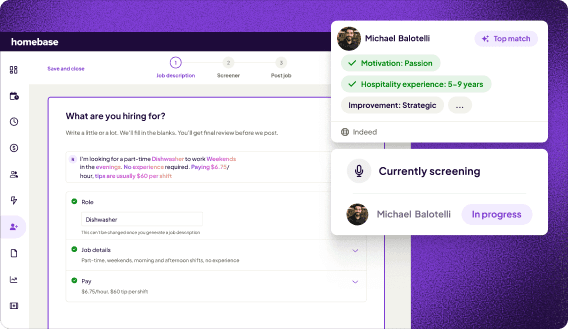
Homebase's AI Hiring Assistant is built for business owners who don't have time to review 500 applications. Post a job to Indeed, ZipRecruiter, Google, and Craigslist in one click. The AI screens every applicant the moment they apply — evaluating spoken answers, asking written follow-ups, and surfacing ranked candidates with clear profiles so you can spot the best fits fast. Automated scheduling invites top matches to book directly in your calendar. When you hire someone, their information flows straight into your team roster and you can send onboarding documents from there.
Scheduling
Build and share weekly schedules in minutes with employee scheduling software built for hourly teams. Templates, auto-scheduling based on availability and roles, and instant mobile schedule sharing keep your team covered. When someone calls out, post their shift as open for others to claim — no group texts needed. Before the schedule even goes out, you see how labor costs stack against your budget.
Time tracking
Any device becomes a time clock. PIN or photo verification prevents buddy punching. Homebase generates payroll-ready timesheets automatically. Geofencing confirms on-site clock-ins. Managers get alerted to missed punches before payroll runs. See how time tracking software compares across tools for hourly teams.
Payroll
Payroll connects directly to schedules and timesheets. Hours flow in automatically. Federal and state payroll taxes — including FICA, FUTA, and state income tax — are calculated, filed, and remitted automatically. Note: local payroll tax compliance (such as municipal or school district taxes in states like Pennsylvania, Ohio, and Kentucky) depends on local agency registration by the business owner. Unlimited payroll runs, multi-state support, W-2 and 1099 processing in one place. Available as a paid add-on on any plan.
Team messaging
Built-in direct and group messaging keeps everything in one place without a separate chat tool. Available on Essentials and above.
Homebase pricing
- Basic (free): One location, up to 10 team members. Scheduling, time tracking, POS integrations.
- Essentials ($30/month per location, or $24/month billed annually): GPS time tracking, late arrival alerts, team messaging, enhanced scheduling.
- Plus ($70/month per location, or $56/month billed annually): AI-assisted scheduling, PTO management, departments and permissions.
- All-in-One ($120/month per location, or $96/month billed annually): Employee onboarding, labor cost analytics, compliance resources, live HR advisor access.
- Payroll add-on: $49/month + $6/employee. Connects directly to schedules and timesheets. Visit joinhomebase.com/pricing for current details.
Homebase pros and cons
Pros:
- Free plan available for one location and up to 10 team members
- Hiring connects directly to scheduling, time tracking, payroll, and onboarding in one app
- Transparent per-location pricing — no custom quotes required
- AI Hiring Assistant built for owners without a dedicated recruiter
- Built-in team messaging without a separate tool
Cons:
- Per-location pricing adds up for multi-location businesses
- Payroll is a paid add-on, not included in any base plan
- AI-powered scheduling requires Plus plan or above
An In-Depth Look at Humanly's Features and Pricing
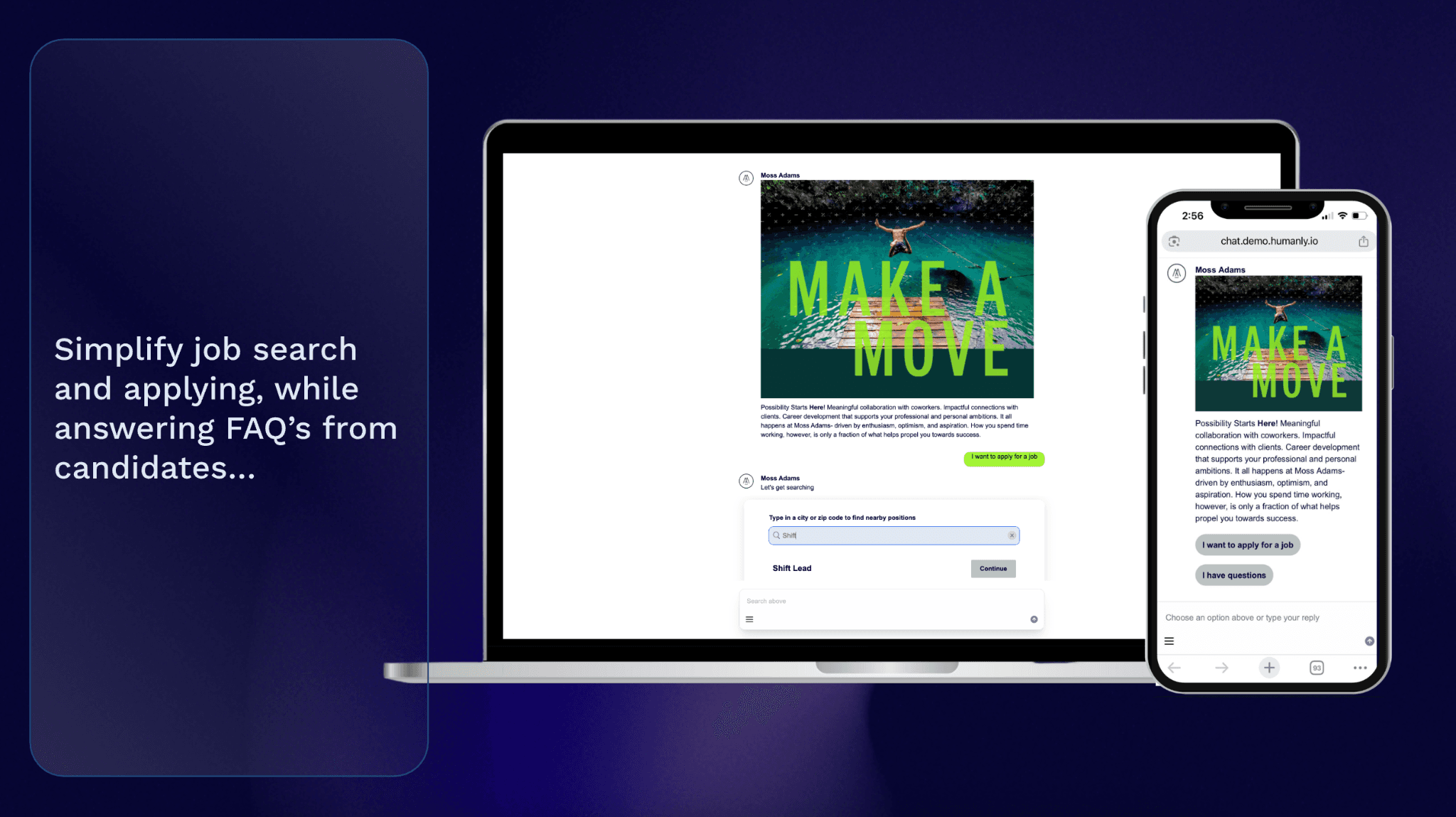
Humanly is built around one thing: getting candidates through the front door faster.
AI recruiting and screening
Humanly engages every candidate 24/7 via chat, SMS, email, voice, and video. It answers questions, screens applicants with customizable criteria, conducts structured AI interviews, and automatically schedules next steps — so no candidate goes unanswered. The built-in ATS helps teams post jobs, track applicants, and manage consistent workflows across roles and locations. The Talent CRM supports sourcing and candidate rediscovery, with access to 600M+ profiles, one-click Chrome sourcing, and automated outreach to re-engage past applicants.
One thing to be aware of: AI screening tools like Humanly — and Homebase's AI Hiring Assistant — are subject to EEOC anti-bias guidelines, FCRA adverse action procedures, and state and local AI audit laws, including NYC Local Law 144. Employers using AI to screen or rank applicants may be required to conduct independent bias audits and notify candidates. Consult legal counsel before deploying any AI hiring tool to confirm your compliance obligations.
What Humanly does not cover
Humanly is a standalone recruiting tool. It has no scheduling, time tracking, payroll, or team messaging. When you hire someone, they don't flow into a schedule or payroll system automatically — you'll need separate tools for everything that comes after the hire. For businesses that need hiring to connect to the rest of their daily operation, Humanly requires additional integrations or separate software to cover those gaps. For a full picture of what to consider when evaluating small business hiring software, see our full guide.
Humanly pricing
Humanly uses a subscription-based pricing model structured according to the volume of interviews or conversations managed and the number of users or recruiters. Custom pricing is available based on organization size and specific feature requirements. No numbers are published publicly — contact Humanly's sales team directly for a quote.
Humanly pros and cons
Pros:
- Strong AI-driven engagement across chat, SMS, voice, and video channels
- 4.8/5 G2 rating (130+ verified reviews) — rated highly for ease of use and support
- Built for high-volume hiring — handles large applicant flows without losing any candidate
- Talent CRM with 600M+ profile access for sourcing and rediscovery
- Integrates with leading ATSs, calendar, and video tools
Cons:
- No free plan — pricing requires a sales conversation
- Custom pricing model makes budgeting difficult; no published rates
- No post-hire workflow — scheduling, payroll, and onboarding require separate tools
- Built for enterprise teams hiring 1,000+ workers annually — likely overkill for small businesses
- AI video interviews can create candidate friction and increase application drop-off
Frequently Asked Questions About Homebase vs. Humanly
Is Homebase better than Humanly?
It depends on your business. If you're a small business owner hiring hourly workers without a dedicated HR team, Homebase is built for you — hiring connects directly to scheduling, payroll, and onboarding in one app. If you're running an enterprise-scale hiring process with 1,000+ annual hires and a dedicated recruiter, Humanly's AI recruiting platform may be the stronger fit.
Does Homebase have AI hiring features?
Yes. Homebase's AI Hiring Assistant posts jobs to top boards in one click, screens every applicant automatically, conducts AI-powered interviews that evaluate spoken answers and written responses, and schedules interviews with top matches automatically. Learn more about how to post a job and manage applicants in one place.
What is Humanly used for?
Humanly is an AI-powered recruiting platform designed for high-volume hiring teams. It engages, screens, and schedules candidates 24/7 through conversational AI via chat, SMS, voice, and video — and includes a built-in ATS and Talent CRM.
Does Humanly have a free plan?
No. Humanly uses custom subscription pricing with no published rates and no free option. You'll need to contact their sales team for a quote.
What happens after you hire someone in Homebase?
When you mark someone as hired in Homebase, their information flows directly into your team roster. From there, you can send onboarding documents and add them to the schedule — all in the same app. Payroll picks up their hours automatically once they start clocking in.
Can Humanly replace a full ATS?
Humanly includes a built-in ATS for posting jobs, tracking applicants, and managing workflows. However, it's best suited for teams with high application volume and dedicated recruiters. It does not cover post-hire operations like employee scheduling, payroll, or team communication.
How should I run background checks as part of hiring?
Background checks are a common part of the hiring process for small businesses. Homebase integrates background check workflows into the same app where you manage applications and onboarding, so you don't have to switch tools mid-hire.
Homebase vs. Humanly: Which Should You Choose?
Choose Homebase if you run a small or mid-size business with an hourly team and want hiring to connect directly to scheduling, payroll, and onboarding — without stitching together separate tools. Whether you're a restaurant, retail shop, salon, or any operation with shift-based workers, Homebase is built for the reality of hourly work. You can start free, hire your first candidate, and have them on the schedule without logging into a second app.
Choose Humanly if you're running enterprise-scale hiring operations — think 1,000+ annual hires across multiple locations, with a dedicated TA team that needs AI to handle candidate volume. For that use case, Humanly's conversational AI and Talent CRM earn their place.
For most small businesses looking to hire faster without adding complexity, Homebase gives you AI-powered hiring, plus everything that comes after it, in one app. Try Homebase free — no credit card required.