Employee Hour Tracking Software
From punch-ins to paychecks.
Automatically track employee hours, calculate wages, and prep for payroll—all in one app.

Tap, track, and tally your team’s hours.

Schedule shifts.
Send clock-in reminders and automatically clock out based on scheduled hours.

Clock in everywhere.
Use our free time clock on most phones, tablets, computers, and POS devices.

Fix errors in time.
Avoid costly payroll mistakes by catching time card discrepancies early.
Track hours, not spreadsheets.

Sign up in 5 minutes
Employee hour tracking app
Keep your team on schedule.
- Create and share the latest schedule in the app instantly.
- Automatically remind employees to clock in/out of their shifts and breaks.
- Set a geofence to make sure employees clock in and out from the right place.
- Get overtime alerts to manage your labor costs.

Employee time cards
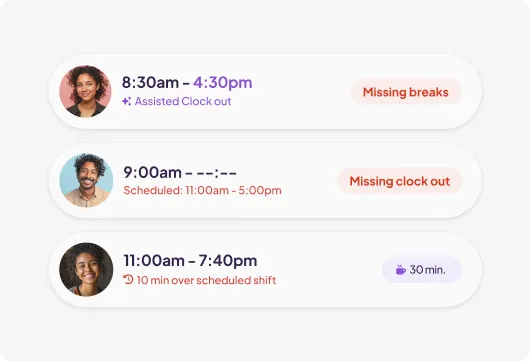
Tidy up your time cards.
- See time cards by day or pay period.
- Quickly spot and resolve errors like missed breaks and clock outs.
- Review and keep logs of time card edits made by managers.
Employee timesheets
Make payroll more perfect.
- Filter timesheets by names, roles, departments, or other groups.
- Set your payroll date and turn on Autopayroll to automate paychecks.
- Send credit card tips from your POS for payroll instantly.
- Automatically calculate wages and taxes based on hours tracked.

I love how easy Homebase is to use. With a free app to go with the software, staff can easily log in/out for their shifts, whether they are working on or off site.
Tare Market
Amber Haukedahl, Founder
1.3 Billion+
Hours tracked in 2025
3.2 Million
Time card edits saved
5 Hours
saved each month on payroll tasks vs alternatives
FAQ
Employee hour tracking, explained.
The everything app for hourly teams.
Spend less time wrangling logins and transferring data. Homebase comes with everything else you need to manage your team.
Top-rated app built for small business teams.
Best Payroll for Hourly Teams
2024

Best in Business for Best AI Implementation
2025

Best Employee Scheduling
2025

Best HR & Employee App
2025


