Best Employee Time Clock Software in 2026

SMALL BUSINESS INTEL, IN YOUR INBOX
Table of contents
It's Sunday night and you're squinting at crumpled time cards, trying to decipher whether Jose worked 8.5 or 9.5 hours on Thursday. Your calculator's out, you're dividing by 60, and somewhere in the back of your mind you're wondering if this is really what you signed up for when you opened your business.
There's a better way. The best employee time clock software turns time tracking from a weekly nightmare into something that just happens—automatically. Your team clocks in with a tap, the app calculates everything from breaks to overtime, and payroll becomes a button you press instead of a puzzle you solve.
This guide covers the top employee time clock apps for 2026—free and paid options, mobile time clock solutions for field teams, web based time clock software for multi-location businesses, and tools that sync with whatever payroll provider you're already using.

TL;DR What you need to know about employee time clock software
Not all time clock apps are built the same. Some nail mobile access but lack payroll integration. Others offer robust features but cost a fortune. Here's what actually matters when you're choosing employee time clock software.
Best overall for hourly teams: Homebase combines scheduling, time tracking, payroll, and team communication in one free platform—the most comprehensive solution for restaurants, retail, and service businesses managing hourly workers.
Best basic free option: Clockify provides unlimited time tracking at no cost for small teams needing simple clock-in/out functionality without scheduling or payroll features.
Best for mobile teams: Connecteam excels at GPS tracking and kiosk mode for field workers across multiple locations.
Best for QuickBooks users: QuickBooks Time syncs seamlessly with QuickBooks Payroll, eliminating double-entry.
Best for customization: Buddy Punch offers flexible clock-in rules and detailed overtime controls for complex pay structures.
The bottom line: Start with a free plan if you just need basic clock-ins and clock-outs. Upgrade when you're tired of chasing down time theft, want automatic overtime warnings, or need your time data to flow straight into payroll without the copy-paste dance.
And don't worry about whether your team has iPhones or Androids—nearly every option works on whatever devices your people already carry.
Let's break down exactly what makes a time clock app worth using.
What is employee time clock software?
Employee time clock software replaces punch cards and paper timesheets with digital tracking. Your team clocks in with a tap, the app does the math, and you get accurate hours without playing calculator.
Here's what modern time clock apps actually do:
- Stop early clock-ins that inflate your labor costs
- Send automatic shift reminders so nobody "forgets" they're working
- Use GPS verification to confirm your team is actually at your location
- Auto-clock-out employees who forget to end their shifts
The difference between basic time tracking and a true employee time clock app comes down to accountability. Real time clock software includes secure PINs or photo verification to prevent buddy punching, tracks exact clock-in locations for field teams, and maintains audit trails for compliance. Some integrate with POS systems to show labor costs alongside sales data in real time.
Turn time tracking into one less thing to worry about.
Why switch to time clock software?
Manual time tracking creates constant friction. Your employees scribble hours on crumpled paper cards, managers burn hours deciphering handwriting and fixing math errors, and payroll becomes that dreaded Sunday night ritual where you're never quite sure the numbers are right.
Someone always "forgot" to clock out. Another swears they worked an extra hour you can't verify. The whole system runs on trust and crossed fingers.
Primo Stropoli, owner of Tetta's Market, shares how much time he wasted on manual time clocks: "I was actually having to actually manually calculate if someone clocked in at 8:01 or and and worked until 3:15. You're wasting so much time on things that are so frivolous and you have to really as a business small business owner dedicate that to more important tasks."
Time clock software removes you from the equation entirely. Here's what changes:
- Your team clocks in with a single tap from their phones
- You get instant notifications the second someone's running late
- The system automatically calculates hours, breaks, and overtime without touching a calculator
- Everyone sees their schedule days in advance and gets reminders before shifts start
- No more "I didn't know I was working today" excuses
After using Homebase for his time clock software, Primo Stropoli has found it much faster to run payroll: "Now it takes me about five minutes. I do payroll every week. I do go through the time sheets and just do a quick vet of everything. And if everything looks good, then I'm I click click click. I'm through payroll."
The money part matters too. Preventing just 15 minutes of early clock-ins per employee per shift can save thousands annually—multiply that across your entire team and suddenly you're looking at real money.
Catching forgotten clock-outs before they balloon into accidental overtime protects your bottom line from those surprise payroll spikes. And when you can see labor costs as a percentage of sales in real time, you stop guessing at staffing levels and start making decisions based on actual data.
Beyond the financial impact, mobile employee time clock apps create the kind of transparency that builds trust. Your employees can check their hours anytime from their phones instead of hunting you down with questions.
Managers get clear, timestamped records for resolving "he said, she said" disputes. And you've got GPS-verified, audit-ready records that prove compliance when regulators come knocking.
Everyone knows where they stand, and nobody's left wondering if they're getting paid correctly.
Best employee time clock software
Not every business needs the same features. A restaurant with 20 servers has different needs than a construction company with crews across three job sites. Here's how the top time clock apps stack up for different situations.
1. Homebase – Best employee time clock app for hourly teams
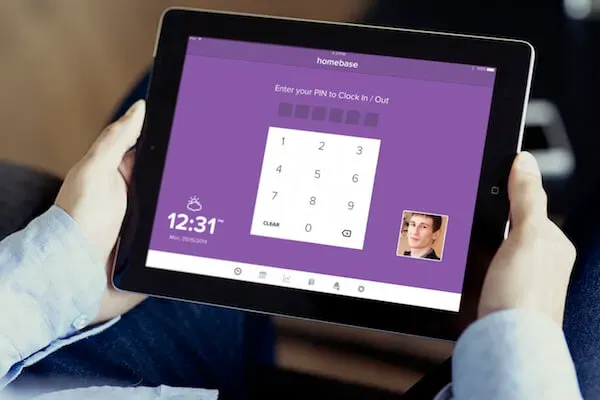
Homebase combines employee scheduling, time tracking, team communication, and payroll into one platform built for hourly teams. The free plan includes unlimited employees and locations—perfect for restaurants, retail shops, salons, and service businesses that need everything in one place.
Time tracking that actually prevents problems:
- Employees clock in from any device using secure PINs and optional photo verification
- GPS location tracking confirms your team is at your business location
- Geofencing restricts clock-ins to within a specific radius
- Automatic break tracking and compliance reminders keep you legal
Everything connects: Build a schedule and Homebase tracks actual hours against scheduled shifts, alerting you to discrepancies. Labor cost tracking shows spending in real time. Overtime alerts warn you before employees hit expensive thresholds.
Time data flows directly into Homebase's built-in payroll—or exports to QuickBooks, Gusto, and ADP with one click.
Your team gets: Mobile access to view schedules, request time off, trade shifts, and message coworkers. Managers can approve timesheets, adjust hours, and run payroll from anywhere.
Best for: Small businesses with hourly workers who want scheduling, time tracking, and payroll in one system.
Pricing: Free plan includes scheduling and time tracking for unlimited employees. Paid plans start at $30/month ($24/month billed annually) per location.
2. Clockify – Best free time clock app
Clockify offers unlimited time tracking completely free, supporting unlimited users and projects. The interface is straightforward—employees clock in with a single click from web, desktop, or mobile apps.
The catch: There's no scheduling integration, no shift reminders, and limited GPS verification on the free plan. Payroll integration requires manual CSV exports. It's solid for basic time tracking, but you'll feel the limitations if you need team management features.
Best for: Small teams needing simple time tracking without scheduling or advanced payroll features.
Pricing: Free for unlimited users. Paid plans start at $3.99/user/month.
3. QuickBooks Time – Best for QuickBooks Payroll users
QuickBooks Time integrates seamlessly with QuickBooks Payroll and QuickBooks Online. Time data syncs automatically—no exports, no manual entry.
What you get: GPS tracking, geofencing, and automatic mileage tracking for teams that drive between jobs. Job costing features track labor by customer or project, showing exactly which jobs make money.
The downside: It's pricier than alternatives and doesn't include scheduling features. Only makes sense if you're already committed to the QuickBooks ecosystem.
Best for: Businesses already using QuickBooks Payroll who want seamless time tracking integration.
Pricing: Starts at $20/month + $8/user/month. 30-day free trial.
4. Connecteam – Best mobile time clock for field teams
Connecteam is built for mobile workforces—construction crews, cleaning services, delivery drivers. Mobile-first design makes clocking in from job sites effortless.
What sets it apart for field teams:
- Robust GPS tracking verifies exactly where employees clock in
- Kiosk mode turns any tablet into a shared time clock
- Geofencing creates virtual boundaries—employees can only clock in when physically inside designated areas
- Automatic overtime alerts before employees exceed scheduled hours
Beyond time tracking, you get scheduling, task management, and team chat. Payroll integration works through exports to major providers.
Best for: Field service businesses and mobile teams needing GPS verification and kiosk clock-ins.
Pricing: Free plan for up to 10 users. Paid plans start at $29/month for the first 30 users.
5. Buddy Punch – Best for custom clock-in rules
Buddy Punch gives granular control over how employees clock in and out—perfect for businesses with complex scheduling or multiple pay rates.
Built for complexity: Set different clock-in rules for each employee. The system supports multiple wage rates per employee, automatically applying the correct rate based on shift type or role.
Clock-in flexibility: Web, mobile, and QR code scanning. Photo capture prevents buddy punching. IP address restrictions limit where employees can clock in from. Detailed edit history tracks every timesheet change.
Best for: Businesses with complex pay structures, multiple wage rates, and detailed overtime policies.
Pricing: Starts at $4.49/user/month plus $19 base fee (minimum 5 users). 14-day free trial.
What free employee time clock apps offer
Free time clock apps give you the basics—employees clock in and out, you track total hours, and you can see who worked when. Most free plans support unlimited employees, which is genuinely helpful when you're just starting out or running a tight budget.
Here's where free plans start showing their limits. GPS tracking gets restricted or disappears entirely. Photo verification to prevent buddy punching? Usually locked behind a paywall. Managing multiple locations? Forget about it on free plans.
Scheduling integration and detailed reporting almost always require upgrading. And payroll integration on free plans typically means downloading CSV files and manually importing them into your payroll system—which defeats half the purpose of having time tracking software in the first place.
The two free plans actually worth using:
- Homebase includes scheduling, time tracking, and team messaging for unlimited employees.
- Clockify provides unlimited time tracking with basic reporting.
Both work well if you just need the fundamentals.
You'll know it's time to upgrade when you catch yourself manually fixing buddy punching issues, getting surprised by overtime costs, or spending Sunday nights copy-pasting timesheet data into payroll. Those pain points mean you've outgrown free plans.
Features to look for in employee time clock software
Not every feature matters for every business. A restaurant with 15 servers needs different things than a landscaping company with crews across town. Focus on what actually solves your problems instead of paying for bells and whistles you'll never use.
Clock-in methods and device compatibility
Look for apps that work on whatever devices your team has:
- Mobile apps for iOS and Android
- Web-based time clocks accessible from any browser
- Tablet kiosk modes for shared devices
- SMS text clock-ins for workers without smartphones
- QR code scanning for touchless clock-ins
Photo capture at clock-in snaps a quick selfie each time someone clocks in, preventing buddy punching without storing biometric data.
GPS tracking and geofencing
Mobile time clock apps with GPS tracking record exact locations when employees clock in—essential for field teams or businesses with multiple locations.
Geofencing creates virtual boundaries so employees can only clock in when physically inside a designated radius.
Who needs this: Construction crews, cleaning services, and delivery drivers obviously benefit. But it's equally valuable for brick-and-mortar businesses where employees might try clocking in from the parking lot before shifts start.
Automatic break tracking and overtime alerts
Labor laws require meal and rest breaks at specific intervals. The best time clock software handles compliance automatically:
- Deducts unpaid meal breaks
- Reminds employees to take required breaks
- Alerts managers when someone misses a mandatory break
Real-time overtime alerts warn you when employees approach overtime thresholds, giving you time to adjust staffing before expensive overtime pay kicks in.
Labor cost tracking shows spending as a percentage of sales or against budgeted targets.
Payroll integration options
Time clock and payroll software should talk to each other seamlessly. Here's what to look for:
Best option: Built-in payroll like Homebase offers—time data flows directly into payroll processing with zero manual entry.
Second best: Direct integrations with QuickBooks, Gusto, ADP, or Paychex that sync automatically.
Minimum requirement: Clean timesheet exports in formats your payroll system can import.
Manual data entry between systems wastes time and invites errors. Don't settle for it.
Mobile and web access
You're managing your team from your phone while they're clocking in from theirs, while your office manager is running payroll reports from a laptop. But different people need different tools.
Your team needs mobile: Check schedules, clock in for shifts, request time off, and view hours from anywhere. Essential for field workers and employees who don't sit at computers all day.
You need web dashboards: Robust reporting and administrative controls for payroll processing and team management.
The reality is you need both. Your team uses mobile for daily clock-ins while managers use web dashboards for the administrative heavy lifting.
Time clock software with payroll integration
Payroll integration is where time clock software either saves your sanity or wastes your money. Without it, you're stuck manually entering hours from one system into another every pay period—burning time and practically begging for errors to sneak in.
The difference between integrated and non-integrated payroll is the difference between pressing a button and spending your evening squinting at spreadsheets. What used to take hours now takes minutes.
Three ways time clocks connect to payroll:
- Built-in payroll (easiest): Platforms like Homebase handle both time tracking and payroll in one place. Your team clocks in, hours accumulate, and you run payroll without toggling between apps. No integration headaches, no compatibility questions, no file exports.
- Direct integrations (pretty good): Your time clock connects to external payroll providers through API connections. QuickBooks Time syncs with QuickBooks Payroll automatically. Other tools integrate with Gusto, ADP, or Paychex. Once it's set up, hours flow over automatically.
- Manual exports (still better than nothing): You download timesheet reports from your time clock app, then import them into your payroll system. Better than typing everything by hand, sure. But you're still dealing with file formatting issues and the occasional data mismatch.
Here's the move: If you already have a payroll provider you love, make sure your time clock plays nice with them before signing up. If you're open to switching or starting fresh, all-in-one solutions like Homebase eliminate the whole integration puzzle.
Free time clock software built for hourly teams
Look, Homebase isn't just another time clock app. It's everything you need to manage hourly teams without juggling six different tools.
Track time accurately with GPS verification and photo clock-ins. Build schedules your team can actually access from their phones. Message everyone instantly when things change. Run payroll that syncs with your time data automatically.
The free plan includes unlimited employees and locations. No credit card required to start. No sneaky upgrade pressure after 14 days.
Your team gets mobile apps they'll actually open and use. You get real-time visibility into who's working and what it's costing you. Payroll becomes something you can knock out from your phone while waiting in the pickup line.
Try Homebase free and see how easy team management can be.
FAQs about employee time clock software
What is the best free employee time clock app?
The best free employee time clock app is Homebase, which offers time tracking, employee scheduling, team messaging, and basic payroll features for unlimited employees—all without charging you a dime.
Most "free" plans nickel-and-dime you with user limits or feature restrictions. Homebase actually gives you the tools you need to manage hourly teams without forcing an upgrade.
Can my team clock in using their phone?
Yes, your team can clock in using their phone with most modern employee time clock apps. They download the app to their iOS or Android device and clock in from anywhere—the job site, the store floor, or even a shared tablet in your break room.
Many apps include GPS tracking to verify location and photo capture to prevent buddy punching. Your field workers get flexibility, you get accountability.
What's the difference between time clock and time tracking software?
Time clock software focuses on when employees start and end shifts, including breaks and overtime, with features like geofencing and buddy punch prevention. Time tracking software has broader capabilities for tracking time across projects or tasks—it's what agencies and freelancers use when they bill hourly.
Think of it this way: time clocks are for managing teams, time trackers are for managing projects. Different tools for different jobs.
Can I use a time clock app on a tablet or desktop?
Yes, you can use a time clock app on a tablet or desktop—most online employee time clock tools work across multiple devices. Set up a tablet as a kiosk time clock in your break room, let employees clock in from their personal phones, and review timesheets from your office computer.
Web based time clock software runs in any browser without installing special software. One system, whatever device you need.
Is a time clock app legal for tracking work hours?
Yes, a time clock app is legal for tracking employee work hours as long as it maintains accurate records and complies with labor laws. The Fair Labor Standards Act requires employers to keep time records for at least three years.
Digital time clocks with automatic storage and audit trails actually make compliance easier than paper systems. You get defensible records without the filing cabinets.