5 Best Small Business Time Clocks for 2026

SMALL BUSINESS INTEL, IN YOUR INBOX
Table of contents
Tracking employee hours sounds simple. Then someone forgets to clock out, another takes a longer break than expected, and payroll day arrives with numbers that don't add up. In fact, according to Ernst & Young, nearly 1 in 5 payrolls in the US contains errors, and each one costs an average of $291 to fix.
But this can change with the right time clock for your small business. Employees clock in from their phone, hours calculate automatically, and payroll prep goes from an afternoon to a few clicks. The best ones also catch problems before they reach payday so you're not playing catch-up at the end of the week.
This post rounds up the best small business time clocks to make all of that possible. Here are the three that rose to the top of our research:
- Connecteam: the strongest all-round pick for field and deskless teams, with GPS, geofencing, and a genuinely useful free plan.
- Clockify: the best free time clock app if zero monthly cost for small teams is your top priority.
- Jibble: the best free option if biometric verification matters. Facial recognition and GPS are both included at no cost.
Read on for the full comparison, pricing details, and a framework to help you pick the right fit.

The best small business time clocks for 2026, at a glance
Not every time clock solves the same problem. If your team works in the field, GPS verification matters more than price. If you're just starting out, a free plan that connects to payroll is worth more than a long feature list. And if you're still weighing a physical punch clock against an app, scroll up to the physical vs. digital section first.
- Connecteam: best for deskless and field-based teams.
- Clockify: best free time clock app for very small teams.
- Jibble: best free digital time clock app with biometric verification.
- QuickBooks Time: best for teams already using QuickBooks.
- Buddy Punch: best affordable pick with strong fraud prevention.
Physical time clocks vs. digital time clock apps
When people search for the best small business time clock, they're often weighing two very different things: a physical machine and an app. Here's a quick breakdown:
- Physical punch clocks (e.g., Pyramid Time Systems, uAttend): Card-based or PIN terminal. No subscription on basic models, simple setup, works offline. Best for businesses with no smartphones on the floor, very stable teams, and no need to integrate with payroll software.
- Biometric terminals (e.g., fingerprint or facial recognition scanners): Eliminates buddy punching at the hardware level. Higher upfront cost ($150–$500+). A better fit for manufacturing floors, warehouses, or environments where mobile phones aren't practical.
- Digital time clock apps (what the rest of this guide covers): Mobile, tablet, or computer-based. Real-time visibility, payroll integration, GPS verification. The right call for most small businesses today.
If you specifically want a physical time clock machine for small business, the uAttend JR2000 is a well-regarded option recommended in small business communities on Reddit. It gives you biometric fingerprint scanning, RFID cards, and PIN punching in one device, with cloud connectivity via WiFi or LAN. Punches store on the clock if the connection drops and sync automatically once it's restored. Note that a uAttend monthly subscription is required to access the cloud dashboard and reporting.
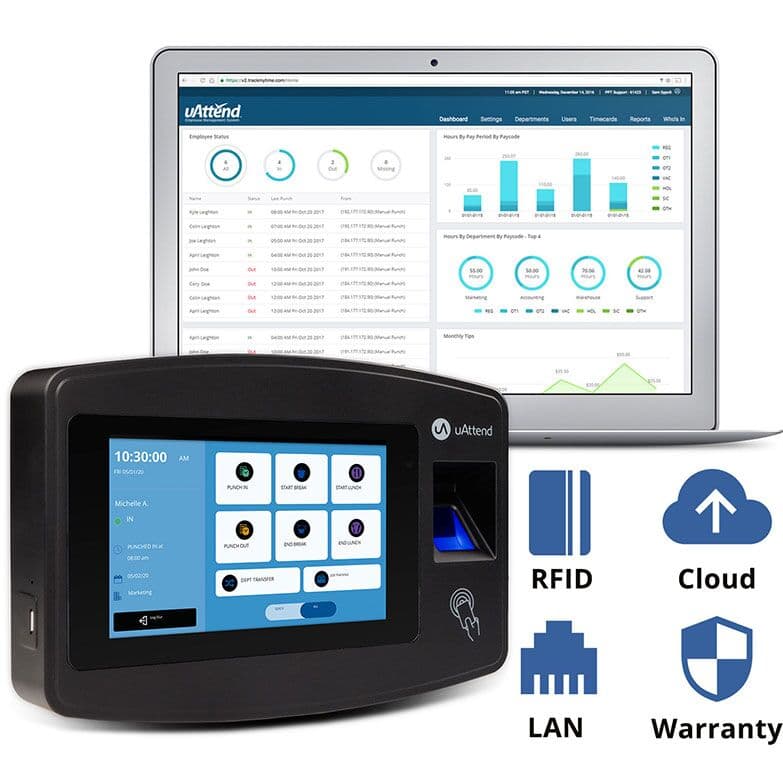
The uAttend JR2000. Source: uAttend.
For everyone else, here's how the top digital time clock apps compare.
Why we built this guide
Time tracking is one of the most common pain points we hear about from small business owners, and it's one of the core problems Homebase was built to solve.
We've spent years working alongside more than 150,000 small businesses dealing with the exact problems this guide covers: timesheets that don't add up, payroll prep that swallows an afternoon, and team members clocking in for each other. That experience shapes how we think about what actually matters in a time clock.
One thing upfront: We make a free time clock app designed specifically for hourly teams, so we do have a stake in this topic. However, Homebase isn’t in the ranked list below. Every app was evaluated independently, on its own merits, based on verified user reviews, ratings, and recent feedback from real small business owners.
Further down, we explain what Homebase offers so you can weigh us for yourself.
How we built this list
Our research draws on current, verified user reviews and ratings from Capterra and Reddit, prioritizing recent feedback so the picture reflects each product today.
We evaluated each tool on:
- Who it's built for and which team types it fits best
- Whether a free tier exists and what it actually includes
- Starting price and how pricing scales with team size
- Core features: mobile clock-in, GPS verification, payroll integration, break tracking
- Recent user sentiment: what people consistently praise and what they flag as limitations
The 5 best small business time clock apps for 2026
Every tool below was chosen because it does at least one thing better than anything else on the list. Some are the most affordable, some are the most feature-complete, some are the easiest to get a team using quickly.
Connecteam: best for deskless and field-based teams
Best for: Businesses with remote, field-based, or multi-site employees who need GPS tracking and team management tools alongside the time clock.
Pricing: Free for up to 10 users. Paid plans start from $29/mo for up to 30 users. Free trial available.
Rating: Capterra 4.6/5 (5,200+ reviews)
Key features:
- GPS clock-in and geofencing across multiple locations
- Seven overtime calculation methods
- Kiosk mode for shared tablets
- Task assignments, digital forms, and safety checklists built in
- Team communication and training modules alongside time tracking
What users like: “The time tracking and the ability to put the crews shifts in so I am not texting everyone. I can see who is late and who forgot to punch in.” — Karen F. (Capterra)
What users criticize: “The "break" option is frustratingly difficult for my employees to utilize a simple 15 minute break; therefore, they have to completely log off before taking a break.” — Tannya S. (Capterra)
Verdict: Connecteam is the strongest pick on this list for businesses with field crews or multiple job sites. However, the feature set can feel like overkill for a five-person shop, and the jump from free to paid is steep.
Clockify: best free time clock app for very small teams
Best for: Very small teams or solo operators who need basic hour logging at no cost and don't need scheduling or payroll integration baked in.
Pricing: Free (5 users, core features). Paid plans from $3.99/mo per user.
Rating: Capterra 4.8/5 (9,200+ reviews)
Key features:
- Free plan for up to 5 users, no credit card required
- Manual time entry, timer mode, and kiosk clock-in (paid plans)
- Basic reporting and CSV export
- Browser extension and desktop app
- GPS tracking on paid plans only
What users like: “What I like about the most with clockify is the fact that I could keep track of the employees clocking in on the sites with the GPS locator as well as keeping track of the billing hours.” — Sheila K. (Capterra)
What users criticize: “It is not easy to add additional time stamps whilst system is running - you need to stop current timer - add the additional ones and then restart. There is also an issue with limited connectivity with other apps.” — Daniel W. (Capterra)
Verdict: Clockify's free plan works well for teams of five or fewer that just need hours logged cleanly. Paid plans are competitively priced and unlock unlimited users, GPS, and kiosk mode. For hourly shift workers who need scheduling and payroll connected, you'll need other tools alongside it.
Jibble: best free time clock with biometric verification
Best for: Small businesses that want biometric verification and GPS on a free plan, particularly field service teams, retail crews, or any operation where buddy punching is a real concern.
Pricing: Free forever (unlimited users, facial recognition, GPS). Paid plans from $4.49/mo per user.
Rating: Capterra 4.8/5 (1,700+ reviews)
Key features:
- AI-powered facial recognition at clock-in to prevent buddy punching
- GPS tracking and geofencing on the free plan
- Kiosk mode for shared tablets or phones on-site
- Offline time tracking with automatic sync when reconnected
- Automated timesheets with break and overtime tracking
What users like: “I have a small business and Jibble is the PERFECT solution for our time keeping. The main features we love are the facial recognition clock in/out, geotagging remote employees, and the easy report generation.” — Luigi V. (Capterra)
What users criticize: “Some features were not as clear at first, and it took a little time to understand where everything was located. A more intuitive layout and clearer guidance for new users would make the onboarding experience smoother.” — Jorge S. (Capterra)
Verdict: Jibble offers the most feature-complete free plan on this list. Unlimited users, GPS, and facial recognition at no cost is genuinely rare. Reporting is lighter than paid tools, but for budget-conscious teams where time theft is a concern, it's hard to beat.
QuickBooks Time: best for QuickBooks users
Best for: Businesses already running payroll or accounting through QuickBooks who want time tracking to sync automatically.
Pricing: Starts from $10/mo base fee + $8/mo per user (discounted from $20/month base; requires QuickBooks Online). No free plan.
Rating: Capterra 4.7/5 (7,000+ reviews)
Key features:
- Native sync with QuickBooks Payroll and QuickBooks Online
- GPS tracking for mobile teams (both plans); geofencing available on Time Elite only
- Job and project-level time tracking
- Kiosk mode for shared devices
- Mileage tracking (Time Elite only)
What users like: “One of the things that I like the most about QuickBooks Time is the fact that it is easy to clock-in via desktop whether it is an actual desk computer or via the web browser on the phone.” — Veronique J. (Capterra)
What users criticize: “It can change without notice and sometimes the changes are not for the better. We recently experienced what seemed to be a user interface change, but we had issues with employees being unassigned projects or not be able to clock into specific jobs.” — Angela W. (Capterra)
Verdict: If QuickBooks already runs your finances, adding QuickBooks Time is the obvious move, with hours flowing to payroll without any manual imports. Outside that ecosystem, the pricing is hard to justify against what else is available.
Buddy Punch: best affordable pick with strong fraud prevention
Best for: Small businesses that want an affordable, reliable time clock with solid anti-fraud tools and don't need a free plan.
Pricing: Starts from $19/month base fee + $4.49/user/month. No free plan.
Rating: Capterra 4.8/5 (1,100+ reviews)
Key features:
- Multiple verification options: PIN, QR code, facial recognition, GPS, geofencing
- IP address locking so clock-ins only happen from approved networks
- Automatic overtime calculations
- Payroll integrations (QuickBooks, ADP, Paychex, Gusto)
- Timesheet approvals with a full audit trail
What users like: “Buddy Punch is very easy to use and employee friendly for punching in and out. The seamless integration with Quickbooks Desktop Enterprise Edition is best part of all.” — Janice I. (Capterra)
What users criticize: “High cost...because the cost of Buddy Punch increased through the years, we eliminated the scheduling feature and reduced our number of employees to keep the cost more affordable.” — Jenni K. (Capterra)
Verdict: Buddy Punch does the core job exceptionally well, with strong anti-fraud tools even on the entry plan and more verification options unlocked on Pro. The base fee can sting for very small teams, and the full range of verification features requires stepping up to Pro.
How Homebase compares
Homebase is a free time clock app built for hourly, shift-based teams. Unlike most tools on this list, our software bundles scheduling, time tracking, payroll, team messaging, and hiring in one app. We also charge per location rather than per user, which keeps costs flat as your team grows.
Best for: Small businesses with hourly teams at one or a few locations, including restaurants, retail, and service businesses that want scheduling, time tracking, and payroll connected without costs that scale with headcount.
Pricing: Free plan for one location, up to 10 team members. Paid plans from $24/mo per location.
Key differentiators:
- GPS, geofencing, and photo verification come standard across plans
- Real-time alerts flag missed punches, early clock-ins, and approaching overtime
- Auto clock-outs automatically resolve forgotten punches
- Per-location pricing, so costs stay flat as your team grows
- Schedule to clock-in to payroll in one connected workflow, no manual exports
Before switching to Homebase, Laura Hilger at Dots and Doodles, a children's activity studio in Wexford, PA, was running on trust. No time clock, no app: just assuming her team was there when they said they were. "We initially started using Homebase as a way for employees to clock in," she said. "Before that, we just trusted when they were there, which is kind of crazy now that you go back and think about it."
Over 150,000 small businesses run their teams on Homebase. Get started for free.
How to choose a time clock for your small business
First, start with your biggest pain point.
- If payroll errors are the issue, prioritize tools with direct payroll integration, not just CSV exports.
- If buddy punching is costing you, look for GPS verification, photo clock-in, or biometric options.
- If scheduling chaos is the core problem, pick a tool where the time clock and shift builder live in the same place.
Then, match the tool to how your team actually works.
- A shared tablet at one location needs kiosk mode.
- A field team needs GPS and mobile clock-in.
- A growing team with seasonal headcount swings is better served by per-location pricing or a free plan than a per-user subscription that grows with every hire.
Finally, check whether the employee time tracking software you’re considering connects to your payroll provider directly. The fewer manual handoffs between apps, the fewer chances for hours to disappear before payday.
Frequently asked questions
What is the best free time clock for small businesses?
Homebase is the strongest free time clock for most businesses with hourly teams. The free plan covers up to 10 team members at one location, clock in clock out, automatic timesheets, and break tracking with no credit card required. Clockify is the best free time clock online option if you have up to 5 users and don't need payroll integration built in.
What is the 7-minute rule for clocking in?
The 7-minute rule is a federal time-rounding guideline. If an employee clocks in 1 to 7 minutes past the quarter hour, the employer can round down to the scheduled start time. If they clock in 8 to 14 minutes past, the time rounds up to the nearest quarter hour. Most digital time clocks track exact minutes, which removes rounding disputes entirely and eliminates the need to apply the rule at all.
What are common timesheet mistakes?
Forgotten clock-ins or clock-outs top the list, followed by buddy punching (one employee clocking in for another), missed break records, and overtime that wasn't flagged until payroll ran. Paper timesheets add a layer of risk because a lost card or illegible entry has no backup. Most digital time clocks catch these automatically through reminders, GPS verification, and real-time alerts.
Do I need GPS on my time clock?
GPS is most useful when your team works across multiple job sites, in the field, or remotely. It verifies that employees are clocking in from the right location and makes buddy punching much harder. For a single-location business with a shared tablet at the front counter, GPS is less critical. Photo verification at clock-in is still worth enabling in either case.
The best time clock is the one your team will actually use
There's no single right answer for every small business. The right time clock depends on how your team works, what it needs to connect to, and what you can afford as you grow. The tools that last aren't always the most feature-packed. They're the ones simple enough for your team to adopt on day one, connected to your payroll so hours don't disappear between systems, and priced in a way that doesn't penalize you for adding people.
For most small businesses running hourly, shift-based teams, Homebase is the strongest all-around fit. The per-location pricing, free plan, and connected workflow across scheduling, time tracking, and payroll reflect how small businesses actually run. Get started with Homebase for free.