Employee Timesheets: The Small Business Guide to Tracking Hours Right


SMALL BUSINESS INTEL, IN YOUR INBOX
Table of contents
Employee timesheets are supposed to make payroll simple. Yet for most small businesses, problems show up regardless of whatever system you’re using: missed punches, hours that don’t line up with the schedule, and timesheet data that has to be re-entered before payroll can run. By the time payroll comes around, you’re reconciling gaps and hoping the math adds up.
This guide covers the most common employee timesheet formats, free templates for each, and the software options worth considering for small hourly teams

What you need to know about employee timesheets in 5 seconds
Employee timesheets are how small businesses track hours, control labor costs, and meet federal recordkeeping requirements under the Fair Labor Standards Act (FLSA). Here's what to keep in mind before you read on.
- Employers need to retain payroll records for at least three years and time records for at least two years, for all non-exempt hourly employees.
- Four timesheet formats cover most small business needs: daily, weekly, biweekly, and monthly. Free templates for each are linked below.
- Paper and spreadsheet timesheets work for very small teams, but they don't scale—no real-time visibility, no overtime alerts, and hours that have to be manually re-entered before payroll can run.
- Digital time tracking tools automate clock-ins, break tracking, and overtime alerts, and sync directly to payroll. Several offer free plans. If you’re ready to compare tools, jump to the software roundup below.
What is an employee timesheet?
An employee timesheet is a record of the hours a team member works during a specific pay period. Businesses use them to run payroll accurately, track labor costs, and document the hours that feed into overtime calculations. And timesheets aren’t optional: employers have to keep accurate time records for all non-exempt hourly employees. More specifically, payroll records must be retained for at least three years, and time records for at least two.
What should an employee timesheet include?
Timesheets come in a few forms: paper logs, spreadsheet templates, or digital time clocks where employees clock in and out from a phone or tablet. Before you build or download a template, make sure it has all of these fields:
- Employee name and role
- Pay period dates
- Daily clock-in and clock-out times
- Break start and end times
- Total hours worked per day
- Total hours worked for the week
- Overtime hours (any hours over 40 in a workweek under the FLSA)
- Manager approval
If a wage dispute ever comes up, the Department of Labor will ask to see these records. A signed, complete timesheet is your paper trail. A spreadsheet with missing fields or no approval signature is not.
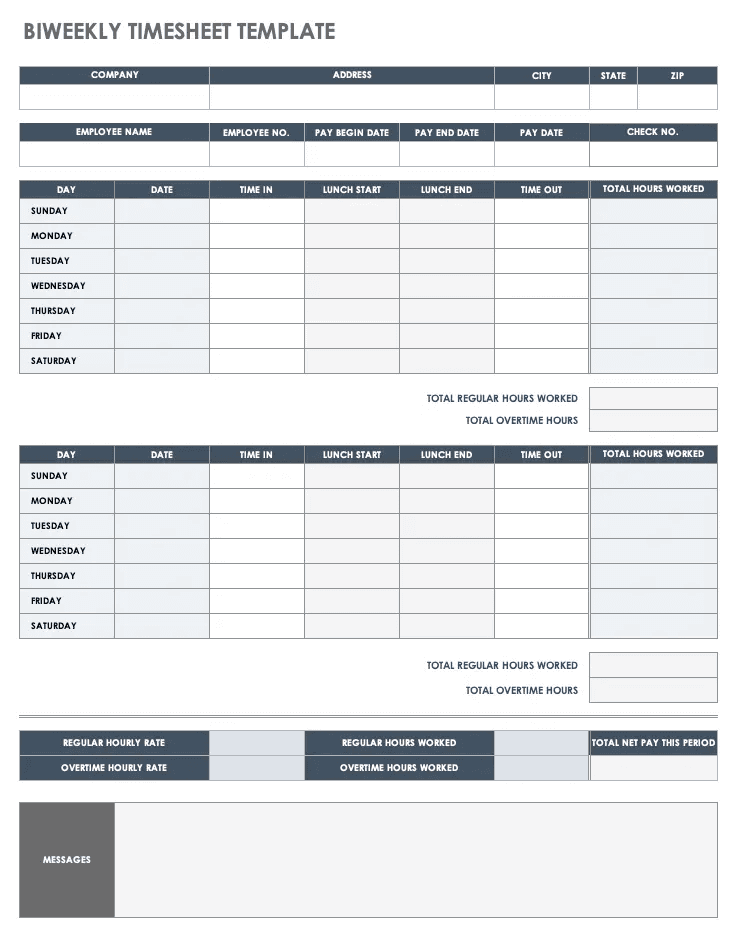
Example of a biweekly employee timesheet template from Smartsheet
Types of employee timesheets and free templates for each
The right timesheet format depends on your pay cycle and how granularly you need to track hours. Here are the four most common types, with a free timesheet template you can use for each.
Daily timesheet template.
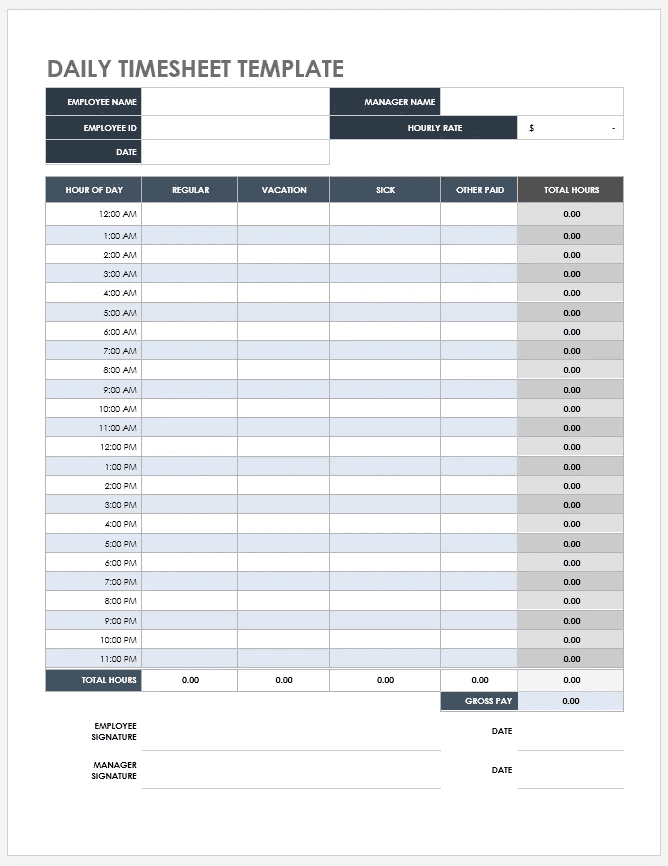
Best for businesses that need hour-by-hour records—these are common in healthcare, home services, and any role where time is billed by task. This Smartsheet daily template breaks each day down by hour from 12:00 AM to 11:00 PM, with separate columns for regular, vacation, sick, and other paid time. It calculates total hours and gross pay automatically, and includes employee and manager signature lines at the bottom.
Weekly timesheet template.
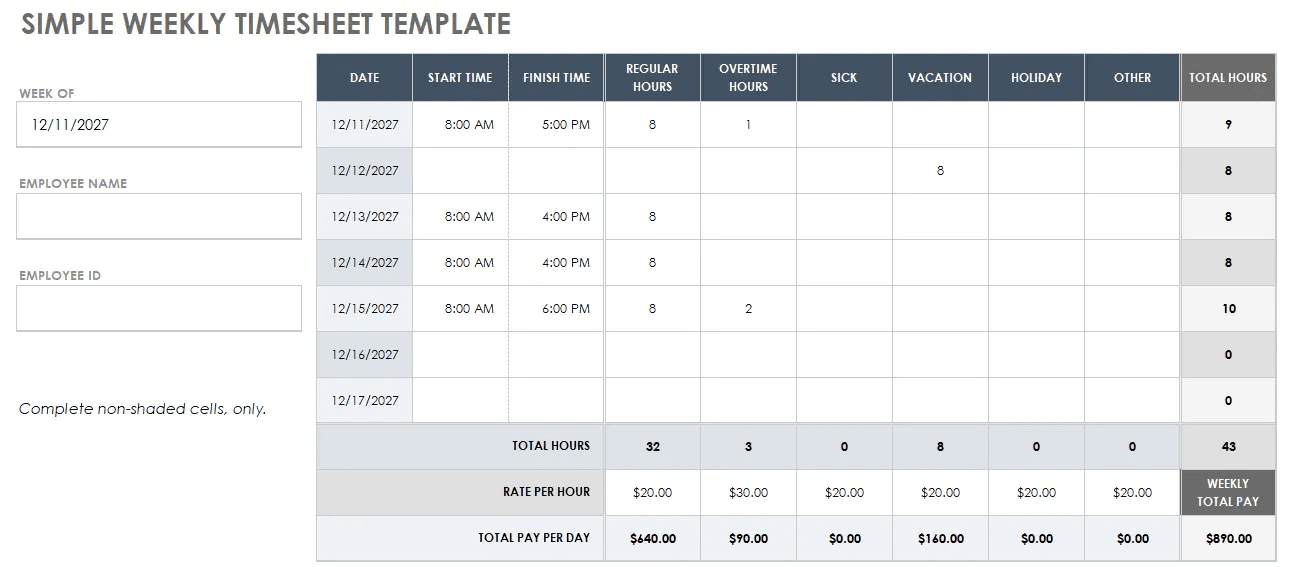
This is the most common format for small businesses. This Smartsheet weekly template covers a standard seven-day workweek with columns for start time, finish time, regular hours, overtime hours, sick, vacation, holiday, and other time. It automatically calculates total hours and total pay per day while also separating regular and overtime columns, which is useful for spotting overtime early.
Biweekly timesheet template.
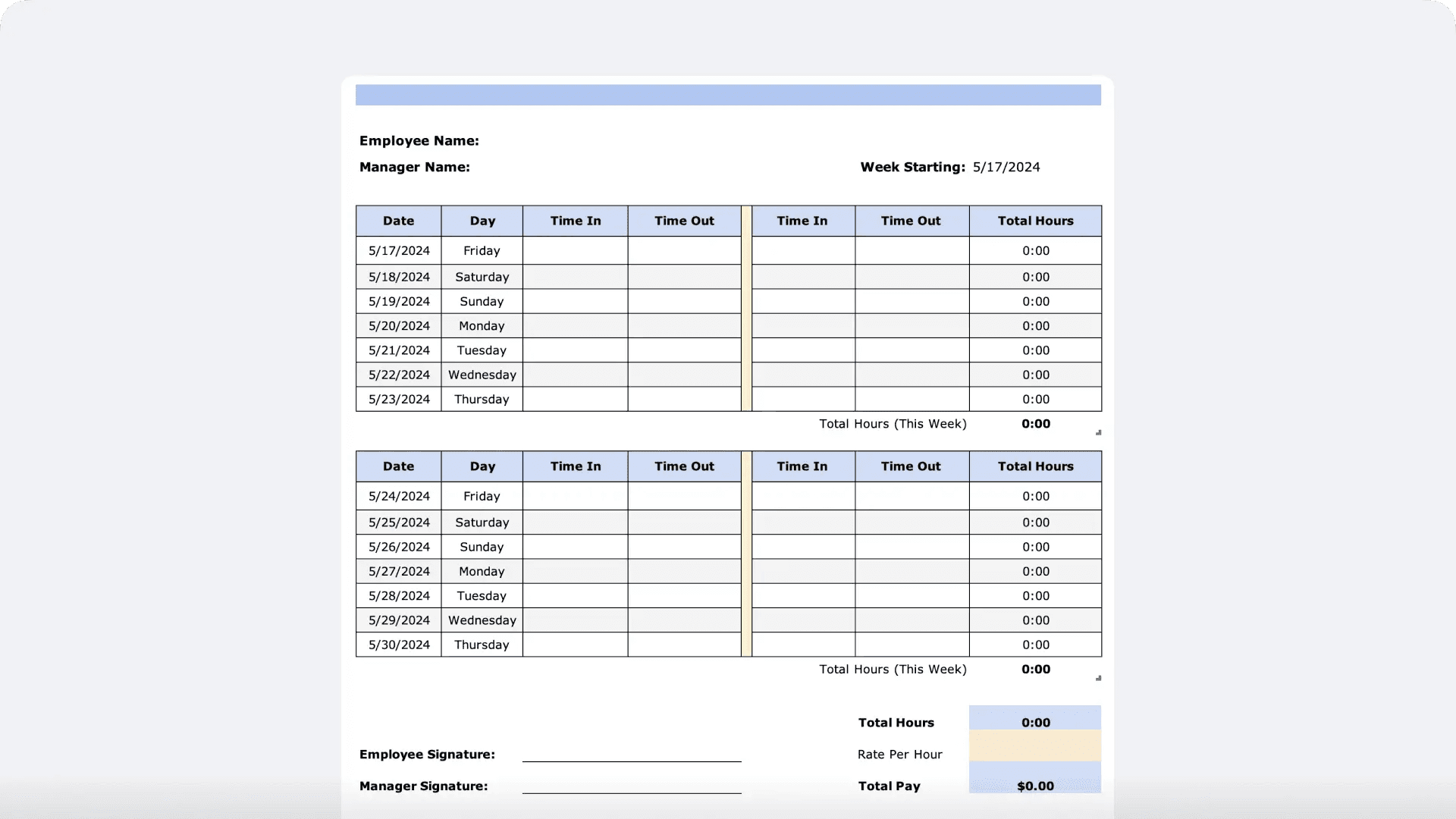
These templates cover a 14-day pay period across two separate weekly grids, which works well for businesses running biweekly payroll. This Time Doctor biweekly template includes two Time In/Time Out columns per day to accommodate split shifts or break tracking, with a weekly subtotal for each of the two weeks, plus employee and manager signature lines and a total pay calculation at the bottom.
Monthly timesheet template.
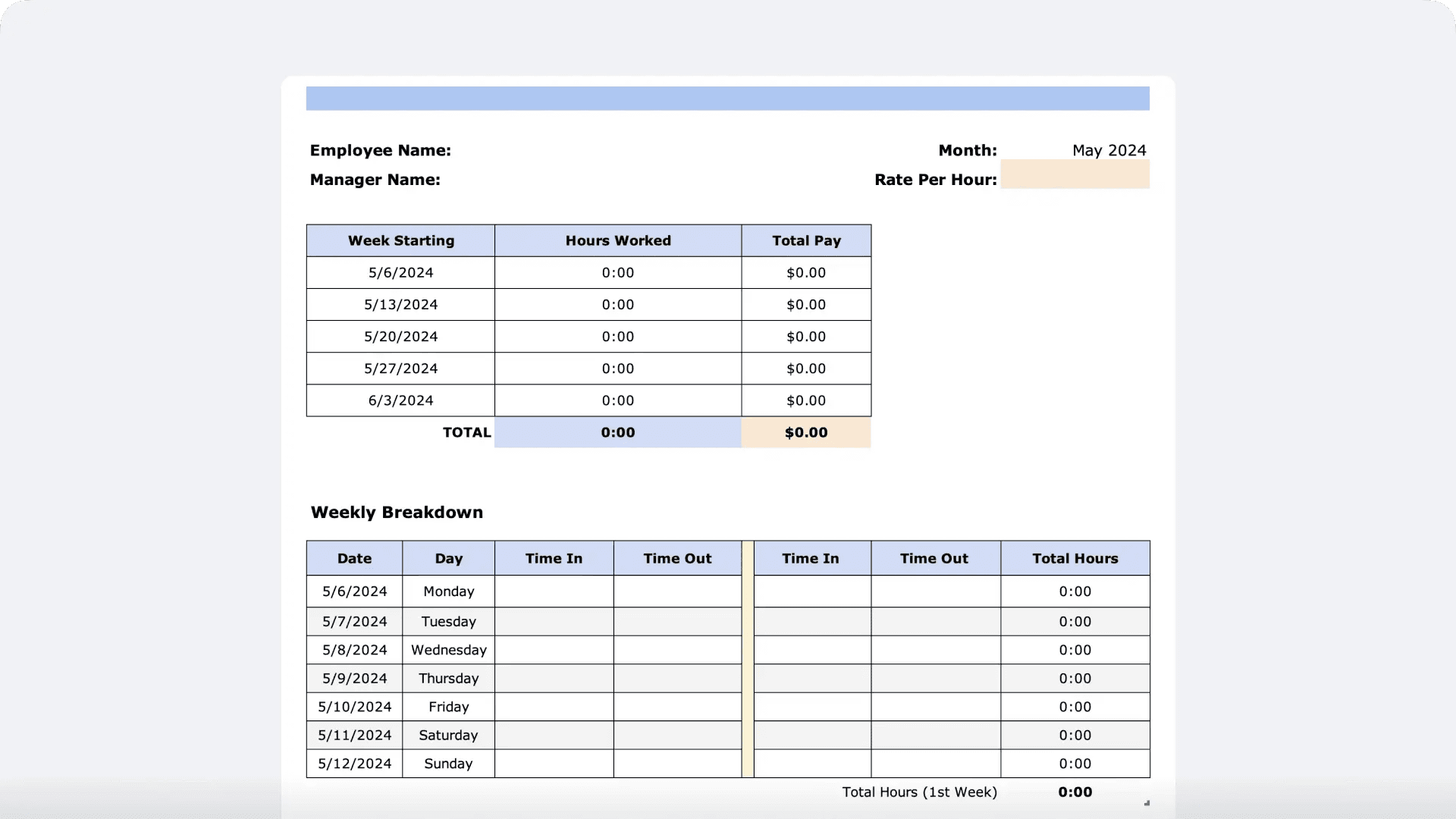
These are less common for hourly teams, and are typically higher-risk from a compliance standpoint since issues can go unreviewed for weeks. Better suited to salaried or project-based employees. This Time Doctor monthly template includes a weekly summary table at the top showing total hours and total pay for each week of the month, followed by a full daily breakdown with two Time In/Time Out columns and a running total for each day.
Manual timesheets vs. employee timesheet software: what's the difference?
For very small teams with simple schedules, a spreadsheet timesheet can work. But the cracks tend to show up quickly. Here's an honest look at what each approach involves.
Manual timesheets (paper or spreadsheet)
Paper and Excel are free and familiar, and there's no setup required. But the problems tend to show up over time. There's no real-time visibility because overtime gets discovered after the fact. Records live in a filing cabinet or on someone's desktop. And manual entry invites mistakes: a misread number, a transposed digit, or a missed punch can cascade into overtime miscalculations and tax withholding errors.
Charles Farriér, owner of Crumble & Whisk bakery, put it plainly: "We're in the process, we're trying to get the work done, but we don't realize that the time is slipping away from us. Especially when you have employees using overtime, or they don't clock out on time, or they forget to use their break."
Employee timesheet software
Digital time tracking addresses the manual pain points directly. Employees clock in from a mobile phone or tablet in seconds. Overtime alerts fire before the threshold is crossed. GPS and photo verification prevent buddy punching. Timesheets feed directly into payroll, so there's no re-entry and no manual math. Records are stored automatically and accessible whenever you need them for an audit or a dispute.
What happened with Crumble & Whisk now that Charles Farriér had all their timesheets and scheduling set up? Instead of “having to sit there and manually input anything from the timesheet”, he can now just click one button to get everything ready to go. Plus, he could finally see where his labor dollars were actually going: "I'm able to go into Homebase and be able to say, 'I've spent an extra hundred hours on labor costs, but where is this going?' And so it allows you to go in there and just kind of like clean everything up and have candid conversations with your team."
What to look for in employee timesheet software
If you're evaluating tools, here are the capabilities that matter most for small hourly teams.
- Mobile clock-in. Your team shouldn't need a desktop to log their hours. Look for an app that works on personal phones and tablets.
- Automatic overtime and break tracking. You want alerts before the threshold is crossed, not a surprise at the end of the pay period.
- GPS or photo verification. Especially important for multi-location teams or anyone clocking in off-site.
- Direct payroll integration. Timesheets that don't connect to payroll just move the manual work downstream. Look for direct sync, not a CSV export you have to upload somewhere else.
- Audit trail and record storage. Every edit to a time card should be logged. Records should be stored and retrievable for the full FLSA retention period.
- Free plan availability. For small teams, a free tier is worth factoring in. Several solid tools offer one.
Best employee timesheet apps for small businesses
There's no shortage of time tracking tools out there. These five are worth considering, depending on your team's setup and what you need most.
- Clockify is best for freelancers and small project-based teams tracking billable hours. It offers project reporting and client-facing timesheet views. The free plan is available but limited in scope; paid plans start at $3.99/user/month. It's less suited to shift scheduling or FLSA break compliance tracking.
- Deputy is best for multi-location businesses that need scheduling and time tracking tightly integrated. It handles role management and shift coverage across multiple sites, and includes compliance tools for break and overtime rules. Plans start at $5/user/month, with a 31-day free trial.
- Homebase is best for small businesses with hourly shift-based teams—restaurants, retail, salons, and similar. The free plan includes free timesheets, a mobile time clock, break tracking, overtime alerts, and timesheet exports. Scheduling and payroll connect directly to time tracking, so hours move through the whole workflow without manual handoffs.
- QuickBooks Time is best for field-based teams already using QuickBooks for accounting. GPS tracking, mobile clock-in, and geofencing make it a strong fit for workers who move between job sites. It requires an active QuickBooks Online subscription, with pricing starting at $20/month base fee plus $8/user/month.
- Toggl Track is best for agencies, consultants, and teams tracking billable hours across multiple clients and projects. The free plan supports a limited number of users; paid plans start at $9/user/month. It doesn't integrate with payroll directly, so time data needs to be exported manually, which makes it better suited to billing and project tracking than hourly employee compliance.
Frequently asked questions about employee timesheets
Are timesheets required by law?
Yes. The Fair Labor Standards Act requires employers to maintain accurate records of hours worked for all non-exempt hourly employees. The FLSA doesn't mandate a specific format, but records must be complete and accurate. Payroll records must be retained for at least three years; time records for at least two years.
How do you keep track of employee timesheets?
Options range from paper logs and spreadsheet templates to digital time clock apps. For most small businesses, a mobile time clock is the most reliable method as it captures clock-ins automatically, tracks breaks and overtime, and stores records without manual entry.
What is the best way to track employee hours?
Digital time tracking is the most accurate option for growing teams. Look for a tool with mobile clock-in, automatic overtime alerts, break tracking, and direct payroll integration. For very small teams just getting started, a free timesheet template can work, but manual entry errors add up quickly.
How do I create a timesheet for an employee?
A basic timesheet needs: employee name, pay period dates, daily clock-in and clock-out times, break times, total daily hours, total weekly hours, overtime hours, and manager approval. You can build one in a spreadsheet or use a free time clock app that fills in this information automatically.
Is there a free app for employee timesheets?
Yes. Several apps offer free time tracking for small teams. Homebase includes a free time clock with clock-in and clock-out, break tracking, overtime alerts, and timesheet exports. It's built for hourly teams and works on any device.
How long should you keep employee timesheets?
Under the FLSA, payroll records must be kept for at least three years. Records used for wage computations, including timesheets and work schedules, must be retained for at least two years. Some states require longer. Digital time tracking tools typically store records automatically.
What should a timesheet include?
At minimum: employee name, pay period, daily clock-in and clock-out times, break times, total daily and weekly hours, overtime hours, and a manager approval field. Some businesses also include role or department, tip amounts, and PTO or sick time.
Get time tracking right from day one
Inaccurate timesheets aren't just a paperwork problem. They're a payroll problem, a compliance problem, and if left unaddressed, a costly one. When Bradley Cooke, Executive Director of Forebay Aquatic Center, switched from manual timesheets to Homebase, his team cut payroll costs by 30% and got payroll processing down to 30 minutes. His take on the experience: “Every time I open up payroll, I'm happy, because of how simple it is.”
Homebase's free time clock lets your team clock in from their phones, tracks breaks and overtime automatically, and sends timesheets straight to payroll. No chasing paper. No spreadsheet math. No surprises on payday. Get started with Homebase for free.