Retail Software: What It Is, Types, and the Best Options for Small Businesses in 2026


SMALL BUSINESS INTEL, IN YOUR INBOX
Table of contents
Here's how it works, the types you actually need, and the best options for small stores in 2026.
Running a small retail store means juggling transactions, inventory, scheduling, and payroll, usually across several disconnected tools or by hand. Retail software brings those pieces together so you're not copying numbers between systems, rebuilding schedules from scratch every week, or doing payroll math on Sunday night.
This guide explains what retail software is, the main types small businesses use, what separates good picks from bad ones, and which tools are worth considering in 2026. We've included a recommended software list below, evaluated independently. See our methodology and disclosure before you get there.
Here's What To Know At A Glance
Most small retail businesses need three to four types of software: a point of sale (POS) system for transactions, inventory tracking, scheduling and time tracking for their team, and payroll. The best picks for 2026 are:
- Square for Retail: best free-tier POS for small stores, no monthly fee, fast setup
- Shopify POS: best for stores selling both in-person and online
- Lightspeed Retail: best for multi-location stores with complex inventory
Scroll down for full entries on each, including pricing, ratings, and what real users say.
Why Trust Homebase? Why We Built This Guide
We're Homebase. We make scheduling, time tracking, payroll, and HR tools for small businesses with hourly teams, including retail stores. We publish this guide because retail software is a topic our customers ask about constantly, and most guides out there are written by vendors with a product to sell or are too focused on enterprise tools to be useful for a 10-person boutique.
Homebase is not in the ranked list below. We cover the team management side of retail software in a separate publisher note at the end. Every tool in the ranked section was evaluated on its own merits. We don't accept payment or backlinks for inclusion.
Our picks were assessed using verified third-party review data from G2 and Capterra, pricing confirmed against each vendor's live page, and patterns from small business owner reviews and forums. See our full methodology at joinhomebase.com/methodology.
How We Chose Our Picks
We looked at software used by small retail businesses: stores with one to three locations, hourly teams, and limited IT support. Tools were evaluated on:
- Free tier or low starting price: most small retailers need to see value before committing
- Ease of setup: can one person get it running without outside help?
- Core retail functionality: POS, inventory sync, sales reporting as a baseline
- Integration with scheduling and payroll tools: does it connect with what your team already uses?
- Real user reviews: patterns across G2 and Capterra, weighted toward small business reviewers
Pricing was verified directly from each vendor's page as of July 2026. Ratings pulled from G2 and Capterra as of the same date. Both change frequently, so check vendor pages directly before making a decision.
What Is Retail Software?
Retail software is any digital tool that manages the daily operations of a retail store: sales transactions, inventory, customer data, employee scheduling, or payroll. Most small businesses use several types working together rather than a single all-in-one system.
Before cloud-based tools, retailers tracked everything manually: ledgers for sales, paper time cards for shifts, clipboards for inventory. Each function lived in its own silo and errors compounded across all of them. Modern retail software connects those functions. When a sale happens, inventory updates. When a shift ends, hours are ready for payroll.
The retail platform market was estimated at $39.16 billion in 2025 and is projected to reach $95.49 billion by 2030, according to a MarketsandMarkets report on the retail platform market. That growth reflects how central software has become to retail operations at every scale, including small stores.
The Types of Retail Software Small Businesses Actually Use
Most small retailers don't need one tool that does everything. They need a few that do their specific jobs well and connect to each other. Here's a breakdown of the main categories and what each one actually handles.
What Does Pos Software Do For A Retail Store?
Point of sale (POS) software processes transactions, records sales history, and tracks inventory automatically with every purchase. Modern POS systems run on tablets and mobile devices, so you can check customers out anywhere on the floor.
A good retail POS does more than checkout. It tracks which products sell fastest, flags low stock, logs customer purchase history, and feeds sales data into reporting. The best small business POS systems connect directly to your inventory and accounting tools so nothing needs to be re-entered. See our guide to the best POS systems for small business for a full breakdown.
How Does Retail Inventory Management Software Work?
Inventory management software tracks what's on shelves in real time, alerts you before you run out of bestsellers, and in some cases automates reordering. It connects to your POS so stock counts update automatically with every sale.
For small retailers, the most useful features are low-stock alerts, sales velocity reports (which products are moving fast vs. sitting), and multi-location visibility if you run more than one store. Without this, you're either counting manually or guessing. Both create costly mistakes. For a deeper look, see our retail POS software guide.
Why Does Employee Scheduling Software Matter In Retail?
Retail teams deal with variable hours, last-minute callouts, and shift swaps constantly. Rebuilding the schedule from scratch every week and managing it over text threads eats time that doesn't need to go there.
Retail scheduling software lets you build and publish schedules quickly, notifies your team automatically, and lets employees manage their own swaps without pulling you in. Connected to time tracking, it captures clock-ins and flags overtime before it hits payroll, which keeps labor costs from surprising you at the end of the pay period. Here's how to think about how to make an employee schedule that actually works for a shift-based team.
What Does Retail Payroll Software Handle?
Payroll software calculates wages, overtime, and tips from actual hours worked, handles tax withholding and filing, and runs direct deposit. For hourly retail teams with variable hours and multiple pay rates, the math is complicated enough that manual calculation creates real risk.
What separates good retail payroll tools: integration with your time tracking so hours flow in without re-entry, automatic overtime and tip handling, and compliance support for the Fair Labor Standards Act (FLSA). Our guide to retail payroll software covers what to look for. And if you want to keep your payroll-to-sales ratio in check, our guide on how to manage labor costs is worth reading alongside it.
When Does A Retail CRM Make Sense?
Customer relationship management (CRM) software builds purchase history profiles and lets you segment customers for targeted promotions. For small retailers, a CRM makes more sense once you have a consistent customer base worth engaging. It's not the first tool to add.
The most practical entry point for small stores: a POS that stores customer purchase data and connects to a basic email marketing tool like Mailchimp. Full CRM functionality is more valuable once you're ready to run segmented campaigns.
Do Small Retail Stores Need E-Commerce Or Accounting Software?
If you sell online, connecting your in-store and online inventory through a tool like Shopify is the simplest way to avoid managing two separate systems. For accounting, QuickBooks is widely used by small retail businesses. It handles bookkeeping, tax prep, and integrates with most POS and payroll tools. Pricing for QuickBooks products has changed in 2026, so check Intuit's site directly for current rates.
What to Look for When Choosing Retail Software
Every tool looks good in a pitch. These questions help you cut through it:
Does it connect with your POS? Scheduling and time tracking tools that don't sync with your point of sale put you back to copying labor data manually. How retail team management works is a good place to start if you're thinking through how your tools should connect.
Is it built for hourly teams? Most general business software is designed for salaried, office-based workers. Retail runs on variable hours, break compliance, shift swaps, and tips. Make sure the tool you choose actually handles that before you commit.
Can your team adopt it without a training session? Sign up for a free trial and run it through your actual workflow. If your least tech-comfortable team member can clock in or check a schedule without help, you're in good shape.
What does it actually cost, total? Monthly subscription plus per-employee pricing plus hardware plus add-ons. Calculate the real number and compare it against the hours you currently spend doing those tasks manually.
What does support look like at 7pm on a Friday? Live chat or phone support matters more than you think when something breaks before a weekend open. Check before you sign.
The Best Retail Software for Small Businesses in 2026
1. Square for Retail
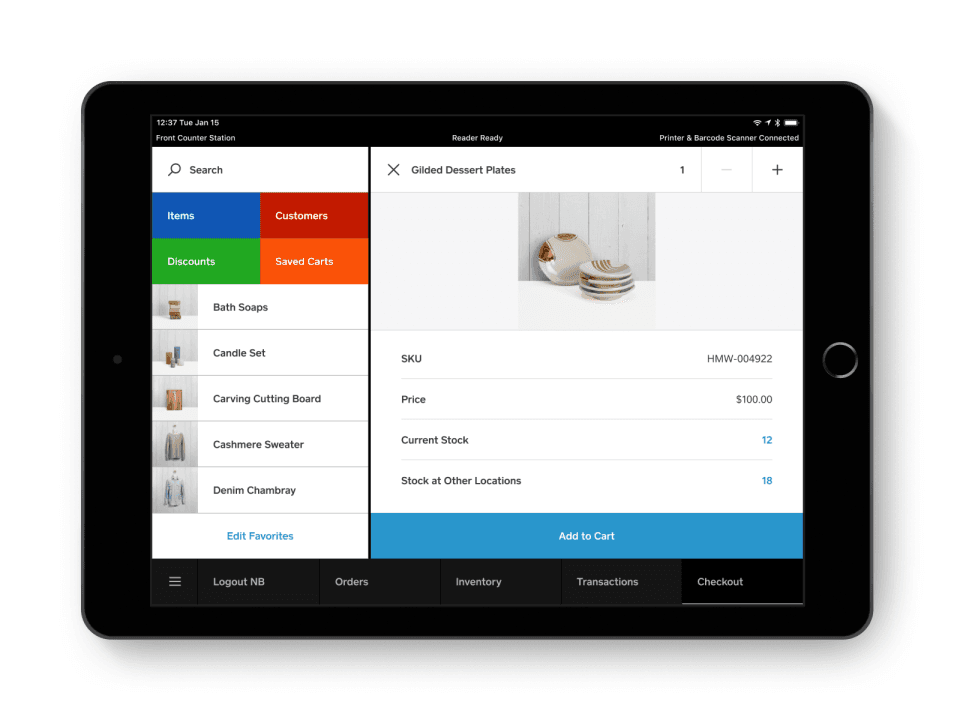
Best for: Small stores that want fast setup and a free-tier POS with solid inventory basics
Square for Retail is a cloud-based point of sale system built for brick-and-mortar retail. It handles transactions, inventory tracking, customer profiles, and basic sales reporting, all from a tablet. The free plan covers core POS with no monthly subscription; you pay per transaction. The paid Square for Retail Plus plan adds vendor management and advanced inventory at $89/month per location.
Key features:
- Free POS software with no monthly fee on the base plan
- Real-time inventory tracking with low-stock alerts
- Customer purchase history and loyalty program support
- Sales and labor reporting dashboard
- Includes team-management tools; can pair with dedicated scheduling tools for full team management
Pricing: Free plan ($0/month, transaction fees apply); Square for Retail Plus at $89/month per location. Check Square's pricing page directly for current transaction fee rates, as they change.
What users like:
Across 1,100+ G2 and 3,000+ Capterra reviews, users consistently praise Square's ease of setup, intuitive interface, fast payment processing, and built-in inventory management. Many reviewers say new employees can learn the system with little to no training.
What users criticize:
The most common complaints involve transaction fees becoming expensive as sales volume grows, limited functionality on the free plan, occasional hardware connectivity issues, and difficulty reaching support during busy periods.
Our take: Square for Retail is the right starting point for most small retailers. It's free to try, fast to set up, and capable enough for daily operations. Its limits show up at higher volume or more complex inventory needs. If you're running multiple locations with advanced reporting requirements, it may not be enough.
2. Shopify POS
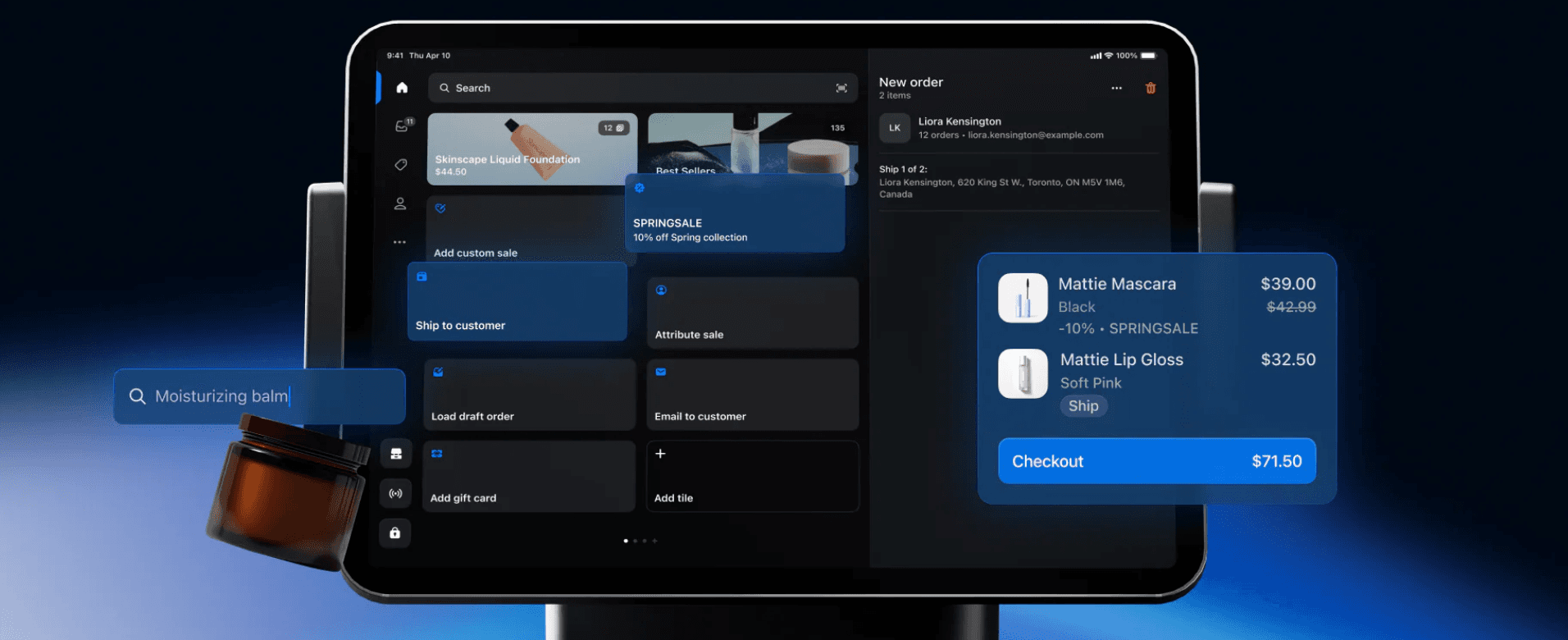
Best for: Stores selling both in-person and online who want one system for both channels
Shopify POS connects your in-store and online sales into one inventory and order system. If you're already on Shopify for e-commerce, the POS integration is a natural extension. Shopify POS Lite is included with any Shopify plan. POS Pro, the full-featured retail version with role-based permissions, exchanges, and in-store analytics, costs $89/month per location, billed yearly.
Key features:
- Unified inventory across online and in-store channels
- Offline mode for selling without an internet connection
- Team member management with role-based permissions
- Customer purchase history synced across channels
- Integrates with Shopify's app ecosystem (accounting, marketing, loyalty)
Pricing: Shopify POS Lite is included with any paid Shopify plan; POS Pro is $89/month per location billed yearly. A Shopify subscription is required either way. Check Shopify's website for current plan pricing, as rates change.
What users like:
Retailers consistently praise Shopify POS for connecting online and in-store inventory, its intuitive interface, and how quickly new employees learn the system. Businesses already using Shopify especially value having ecommerce and POS managed from one place.
What users criticize:
The most common complaints involve total cost of ownership. Users frequently mention needing paid apps, POS Pro, or higher Shopify plans to unlock advanced reporting and core retail functionality. Support quality also receives mixed reviews, with complaints increasing noticeably through 2025 and 2026.
Our take: Shopify POS is the strongest option if you're selling online and in-store. If you're purely brick-and-mortar with no online channel, you're paying for infrastructure you won't use. Square is a better fit in that case.
3. Lightspeed Retail
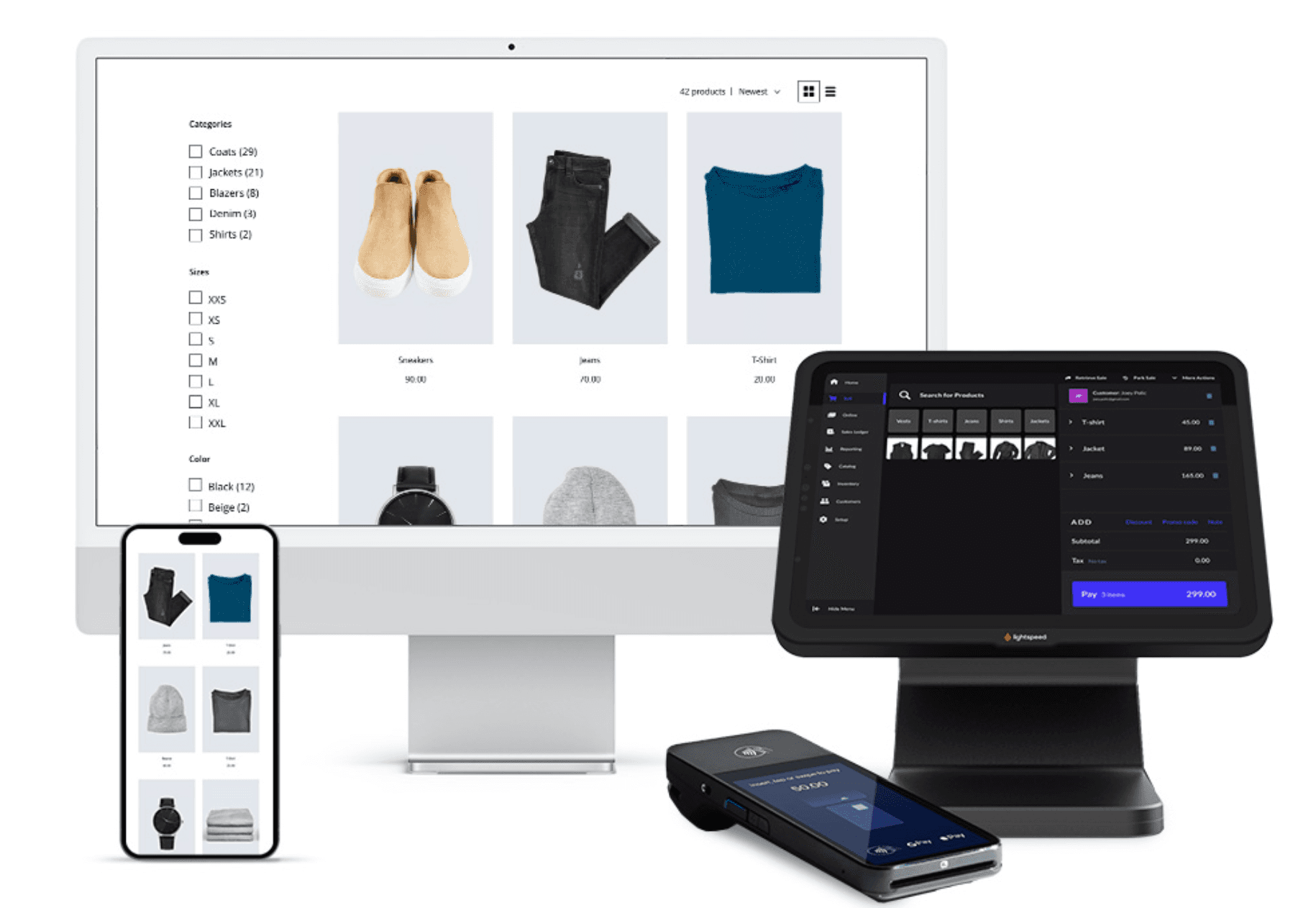
Best for: Established retailers with multiple locations or complex inventory who need deeper reporting
Rating: Capterra 4.0/5 (975 reviews); customer service rated 3.9/5 on Capterra. See G2 for the current G2 rating.
Lightspeed Retail is a cloud-based POS and inventory management system built for retailers with more complex needs: multiple locations, large product catalogs, vendor management, and detailed sales analytics. Monthly pricing runs $109/month (Basic), $179/month (Core), and $339/month (Plus). Annual billing lowers those to approximately $89/$149/$289 per month. A free trial is available.
Key features:
- Multi-location inventory management with real-time visibility
- Vendor catalog integration for faster purchase orders
- Advanced sales and inventory reporting
- eCommerce integration for omnichannel selling
- 24/7 support (check Lightspeed's website for current support terms by plan)
Pricing: Monthly billing: Basic $109/month, Core $179/month, Plus $339/month. Annual billing typically lowers those rates. Annual contracts are required for lower pricing. Check Lightspeed's pricing page for current rates before purchasing.
What users like:
Businesses managing multiple stores consistently praise Lightspeed's inventory tools, purchasing workflows, detailed reporting, and multi-location capabilities. Many reviewers say it offers far deeper retail functionality than entry-level POS systems.
What users criticize:
The most common complaints center on pricing, lengthy contracts, a steeper learning curve than competitors like Square, and customer support responsiveness. Some reviewers also report unexpected price increases after renewal, and note that advanced reporting features are locked behind higher-tier plans. Lightspeed's customer service rating is 3.9/5 on Capterra, the lowest of the three tools in this guide.
Our take: Lightspeed earns its price for retailers who need multi-location inventory control, advanced analytics, and purchase order management. For a single-location store with a simpler product catalog, the cost and complexity are hard to justify when Square or Shopify POS cover the basics for less. Read the contract terms carefully before signing.
How Homebase Compares
Publisher note: Homebase is not part of the ranked list above.
Homebase handles the team management side of retail operations: scheduling, time tracking, payroll, hiring, and HR. It's not a POS system and doesn't track inventory. Those categories are covered by the tools above. Here's where it fits alongside each option:
Square for Retail
- What it covers: POS and inventory
- Starting price: Free ($0/month, transaction fees apply); Plus at $89/month per location
- Free tier: Yes
- Pairs with Homebase for: scheduling, time tracking, and payroll. Homebase integrates directly with Square
Shopify POS
- What it covers: POS and e-commerce
- Starting price: Shopify plan required + $89/month per location for POS Pro
- Free tier: POS Lite included with any paid Shopify plan
- Pairs with Homebase for: scheduling, time tracking, and payroll. Homebase integrates directly with Shopify
Lightspeed Retail
- What it covers: POS, inventory, and advanced analytics
- Starting price: $109/month (monthly billing)
- Free tier: Free trial only
- Pairs with Homebase for: scheduling, time tracking, and payroll. Homebase integrates directly with Lightspeed
Homebase
- What it covers: Scheduling, time tracking, payroll, hiring, and HR
- Starting price: Free for up to 10 employees; paid plans from $30/location/month
- Free tier: Yes, up to 10 employees
- Best for: Hourly team management, works alongside whichever POS you choose
Frequently Asked Questions About Retail Software
What is retail software?
Retail software is any digital tool that manages the daily operations of a retail business: processing sales, tracking inventory, scheduling team members, or running payroll. Most retail businesses use several types working together rather than one tool that handles everything. The retail platform market was estimated at $39.16 billion in 2025 and is projected to reach $95.49 billion by 2030, according to a MarketsandMarkets report on the retail platform market.
What software do retail stores use?
Small retail stores typically use a POS system for transactions, inventory software to track stock, scheduling and time tracking software for shifts and hours, and payroll software. Stores selling online add an e-commerce tool. Larger operations may also add a CRM for customer segmentation and accounting software for financial reporting.
What's the best free retail software for small businesses?
Square for Retail has the strongest free POS tier for small stores: no monthly fee, inventory tracking included, fast setup. Homebase offers free scheduling and time tracking for teams up to 10 employees. Free tiers for inventory-specific or accounting tools are more limited; most require paid plans.
What is retail management software?
Retail management software combines multiple retail functions: POS, inventory, reporting, and sometimes scheduling, into one system. It gives owners a centralized view of operations. Some retail management systems are built for enterprise retailers; others like Lightspeed Retail target established small businesses with more complex needs.
How much does retail software cost?
Pricing varies significantly by category and vendor. Square for Retail's POS is free with transaction fees; Plus is $89/month per location. Shopify POS Lite is included with a required Shopify plan; POS Pro is $89/month per location billed yearly. Lightspeed Retail starts at $109/month on monthly billing. Homebase's free plan covers scheduling and time tracking for up to 10 employees; paid plans start at $30/location/month. Check each vendor's pricing page directly before purchasing, as rates change frequently.
How do I manage employee schedules in a retail store?
Dedicated scheduling software is the most efficient approach. Tools like Homebase let you build and publish schedules quickly, notify your team automatically when shifts go up, and let team members request swaps without you in the middle of every change. Paired with time tracking, hours flow directly into payroll without manual re-entry. See our full guide to retail scheduling software.
What's the difference between POS software and retail management software?
A POS system handles in-store transactions. Retail management software is broader. It typically includes POS functionality plus inventory, reporting, and sometimes purchasing and CRM. Not every small retailer needs a full management system. Many get by with a POS paired with separate tools for scheduling, time tracking, and payroll.
Is it better to use one integrated retail system or separate tools?
In this r/smallbusiness thread, a retailer managing B2B and B2C sales across a physical store, a website, and phone and email orders asked exactly this, working with a $10-20k/year budget. The prevailing answer from commenters: go integrated over disconnected. One commenter put it plainly — nothing is worse than manually moving data between systems. Zoho and Shopify came up most often as starting points at that budget. The consensus: prioritize integration over features when you're building your stack.
Where to go from here
The right retail software stack looks different for every store, but the starting point is almost always the same: figure out which part of your operations is costing you the most time or money right now, and fix that first.
For most small retailers, that's the POS and the team. Get transactions and inventory under control with one of the tools above, then get your scheduling, time tracking, and payroll off manual processes. Those two areas cover the majority of what retail software is actually used for day to day.
If you're earlier in the process and still working out how to set up your store's operations, our guide to retail store management covers the broader picture. And if you're just getting started, how to start a retail business walks through what you actually need to get open.
For the team management side: scheduling, retail time tracking, and payroll software for small business, Homebase covers all of it in one place, free to start for teams up to 10. We connect with Square, Shopify, Lightspeed, and most other POS systems, so your labor data and sales data stay in sync without any manual bridging.