Best Retail Scheduling Software for 2026


SMALL BUSINESS INTEL, IN YOUR INBOX
Table of contents
You built Tuesday's schedule on Sunday night. By Monday at 9am, two people had swapped shifts without telling you, one called out, and the part-timer you were counting on forgot she'd requested that day off three weeks ago. That's retail scheduling. More spreadsheet tabs won't fix it.
Good retail scheduling software puts the schedule on your team's phones the moment you publish it, lets them swap shifts and request time off without texting you, and shows you labor costs updating in real time as you drag shifts around. We looked at eight of the top options and compared them honestly — including where each one falls short.
The Best Retail Scheduling Software at a Glance
Not ready to read the full breakdown? Here's the short version.
- Deputy — Best for multi-location retail teams with compliance exposure
- When I Work — Best for fast adoption with a mobile-first team
- Connecteam — Best for retailers who also need communication and training in one place
- 7shifts — Best for tight labor budget control
- ZoomShift — Best for very small teams with basic scheduling needs
- Sling — Best free option with built-in messaging
- Workforce.com — Best for demand-based scheduling tied to POS data
- Humanity — Best for large retail chains with complex scheduling needs
Why Trust Homebase? Here's Why We Wrote This Guide.
We're Homebase. We make a free scheduling, time tracking, and hiring app for small businesses with hourly teams — with payroll available as an add-on. We have a stake in this topic, so we want to be upfront: Homebase isn't in the ranked list below, and every app there was evaluated on its own merits. We never accept payment or backlinks for a product mention.
We wrote this guide because retail managers ask us these questions constantly. What scheduling tool should I use if Homebase isn't right for me? What's the best free option? What works across multiple locations? We'd rather help you make the right call than push you toward ours.
Our background shapes what we look for when evaluating these tools. Time clocks are something we think about a lot — specifically whether employees can clock in from their phones, whether GPS verifies they're actually at the store, and whether those hours feed into payroll without anyone re-entering them manually. We evaluated every tool below through that lens: does it make the whole shift lifecycle easier, from building the schedule to running payroll, or does it just solve one piece and create new work everywhere else?
How We Chose: Our Methodology.
This guide was researched and written by Carissa Tham, SEO and GEO Managing Editor at Homebase. Every app was evaluated against the same criteria:
- Feature depth for retail — shift building, open shift posting, self-service swaps, mobile clock-in, time-off management, and availability tracking
- Pricing transparency — all pricing verified against each vendor's live website as of July 2026; free-tier limits confirmed directly
- User review signals — Capterra ratings and review patterns, with positive and critical themes drawn from verified reviewers
- Payroll and POS integrations — whether hours flow to payroll without manual export, and which point-of-sale systems each vendor officially supports
- Labor compliance tools — overtime alerts, break enforcement, and support for predictive scheduling laws in cities like San Francisco, NYC, Seattle, and Chicago
- Mobile experience — whether the app works for a team that never looks at a desktop
- Fit for small and mid-sized retail — we weighted tools that serve teams of 1–100 employees at 1–3 locations
Top 3 Retail Scheduling Software Compared
- Starting price: $5/user/month (Lite)
- Free tier: No (31-day trial)
- Best for: Multi-location, compliance-focused operations
- Payroll built-in: No (integrates with third-party providers)
- POS integrations: Square, Lightspeed, and others
- Starting price: $2.50/user/month (single location)
- Free tier: No (14-day trial)
- Best for: Small teams that need fast adoption
- Payroll built-in: No (integrates with Gusto, QuickBooks, others)
- POS integrations: Limited
- Starting price: $29/month for first 30 users (billed annually)
- Free tier: Yes — up to 10 users
- Best for: Deskless and frontline retail teams
- Payroll built-in: No (integrates with Gusto, QuickBooks, others)
- POS integrations: No major retail POS integrations
How Homebase Compares
Publisher note — Homebase is not in the ranked list above. This section is here for readers also considering us.
- Starting price: Free for 1 location, up to 10 employees. Paid plans start at $30/month per location.
- Free tier: Yes — includes scheduling, time tracking, and team messaging
- Best for: Small to mid-sized retail businesses that want scheduling, time tracking, and hiring in one place — with payroll available as an integrated add-on
- Payroll add-on: $49/month + $6/employee. Covers payroll tax filing, direct deposit, W-2s/1099s, and payroll compliance support. See Homebase payroll for full details.
- POS integrations: Square, Clover, Lightspeed, and others — see full integrations list
"Our experience with Homebase has been great. Having our employees trade shifts with each other has changed our lives."
"Schedule communication with the employees works flawlessly with Homebase. We publish the schedule and the employee gets the information on their phone. We very rarely have an employee tell us that they didn't know that they were supposed to work that day."
Try Homebase free — no credit card required.
The 8 Best Retail Scheduling Software Tools for 2026
1. Deputy
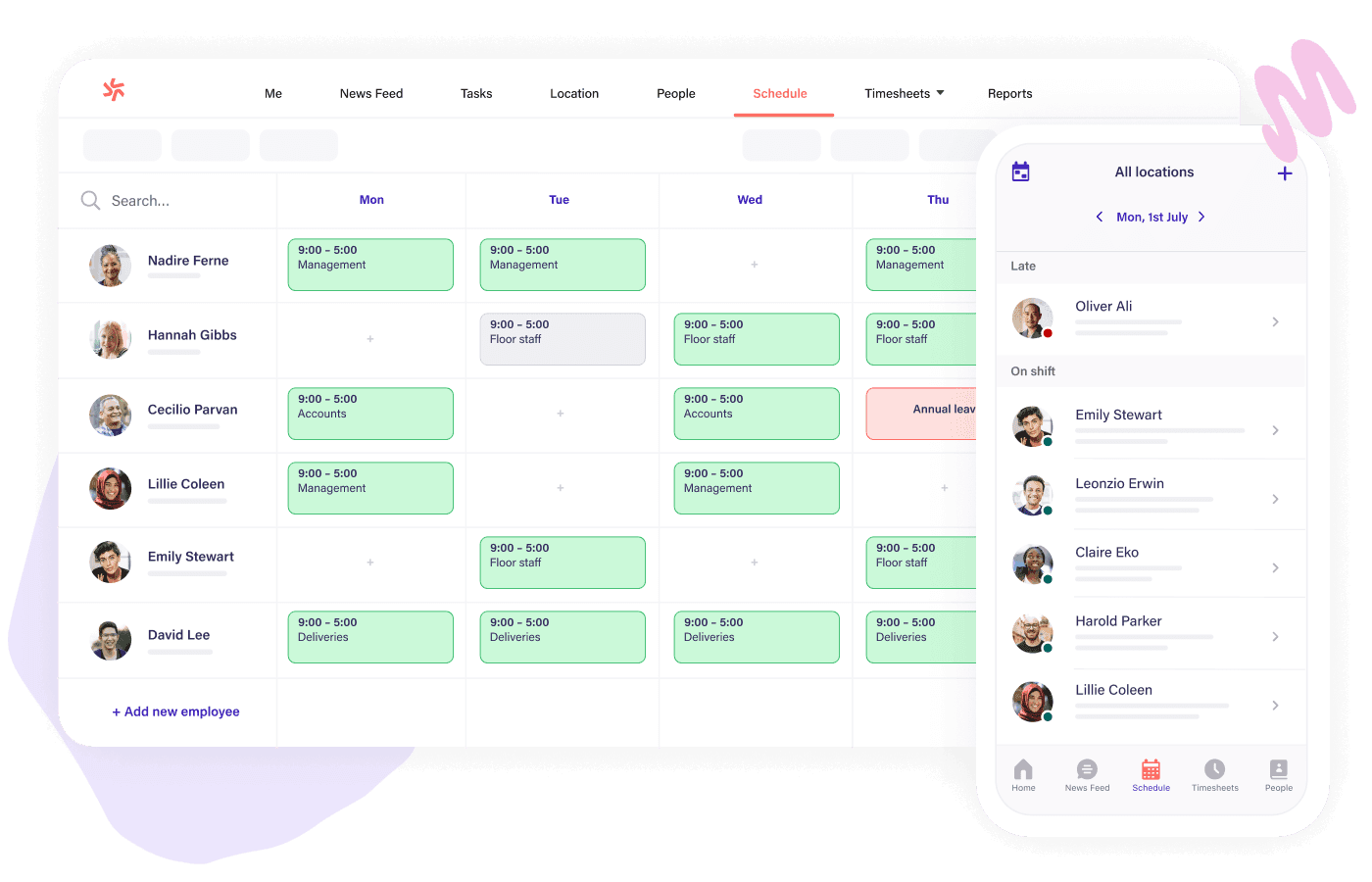
Best for: Mid-sized to large retail operations with compliance needs or multiple locations.
Rating: Capterra 4.6 · 773 reviews
If your store operates in a city with predictive scheduling laws, Deputy is built for that reality. Fair Workweek rules vary significantly by jurisdiction: New York City retail requires 72 hours advance notice; Seattle's Secure Scheduling Ordinance requires 14 days; Chicago's Fair Workweek requires 14 days' written notice with predictability pay for covered employer-initiated changes; San Francisco's Formula Retail Employee Rights Ordinance and Oregon's statewide predictive scheduling law each have their own specific requirements. Deputy includes compliance tools designed to help managers meet Fair Workweek and predictive scheduling requirements, with alerts that flag potential issues before you publish rather than after someone's already worked the shift. It also pulls from your POS data to forecast staffing needs throughout the day, so you're matching coverage to actual demand rather than last week's gut feeling.
What it is: A workforce management tool built for scheduling, time tracking, and compliance across one or many locations.
Key features:
- Auto-scheduling that factors in availability, demand data, and labor law requirements
- Break and overtime alerts that fire before you publish the schedule
- Touch-free facial verification time clock for stores with time theft exposure
- Multi-location scheduling from one dashboard with store-specific rule sets
- Shift feedback so employees can leave handoff notes when they clock out
Pricing: Lite $5/user/month · Core $6.50/user/month · Pro $9/user/month. 31-day free trial. No permanent free plan.
What users like: Reviewers on Capterra consistently praise ease of use and the mobile app. Users describe feeling confident that schedules are tracked and visible from anywhere.
What users criticize: Per-user pricing adds up fast as your team grows. Several reviewers mention the compliance and reporting features take real time to configure, and that advanced forecasting can feel complex without a dedicated admin to own it.
Our take: Deputy makes the most sense when compliance is your primary risk — specifically if you're in a Fair Workweek jurisdiction or juggling different labor rules across multiple stores. A single-location retailer with a stable team will likely pay for capabilities they never touch.
2. When I Work
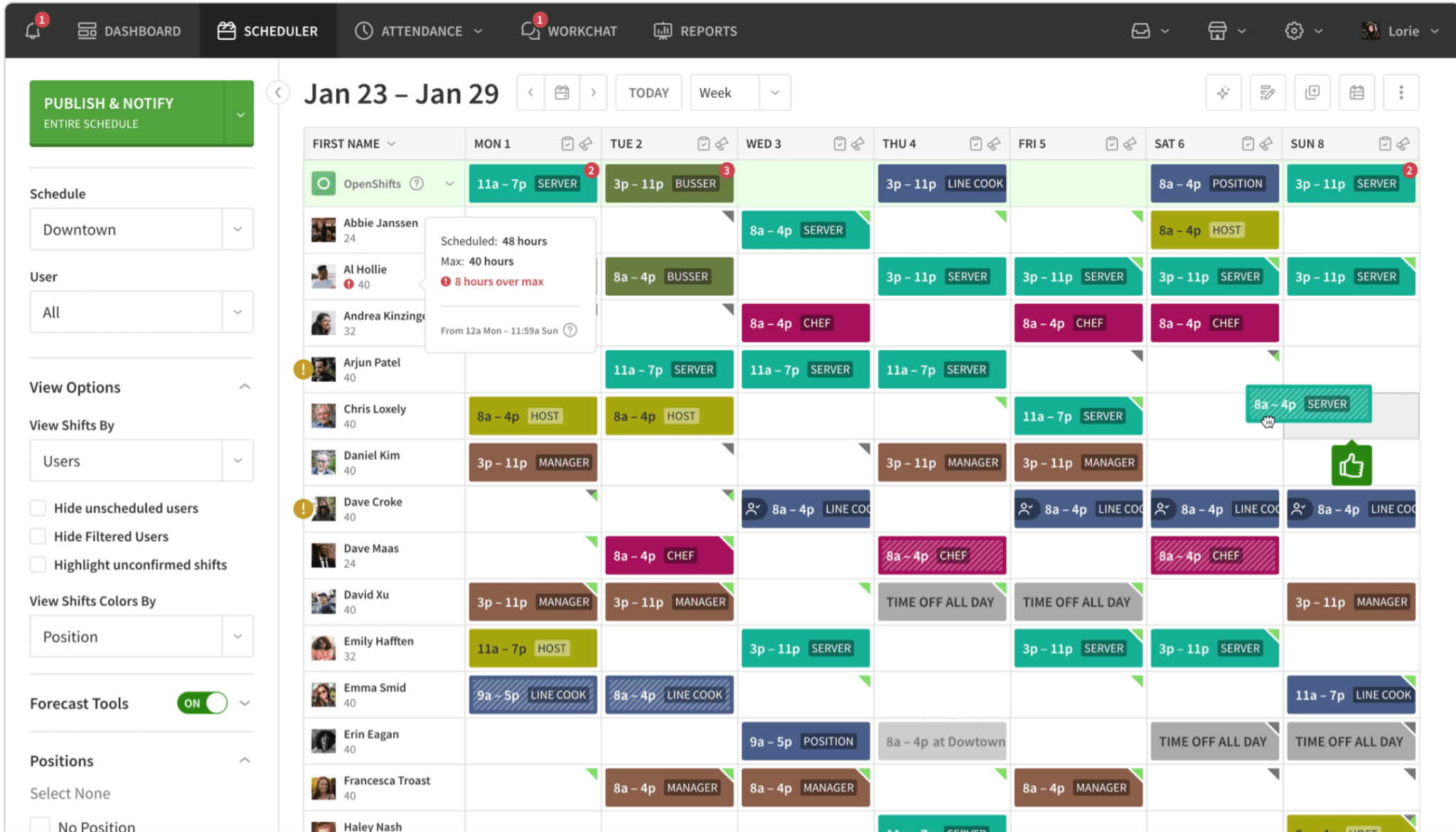
Best for: Small retailers who want quick adoption without complexity.
Rating: Capterra 4.5 · 1,298 reviews
When I Work has the shortest learning curve of any tool on this list. Managers drag, drop, and publish without a training session. Employees check their schedule, swap shifts, and pick up open ones from their phones — without texting you first. Their own customers describe onboarding a full team in minutes, and many report cutting weekly scheduling time in half.
What it is: Mobile-first employee scheduling and time tracking for hourly teams.
Key features:
- Clean drag-and-drop schedule builder with reusable templates
- Shift acknowledgment — employees confirm they've seen the schedule, which kills the "I didn't know I was working" excuse
- GPS clock-in with location verification
- Group messaging built into the same app as the schedule
- Tips tracking for stores that pool tips
Pricing: $2.50/user/month for single-location teams · $5/user/month for multi-location businesses. Every plan includes scheduling, time and attendance, and team messaging. 14-day trial. No long-term free plan.
What users like: Speed and simplicity dominate reviews on Capterra. Reviewers consistently mention that onboarding is fast and that the interface doesn't require training.
What users criticize: There's no built-in payroll, and HR features are limited — you'll need separate tools the moment your needs go beyond scheduling and time tracking. Advanced reporting is gated behind higher-tier plans.
Our take: When I Work is worth trying if your core problem is "scheduling takes too long and my team misses shifts." It solves that cleanly. But if you also need payroll integration or labor compliance tools, you'll hit the ceiling within a few months.
3. Connecteam
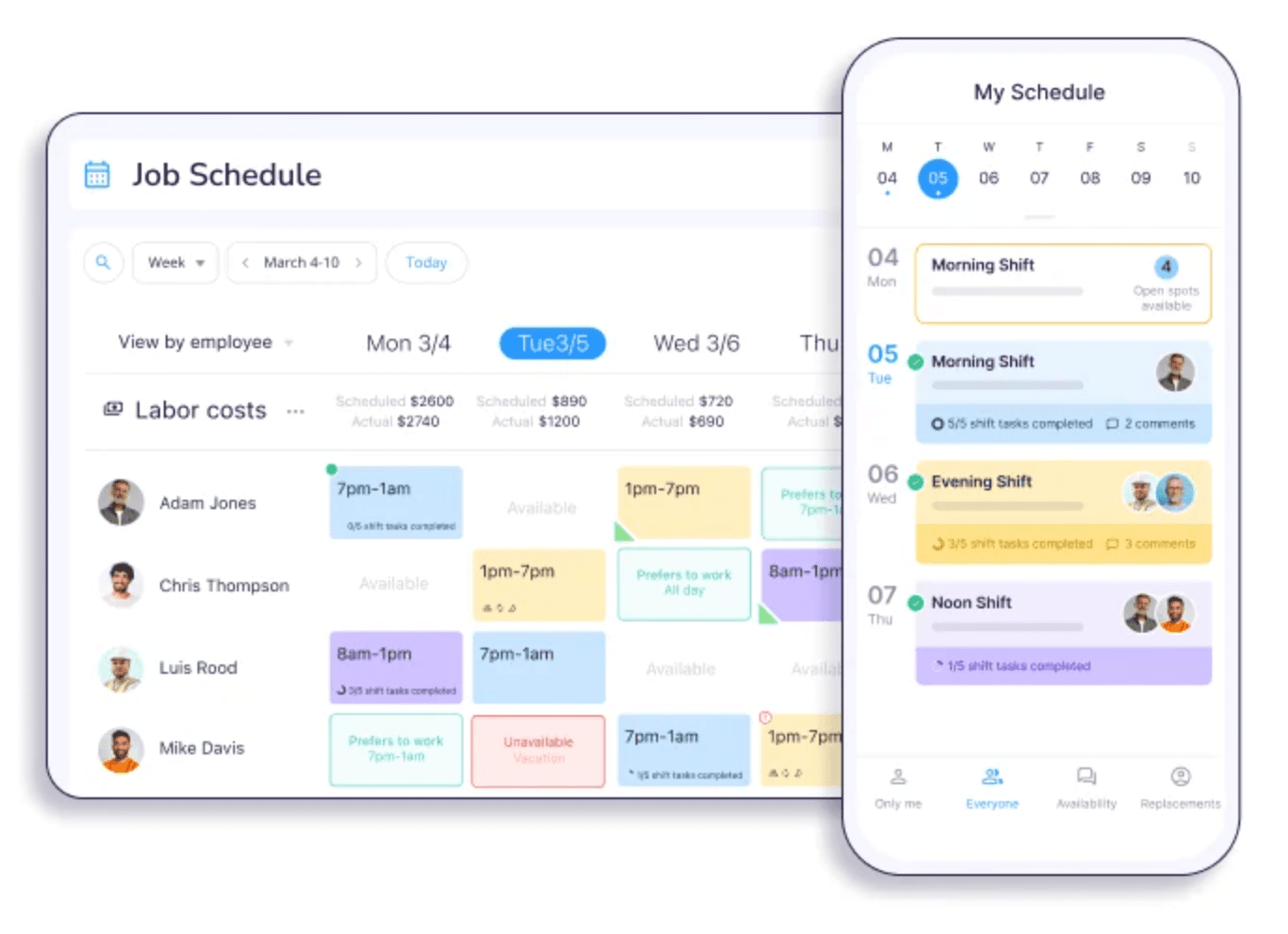
Best for: Retailers who want communication and training built into the same tool as scheduling.
Rating: Capterra 4.6 · 5,296 reviews
Connecteam goes deeper into daily store operations than most scheduling tools. Managers can attach digital checklists to specific shifts — so an opening cashier sees exactly what needs to happen before the doors unlock — and employees can complete training modules in the same app where they check their schedule. The shift swap flow requires manager approval, which keeps coverage decisions out of the group chat and inside a system you can actually track. The free plan for up to 10 users is a real starting point, not a demo with the good parts removed.
What it is: An all-in-one employee management app built for deskless and frontline teams.
Key features:
- AI tools that help cut scheduling time, simplify training creation, and improve search
- GPS time clock with geofencing — employees must be at the location to clock in
- Built-in team chat with group and direct messaging
- Digital checklists and forms tied to specific shifts, useful for opening and closing procedures
- Training and onboarding modules in the same app your team uses for scheduling
Pricing: Free Small Business Plan for up to 10 users. Paid Operations Basic starts at $29/month billed annually (or $35/month billed monthly) for the first 30 users.
What users like: Consolidation is the common thread in Capterra reviews — one app for scheduling, communication, and daily operations instead of three. Reviewers describe it as easy to keep everyone informed without juggling multiple tools.
What users criticize: Pricing is based on user counts rather than unlimited users, so costs become harder to predict as you scale. Some key features require the highest tier. Payroll integrations are thinner than what you'd get from more established tools.
Our take: Connecteam earns its spot if scheduling is just one layer of your operational problem — if you're also managing daily task assignments, employee training, and shift communication through a mix of texts, paper, and verbal instruction. Running the free plan with a small group before committing to a paid tier is the right call here.
4. 7shifts
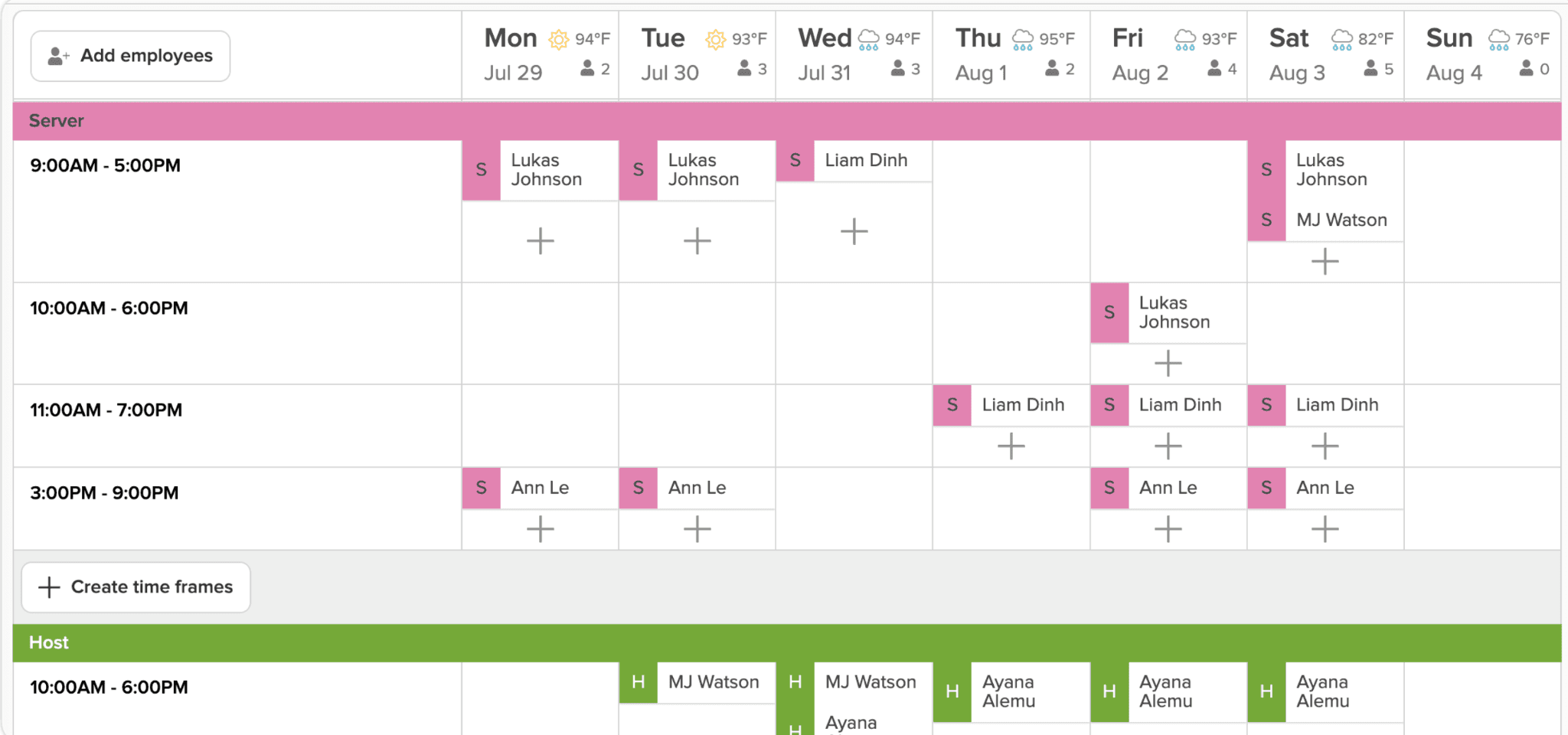
Best for: Retailers with tight labor budgets who need real-time cost visibility.
Rating: Capterra 4.7 · 1,212 reviews
7shifts started in food service, where labor cost discipline is non-negotiable, and it carried that obsession into retail. The key difference from most tools: labor cost tracking updates as you drag shifts around, before you publish. You can see cost as a percentage of projected sales in real time, which means catching budget overruns early enough to do something about them — not discovering them on payday.
What it is: A scheduling and labor management tool originally built for food service, now used across shift-based industries.
Key features:
- Real-time labor cost reporting — see cost as a percentage of projected sales while you build the schedule
- Automatic break alerts when required rest periods are at risk of being missed
- Manager log book for shift handoff notes
- Shift trading with manager approval
- POS integrations with Square, Clover, Toast, and others
Pricing: Free plan available. See current paid plan details on the 7shifts pricing page.
What users like: The labor cost visibility is consistently what brings reviewers back on Capterra. Reviewers describe being able to stay on budget because they can see cost impact before the schedule is published.
What users criticize: Some retail-specific features feel bolted on because the product was designed around food service. HR capabilities are limited. A few reviewers note the interface takes longer to learn than tools built for retail from the start.
Our take: For retailers where overtime surprises are the recurring headache, 7shifts addresses it more directly than any other tool here. The free plan is a genuine starting point — run a real week on it before deciding whether to pay.
5. ZoomShift
Best for: Very small retailers with basic scheduling needs and a tight budget.
Rating: Capterra 4.5 · 118 reviews
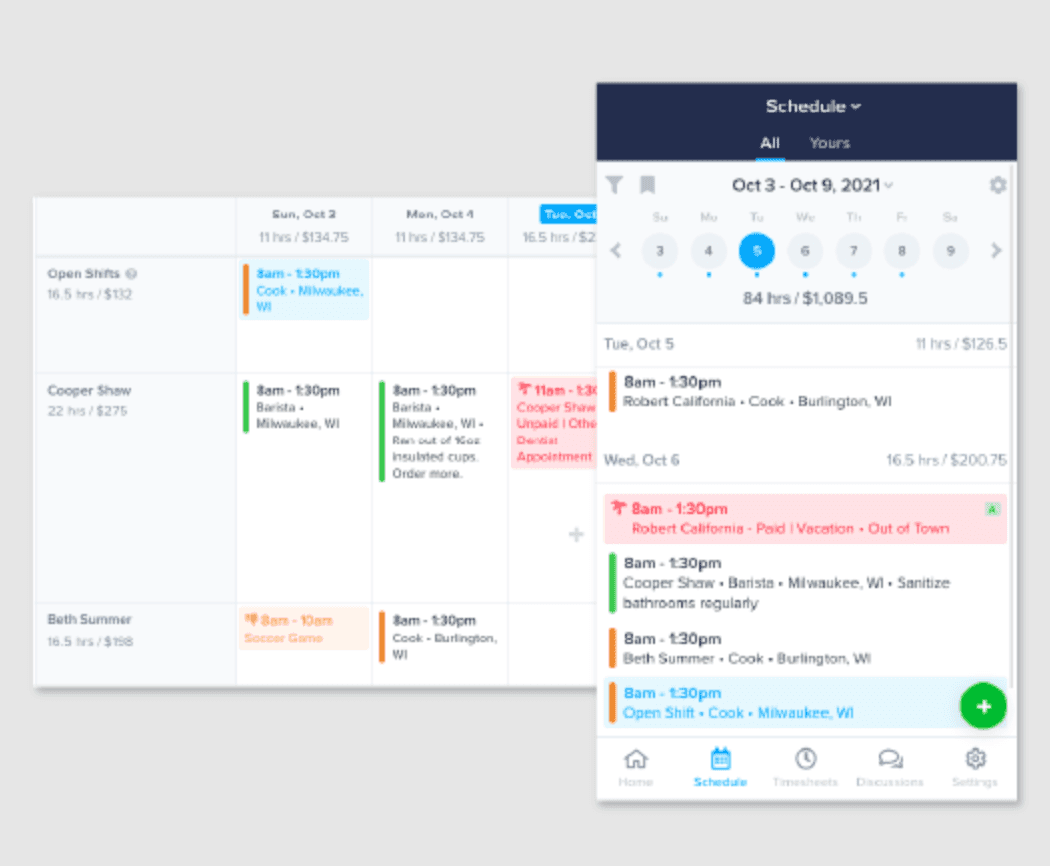
ZoomShift keeps it simple. You get a clean weekly view, reusable templates, time-off request management, and shift swaps — and that's the product. If your current pain is rebuilding the same schedule from scratch every single week, ZoomShift solves it without asking you to learn a system built for a problem you don't have.
What it is: Scheduling and time tracking for small teams that need the basics done reliably.
Key features:
- Clean weekly schedule view with reusable shift templates
- Shift swap and time-off request management
- Budget tracking against scheduled hours
- Mobile apps for managers and employees
- Basic labor cost visibility by week
Pricing: Starter $2/active team member/month · Premium $4/active team member/month. 14-day free trial. No permanent free plan.
What users like: The learning curve is the most praised aspect in Capterra reviews. Reviewers describe clean interfaces that employees pick up without needing any training.
What users criticize: Integrations are limited compared to the rest of this list. Reporting is minimal. No built-in payroll. The per-employee pricing model adds up once you push past 15 or 20 people.
Our take: ZoomShift works well for a 5–15 person team that wants off spreadsheets without taking on extra complexity. If you're expecting to grow quickly, or you know you'll need HR tools or payroll integration within the year, you'll likely be shopping again soon.
6. Sling
Best for: Retailers who need strong internal communication alongside scheduling, with a free option.
Rating: Capterra 4.6 · 211 reviews
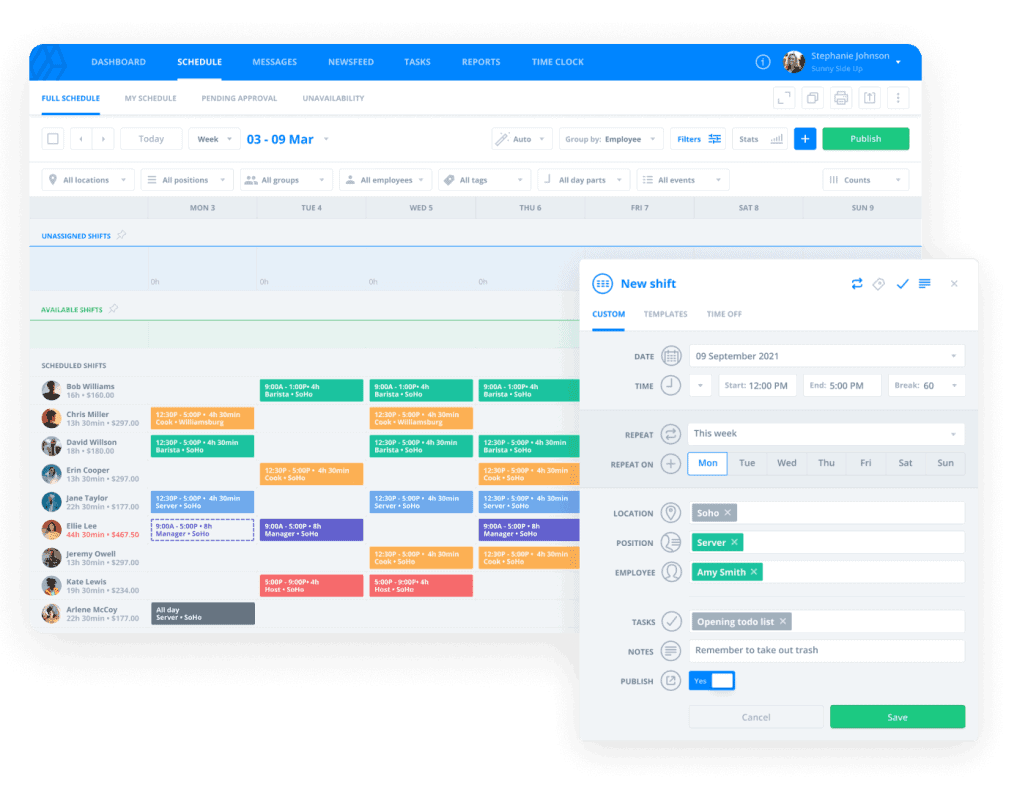
Most scheduling tools treat communication as an add-on — a notification here, a shift reminder there. Sling treats it as a primary feature. Managers can post announcements, send direct messages, and coordinate last-minute coverage without leaving the app, which means fewer things fall through the gap between "group text" and "nobody saw it." Reviewers describe the messaging as the feature that makes the biggest difference day to day. The free plan is capped at 30 users, confirmed by Sling's own help documentation.
What it is: Employee scheduling combined with team communication tools for shift-based businesses.
Key features:
- Visual drag-and-drop scheduling with reusable templates
- In-app messaging — group and direct channels, separate from personal phones
- Task management tied to shifts
- Labor cost management included in paid plans
- Shift swap with approval workflows
Pricing: Free plan, capped at 30 users · Premium $2/user/month (or $1.70/user/month billed annually) · Business $4/user/month (or $3.40/user/month billed annually). 15-day trial on paid plans.
What users like: The communication tools and the free tier are the primary reasons people choose Sling, based on Capterra reviews. Several small retailers mention using the free plan for over a year without needing to upgrade.
What users criticize: No GPS tracking or geofencing for the time clock. Limited customization. No built-in payroll. Several reviews called out the free plan's user cap as a frustrating surprise for teams that had built their workflow around the original limit.
Our take: Sling fits best when your scheduling chaos is really a communication problem — missed shifts because no one saw the update, shift swaps that happen over text and never reach you, last-minute changes that disappear in a group chat. If that's the core issue, Sling handles it well, and the free tier is a real option for teams under 30.
7. Workforce.com
Best for: Retail operations that want scheduling driven by real POS sales data.
Rating: Capterra 4.7 · 41 reviews
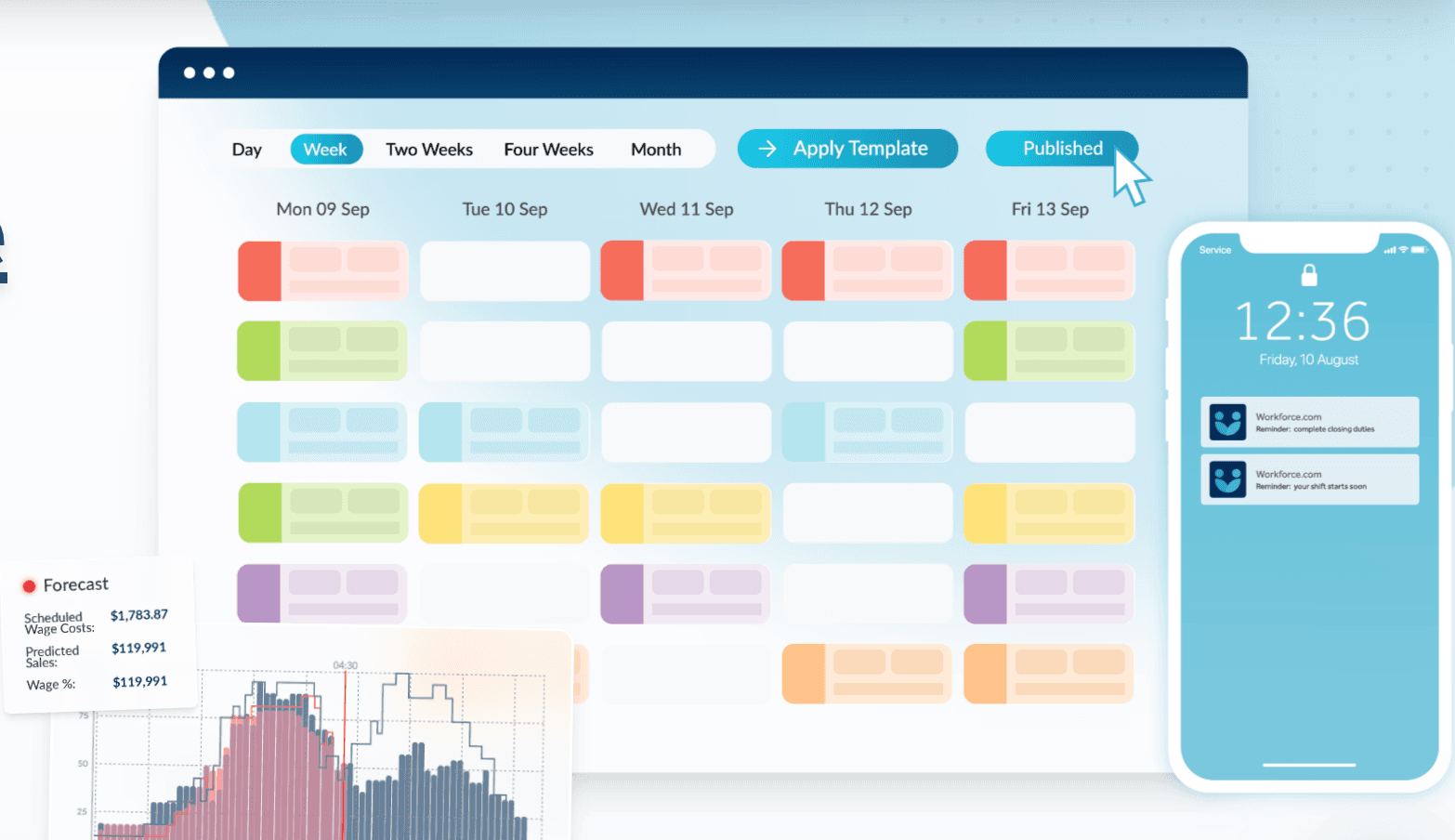
The problem with building schedules by instinct is that instinct doesn't know you're about to have an unusually slow Tuesday or a busier-than-expected Saturday. Workforce.com connects to your POS and uses actual foot traffic and sales patterns to recommend staffing levels throughout the day. It also monitors compliance across locations automatically — flagging Fair Workweek violations, overtime thresholds, and shift clashes before anything publishes.
What it is: A demand-based scheduling and compliance tool built for retail operations across multiple locations.
Key features:
- Demand forecasting tied to POS data — staffing recommendations update based on predicted traffic and sales
- Scheduling conflict prevention — flags overtime, Fair Workweek violations, and shift clashes before publishing
- Time clock app with GPS and photo verification
- Compliance monitoring for break requirements and labor law thresholds by location
- Multi-location dashboard for retail chains
Pricing: Contact Workforce.com for a quote.
What users like: Demand forecasting is the feature that drives most positive reviews on Capterra, particularly for retailers where traffic swings significantly between peak and slow periods.
What users criticize: Pricing opacity is the most consistent complaint — you can't evaluate cost without a sales call. Several reviewers flagged a learning curve getting started, and smaller single-location teams often report feeling like the tool was built for a problem bigger than theirs.
Our take: Worth requesting a demo if you're running 2–5 locations and your schedule feels perpetually off — too many people on slow days, not enough on peak ones. The POS-driven forecasting is the clearest differentiator on this entire list. Single-location operations won't get enough return on the complexity.
8. Humanity (by TCP Software)
Best for: Large retail chains with complex, multi-location scheduling needs.
Rating: Capterra 4.3 · 379 reviews
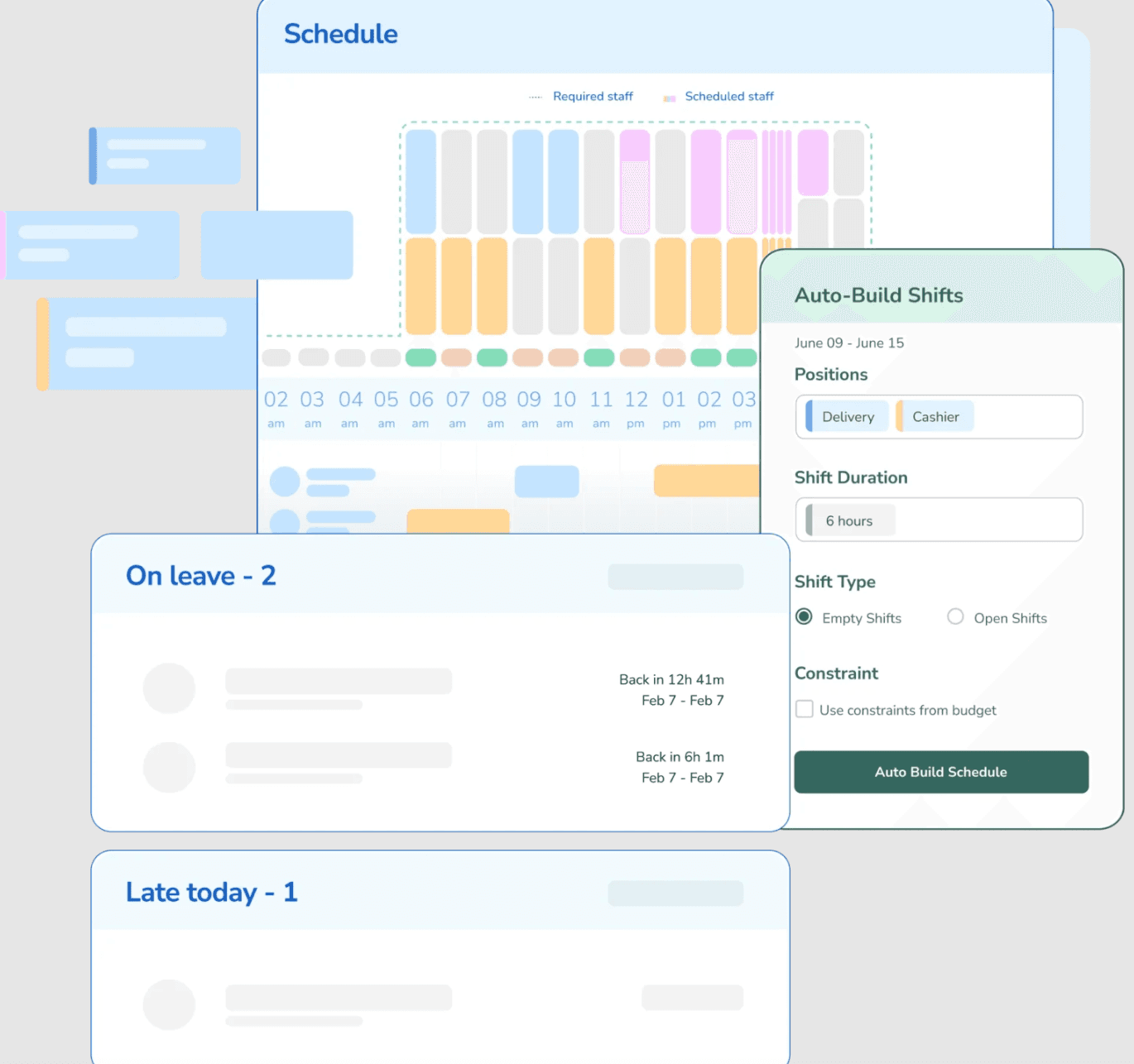
Humanity is the most capable tool on this list by a distance, and the one most likely to be overkill. Its AI-powered Demand Scheduler generates schedules based on historical patterns and demand forecasting — useful for a regional chain managing different labor law requirements across a dozen cities, and more complexity than a boutique with 12 employees will ever need. Reviewers who run large multi-location operations describe it as a time-saver once the tool is fully configured, with the caveat that getting there takes real effort.
What it is: An enterprise-grade scheduling system with AI-driven automation and multi-jurisdiction compliance tools.
Key features:
- AI-powered Demand Scheduler using historical data and demand patterns
- Advanced compliance tracking across multiple labor law jurisdictions simultaneously
- Deep analytics and labor cost reporting for operations teams
- Extensive HR system integrations for enterprise environments
- Employee self-service portal for schedule management and requests
Pricing: Essentials $2.75/employee/month (billed annually) · Professional from $3.75/employee/month (billed annually) · Enterprise: custom quote. See current plan details on the Humanity pricing page.
What users like: Operations teams at scale cite the automation depth and compliance handling as the features that justify the cost. Reviewers on Capterra describe it as well-suited to large multi-location operations.
What users criticize: Steep learning curve, a significant setup timeline, and historically opaque pricing are the most consistent frustrations. Smaller teams repeatedly surface in reviews as people who felt the tool was built for someone else entirely.
Our take: Humanity belongs on the shortlist for retailers with 10-plus locations, multi-state compliance requirements, and a dedicated operations team to own the implementation. Everyone else should look earlier on this list.
What Reddit Says About Retail Scheduling Software
The r/smallbusiness thread on free scheduling apps is worth reading before you decide. It was posted by a small retail shop owner with 8–10 people, a tight budget, and a specific concern: finding something that "won't suddenly lock features behind a massive paywall after a month."
A few things worth noting from the responses. Homebase was recommended directly by name — one commenter described it as covering "scheduling, time tracking/clocks and everything else" with a solid mobile app for shift swaps and reminders. The broader theme across multiple replies was consistent: for a team that size, the bar isn't high. As one commenter put it, "as long as employees can see shifts on their phones and you can edit fast, that's honestly all you need at 8–10 people." The conversation also touched on paywalled free plans being a recurring frustration — several people mentioned apps that advertise "free" but push upgrades quickly.
What the thread doesn't resolve is which specific tool holds up best at that size. The replies surface a range of options beyond those in this guide, which is useful context if the tools above don't fit your situation.
Frequently Asked Questions About Retail Scheduling Software
What is retail scheduling software?
Retail scheduling software is a digital tool that replaces spreadsheets for building and communicating employee work schedules. It tracks availability, handles time-off requests, enables shift swaps, and sends automatic notifications when schedules are published or changed. Most tools connect to time tracking so hours flow to payroll without being re-entered manually at the end of each pay period.
What is the best retail scheduling software?
It depends on your store's size and biggest pain point. Deputy is the strongest choice for compliance-heavy or multi-location operations. When I Work wins on ease of adoption for small teams. Connecteam covers more operational ground for retailers who also need training and communication tools in one place. Most retailers with under 10 employees at one location can start with a free plan and upgrade only when they've genuinely outgrown it.
Is there free retail scheduling software?
Yes. Connecteam is free for up to 10 users. Sling's free plan is capped at 30 users. Deputy and When I Work offer trials rather than permanent free plans. Free tiers typically limit user counts, locations, or advanced features like payroll integration.
How does retail scheduling software help with labor costs?
Good retail scheduling software shows you labor costs updating in real time as you build the schedule — so you see who's approaching overtime before you hit publish, not after payday. Most tools also alert you when scheduled hours exceed your budget target and automatically flag Fair Labor Standards Act (FLSA) overtime thresholds, which require overtime pay for covered nonexempt employees working more than 40 hours in a workweek.
What features should retail scheduling software have?
The non-negotiables: drag-and-drop schedule building, mobile clock-in and clock-out, shift swap and open shift tools, automatic schedule notifications, time-off request management, and overtime alerts. If you operate in a jurisdiction with predictive scheduling laws, the requirements vary: NYC retail requires 72 hours advance notice, Seattle requires 14 days, covered employers in Chicago generally must provide schedules 14 days in advance, with predictability pay for certain employer-initiated changes, and Oregon's statewide law applies to large covered employers across the state. Look for tools that flag violations before you publish, not after.
Does retail scheduling software integrate with payroll?
Many tools connect to payroll providers like QuickBooks, Gusto, or ADP, but supported integrations vary by vendor. Time tracking data flows straight to payroll without manual timesheet entry. Some tools include native payroll with tax calculations and direct deposits built in, which eliminates the integration step and the reconciliation errors that come with syncing two separate systems. Homebase is one of them — payroll is available as an add-on.
How do you make a retail schedule?
Start with your minimum coverage requirements by shift type and day part. Layer in employee availability, approved time-off requests, and role requirements. Check overtime exposure before you publish. Scheduling software speeds this up considerably — most tools can draft a week based on past patterns and current availability in a few minutes, leaving you to review and adjust rather than build from scratch.
The Bottom Line
Retail scheduling sits at the intersection of a labor cost problem, a retention problem, and a communication problem. The schedule you publish isn't just an operational document. It signals to your team how much you respect their time — and that signal shows up in your turnover rate.
The right tool is the one that fits your actual team size, tech comfort level, and biggest scheduling pain point. Start with the free plans where they exist, run a real week on them, and upgrade only when you've genuinely hit the ceiling.
"I love the ease of making my team's schedule every week. I can do it from my phone wherever I'm at — and that's a game changer for someone who's always on the move like myself!"
Try Homebase free — build your first schedule in minutes. No credit card required.