Best Scheduling Software for Service Technicians in 2026

SMALL BUSINESS INTEL, IN YOUR INBOX
Table of contents
Running a field service team means your schedule is never really settled. A job runs three hours over. A tech calls in sick at 7am. An emergency call lands at midday. Suddenly you're on the phone rerouting three people while a customer sits in a service window you can no longer hit.
According to Salesforce's field service trends research, 47% of field service appointments don't go as planned, typically because of customer miscommunication, missing parts, or inaccurate scheduling assumptions. Most small service businesses absorb that breakdown through group texts and spreadsheets. The cost doesn't show up in one place. It shows up scattered across callbacks, late arrivals, and techs who find out their schedule changed when a customer calls them instead of you.
Scheduling software for service technicians puts the whole operation in one view: who's available, what's assigned, and what changed in the last hour. When a job runs long or a tech is out, the right tool lets you reassign in seconds and push the update to your team's phones without a single call.
This guide ranks the five tools that small and mid-sized service businesses actually use in 2026, covering what they cost, where each one fits, and where each one falls short.
The Short List: Scheduling Software for Service Technicians in 2026
- Homebase: Best for small service and technical businesses with hourly teams who want scheduling, team messaging, time tracking, payroll, and hiring all on one app
- ServiceTitan: Best for established HVAC, plumbing, and electrical contractors that need dispatch, CRM, and invoicing in one place
- ServiceTrade: Best for commercial contractors managing inspections and recurring maintenance contracts
- FieldPulse: Best for growing field service teams that want FSM features without enterprise pricing
- Workyard: Best for trade teams where GPS-verified time tracking matters as much as scheduling
- Jobber: Best for small home service businesses managing jobs from quote through invoice
Why Trust Homebase? Why We Built This Guide
We're Homebase, and we make free employee scheduling, time tracking, and HR tools for small businesses with hourly teams.
We have a stake in this topic, and we want to be upfront: Every tool was evaluated on its own merits. We never accept payment or backlinks for a product mention. If you want to see how we fit in, there's a publisher note below the comparison section.
We built this guide because field service scheduling is a real purchasing decision, and small business owners deserve a straight look at what's available.
How We Chose These Tools
We evaluated tools that appeared in organic search results and G2/Capterra categories for field service management software. We also reviewed discussions across trade subreddits covering HVAC, locksmith, electricians, handyman, and small business operations, including threads where service business owners described what they'd tried, what broke down, and why they switched.
Our criteria:
- Dispatch capability: Can managers assign jobs, view tech availability, and push real-time updates from one place?
- Mobile experience for technicians: Can field techs view their schedule, job details, and updates from their phone, including offline?
- Scheduling features: Drag-and-drop scheduling, availability and time-off visibility, job notes attached to each assignment
- Pricing fit: Does the pricing work at small business scale without an enterprise-tier commitment?
- User review patterns: We aggregated verified reviews from G2 and Capterra, weighting patterns across multiple reviews over individual anecdotes
This guide was reviewed by Kerry McCreadie, Senior Manager of Organic Growth at Homebase, with experience covering scheduling, HR, and field operations tools for small businesses. Read our full methodology.
How the Top 3 Scheduling Tools for Service Technicians Compare
ServiceTitan
- Price: Custom pricing. Demo required.
- Free tier: No
- Best for: Established HVAC, plumbing, electrical operations
- Setup time: Weeks (onboarding-intensive)
- Key integrations: QuickBooks, Google Calendar, Stripe
ServiceTrade
- Price: Custom pricing. Contact for a quote.
- Free tier: No
- Best for: Commercial contractors, inspections, maintenance contracts
- Setup time: 1-2 weeks
- Key integrations: QuickBooks, Intacct
FieldPulse
- Price: From $49/month (solo); team plans $99-$249/month
- Free tier: No (14-day free trial available)
- Best for: Small to mid-sized field service teams (1-20 techs)
- Setup time: Days
- Key integrations: QuickBooks, Stripe, Google Calendar
The 6 Best Scheduling Tools for Service Technicians in 2026
Each tool below is evaluated on the same criteria: dispatch capability, mobile experience, scheduling features, pricing fit, and user review patterns across G2 and Capterra. The picks are ordered by operational scale, starting with the most enterprise-heavy and working down to tools built for smaller crews.
1. Homebase
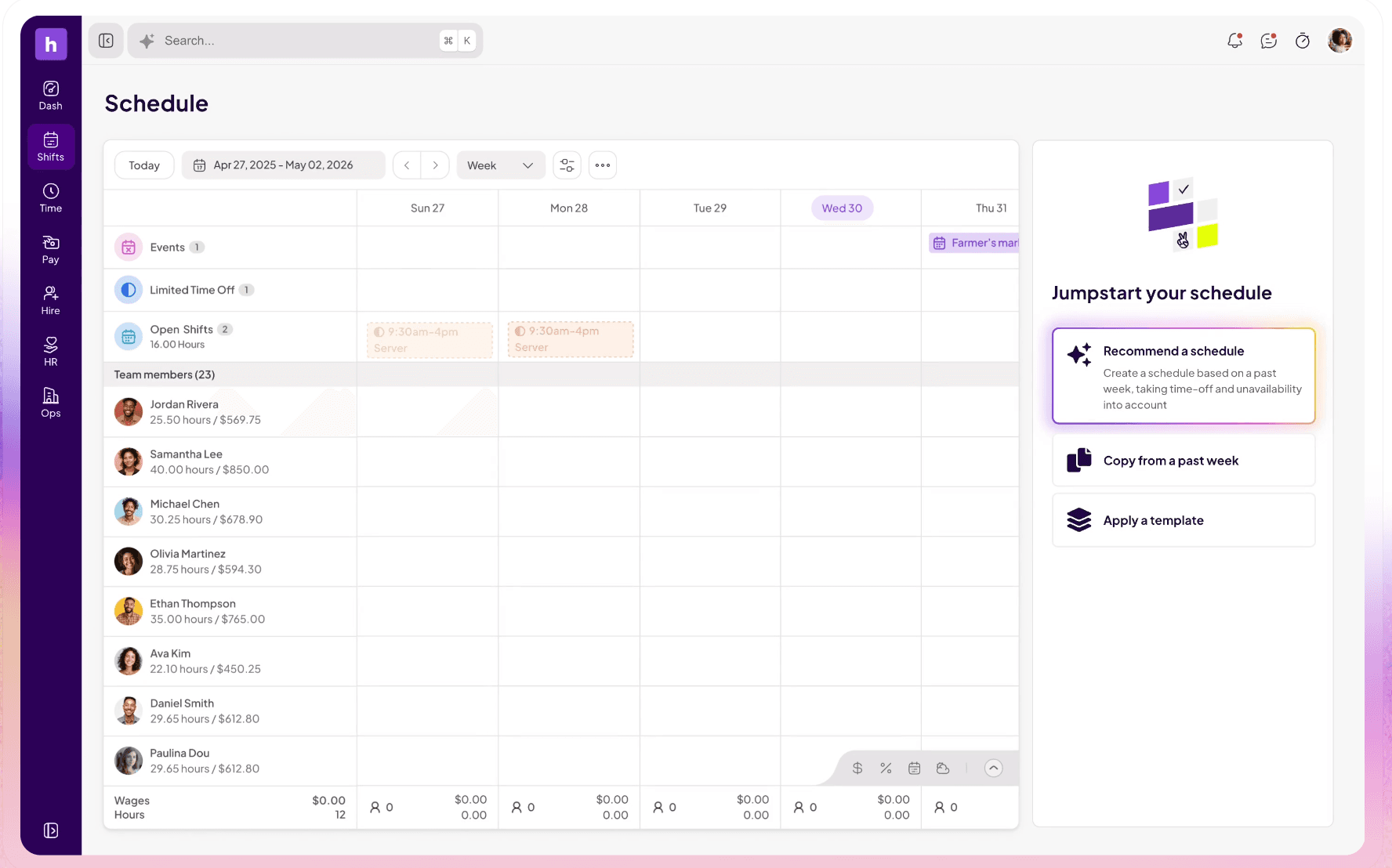
Homebase is built for small businesses with hourly teams: restaurants, retail shops, healthcare offices, and service businesses with crews of 2-50. It's not field service management software, so there's no work order management, customer invoicing, or asset tracking.
What it does include:
- Price: Free for up to 10 team members at one location. Paid plans for larger teams.
- Free tier: Yes, up to 10 team members at 1 location
- Best for: Small hourly teams that need employee scheduling, time tracking, and team messaging without a full FSM suite
- Setup time: Minutes
If your business needs job dispatch, CRM, invoicing, and work order management, the tools ranked below are the right category. If you're running a small service team and your main problem is coordinating who's working when and getting updates to your team's phones, Homebase is worth a look.
2. ServiceTitan
Best for: HVAC, plumbing, and electrical contractors with established operations and five or more technicians.
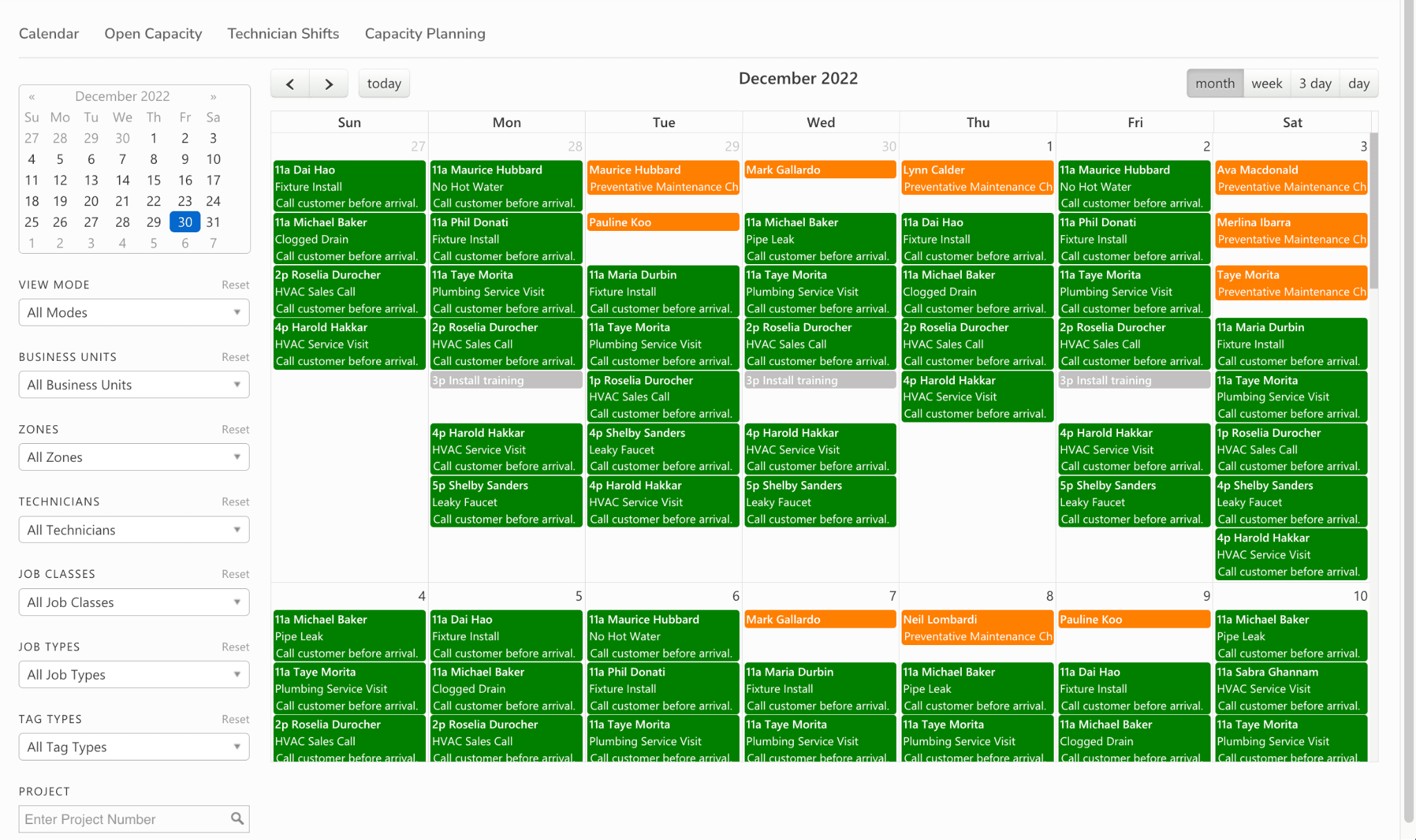
ServiceTitan is a field service management system built for trade contractors. It handles scheduling, dispatch, CRM, invoicing, and reporting in one place, and is used by residential and commercial contractors who've outgrown simpler tools and need a single system covering the full job lifecycle. If you're running a multi-tech operation with recurring service agreements, ServiceTitan is built for that scale.
What it is: A field service management system for HVAC, plumbing, electrical, and other trade businesses. Covers scheduling, dispatch, customer CRM, invoicing, and performance reporting.
Key features:
- Drag-and-drop dispatch board with real-time technician location
- Customer CRM with full service and equipment history per job site
- Mobile app for techs: job notes, checklists, photo capture, payment collection, and customer signatures
- Invoicing and payment processing built in
- Pricebook and estimate tools
- Reporting on technician performance, revenue, and job completion rates
Pricing: Custom, no public rates, demo required.
What users like: G2 reviewers consistently praise ServiceTitan for bringing scheduling, dispatch, CRM, invoicing, payments, reporting, and marketing into a single system. Many say the biggest benefit is eliminating the need to switch between multiple tools, and also highlight its customization options and visibility into business performance. (G2, Capterra)
What users criticize: Across G2 and Capterra, the most common complaints are the steep learning curve, lengthy onboarding process, high overall cost, and inconsistent customer support experiences. Some reviewers also mention that reporting customization and certain integrations require additional setup or refinement. (G2)
What service business owners say on Reddit: ServiceTitan comes up most in conversations about larger operations. Small business owners consistently say the best scheduling software is the one their technicians actually use, and several note that enterprise platforms like ServiceTitan can feel like more than they need when the team is still small. The owners who stick with it are running 10+ techs with recurring agreements that justify the onboarding investment. (r/smallbusiness, r/Locksmith)
Our take: ServiceTitan earns its position for established contractors running complex multi-tech operations with high job volume and recurring service agreements. The weeks-long onboarding and enterprise pricing make it the wrong starting point for a 2-5 tech crew still getting off spreadsheets. Start with FieldPulse or Workyard and grow into ServiceTitan when the operation justifies it.
3. ServiceTrade
Best for: Commercial service contractors managing inspections and maintenance contracts across HVAC, fire protection, refrigeration, and mechanical.
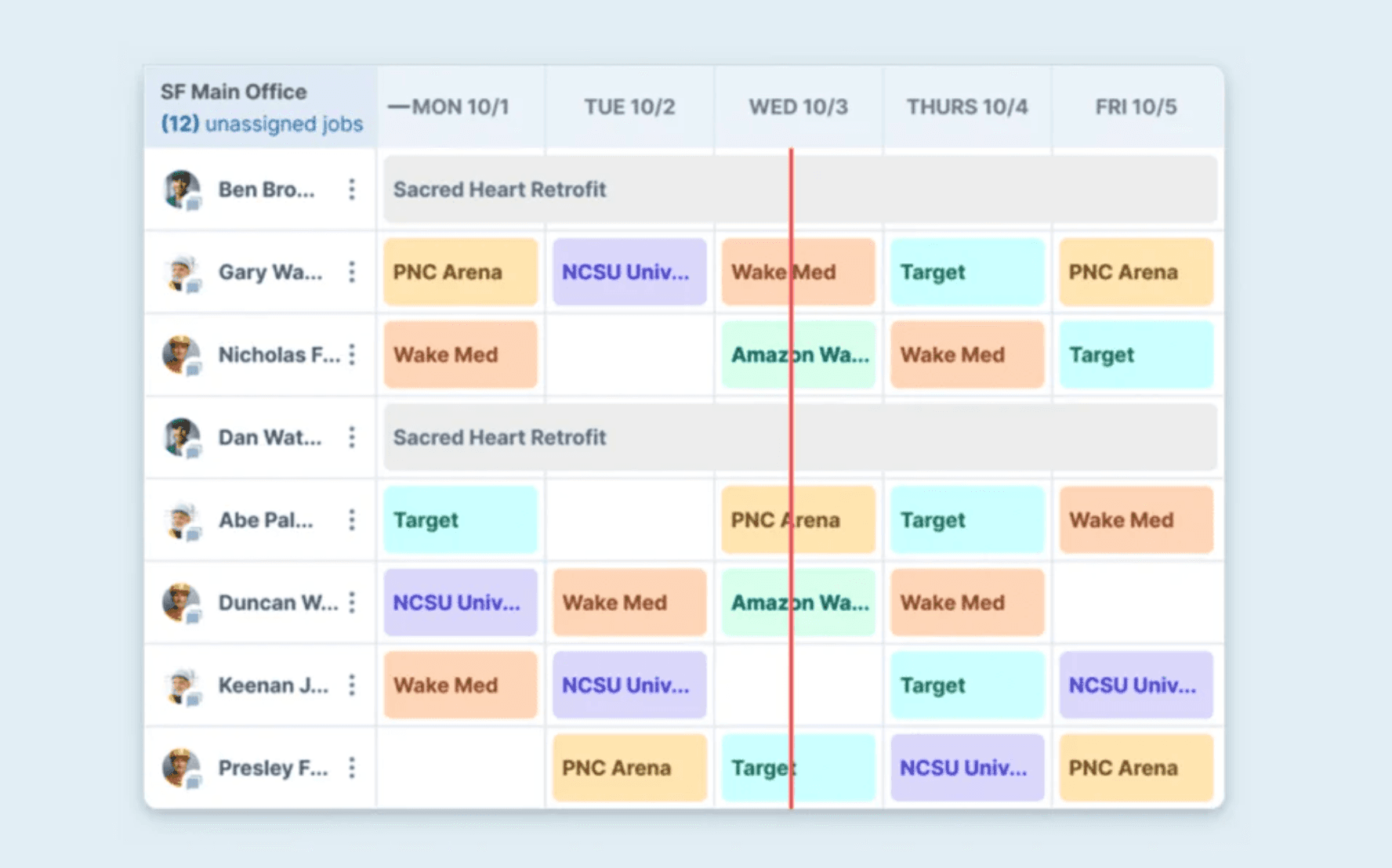
ServiceTrade is built for commercial contractors who run recurring service agreements and need tight field-to-office communication. Where ServiceTitan skews residential, ServiceTrade's core is commercial: asset tracking, inspection management, and the tools that keep contract-driven service operations running without constant manual coordination between the office and the field. If you're looking for field service scheduling software purpose-built for commercial accounts rather than residential jobs, ServiceTrade is the strongest option in this list.
Rating: G2 4.5/5 (56 reviews) · Capterra 4.6/5 — G2 · Capterra. Named a 2025 "Best Ease of Use" product in the Service Dispatch category on Capterra.
What it is: A field service management tool for commercial contractors, centered on inspections, service agreements, and asset management.
Key features:
- Scheduling and dispatch with drag-and-drop interface and map view
- Real-time technician tracking for dispatchers
- Asset management with full service history per piece of equipment
- Mobile app for techs: job details, photos, checklists, and inspection forms
- Sales CRM and proposal tools for service contract management
- Customer portal for self-service service history access
- Integrations with QuickBooks and Intacct
Pricing: Custom, contact ServiceTrade for a quote. No public pricing.
What users like: Reviewers consistently highlight ServiceTrade's commercial-service workflow, particularly its asset history, inspection documentation, technician photo capture, and mobile access to service records. Businesses managing recurring maintenance contracts frequently note how easily technicians can document work in the field. (G2, Capterra)
What users criticize: The most common themes are limited pricing transparency before sales conversations, reporting that can require additional customization, and a product experience that fits commercial contractors better than residential service companies. (G2)
Our take: If your business runs on maintenance contracts, recurring inspections, and commercial accounts, ServiceTrade is purpose-built for that workflow in a way that general FSM tools aren't. The commercial focus that makes it strong for fire protection or refrigeration contractors also makes it a poor fit for residential HVAC or home service operations. Match the tool to the operation type before requesting a demo.
4. FieldPulse
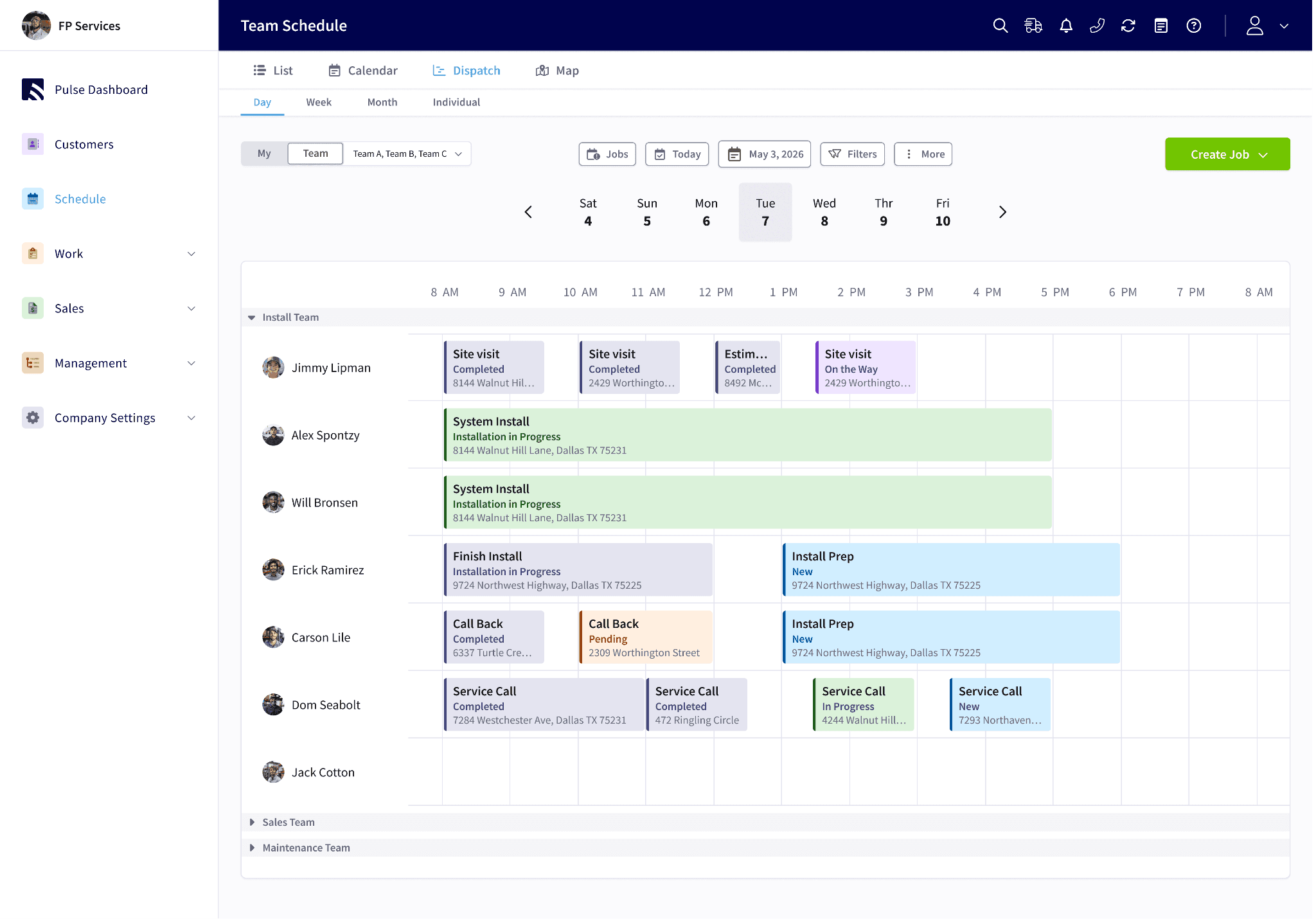
Best for: Small to mid-sized field service businesses in HVAC, plumbing, electrical, and pest control that want comprehensive FSM features without enterprise cost or complexity.
FieldPulse is an all-in-one field service management tool for smaller contractors. It combines scheduling, dispatch, CRM, invoicing, and estimates in a single product, and on the base plan, pricing doesn't scale linearly per user. That's a real advantage for growing teams where headcount is increasing faster than revenue. It's the tool that comes up most often in small business forums when owners ask what sits between "too simple" and "too expensive." For HVAC business software at small-team scale, FieldPulse is consistently the most-cited mid-tier option.
What it is: An all-in-one field service management tool for small and growing service businesses. Covers scheduling, dispatch, CRM, invoicing, estimates, and time tracking.
Key features:
- Drag-and-drop scheduling with daily agenda, Gantt, and map-based views
- GPS-based nearest-tech assignment to minimize travel time
- Mobile app for iOS and Android, with offline mode supported
- Estimates and invoicing with a client-facing portal
- Customer CRM with full job history
- Multi-team scheduling for businesses running multiple crews or locations
- QuickBooks Online integration for invoices, customers, and payments
Pricing: From $49/month (solo); team plans from $99-$249/month. Annual discount available. No free tier, but a 14-day free trial is available with no credit card required.
What users like: Reviewers frequently point to FieldPulse's responsive customer support, guided onboarding, mobile experience, and all-in-one approach to scheduling, CRM, estimates, and invoicing. Many small businesses describe it as offering a strong balance between capability and ease of use, without the complexity of larger enterprise tools. (G2, Capterra)
What users criticize: Recurring feedback includes having to navigate multiple screens to view all information for a single job, occasional software issues after updates, and requests for deeper reporting and workflow customization. Some reviewers also mention slower resolution of long-standing feature requests. (Capterra)
What service business owners say on Reddit: FieldPulse comes up frequently when owners ask what's available below ServiceTitan pricing. A recurring pain point across Reddit threads is maintaining customer information, job status, and schedules across multiple disconnected tools, and FieldPulse's all-in-one model addresses that directly. Mobile reliability matters a lot to owners whose techs work in the field without desktop access, and FieldPulse's offline mode gets called out specifically for this. (r/smallbusiness, r/smallbusiness)
Our take: FieldPulse fills a real gap between simple scheduling tools and full enterprise FSM. It's a strong fit for a 3-20-tech service business that needs job management, CRM, and invoicing without ServiceTitan's setup commitment or pricing. The mobile app's offline functionality is a practical advantage for techs working in basements or on rural routes. As operations grow, the interface shows its complexity, and information architecture is a legitimate complaint from heavier users.
5. Workyard
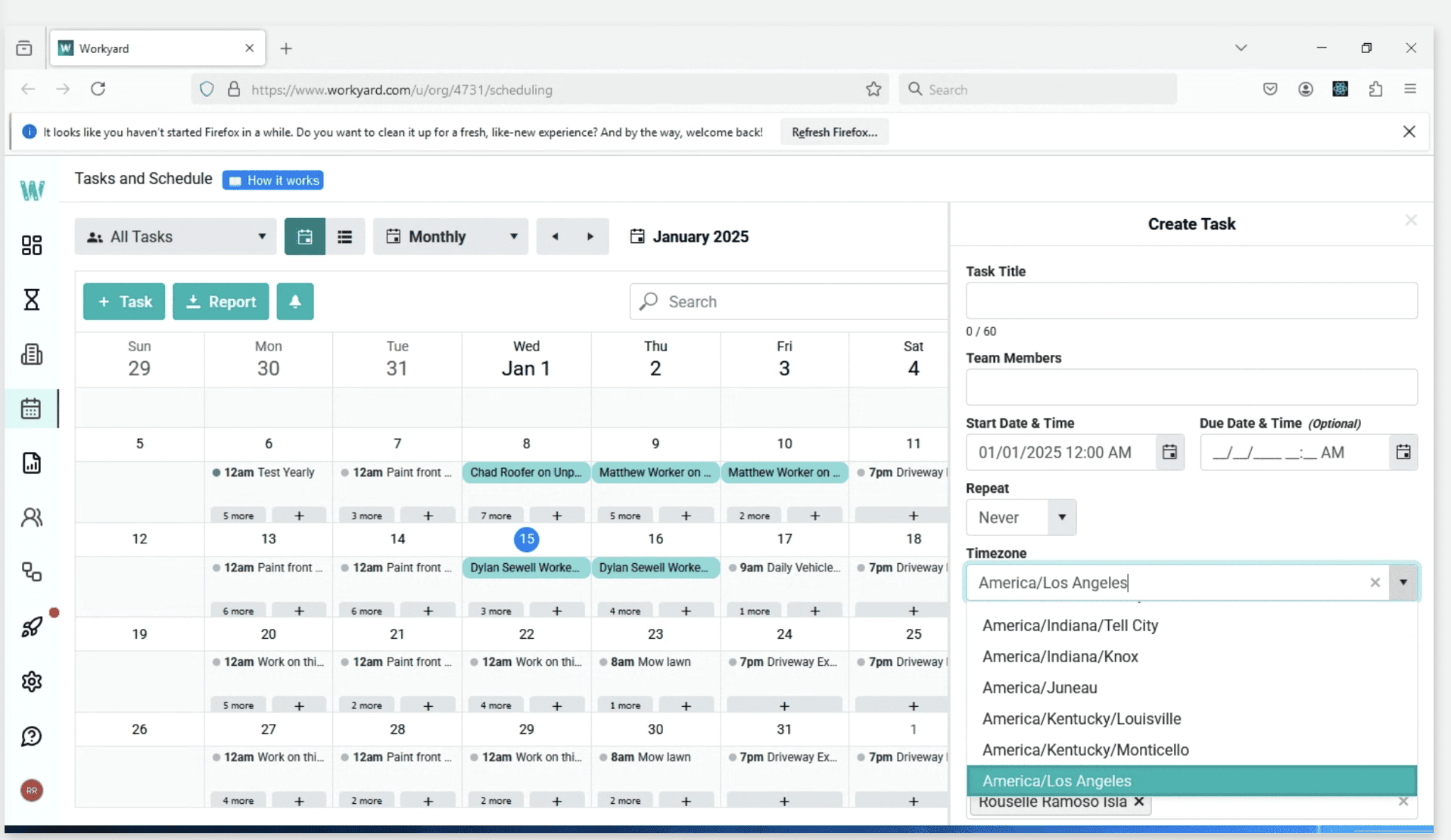
Best for: Construction crews and trade teams where GPS-verified time tracking and job costing matter as much as scheduling.
Workyard is a crew management tool built around labor accuracy. Its core is GPS-verified time tracking: field workers clock in from their phone, and the app records arrival and departure times, travel routes, and mileage, assigning every hour to the right job or cost code. Scheduling is a strong secondary feature, but Workyard isn't a full FSM replacement. For teams doing construction time tracking or managing trade crews across multiple job sites, Workyard handles the labor accuracy side in a way that scheduling-first tools don't.
Rating: G2 4.8/5 (349 reviews) · Capterra 4.8/5 — G2 · Capterra. Capterra reviewers highlight GPS tracking accuracy and job costing as the core value drivers.
What it is: A crew management tool for field teams, built around GPS time tracking, job costing, and payroll-ready timesheets. Strong scheduling features, but no customer invoicing or CRM.
Key features:
- GPS-verified clock-in/clock-out with automatic job site detection via geofencing
- Real-time crew location on map view for dispatchers
- Drag-and-drop job scheduling with assignment notes and checklists
- Offline time tracking that syncs when connectivity returns
- Break and overtime rule enforcement built in
- Job costing with cost code assignment per hour entry
- Payroll export to QuickBooks, ADP, Gusto, Procore, and 20+ integrations
Pricing: Starter: $8/user/month plus $50/month base fee (monthly) or $6/user/month plus $50/month base fee (annual). Pro: $16/user/month plus $50 base (monthly) or $13/user/month plus $50 base (annual). Enterprise: custom.
What users like: Capterra reviewers consistently praise Workyard's GPS time tracking, automated timesheets, payroll preparation, and job costing. Many say the software saves administrative time by reducing manual time entry while giving managers greater confidence in field attendance. (G2, Capterra)
What users criticize: The most common concerns are pricing for very small businesses, since the monthly base fee plus per-user pricing adds up quickly at small team sizes. Reviewers also note that Workyard focuses on workforce management rather than customer-facing capabilities like CRM, quoting, or invoicing. (Capterra)
Our take: Workyard is the right choice when labor accuracy is the priority: construction contractors, trade businesses with compliance requirements, or any service operation where GPS time verification and job costing matter alongside scheduling. It's not the right call if you need customer management or invoicing. The $50 monthly base fee changes the per-user math at very small team sizes, so run the numbers for your specific headcount before committing.
6. Jobber
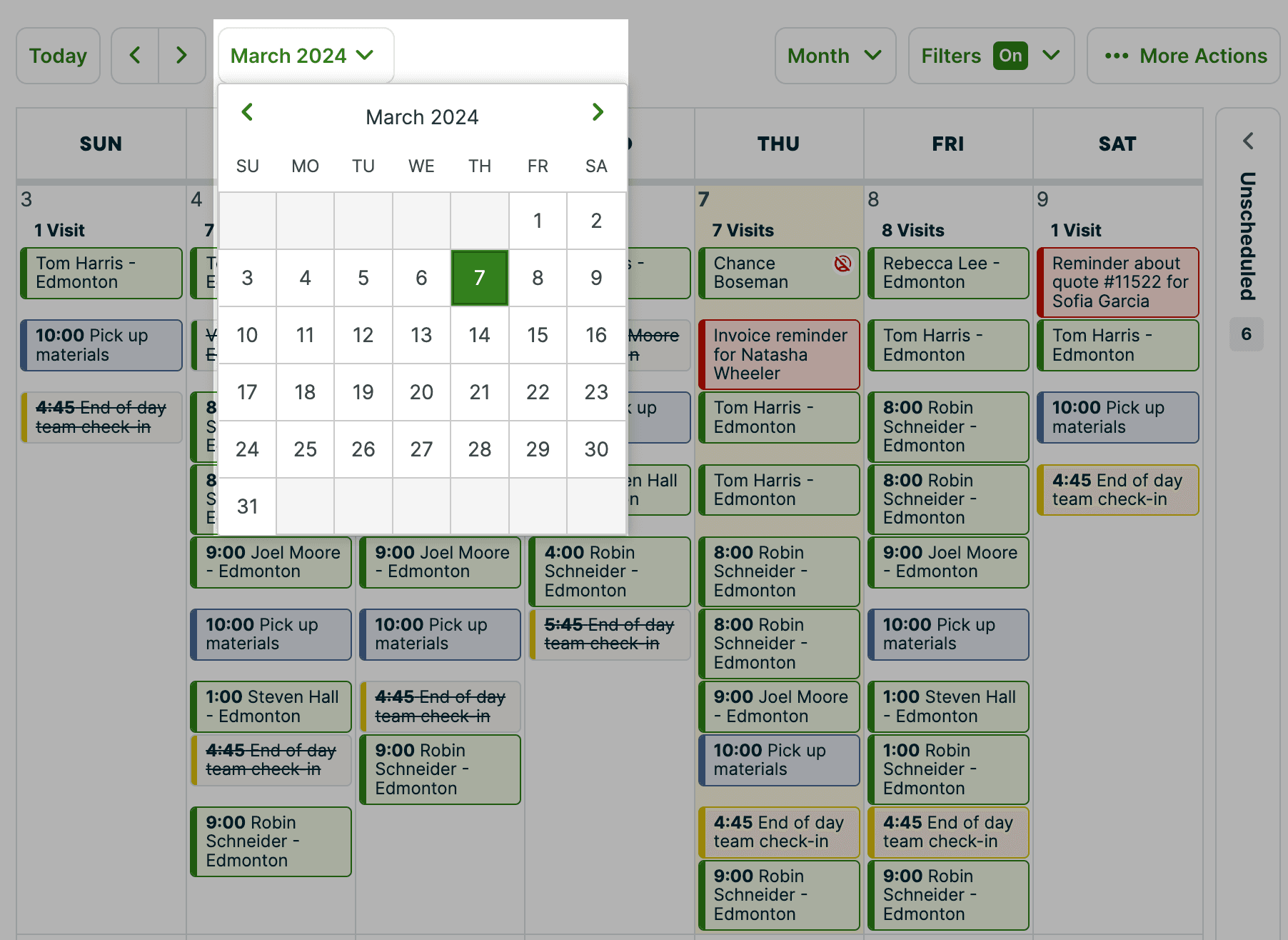
Best for: Small home service businesses in landscaping, cleaning, plumbing, and pressure washing that manage jobs from quote through invoice.
Jobber is a job management tool built for home service businesses running field operations. It handles the full job lifecycle: quote, schedule, dispatch, and invoice, with a client-facing hub for customer communication. It's built for owner-operators and small crews, not for complex dispatch operations or commercial service contracts. If you're a small plumbing or cleaning operation looking for plumbing scheduling software with a short ramp time, Jobber is built for that entry point.
What it is: A job management tool for home service businesses, covering quoting, scheduling, dispatch, client communication, and invoicing in one product.
Key features:
- Drag-and-drop scheduling calendar
- Route optimization for multi-stop service days
- Client hub: customers can view quotes, approve work, and pay online
- Mobile app for techs: job details, notes, before-and-after photos
- Automated client reminder emails and texts
- Invoicing and online payment collection
- QuickBooks and Stripe integrations
Pricing: Core from $49/month (1 user); Connect from $129/month (up to 5 users); Grow from $249/month (up to 15 users). Annual billing discounts available.
What users like: Reviewers consistently describe Jobber as easy to learn and easy to implement. They frequently praise its scheduling, quoting, invoicing, automated client reminders, and customer portal, saying these features help small service businesses reduce admin work while presenting a more professional customer experience. (G2, Capterra)
What users criticize: Common complaints focus on reporting depth, scheduling flexibility for larger operations, and limitations once businesses grow into multiple crews or more complex commercial workflows. Some reviewers also mention wanting more customization around job notes and reporting. (Capterra)
What service business owners say on Reddit: Jobber and Housecall Pro come up in nearly every scheduling software thread as the starting reference points. Owners who've used them describe both as solid for small residential crews but limited once complexity grows. Route optimization and recurring scheduling are two features that come up frequently as buying triggers across locksmith and HVAC threads. Device compatibility also matters: several business owners said they ruled out products that didn't support the Android phones their techs already carried. (r/Locksmith, r/handyman)
Our take: Jobber works best for sole operators and small residential service crews of 1-5 techs who want a short ramp time and a solid job-to-invoice flow. If your business is growing toward commercial contracts, multi-crew dispatch, or complex recurring maintenance agreements, you'll likely outgrow Jobber faster than FieldPulse or ServiceTrade.
What Real Service Business Owners Are Saying
Across Reddit threads in r/smallbusiness, r/handyman, r/electricians, r/Locksmith, and r/Businessowners, the same problems come up in nearly every scheduling software discussion. These patterns are more useful than any single product review.
Most businesses start in spreadsheets. Nearly every discussion begins with someone managing customers in Excel, Google Sheets, Google Calendar, or on paper. Owners say they reached the tipping point when recurring service visits, multiple technicians, or emergency jobs made spreadsheets unworkable. The jump to automated scheduling software usually happens when something falls through the cracks: a double-booked tech, a customer who never got a reminder, or a job that got lost between tools. (r/smallbusiness)
Simplicity beats feature bloat. Small business owners consistently say the best scheduling software is the one their technicians actually use. Many prefer simpler scheduling tools over enterprise FSM platforms with features they don't need. One recurring theme: owners who evaluated Housecall Pro, Jobber, and KickServ found they all did too much because the business had already sorted invoicing, GPS, and time clocks separately and just needed dispatch and scheduling. (r/smallbusiness)
Cost is the biggest complaint at small scale. Owners frequently say enterprise field service software becomes hard to justify for teams with only a handful of technicians. The $200/month threshold comes up repeatedly as the point where part-time or side-business operators stop looking. Several owners running side businesses noted that the tools work well operationally but don't make financial sense at lower job volumes. (r/Locksmith, r/electricians)
Route optimization is a real buying trigger. Especially for locksmiths, HVAC techs, and mobile service businesses covering multiple territories, owners ask for the ability to assign the nearest technician, avoid backtracking, and handle recurring service reminders automatically. When a tool can't do this, they start looking. (r/smallbusiness)
Device compatibility can decide the purchase. Several business owners said they eliminated products outright because they required iPhones and their techs were already on Android. This came up most strongly in the locksmith thread and is a real constraint for teams where the owner doesn't control what device each tech uses. (r/Locksmith)
Mobile access matters more than desktop features. Owners repeatedly say their techs need something that works in the field, not software that requires returning to the office. Tools that function as true field service scheduling apps with offline mode come up as differentiators. Those that require a PC for anything beyond basic signoffs get flagged as a problem. (r/smallbusiness, r/Businessowners)
Scheduling Software for Service Technicians FAQs
What does scheduling software for service technicians do?
Scheduling software for service technicians helps field service businesses plan, assign, and update technician schedules in one place, replacing spreadsheets and group texts with a shared digital system. It gives managers a live view of who's available and what jobs are assigned, and lets them push real-time updates to techs' phones when something changes. Most tools built for field service also include job notes, customer history, and mobile access so techs have the full picture before they arrive on site.
What's the difference between scheduling software and field service management software?
Scheduling software focuses on job assignment, employee availability tracking, and real-time coordination. Field service management (FSM) software is broader, adding invoicing, customer management, work orders, asset tracking, and often CRM. Reddit discussions suggest many small businesses prefer starting with simpler work schedule apps and only moving to full FSM once they need inventory, invoicing, or advanced work order management. If you've already sorted those separately, a scheduling-first tool may be all you need right now.
How many technicians do I need before scheduling software is worth it?
Based on discussions from small business owners, most start looking for scheduling software once they have two or more technicians or recurring service visits that become difficult to manage in spreadsheets. The tipping point is usually when something falls through the cracks: a missed appointment, a double-booking, or a tech who found out their schedule changed from the customer instead of you. Solo operators often manage with Google Calendar until that happens. (r/smallbusiness)
How much does scheduling software for service technicians cost?
Costs vary widely. Simpler tools for small teams start around $49/month. Mid-tier FSM tools like FieldPulse run $99-$249/month for growing teams. Enterprise tools like ServiceTitan and ServiceTrade use custom pricing that requires a demo call. Workyard charges per user ($6-$16/user/month) plus a $50/month base fee. Most SMB-focused options offer no permanent free tier, though free trials are common. For part-time or side businesses, $200+/month is a hard threshold, and several owners in Reddit discussions said the tools worked fine operationally but couldn't be justified at their job volume.
What's the biggest complaint about field service software?
Cost and complexity. Small business owners frequently say enterprise platforms can be expensive and include more functionality than smaller teams actually need. The second most common complaint is that information lives in too many places. Owners describe juggling Google Calendar, QuickBooks, spreadsheets, and separate invoicing systems with no single source of truth for job status and customer history. (r/Locksmith)
How do I schedule service technicians more efficiently?
Start by identifying where your schedule breaks down most: double-bookings, missed update communication, or uneven workload distribution. Then choose a tool that solves that specific problem first. Understanding how to make an employee schedule that accounts for real field constraints like travel time, job duration, and tech availability is the foundation before any software can help. From there, look for drag-and-drop scheduling, real-time push notifications when assignments change, and a mobile time clock that works offline.
What scheduling software works for HVAC technicians?
ServiceTitan and ServiceTrade are purpose-built for HVAC operations. Both handle dispatch, recurring maintenance agreements, and customer service history at the scale HVAC businesses typically need. ServiceTitan is better suited to residential operations, while ServiceTrade is stronger for commercial accounts and inspection-heavy workflows. FieldPulse is a strong fit for smaller HVAC contractors that want FSM features without enterprise pricing. Workyard works well for HVAC teams where GPS time clock tracking and job costing are priorities alongside scheduling.
Is there free scheduling software for service technicians?
Most dedicated field service management tools don't offer a permanent free tier, since the category is complex enough that free plans are rare. Free trials of 14 days are common and give you enough time to run test jobs before committing. Homebase offers a free scheduling app for up to 10 team members at one location, a practical starting point for small service teams that don't need full FSM features like invoicing and work orders.
Ready to simplify scheduling for your service team?
The right tool depends on where your operation is today. If you're running 10+ techs with recurring service agreements, ServiceTitan or ServiceTrade will handle the complexity. If you're a growing crew of 3-20 that needs job management, CRM, and invoicing without the enterprise price tag, FieldPulse is worth a serious look. And if you're a small residential crew that just needs to get from quote to invoice without a steep learning curve, Jobber gets you there fast.
If your main problem is coordinating who's working when, getting schedule updates to your team's phones, and tracking hours without chasing people down, that's where Homebase fits in. It's free for up to 10 team members and takes minutes to set up. Try Homebase free, no credit card required.