Compare Homebase to Deputy
Discover how Homebase stands out against competitors in team management solutions for your business.
Compare
See How We Stack Up
Discover the advantages of Homebase over Deputy.
Homebase | Deputy | |
|---|---|---|
Build your weekly schedule | ||
Clock in on tablets, computers & POS Devices | ||
Customize overtime & break preferences | ||
Manage availability & time off requests | ||
Allow employees to trade, cover and claim open shifts | ||
Manage and store timesheets for 4+ years | ||
Payroll Integrations | ||
Offer flexible pay benefits to your team, like Cash Out | ||
In-app team messaging with custom channels and read receipts | ||
Manage employee recruiting, hiring, and onboarding | ||
Manage HR & compliance | ||
Get live support from certified HR Advisors |
Trusted by 150,000+ small businesses and their teams.


Why businesses choose Homebase over Deputy
Real numbers, real results. Hourly teams thrive with Homebase.
Scheduling
275 MILLION
Shifts logged on Homebase Scheduling
Time Clock
1 BILLION
Hours tracked with Homebase Time Clock
Payroll
4 MILLION
Paychecks processed with Homebase Payroll
A closer look at Homebase
Simplify scheduling, time clocks, and payroll all in one app. Manage your team with messaging and HR built for small business.
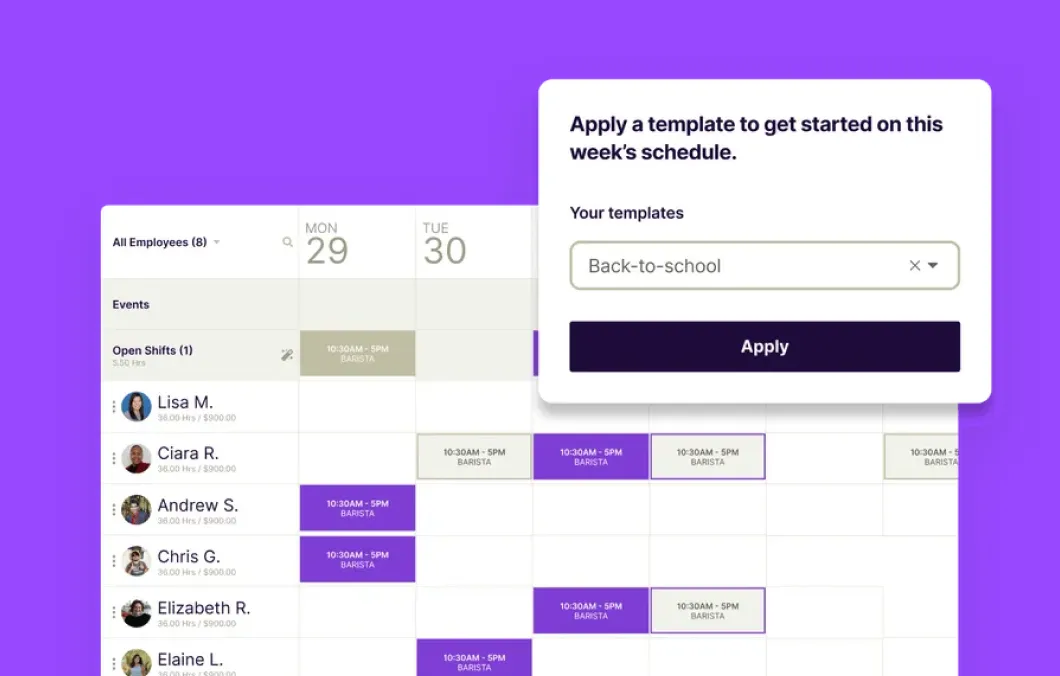
Employee scheduling

Our employee scheduling software helps you create your perfect schedule in minutes.
- Use templates and auto-scheduling to set it and forget it
- Manage team availability and time off to avoid scheduling conflicts
- Quickly find coverage: Post open shifts for employees to claim
Time tracking
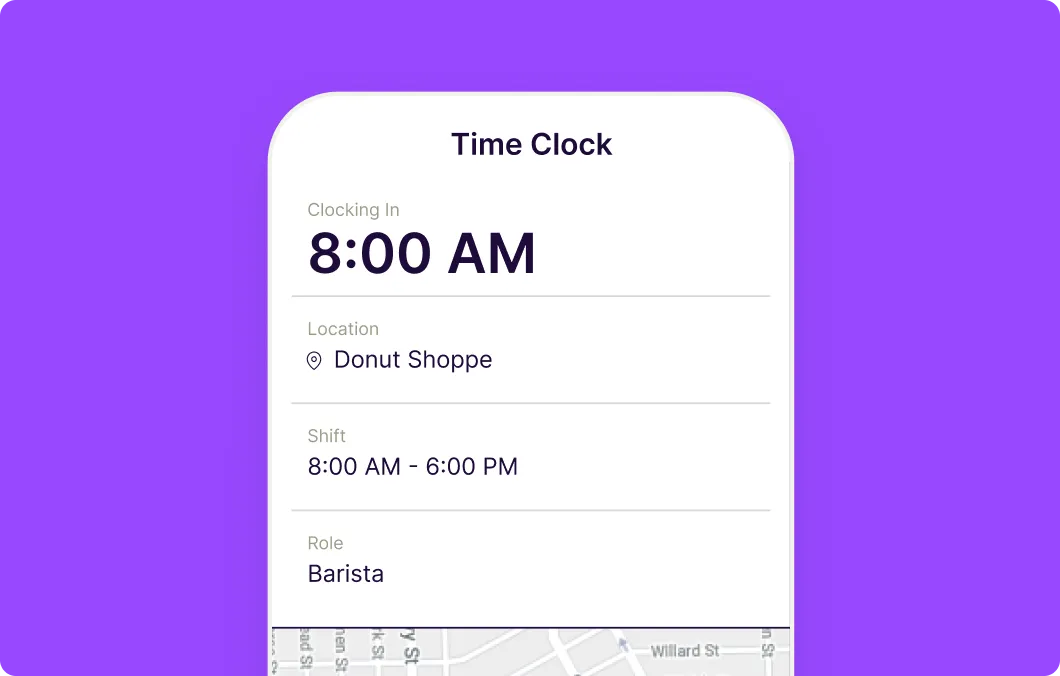
Track time from (almost) any device.
- Track hours, breaks, overtime, and paid time off — without doing data entry or math
- Put your time clock on Android tablets and smartphones, iPads and iPhones, computers, and POS devices
- Get alerts when employees are late for shifts so you can keep your team on track
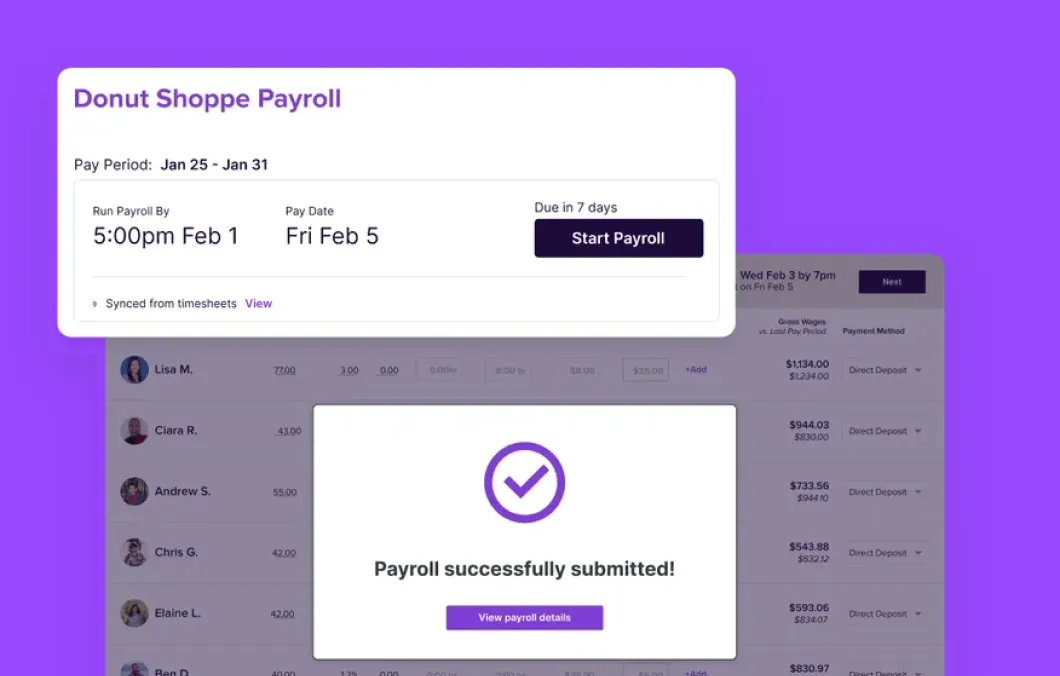
Payroll

Run payroll without doing math.
- No more spreadsheets: automatically calculate hours, breaks, overtime, PTO, and wages
- Let us handle your tax calculations, send direct deposits, and file your payroll taxes
- Take payroll off your plate completely with auto-payroll
Team Communication
Stay connected as a team with team messaging.
- Message individuals, groups, or the entire team without juggling texts and emails
- Instantly create groups for quick requests, like "everyone working today" or "all keyholders"
- Never miss the newbie. New team members get added automatically on Day 1 - no need to exchange phone numbers and update the group chats
Hiring and Onboarding
Fast-track your hiring
- Get a headstart with pre-filled and customizable job descriptions
- Post your job for free to multiple top online job boards
- Allow walk—ins and referrals to apply right from their phones.
Stay connected as a team with team messaging.
- Message individuals, groups, or the entire team without juggling texts and emails
- Instantly create groups for quick requests, like "everyone working today" or "all keyholders"
- Never miss the newbie. New team members get added automatically on Day 1 - no need to exchange phone numbers and update the group chats
Fast-track your hiring
- Get a headstart with pre-filled and customizable job descriptions
- Post your job for free to multiple top online job boards
- Allow walk—ins and referrals to apply right from their phones.
Our customers love us
"Homebase simplifies scheduling, payroll, and HR in a way that is easy to navigate and understand. We highly recommend it."
"As a small business I want to leverage tools that will help me with systems AND make things easier for my team."
"Our team members love using Homebase. It's user-friendly and has significantly improved communication and collaboration"
Make work radically easier.
FAQs
Find answers to common questions about comparing Homebase with others
Yes. Homebase includes free setup and onboarding support with its payroll plan. According to a Homebase customer survey of 385 users (October 2024), 90% of customers who switched payroll providers said the move was faster than expected, with an average switch time of about two weeks.
Based on Capterra and G2 reviews, the most common complaints include opaque pricing, concerns about unexpected costs, slow or inconsistent customer support, administrative workflows that feel cumbersome on mobile, and features that require specific module combinations to work as expected. The platform is feature-rich but generally better suited to companies with dedicated HR staff.
Yes. Homebase offers full-service payroll including automated tax filing, direct deposit, W-2 and 1099 filing, contractor payments, and tip pooling for hourly teams. Payroll connects directly to Homebase scheduling and time tracking, so there's no data re-entry between systems.
Paycor does not publish pricing publicly. You have to request a custom quote based on company size and which modules you need. Homebase Payroll starts at $39 per month plus $6 per active employee, with no hidden fees and no sales call required to get started.
No. Paycor and Paychex were separate companies until Paychex completed its acquisition of Paycor on April 14, 2025. Paycor now operates as a Paychex company but continues as its own product with its own pricing, platform, and contract terms. If you're evaluating Paycor, you're looking at the Paycor product, not Paychex Flex.
All three handle restaurant scheduling but serve different needs. 7shifts is scheduling-first with deep labor analytics — best for operators who want granular cost control. Homebase covers scheduling plus full HR, payroll, and hiring in one platform. Toast Scheduling, via Sling, is solid for Toast-committed operators but is a paid add-on and doesn't include HR-native features.
Yes, and this is a common setup. Many restaurants use Toast for point-of-sale and payment processing, then use Homebase for scheduling, time tracking, payroll, and HR. The two platforms integrate natively, so timecards from Toast POS sync directly to Homebase. You don't need to replace Toast to use Homebase.
Toast Payroll is built for restaurants already using Toast POS — hours and tips flow directly from the register into payroll. Homebase Payroll works with any POS, including Toast, and adds scheduling, HR, and hiring tools to the payroll layer. Toast Payroll pricing is quote-based; Homebase Payroll is publicly priced at $39/month plus $6/employee.
Yes. Homebase and Toast have a native integration. Employees clock in on your Toast POS terminal, and their timecards sync automatically to Homebase. Homebase pushes your published schedule back to Toast so the POS enforces clock-in windows. Toast sales data also syncs to Homebase for labor cost reporting.
Homebase is built specifically for small businesses with hourly teams — restaurants, retail stores, salons, healthcare offices, and similar operations. Over 150,000 small businesses use it. The free plan and per-location pricing make it accessible at any team size, and the all-in-one design means fewer tools to manage as the business grows.
Homebase is the most direct alternative for teams that need broader workforce management alongside time tracking. Other options include When I Work for scheduling-focused operations, Clockify for project-based time tracking, and Deputy for compliance-heavy environments. Each solves a different version of the workforce management problem.
It depends on what your team needs. OnTheClock is a strong fit for businesses that want focused time tracking and scheduling, especially with a very small team. Homebase is the better fit for teams that want scheduling, time tracking, payroll, team messaging, and HR support working together in one place, particularly as the team grows past eight to ten people.
OnTheClock integrates with QuickBooks, Gusto, and ADP for payroll exports and launched its own payroll product in December 2024. Homebase Payroll is more established. It processes payroll natively, files taxes automatically, and connects directly to time tracking and scheduling without requiring exports or a separate app.
Both tools cover time tracking, scheduling, messaging, and payroll. The difference is depth and scope. Homebase also includes hiring, onboarding, HR compliance, AI-powered tools, and broad POS integrations, all in one platform. OnTheClock is simpler to set up and better suited to teams that need focused timekeeping without the broader workforce management suite.
OnTheClock uses per-employee pricing at approximately $4 per employee per month plus a $5 base fee. For 5 employees, expect around $25 per month. For 15 employees, around $65 per month. For 30 employees, around $125 per month. Verify current rates on the OnTheClock website before making a decision.
OnTheClock doesn't have a free plan. It offers a 30-day free trial, after which pricing starts at approximately $4 per employee per month plus a $5 base fee. For a team of 10, that's around $45 per month. Homebase offers a free plan with no expiration for one location and up to 10 employees.
The core difference is scope and buyer type. Harri is an enterprise hospitality HCM optimized for workforce complexity: deep compliance automation, high-volume hiring, and enterprise payroll integrations. Homebase is a small business-first all-in-one optimized for simplicity: scheduling, time tracking, payroll, and hiring in one platform with transparent pricing and fast setup.
Yes. Homebase supports multi-location operations, and managers can schedule and view across locations from one account. Pricing is per location, starting at $24/month annually on Essentials. For operators with more than 10 locations, compare the per-location total directly against enterprise-priced alternatives.
For small to mid-sized restaurant operators, Homebase and 7shifts are the most common alternatives. For enterprise hospitality groups, Deputy and Fourth (HotSchedules) are also worth evaluating. The right fit depends on your location count, team size, and whether you need enterprise HCM depth or a simpler all-in-one tool.
Harri doesn't publish pricing. A custom quote is required through their sales team. One third-party review cited an example of approximately $375/month for 100 employees across 10 locations plus an implementation fee, but these are not official figures. Contact Harri directly for accurate pricing based on your business size and needs.
Harri is a workforce management and HCM platform built for the hospitality industry. It covers the full employee lifecycle from recruiting and onboarding through scheduling, time tracking, compliance, and engagement. It's primarily used by enterprise and mid-market hospitality operators managing multiple locations with complex compliance and hiring needs.
ZoomShift is best for small, stable teams that need a simple, affordable way to publish and manage schedules. It's particularly well-suited for seasonal businesses that want to pause their subscription during slow periods. It's not the right fit for businesses that need payroll processing, hiring tools, or HR compliance features.
ZoomShift does not process payroll. It generates a payroll export you send to a third-party service. Homebase offers full payroll processing as an add-on to any plan — automated tax filing, direct deposit, and W-2/1099 generation — at $39/month plus $6 per active employee.
ZoomShift charges per active user ($2–$4/month); Homebase charges per location ($30–$120/month for paid plans). For very small teams, ZoomShift can be cheaper. As headcount grows past around 15 employees, Homebase's per-location pricing generally becomes more cost-effective. Businesses adding Homebase Payroll ($39/month + $6/employee) should factor that in when comparing total costs.
Yes. ZoomShift's free Essentials plan covers up to 20 users at one location but limits scheduling to two weeks in advance. Homebase also has a free plan — for up to 10 employees — that includes basic scheduling, time tracking, and POS integration, with no scheduling horizon restriction. Homebase's free plan does not include team messaging.
For most small businesses, Homebase offers a broader feature set — covering scheduling, time tracking, payroll, hiring, and HR in one platform, while ZoomShift focuses on scheduling and time tracking. ZoomShift is the better fit for very small or seasonal teams that need basic scheduling at low cost without the additional features.
Yes. Homebase has a free plan for one location with up to 10 employees that covers basic scheduling, time tracking, team messaging, and mobile app access. Paid plans add GPS clock-in, PTO tracking, payroll, advanced hiring tools, and HR Pro resources.
Yes. Workstream offers full-service payroll for hourly workers, including automated tax filing and direct deposit. Pricing is quote-based and varies by location count, employee count, and modules. Contact Workstream's sales team for a quote.
Homebase is scheduling-first and integrates scheduling, time tracking, payroll, and HR in one system with published pricing, built for independent small businesses. Workstream is hiring-first and built for franchise and QSR operators, with its primary strengths in high-volume hiring, onboarding automation, and payroll. Homebase has a free plan for one location with up to 10 employees; Workstream requires a sales call to get pricing.
Workstream publishes plan and module packaging, but pricing is quote-based. Costs are set per employee per month and vary based on selected modules, employee count, location count, and contract length. To get a quote, book a demo through their sales team.
Workstream is well suited for franchise groups and multi-location operators with frequent hiring needs. Independent small businesses with one to five locations that prioritize scheduling, time tracking, and payroll in a single system may find Homebase a better fit, given its free plan, published pricing, and scheduling-first design.
Workstream is primarily used for hiring and onboarding hourly workers at scale, with a particular focus on restaurants and QSR/franchise operators. Its core features include text-to-apply, applicant tracking, digital onboarding, payroll, HR compliance workflows, and team communication.
On Capterra, Clockify holds a 4.8/5 rating based on approximately 9,245 reviews. Homebase holds a 4.6/5 rating based on approximately 1,149 reviews. Ratings and review counts change frequently and should be verified before making a decision.
No. Clockify tracks and exports hours. You run payroll through a separate service like Gusto or QuickBooks.
Clockify. It handles billable hour tracking, client invoicing, project budgets, and time across multiple clients in one free plan. Homebase isn't designed for that use case.
Homebase. It's built specifically for shift-based businesses. You get labor cost forecasting, POS integration, tip management, GPS clock-in, and payroll in one place. Clockify's strength is project time tracking for agencies and freelancers.
Yes. Homebase is free for one location with up to 10 team members. The free plan includes scheduling, time tracking, team messaging, and POS integrations. Payroll is a separate add-on.
Yes. Clockify's free plan lets unlimited users track time across unlimited projects with no time limit and no credit card. It's not a trial. The trade-off is that advanced features such as scheduling, GPS tracking, invoicing, approvals, and time off management require paid plans starting at $3.99 per user/month.
HigherMe is a dedicated hiring tool for hourly businesses, strong on applicant sourcing, screening, and pipeline management. Homebase includes hiring, plus scheduling, time tracking, payroll, onboarding, HR, and team communication. If hiring is your only problem, HigherMe is a focused option. If you want hiring connected to everything that comes after someone's accepted the job, Homebase covers the full employee lifecycle in one place.
HigherMe is designed for restaurants and understands hourly hiring well. For independent or small multi-location restaurants, the fit depends on whether a standalone hiring tool makes sense given your volume and the tools you're already paying for. Homebase was built specifically for small business owners who are also managing their own scheduling, payroll, and team without a dedicated HR team.
Partly. HigherMe covers the hiring pipeline well, but scheduling and time tracking aren't included. Homebase covers those, plus payroll, team messaging, and HR. If you only need a hiring tool, HigherMe is worth evaluating. If you need the full picture of running an hourly team, HigherMe alone won't get you there.
Yes. Homebase includes a built-in Hiring Assistant with applicant tracking, AI-powered screening, deal-breaker filtering, automated interview scheduling, background checks, and digital onboarding. Unlike standalone hiring tools, Homebase's hiring connects directly to scheduling and payroll, so a new hire goes from offer letter to first shift without touching a second app.
HigherMe does not publicly advertise a free tier, and pricing is not publicly listed — you'll need to contact their sales team for a quote. Homebase offers a free plan for one location with up to 10 team members, with paid plans starting at $30/month per location ($24/month annual billing).
Homebase scheduling is free for one location with up to 10 employees. If you need more — unlimited employees, GPS time tracking, auto-scheduling, or labor cost forecasting — paid plans start at $30/month per location. The Plus plan ($70/month) adds auto-scheduling and labor cost controls. All-in-One ($120/month) includes everything plus hiring, onboarding, and HR tools. All plans cover unlimited scheduling for your full team at that location, and you're only ever paying per location — not per person.
7shifts offers a free plan for single-location restaurants with up to 30 employees. Paid plans start at $29.99/month per location. Their higher tiers run $69.99/month and $135/month per location, with an enterprise option available for larger operations. Note that 7shifts focuses primarily on restaurants and doesn't include native payroll — you'd need a separate payroll service on top of your subscription.
For hourly teams, it's one of the strongest options out there. Homebase payroll is native, meaning it's built directly into the same app you use for scheduling and time tracking. Approved hours flow straight into payroll — no exporting files, no re-entering data. Wages, overtime, tips, and taxes are all calculated automatically, and federal, state, and local tax filings are handled for you.
Homebase has processed over 7 million paychecks and $5 billion in gross payroll since 2022, and 84% of customers report faster payroll processing after switching. It's been recognized as Best Payroll for Hourly Teams by CNN Underscored and Best Small Business Payroll by U.S. News 360 Reviews. Pricing is straightforward: $39/month plus $6 per employee.
Yes. The Basic plan is genuinely free — no credit card required, no trial period. You get scheduling, time tracking, team messaging, and POS connections for up to 10 employees at one location. It's not a stripped-down preview; it's a fully functional starting point for small teams. When you're ready for more — GPS time tracking, auto-scheduling, labor cost forecasting, or payroll — paid plans start at $30/month per location.
Yes. The Basic plan is free for one location with up to 10 team members — no credit card required. It includes scheduling, time tracking, team messaging, and POS connections.
Both platforms support franchise and multi-location operations. Homebase offers centralized hiring, onboarding, scheduling, payroll, and workforce management that scales across locations for any business type. 7shifts provides franchise tools built specifically around restaurant workflows and POS data.
7shifts Pay runs through a Gusto integration. You'll pay both 7shifts and Gusto fees and manage the two systems separately. Homebase payroll is built into the same app as scheduling and time tracking.
Yes. Homebase handles tip distribution directly through payroll — automatic calculations distributed alongside wages. No separate system needed.
No. 7shifts is designed exclusively for restaurants and hospitality operators. If you run a retail store, salon, or any other type of hourly business — or want to expand beyond food service — you'll need a different tool.
Yes. Homebase works for restaurants of any size — single locations, multi-location groups, and franchise operators. We offer scheduling, time tracking, payroll, tip management, team messaging, and AI-powered hiring tools built for hourly teams, including food service businesses.
Yes. Homebase payroll runs at $39/month + $6/employee and includes unlimited payroll runs, automated tax filing, multi-state support, tip management, and earned wage access. Hours flow from Homebase time tracking directly to payroll with no manual entry.
Yes. Homebase payroll supports importing data from your current payroll provider so you can transition smoothly. Some businesses also use Homebase for scheduling and time tracking while managing accounting separately in QuickBooks Online.
QuickBooks offers scheduling through QuickBooks Time, which bundles with Payroll Premium and Elite. It works for straightforward scheduling with minimal week-to-week changes. Homebase scheduling is free to start and includes AI scheduling, shift trades, open shifts, and coverage tools built specifically for hourly operations.
It depends on your business type. Homebase is purpose-built for hourly, shift-based teams — restaurants, retail, salons, and similar businesses. QuickBooks is better suited for businesses that prioritize accounting, bookkeeping, and financial reporting. If you manage schedules and hourly employees, Homebase covers more of your day-to-day needs in one place.
No. QuickBooks Time tracks and exports hours but doesn't process payroll. You need a separate QuickBooks Payroll subscription for payroll processing, tax filing, and direct deposit.
Homebase includes GPS location verification at clock-in and supports multiple locations. It's designed for businesses with multiple store or restaurant locations, not mobile field crews moving between client job sites.
No. QuickBooks Time requires a paid subscription starting around $20/month plus a per-user fee. Homebase offers a free plan for one location.
Yes. Homebase integrates with QuickBooks Online for payroll and accounting. You can find details on the QuickBooks integration page.
Yes. Intuit acquired TSheets and rebranded it as QuickBooks Time. The core product — GPS time tracking for mobile crews with QuickBooks integration — is the same.
Yes — Humanity's Essentials plan is designed for small teams and supports up to 250 employees at $2.75/employee/month billed annually. That said, 48.8% of Humanity's G2 reviewers come from mid-market companies, and its Professional and Enterprise plans are built for more complex operations. 83.1% of Homebase's G2 reviewers are small businesses. If you're a small hourly business, Homebase's free plan and per-location pricing will likely be a better fit.
According to G2 verified reviewers, Homebase scores 9.1/10 for ease of use and 9.2/10 for ease of setup. Humanity scores 8.7/10 for ease of use and 8.4/10 for ease of setup. Humanity reviewers frequently flag a steeper learning curve and more complex initial configuration.
No. Humanity Schedule does not include native payroll on any plan. Timesheets can be exported to third-party payroll providers, but wages, taxes, and direct deposits are handled outside the app. Homebase offers native payroll as an add-on ($39/month + $6/employee) — hours tracked during the week flow directly to payroll automatically.
No. As of 2026, Humanity does not offer a permanently free plan. A 30-day free trial is available without a credit card. Homebase offers a free plan for one location and up to 10 employees with no time limit.
It depends on your business. Homebase is the better fit for small hourly businesses that want an all-in-one tool — scheduling, time tracking, payroll, hiring — with transparent pricing and a free plan. Humanity is better suited to larger, more complex operations where enterprise compliance tooling and demand forecasting at scale are priorities.
Patriot offers My Patriot, an employee mobile app for viewing pay information and tracking time when the employer uses the Time & Attendance add-on. There's no full manager app for running payroll, approving timesheets, or managing schedules. Homebase has a complete mobile app for both managers—scheduling, payroll, and team management—and team members—clock-ins, schedule viewing, and messaging.
Patriot's Full Service Payroll plan handles all federal, state, and local tax filings and deposits automatically. The Basic plan requires you to file your own taxes. Homebase payroll includes automated tax filing on every plan.
No. Patriot is focused on payroll and accounting. There's no scheduling feature. Homebase includes full scheduling on all plans, starting with the free tier.
On payroll alone, yes. Patriot's Basic plan is currently $8.50/month + $2 per worker paid (promotional rate; standard pricing is $17/month + $4). Homebase payroll is an add-on to Homebase's broader app, running approximately $39/month + $6 per active employee. That broader app includes scheduling, time clocks, hiring, team messaging, and HR tools. For payroll only, Patriot costs less.
Homebase. Per-location pricing means your software cost doesn't grow with every hire, and the built-in payroll, HR, and hiring tools mean you won't need to add new systems as your team scales. When I Work's per-user pricing and limited feature set can create cost and workflow friction as the business grows.
It depends on team size. When I Work charges per user, so costs increase with every hire. Homebase charges per location, so your cost stays flat as headcount grows. For a 20-person team, Homebase Essentials runs $24/month — compared to $160/month for When I Work's Premium plan. Homebase also has a free plan; When I Work only offers a 14-day trial.
The core difference is scope. When I Work covers scheduling, time tracking, and messaging. Homebase covers all of that plus native payroll, HR and compliance tools, AI-powered scheduling, and hiring and onboarding. Homebase is built to be the one app hourly teams need to run their whole operation.
When I Work doesn't include native payroll. It integrates with third-party providers like Gusto, ADP, Rippling, and QuickBooks, but you'll manage payroll in a separate system. Homebase includes built-in payroll designed for hourly teams — overtime, tips, and taxes handled automatically.
For most small businesses, yes — especially if you need more than just scheduling. Homebase includes native payroll, built-in HR and compliance tools, AI-assisted scheduling, and hiring features that When I Work doesn't offer. If you only need basic scheduling and already have payroll covered elsewhere, When I Work is a simpler option.
For most small hourly businesses, yes. Homebase covers the day-to-day features these businesses actually use: scheduling, time tracking, team messaging, hiring, onboarding, and payroll. BambooHR's advantages — structured performance reviews, benefits administration, and advanced people analytics — matter more to businesses with dedicated HR teams running formal programs than to most owners managing hourly shift workers.
Yes — for most restaurant and retail businesses. Homebase is specifically designed for shift-based hourly teams in food and beverage, retail, and similar industries. It includes employee scheduling, a mobile time clock with GPS verification, labor cost tracking tied to your POS, and payroll built for tips and overtime. BambooHR doesn't include scheduling and isn't designed for hourly shift work.
Homebase has a free plan that never expires — scheduling, time tracking, and POS integration included for up to 10 employees at one location. Paid plans start at $30 per location per month (or $24/month billed annually). The All-in-One plan with live HR advisor access is $120/month per location ($96 annually). Payroll is $39/month plus $6/month per active employee, added to any plan.
BambooHR publishes starting prices on its website but requires a custom quote for exact costs. Based on current data, plans start at approximately $10/employee/month for Core, $17/employee/month for Pro, and $25/employee/month for Elite. Businesses with 25 or fewer employees pay a flat $250/month regardless of plan tier. Time tracking, payroll, and benefits administration are priced as separate add-ons.
No. BambooHR doesn't offer a free plan. Pricing starts at approximately $10 per employee per month on the Core plan, with a flat $250/month minimum for businesses with 25 or fewer employees. Full pricing requires a custom quote from their sales team.
No. BambooHR doesn't include employee scheduling. It's an HR platform focused on employee records, onboarding, performance management, and compliance — it doesn't build or manage work schedules. Most businesses would need a separate scheduling tool alongside it. Homebase includes scheduling on its free plan.
What's the difference between Deputy and Homebase free plans?
Homebase gives you more for free. Our Basic plan includes core scheduling, time tracking, team communication, and hiring tools for single-location businesses with no time limit. Deputy doesn't offer a permanent free plan - only paid subscriptions after the trial period ends. Start running your team more efficiently today without spending a dime.
Can I try these platforms before committing?
Start using Homebase for free today. Our Basic plan gives single-location businesses core scheduling, time tracking, and team communication tools without time limits. It's everything you need to get started without spending a dime. Deputy offers a trial period, but requires payment to access their full workforce management features beyond the trial.
What are Homebase and Deputy?
Homebase is the everything app for hourly teams, with employee scheduling, time clocks, payroll, team communication, and HR. 100,000+ small (but mighty) businesses rely on Homebase to make work radically easy and superpower their teams. Our mission is to make small business teams unstoppable. While Deputy offers workforce management for various business types, we've laser-focused on making life easier for hourly teams like yours. No fluff, just what works.
Can I try these platforms before committing?
Start using Homebase for free today. Our Basic plan gives single-location businesses core scheduling, time tracking, and team communication tools without time limits. It's everything you need to get started without spending a dime. When I Work offers a free trial, but requires payment to continue using their full feature set after the trial period.
What's the difference between When I Work and Homebase free plans?
Homebase gives you more for free. Our Basic plan includes core scheduling, time tracking, team communication, and hiring tools for single-location businesses with no time limit. When I Work doesn't offer a permanent free plan - only paid subscriptions after your trial ends. Start running your team more efficiently today without spending a dime.
What's the difference between Sling and Homebase free plans?
Homebase gives you more for free. Our Basic plan includes core scheduling, time tracking, team communication, and hiring tools for single-location businesses with no time limit. Sling's free plan lacks time tracking and many team management features that are essential for hourly businesses. Start running your team more efficiently today without spending a dime.
What are Homebase and When I Work?
Homebase is the everything app for hourly teams, with employee scheduling, time clocks, payroll, team communication, and HR. 100,000+ small (but mighty) businesses rely on Homebase to make work radically easy and superpower their teams. Our mission is to make small business teams unstoppable. While When I Work provides employee scheduling and communication tools, we've laser-focused on making life easier for hourly teams like yours. No fluff, just what works.
Can I try these platforms before committing?
Start using Homebase for free today. Our Basic plan gives single-location businesses core scheduling, time tracking, and team communication tools without time limits. It's everything you need to get started without spending a dime. Sling's free plan is more limited and requires upgrading for essential features like time tracking and payroll integration.
What are Homebase and Sling?
Homebase is the everything app for hourly teams, with employee scheduling, time clocks, payroll, team communication, and HR. 100,000+ small (but mighty) businesses rely on Homebase to make work radically easy and superpower their teams. Our mission is to make small business teams unstoppable. While Sling offers employee scheduling and basic workforce management, we've laser-focused on making life easier for hourly teams like yours. No fluff, just what works.
What's the difference between QuickBooks Time and Homebase free plans?
Homebase gives you more for free. Our Basic plan includes core scheduling, time tracking, team communication, and hiring tools for single-location businesses with no time limit. QuickBooks Time doesn't offer a permanent free plan - only paid subscriptions after the trial period ends. Start running your team more efficiently today without spending a dime.
What's the difference between Clockify and Homebase free plans?
Homebase gives you more for hourly teams. Our Basic plan includes core scheduling, time tracking, team communication, and hiring tools for single-location businesses with no time limit. Clockify's free plan focuses on individual time tracking but lacks the team management, scheduling, and communication tools that hourly businesses need. Start running your team better today.
Can I try these platforms before committing?
Start using Homebase for free today. Our Basic plan gives single-location businesses core scheduling, time tracking, and team communication tools for free – without time limits. It's everything you need to get started without spending a dime. Tsheets only offers a limited trial period before requiring payment for continued use.
Can I try these platforms before committing?
Start using Homebase for free today. Our Basic plan gives single-location businesses core scheduling, time tracking, and team communication tools for free – without time limits. It's everything you need to get started without spending a dime. While Clockify does offer a free version, it lacks the team management features that hourly businesses need.
What are Homebase and Clockify?
Homebase is the everything app for hourly teams, with employee scheduling, time clocks, payroll, team communication, and HR. 100,000+ small (but mighty) businesses rely on Homebase to make work radically easy and superpower their teams. Our mission is to make small business teams unstoppable. While Clockify offers basic time tracking for freelancers and projects, we've laser-focused on making life easier for hourly teams like yours. No fluff, just what works.
What are Homebase and Quickbooks Time?
Homebase is the everything app for hourly teams, with employee scheduling, time clocks, payroll, team communication, and HR. 100,000+ small (but mighty) businesses rely on Homebase to make work radically easy and superpower their teams. Our mission is to make small business teams unstoppable. While QuickBooks Time (formerly TSheets) offers time tracking focused on accounting integration, we've laser-focused on making life easier for hourly teams like yours. No fluff, just what works.
Can I integrate these platforms with my existing business tools?
Homebase connects seamlessly with the tools you already use – Square, Toast, Clover, Shopify, and other POS systems. These integrations let you forecast labor based on sales and streamline your entire operation. One app to conquer every shift.
How user-friendly is Homebase for non-tech-savvy managers and staff?
If you can use your phone, you can use Homebase. We've made our app straightforward for busy retail and restaurant teams. Your staff will pick it up immediately, and you won't waste precious time on training. We set it, you forget it.
Can I try these platforms before committing?
Start using Homebase for free today. Our Basic plan gives single-location businesses core scheduling, time tracking, and team communication tools for free – without time limits. It's everything you need to get started without spending a dime. Connecteam's free option is more limited for businesses with multiple employees.
Conquer your workday
Join the 100K+ small businesses using Homebase for time clocks, schedules, payroll, and HR.