Small Business Management Software: What It Is & How to Choose the Right One


SMALL BUSINESS INTEL, IN YOUR INBOX
Table of contents
At some point, spreadsheets stop working. You're rebuilding the schedule every Sunday night, chasing time cards before payroll closes, and fielding texts about shift swaps at 10pm. When the manual juggling gets heavy enough, you start looking for software, and quickly find that "small business management software" means very different things to very different vendors.
This guide covers tools that handle the operational core of running a small business with employees: scheduling shifts, tracking hours, processing payroll, and keeping your team in the loop. It doesn't cover project management tools, CRM software, or accounting-only apps. Those solve different problems. If your biggest headaches involve your people and their time, the tools below are what to look at.
The Best Small Business Management Software at a Glance
Here's a quick look at the top picks:
- Gusto: best full-service payroll with built-in HR and benefits for small teams
- QuickBooks Payroll: best for businesses already using QuickBooks accounting
- Jobber: best for field service businesses managing jobs, invoicing, and dispatch
- Deputy: best scheduling-first tool for hourly teams at one or multiple locations
- When I Work: best straightforward scheduling with payroll integrations
- Zoho One: best all-in-one suite for growing businesses that need CRM, finance, and HR together
- HubSpot: best for customer-facing businesses that need CRM plus basic team tools
- monday.com: best for project-based teams that need task tracking and workflow management
Why Trust Homebase? Why We Built This Guide
We're Homebase, and we make scheduling, time tracking, payroll, hiring, and HR software for small businesses with hourly teams: restaurants, retail shops, salons, and service businesses.
We have a stake in this category, so we want to be upfront: Homebase isn't in the ranked list below. Every app here was evaluated on its own merits. We don't accept payments or backlinks in exchange for product mentions, and no vendor paid to appear in this guide.
We built it because 150,000+ small businesses use Homebase, and one of the most common things we hear is "we didn't know what software to pick before we found you." Helping owners make a good software decision, even when that means recommending something other than us, is part of how we serve the people we work with.
How We Chose: Our Methodology
To make this list, a tool had to handle at least one of the core operational functions for small business teams: scheduling, time tracking, payroll, or HR. We evaluated each app on:
- Scope fit: Does it serve small businesses with employees, not just freelancers or enterprise teams?
- Pricing transparency: Is pricing publicly listed without a sales call?
- Verified user base: Does it have a meaningful volume of reviews on G2 and Capterra?
- Free tier or trial: Can you test it without committing?
- Honest tradeoffs: What do real users say breaks or falls short?
Pricing was verified against each vendor's live pricing page as of August 2026. Prices change, so always confirm before buying. Ratings were pulled from each app's live G2 and Capterra pages. Read our full methodology.
Top 3 Picks
Top 3 small business management software picks compared across best fit, pricing, free tier, payroll, scheduling, and mobile app availability
| Tool | Best for | Starting price | Free tier | Payroll | Scheduling | Mobile app |
|---|---|---|---|---|---|---|
| Gusto | Payroll + HR, especially benefits-offering teams | $49 per month + $6/employee | ✗14-day trial | ✓All plans | ✗ | ✓ |
| QuickBooks Payroll | Teams already using QuickBooks accounting | ~$50 per month + $6/employee | ✗30-day trial | ✓All plans | ✗ | ✓ |
| Jobber | Field service businesses (HVAC, landscaping, cleaning) | $39 per month, 1 user, annual — or $49/mo monthly | ✗14-day trial | Via integrationGusto, QuickBooks | Job dispatchNot shift scheduling | ✓ |
How Homebase Compares
Publisher note: We're Homebase. Here's where we fit.
- Best for: Small businesses with hourly employees: restaurants, retail, salons, home services
- Starting price: Free for 1 location, up to 10 employees. Paid plans from $24/month/location (billed annually). Payroll add-on: $49/month + $6/employee
- Free tier: Yes: scheduling and time tracking, up to 10 employees, 1 location
- Payroll included: Paid add-on (not bundled in any plan)
- Scheduling included: Yes, on all plans including free
- Mobile app: Yes: iOS and Android for managers and employees
Homebase is the only tool on this list where scheduling, time tracking, and payroll connect in one workflow. Hours flow from clock-out to payroll without re-entry. It's built specifically for shift-based hourly teams, not repurposed from a project management or salaried-HR tool. If your team has hourly employees and your biggest pain is managing shifts and payroll together, it's worth a look.
The Best Small Business Management Software, Ranked
1. Gusto
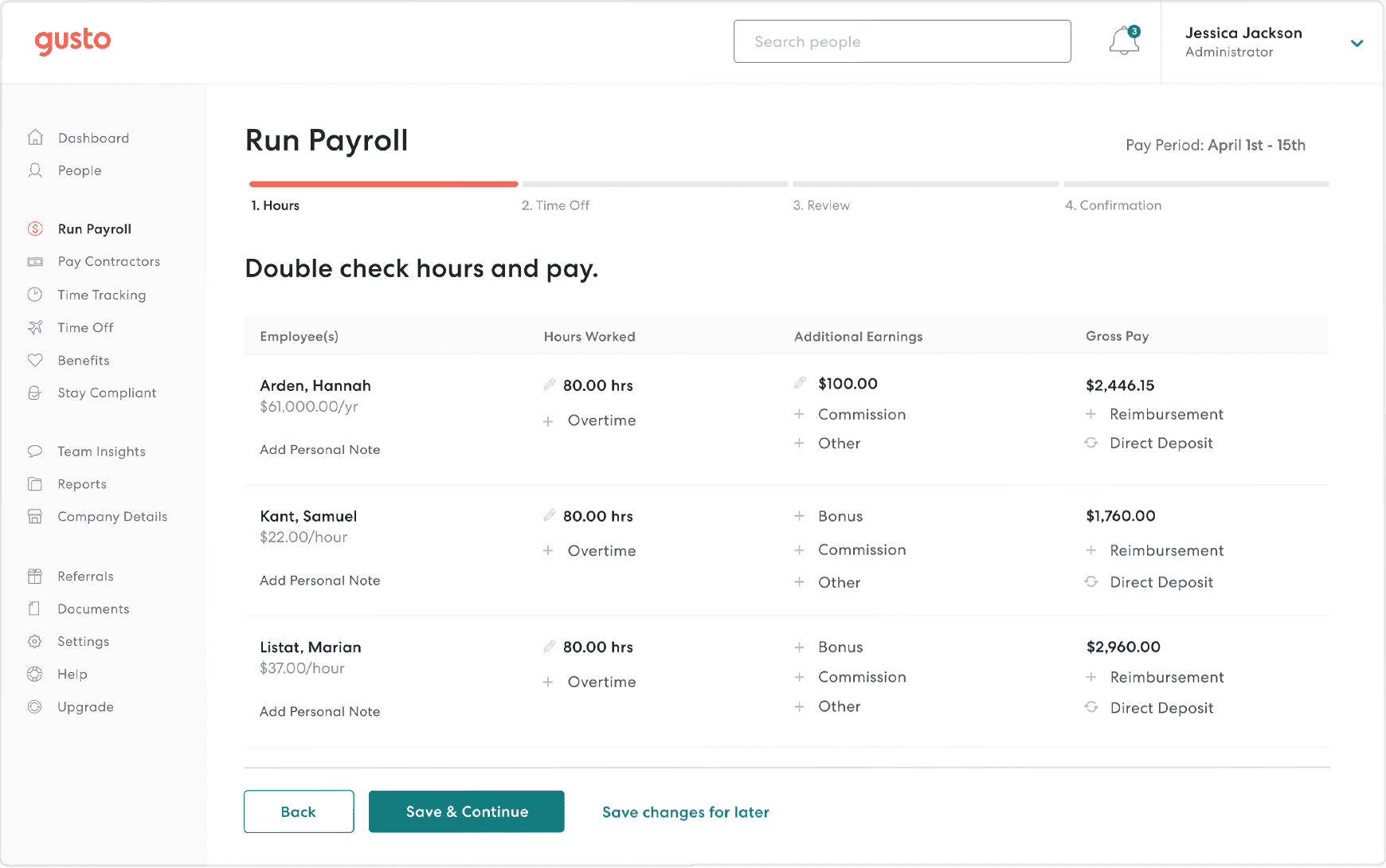
Best for: Small businesses that want full-service payroll, tax filing, and the ability to offer benefits, without a dedicated HR team.
Rating: G2 4.5/5 · Capterra 4.6/5
Gusto is a payroll and HR app built for small and mid-sized businesses. It handles payroll tax calculations, direct deposits, W-2s, and new hire reporting automatically. The benefits administration module lets owners offer health, dental, vision, and 401(k) directly through Gusto, which acts as your licensed benefits broker (or connects your existing broker to the account). Time tracking is available on Plus and higher plans, but scheduling isn't included. You'll need a separate tool if shift management is a core need.
Key features:
- Full-service payroll with automatic federal, state, and local tax filing
- Benefits administration: health, dental, vision, 401(k) via Gusto's licensed brokerage
- Onboarding with digital offer letters and e-signatures
- Time tracking and PTO management (Plus plan and above)
- HR compliance tools including offer letters, termination checklists, and document storage
Pricing: Simple plan starts at $49/month + $6/employee. Plus and Premium tiers available at higher rates. No free plan; 14-day trial.
What users like: Reviewers consistently highlight the clean interface and the relief of automated tax filing. One Capterra reviewer notes that payroll goes from hours to minutes once everything is set up, with taxes handled without any manual filing.
What users criticize: The per-employee fee stacks up fast for teams over 20. Several G2 reviewers flag that customer support response times can be slow, and that getting help with complex payroll issues sometimes requires multiple attempts.
Our take: Gusto is the right choice if benefits administration matters to your business, it's one of the few tools that makes offering health insurance actually accessible at the small business level. It's not built for scheduling or shift management, so hourly teams will need a companion tool for that. If your team is mostly salaried or you're already managing schedules elsewhere, Gusto is hard to beat on payroll. For a direct comparison, see Gusto alternatives for small businesses.
2. QuickBooks Payroll
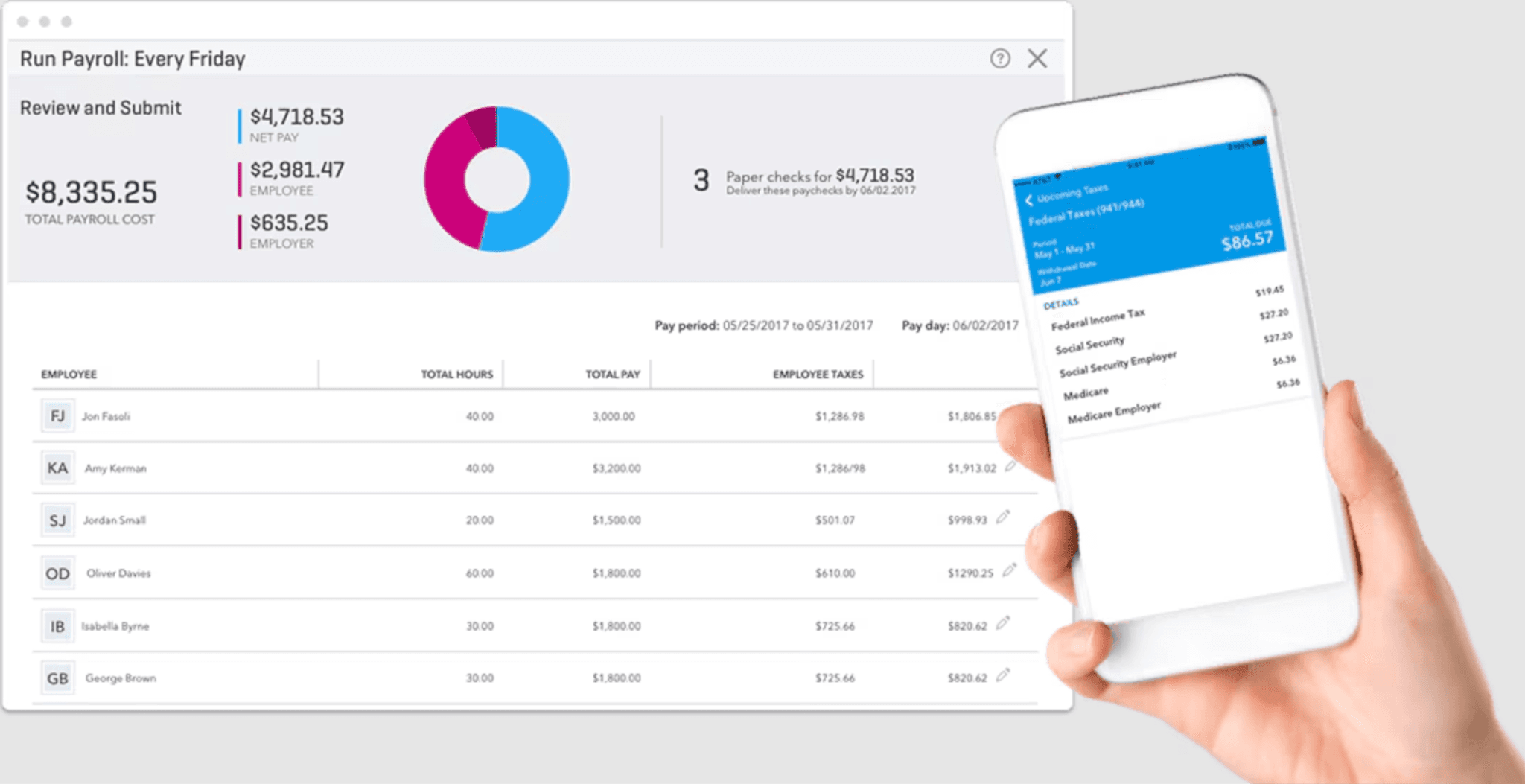
Best for: Small businesses that run accounting in QuickBooks and want payroll in the same ecosystem.
Rating: G2 4.2/5 · Capterra 4.4/5
QuickBooks Payroll is the employer-facing payroll product from Intuit that plugs directly into QuickBooks Online. QuickBooks Workforce is a separate employee-facing portal where workers view pay stubs, W-2s, and clock in via QuickBooks Time. QuickBooks Payroll processes pay runs, files taxes, and handles W-2s and 1099s. The native accounting integration is the main reason to use it: hours, wages, and payroll tax payments flow into your books automatically without exports or manual entries. The tax penalty protection on the Elite plan covers up to $25,000 per year in penalties resulting from Intuit calculation errors, provided the business supplied accurate, timely data.
Key features:
- Payroll processing with automatic tax filing
- Same-day direct deposit on Premium and Elite plans
- Tax penalty protection up to $25,000/year (Elite, for Intuit calculation errors)
- Native sync to QuickBooks Online accounting
- Employee self-service via QuickBooks Workforce portal (pay stubs, W-2s, time clock)
Pricing: Core plan runs approximately $50/month + $6/employee. No free plan; 30-day trial available.
What users like: The integration with QuickBooks accounting is the most frequently cited advantage. Capterra reviewers describe payroll reconciliation as near-automatic for businesses already using QuickBooks: no exports, no double entry.
What users criticize: G2 reviewers flag pricing as a consistent pain point, particularly the compounding cost of QuickBooks Online plus the payroll add-on. Customer service quality is frequently called out as inconsistent.
Our take: If you're already paying for QuickBooks Online, adding payroll here is the cleaner choice, the integration is actually tight. But if you're not already a QuickBooks user, the combined cost of an accounting subscription plus the payroll add-on is harder to justify against standalone payroll options like Gusto or Homebase Payroll. Worth running the total cost comparison before deciding. If you're considering alternatives, this guide to choosing a payroll service covers what to weigh.
3. Jobber
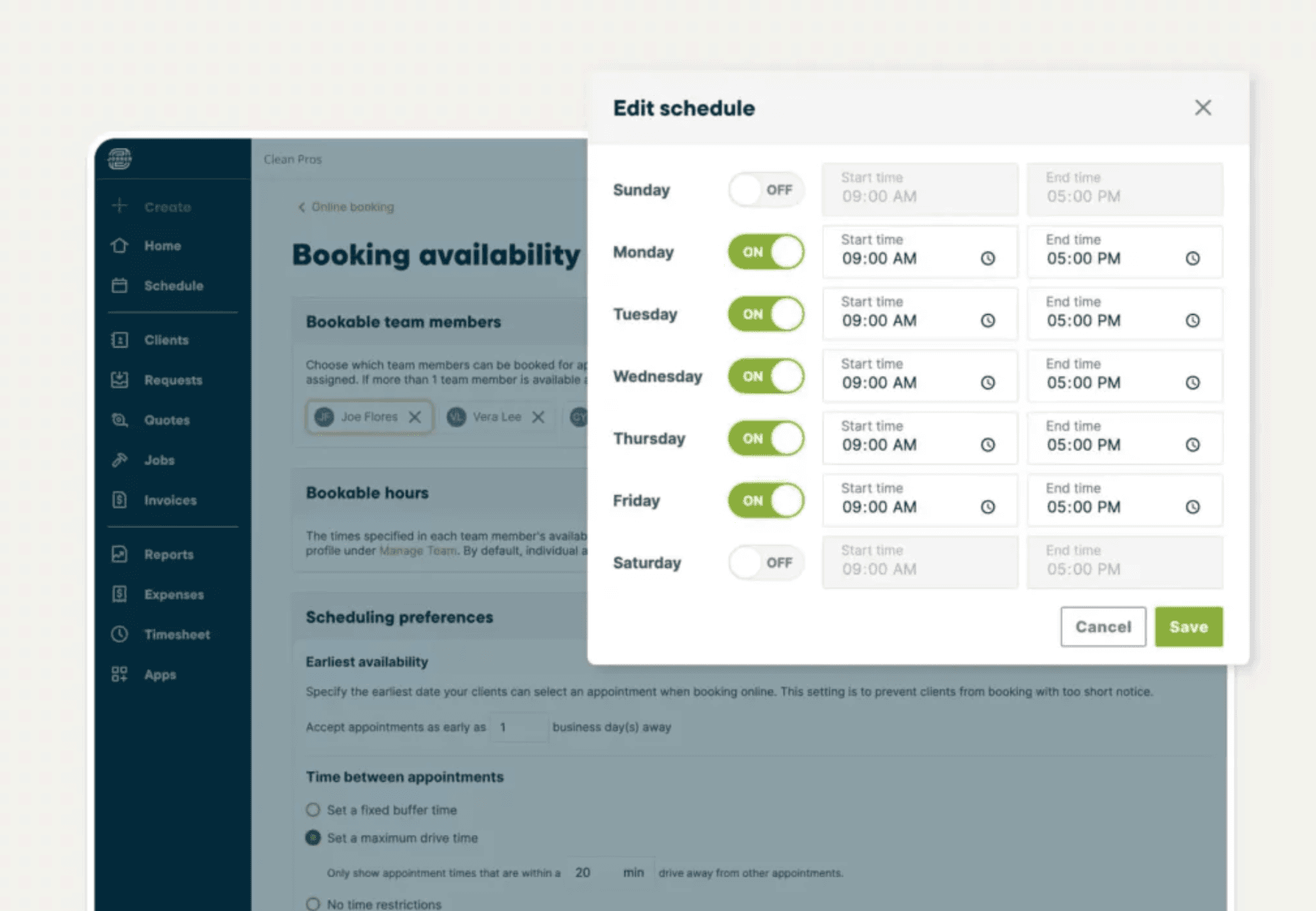
Best for: Field service businesses, HVAC, landscaping, plumbing, cleaning, that need job dispatch, invoicing, and client management alongside team scheduling.
Rating: G2 4.5/5 · Capterra 4.5/5
Jobber is a field service management tool, not an HR or payroll app. What it does exceptionally well: scheduling jobs, dispatching technicians, generating invoices, collecting payments, and managing client relationships, all connected in one system. The drag-and-drop calendar, GPS job tracking, and automated client communication (appointment reminders, on-my-way texts, follow-up requests) are built specifically for businesses where the work happens at customer locations. Payroll isn't built in; Jobber integrates with Gusto and QuickBooks for that.
Key features:
- Job scheduling and dispatching with drag-and-drop calendar
- GPS route optimization and technician tracking
- Automated client communication (reminders, follow-ups)
- Invoicing and online payment collection
- QuickBooks Online integration for accounting sync
Pricing: Core plan starts at $39/month (1 user, billed annually) or $49/month (billed monthly). Connect plan runs $119–$139/month for up to 5 users. Grow plan runs $249–$299/month for up to 15 users. First-year discounts available on annual billing.
What users like: G2 reviewers frequently describe Jobber as reducing admin time by 30–40 hours per month. The client communication automation, especially the automatic appointment reminders, is cited as saving significant back-and-forth. Capterra reviewers highlight that most teams are live within a day of signing up.
What users criticize: G2 reviewers note that essential features like QuickBooks sync and automated payments are locked to higher-priced tiers, and per-user fees make the app expensive as teams grow beyond 5 people. The mobile app lacks offline capability, which creates issues for crews in low-connectivity areas.
Our take: Jobber is the right tool if your business sends people to job sites, but it's the wrong tool if your primary need is scheduling shift workers in a fixed location like a restaurant or retail store. The job-based workflow doesn't map to shift-based hourly teams. For trades, home services, and any business where "dispatch" is a real word in your vocabulary, it's a strong choice.
4. Deputy
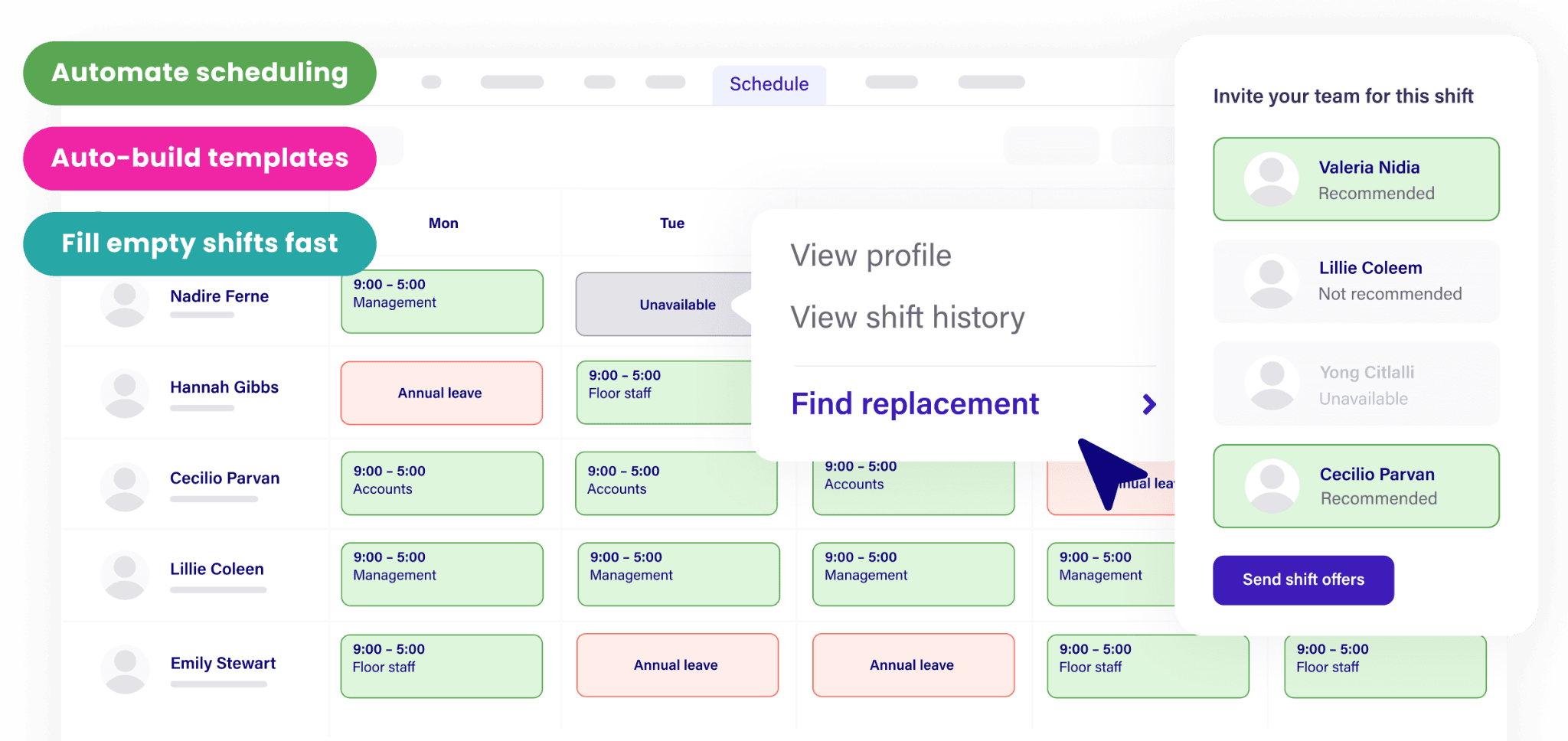
Best for: Scheduling-first teams with hourly employees, especially at multiple locations or with compliance-heavy operations.
Rating: G2 4.6/5 · Capterra 4.6/5
Deputy is a scheduling and time tracking app with shift management at its core. It handles shift creation, availability management, leave requests, and labor compliance, including break enforcement and overtime tracking, with notably strong multi-location support. AI-powered demand forecasting helps managers build schedules based on foot traffic or sales data rather than guessing. Payroll isn't built in; Deputy integrates with Gusto, ADP, QuickBooks, Xero, and others so hours feed into payroll automatically.
Key features:
- Shift scheduling with demand forecasting and AI optimization
- GPS-enabled time clock with facial recognition verification (Deputy Kiosk app)
- Break and overtime compliance tracking
- Employee self-service app (shift swaps, availability, leave requests)
- Payroll integrations with Gusto, ADP, QuickBooks, and Xero
Pricing: Deputy bills per user. Scheduling Only or Time & Attendance Only runs approximately $3.50/user/month. Premium (Scheduling + Time & Attendance) runs approximately $4.90–$5.00/user/month billed annually.
What users like: G2 reviewers frequently praise the compliance features, automatic break reminders and labor law alerts, for giving owners peace of mind without constant monitoring. The mobile app is consistently rated as intuitive for both managers and employees.
What users criticize: Capterra reviewers note that the reporting features are less flexible than they'd expect at Deputy's price point, and some flag that customer support response times slow down after onboarding.
Our take: Deputy is a strong pick if scheduling and compliance are your primary pain, and you're comfortable managing payroll through a separate tool. It's particularly well-suited to multi-location retail or hospitality operations where labor law compliance across locations is actually complex. See scheduling software alternatives if you're comparing tools in this category.
5. When I Work
Best for: Small teams that need reliable shift scheduling and are happy to handle payroll through an integration.
Rating: G2 4.3/5 · Capterra 4.5/5
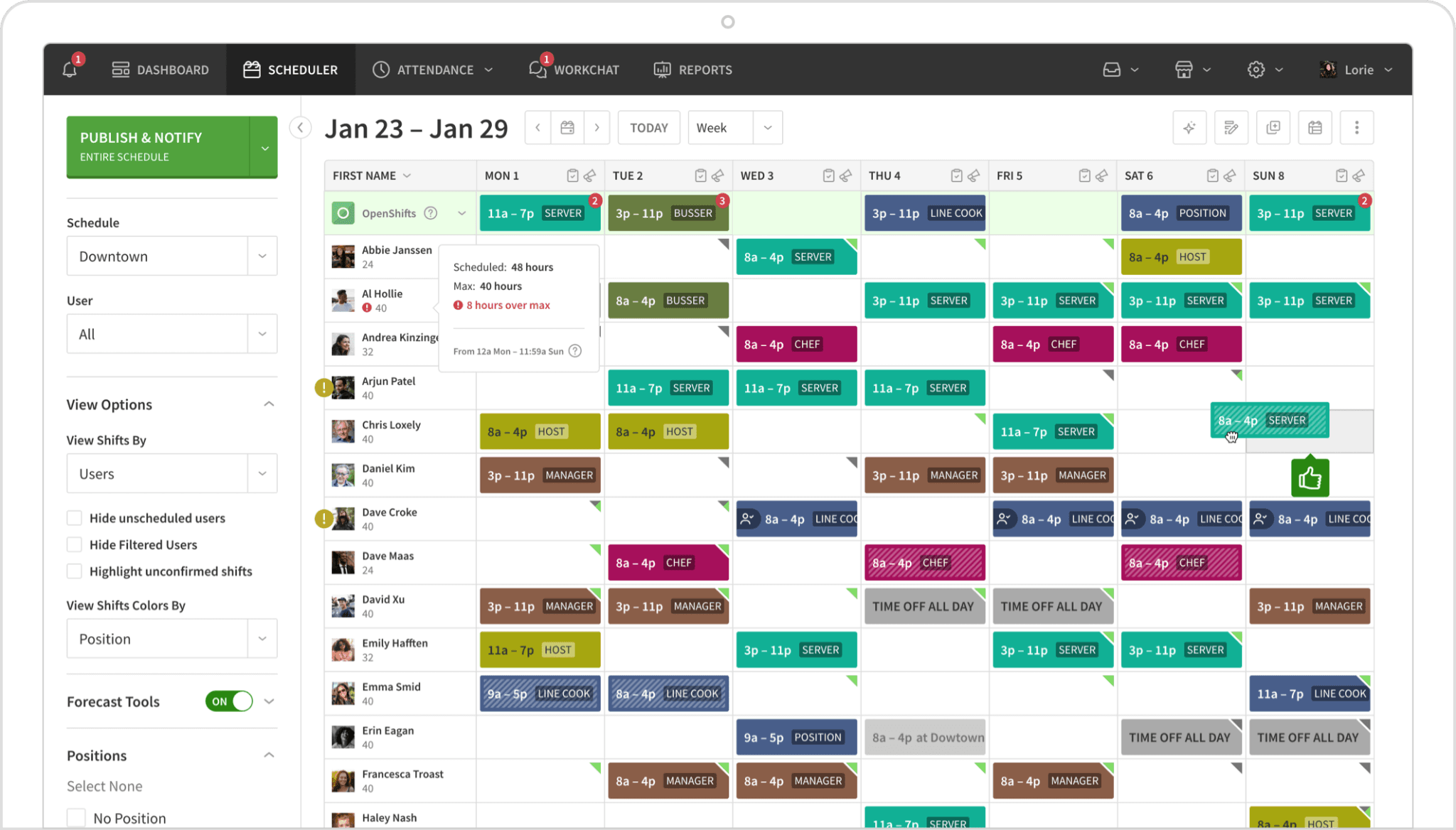
When I Work keeps scheduling simple. Managers build shifts on a drag-and-drop calendar, employees view and claim them on their phones, and the tool handles availability, time-off requests, and shift swaps without much setup. The payroll integration story is one of its stronger points. It connects natively with Gusto, QuickBooks, ADP, Square, and Rippling, so hours flow into whichever payroll tool you're already using. Time tracking is a paid add-on on most plans.
Key features:
- Drag-and-drop shift scheduling with conflict detection
- Employee self-scheduling and shift swap requests
- Team messaging built into the app
- Payroll integrations with Gusto, QuickBooks, ADP, Square, Rippling
- Time clock with GPS verification (paid add-on)
Pricing: When I Work no longer offers a permanent free plan, only a 14-day free trial. Paid plans start at approximately $2.50–$3.00/user/month for scheduling and messaging, or $4.00–$4.50/user/month with time and attendance.
What users like: Capterra reviewers describe setup as fast, scheduling live the same day, and employee adoption as unusually smooth, with workers picking up the mobile app quickly. Shift swap and self-scheduling features are frequently cited as saving managers hours per week.
What users criticize: G2 reviewers note that reporting remains thin across all tiers, and that some Android users experience sync issues where schedule updates don't push reliably to the mobile app.
Our take: When I Work is a straightforward scheduling tool, and that's actually its strength. If you've already solved payroll (or are committed to a specific payroll tool), pairing When I Work with your existing system is a clean, low-friction setup. It doesn't try to be everything, which makes it easier to learn and maintain. If you want to compare it against similar tools, the best employee scheduling software roundup covers the full field.
6. Zoho One
Best for: Growing businesses that want a single subscription covering CRM, accounting, HR, project management, and more, and have the patience to configure it.
Rating: G2 4.4/5 · Capterra 4.4/5
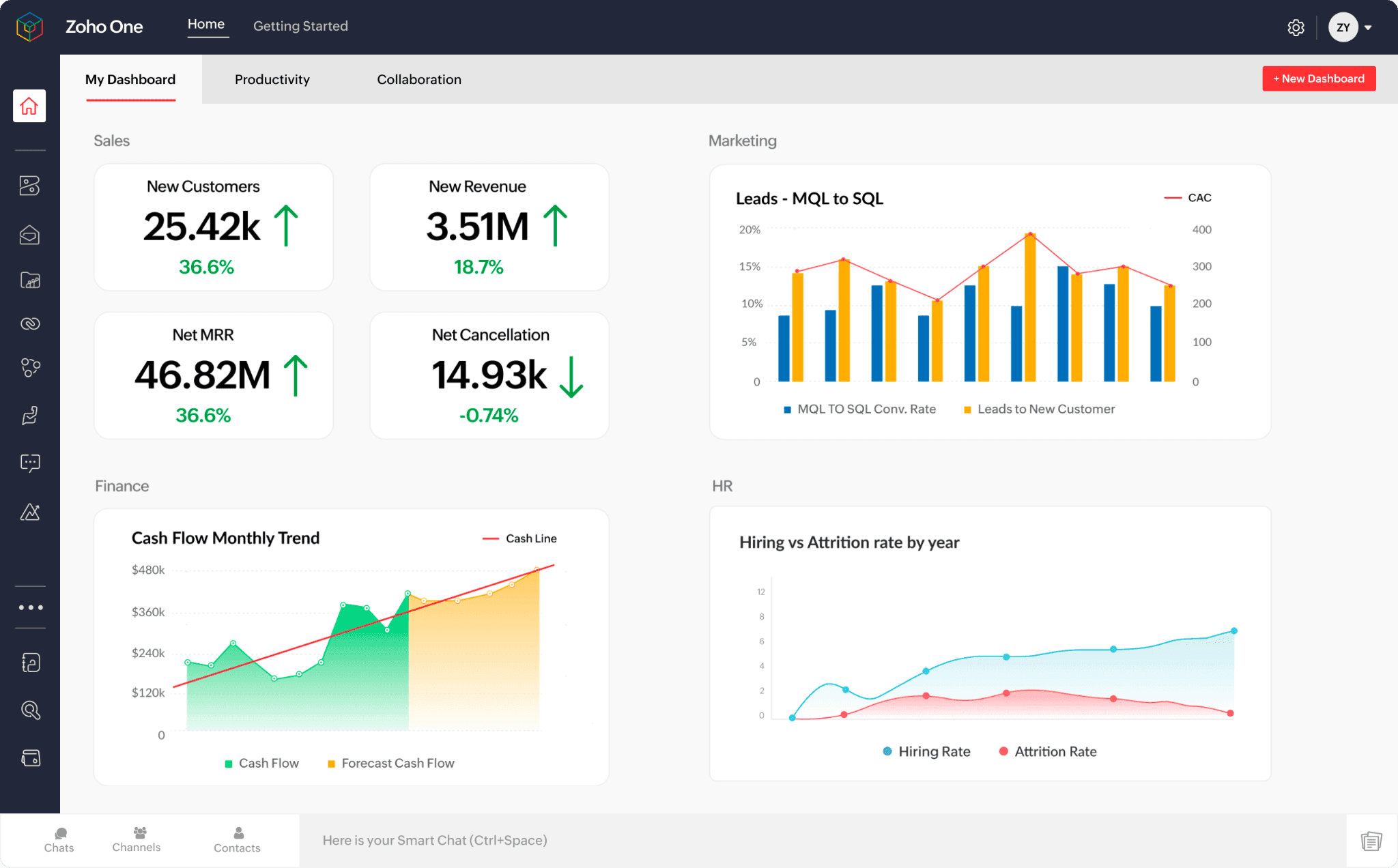
Zoho One is a business suite covering over 50 integrated apps: CRM, accounting, project management, HR, email marketing, social media, and more, all under one subscription. The breadth is its differentiator, no other tool on this list covers as many functions. The trade-off is real. Setup takes meaningful time, and getting the apps to work together the way you want requires configuration that can feel like a part-time project.
Key features:
- 50+ integrated apps including Zoho CRM, Books (accounting), People (HR), Projects, and Campaigns
- Unified dashboard with cross-app reporting
- Employee directory, onboarding, and leave management via Zoho People
- Automated workflows connecting sales, operations, and finance data
- Mobile access across all apps
Pricing: All-employee licensing (every employee must be licensed) runs approximately $37–$45/employee/month. Flexible user licensing (selective employees only) runs approximately $90–$100/user/month.
What users like: G2 reviewers highlight the value-for-money compared to buying separate tools for CRM, accounting, and HR. Businesses that take the time to configure it describe it as actually replacing 4–6 standalone subscriptions.
What users criticize: Capterra reviewers consistently flag the steep learning curve and the friction between apps, data doesn't always sync as cleanly as advertised, and some integrations between Zoho's own products require manual troubleshooting.
Our take: Zoho One is right for a 20–50 person business that's outgrown individual point tools and wants to consolidate. It's wrong for a 6-person restaurant that just needs scheduling and payroll, the setup overhead and complexity will outweigh the benefits. This is a "grow into it" tool, not a "set up in an afternoon" one.
7. HubSpot
Best for: Small businesses where customer relationships are the central operational challenge: sales teams, service businesses with ongoing client accounts, or any owner who needs a CRM before they need an HR tool.
Rating: G2 4.4/5 · Capterra 4.5/5
HubSpot is a CRM and marketing app, not an employee management tool. It earns its place on this list because many small business owners discover they need a customer management system before, or alongside, an HR tool. HubSpot's free CRM is legitimately capable, covering contact management, deal pipelines, email tracking, and live chat. Scheduling, time tracking, and payroll fall outside its scope entirely.
Key features:
- Contact and lead management with deal pipeline tracking
- Email marketing and automation
- Live chat and customer support inbox
- Website forms and landing pages
- Sales reporting and analytics
Pricing: Free tools available for up to 2 seats. Starter Customer Platform starts at $15/seat/month (billed annually) or $20/month (billed monthly).
What users like: G2 reviewers frequently describe HubSpot as the CRM that "doesn't feel like a CRM," the interface is intuitive enough that sales teams actually use it without being forced to. The free tier is cited as unusually capable compared to competitors.
What users criticize: Capterra reviewers note that costs escalate quickly as you need more contacts or advanced features, and that the paid tiers can feel expensive relative to what's unlocked.
Our take: HubSpot doesn't solve scheduling, payroll, or HR. Include it only if your primary management challenge is customer relationships, not employee operations. For retail, restaurants, and service businesses with hourly teams, HubSpot solves the wrong problem. For an agency, a consulting firm, or any business where growing the customer base is the daily challenge, it's a strong choice.
8. monday.com
Best for: Project-based teams that need task tracking, workflow management, and cross-team visibility: not shift scheduling or hourly payroll.
Rating: G2 4.7/5 · Capterra 4.6/5
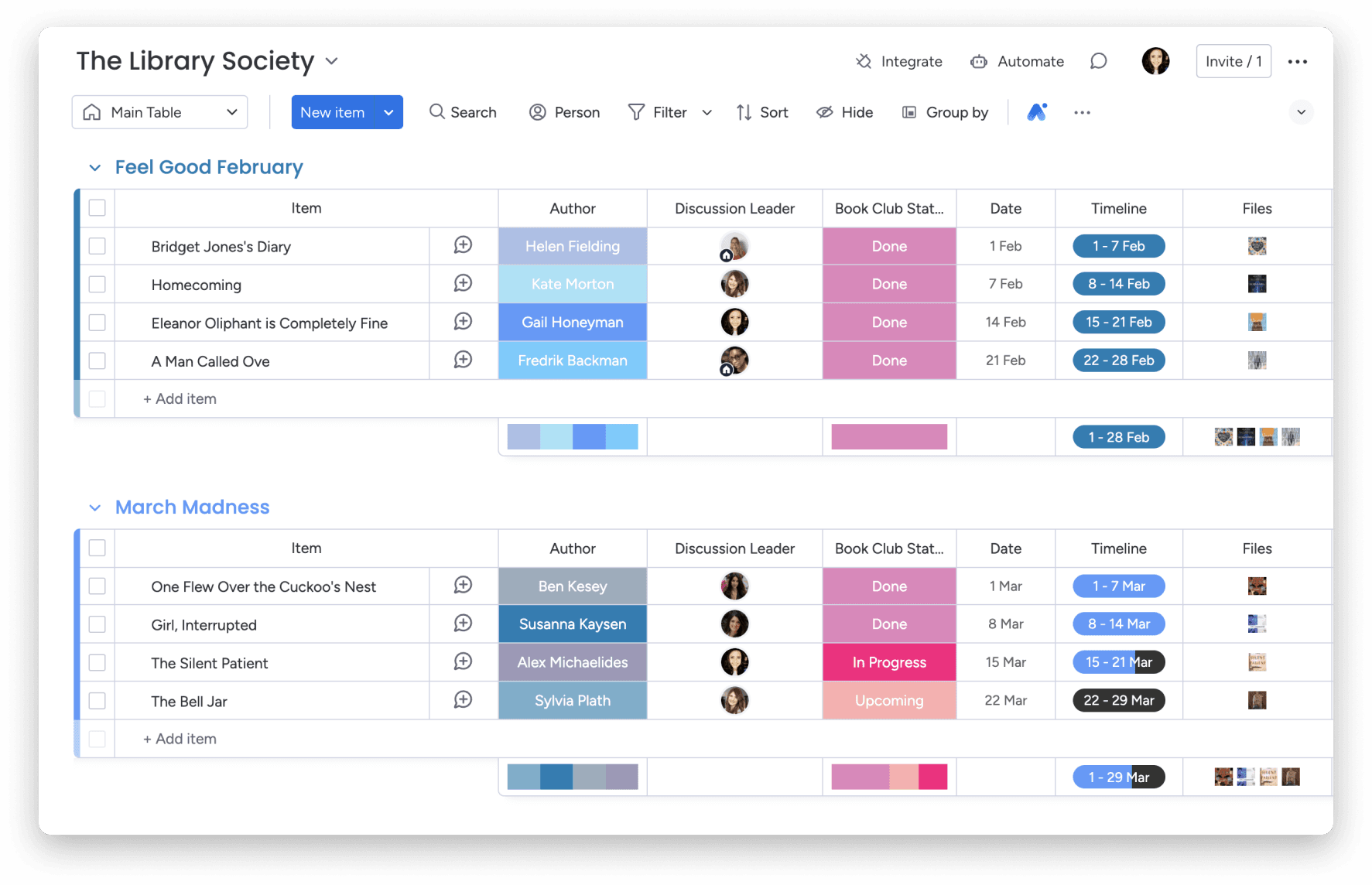
monday.com is a project management and workflow app with wide adoption across industries. It ranks prominently for this keyword (including holding the top organic spot in many SERPs), but monday.com is built for project-based teams, not hourly shift workers. It handles tasks, timelines, Gantt charts, and cross-department collaboration exceptionally well. It doesn't handle payroll, shift scheduling, or labor compliance, and its time tracking is task-based rather than clock-in/clock-out.
Key features:
- Visual project boards with Kanban, Gantt, and timeline views
- Workflow automation with 200+ pre-built templates
- Cross-department dashboards and reporting
- 200+ app integrations including Slack, Google Workspace, Salesforce
- AI-powered task generation and project planning
Pricing: Free plan for up to 2 seats. Basic plan from $9/seat/month (billed annually, 3-seat minimum, so $27/month minimum). Standard plan from $12/seat/month.
What users like: G2 reviewers consistently rate monday.com as one of the most visually intuitive project management tools available, with strong adoption rates and meaningful time savings on project coordination.
What users criticize: Capterra reviewers note that per-seat pricing adds up quickly for larger teams, and that the feature depth can feel overwhelming for users who only need basic task management.
Our take: monday.com is on this list because it's actually useful and prominently recommended in this space. Be clear-eyed about the fit. If you run a restaurant, retail store, or service business with hourly employees, it doesn't address your actual operational needs. If you run an agency, consultancy, or any business where projects and deliverables are the unit of work, it's one of the best tools available.
What Is Small Business Management Software?
Small business management software is a category of digital tools that helps owners handle day-to-day operations: typically employee scheduling, time tracking, payroll, HR, and team communication, in one place rather than across separate apps.
The category overlaps with, but is distinct from, project management software (which tracks tasks and deliverables), CRM software (which manages customer relationships), and accounting software (which handles financial reporting). The tools above focus on managing people and their time, the operational core that keeps a team running.
For businesses with hourly employees, the critical functions are scheduling, time tracking, and payroll, ideally connected so hours flow automatically to payday without manual re-entry.
What Does Small Business Management Software Do?
Small business management software automates the operational tasks that otherwise eat into an owner's week: building schedules, tracking who's clocked in, calculating hours and overtime, running payroll, and keeping the team informed of changes.
The core functions in this category include:
Scheduling. Create and publish shift schedules, let employees view their shifts on their phones, manage availability and time-off requests, and handle last-minute shift swaps without endless texts. Employee management software cuts the weekly time investment in scheduling from hours to minutes for most small teams.
Time tracking. Employees clock in and out from their phones or a shared device. The system records hours, flags missed punches and overtime, and generates timesheets for payroll review. GPS verification confirms employees are on-site. Time and attendance software removes the manual calculation step entirely.
Payroll. Timesheets convert to pay runs with wages, overtime, tips, and taxes calculated automatically. Direct deposit goes out on schedule. Tax forms are generated and filed. The right payroll service for your business depends on team size, whether you need benefits administration, and whether scheduling and payroll need to connect.
HR and compliance. Store employee documents, track certifications, manage onboarding paperwork digitally, and get alerts when labor laws change. HR software for small businesses ranges from basic document storage to full compliance monitoring.
Team communication. Publish schedule updates, send shift reminders, and handle team announcements in one place rather than across group texts and email chains.
How to Choose Small Business Management Software
The right tool depends less on feature lists and more on the specific operational pain you're trying to fix. Work through these questions before committing:
Do you need payroll? If yes, check whether it's built in or requires an integration. Built-in payroll (Gusto, QuickBooks Payroll) is simpler if payroll is your primary need. For hourly teams where time tracking and payroll need to work together, a connected all-in-one reduces manual steps.
How many employees do you have? Free tiers cap out fast. Homebase's free plan covers up to 10 employees at one location. When I Work no longer has a permanent free plan. Gusto has no free plan at all. Map your headcount to the pricing model before anything else, and consider if you need specialized tools like franchise management software.
Are your employees hourly or salaried? Hourly-team tools (shift scheduling, GPS clock-in, break compliance, PTO tracking) are meaningfully different from salaried-HR tools. Most of the CRM and project management tools that appear in this category don't address hourly-team needs.
Do you need compliance support? If you operate in California, New York, or another state with complex break and overtime rules, look for tools that flag violations automatically. Hourly employee time tracking software with built-in compliance alerts is worth the added cost if labor law exposure is a real risk for your business.
What's your existing tech stack? If you're already on QuickBooks, a payroll tool with a native accounting sync is worth more than a marginally cheaper one that requires CSV exports. Match the tool to what's already working.
Managing an hourly team manually takes real time every week. Homebase brings scheduling, time tracking, and payroll into one app built for exactly this, free for up to 10 employees. Try it free.
Frequently Asked Questions About Small Business Management Software
What is the best software for managing a small business?
It depends on your team type. For hourly workers in restaurants, retail, and service businesses, tools that combine scheduling, time tracking, and payroll in one place matter most, Gusto, Deputy, and Homebase are common picks. For project-based teams like agencies or consultancies, project management tools like monday.com or Asana are more relevant. The category of software that helps varies more than most roundups acknowledge.
How much does small business management software cost?
Free tiers exist for some scheduling tools, Homebase covers up to 10 employees for free. Paid scheduling plans typically run $20–$80/month per location (or $2–$5/user/month for per-user tools). Payroll adds $40–$80/month as a base fee plus $6–$13 per employee depending on the tool. All-in-one suites like Zoho One charge per user. Budget for the full stack: scheduling, time tracking, and payroll rarely come free together.
Is there free small business management software?
Yes, with limits. Homebase offers free scheduling and time tracking for up to 10 employees at one location. HubSpot's CRM is free for up to 2 users. When I Work no longer has a permanent free plan, only a 14-day trial. Most free tiers restrict either the number of users or the feature set, so check the specific caps before committing.
What is the difference between project management software and business management software?
Project management software, Asana, ClickUp, monday.com, tracks tasks, timelines, and deliverables for project-based work. Business management software covers operational functions: scheduling shifts, tracking employee hours, running payroll, and managing labor compliance. They solve different problems. A restaurant owner needs business management software; an agency project lead needs project management software.
Do small businesses need HR software?
Not immediately, but the compliance risk grows with headcount. Once you have more than a handful of employees, tools that track break requirements, flag overtime, and alert you to labor law changes reduce the risk of costly violations. For most small businesses with hourly employees, basic HR functions, time card storage, digital onboarding paperwork, and overtime tracking, are available within scheduling and payroll tools without a separate HR subscription.
What software do most small businesses use?
QuickBooks dominates small business accounting. For scheduling and time tracking, Homebase, Deputy, and When I Work are widely used among hourly teams. For payroll, Gusto and QuickBooks Payroll are the most common picks. No single tool wins every category, most small businesses end up with 2–3 tools covering accounting, scheduling, and payroll separately until they find an all-in-one that fits. A comparison of Gusto vs. Justworks is a good starting point if you're deciding between payroll-focused tools.
How long does it take to set up small business management software?
Most scheduling and time tracking tools are live within an hour. Payroll takes longer, typically 1–3 days to verify bank accounts, enter employee data, and confirm tax settings. For businesses that already have state tax accounts set up, 90% of Homebase payroll customers were up and running in under an hour (Homebase internal data, 2024). Tools like Zoho One can take days or weeks to configure depending on how many apps you're using.
Can small business management software handle multiple locations?
Yes, most paid plans support multiple locations. Homebase charges per location. Gusto and QuickBooks Payroll handle multi-state payroll. Deputy is particularly strong for multi-location scheduling. Confirm multi-location limits and pricing with each vendor before selecting, the jump from single to multi-location pricing can be significant.
Find the Right Fit for Your Team
The right small business management software comes down to one question: what's actually slowing you down?
If payroll is the pain, Gusto handles it cleanly, and QuickBooks Payroll makes sense if you're already living in QuickBooks. If you run a field service business, Jobber is built for how you work. If scheduling and compliance are the daily grind, Deputy or When I Work get you there without overcomplicating it. And if you need a full business suite and have the time to configure one, Zoho One covers more ground than anything else on this list.
For small businesses with hourly teams — restaurants, retail shops, salons, home services — the tools that matter most are the ones that connect scheduling, time tracking, and payroll in one place. That's where Homebase fits. It's free for up to 10 employees, and paid plans scale as your team grows. Try Homebase free.
All pricing verified against vendor pricing pages as of August 2026. Rates change, so always confirm before buying. G2 and Capterra ratings reflect data pulled at time of publication.