Homebase vs. Toast
Discover how Homebase stands out against competitors in team management solutions for your business.
Compare
See How We Stack Up
Discover the advantages of Homebase over Toast.
| Homebase | Toast | |
|---|---|---|
| Employee scheduling | Included in Homebase | Sling Lite free; advanced features paid |
| Time clock + timecard sync | Included in Homebase | Toast POS only |
| Full-service payroll | Included in Homebase | Included in Toast |
| Automated tip management | Included in Homebase | Toast POS required |
| Team messaging | Included in Homebase | Basic messaging in Sling Lite |
| Works with any POS | Included in Homebase | Not included in Toast |
| Transparent public pricing | Included in Homebase | Not included in Toast |
| Free employee mobile app | Included in Homebase | Sling app included with Lite |
| Labor cost vs. sales reporting | Included in Homebase | Sling Pro required |
| HR & compliance tools | Included in Homebase | Limited |
| Free plan available | Included in Homebase | Scheduling Lite free; full payroll/HR requires paid plans |
| Hiring and job posting | Included in Homebase | Careers page only |
Trusted by 150,000+ small businesses and their teams.















Why businesses choose Homebase over Toast
Real numbers, real results. Hourly teams thrive with Homebase.

Scheduling
275 Million
Shifts logged on Homebase Scheduling

Time Clock
1 Billion
Hours tracked with Homebase Time Clock

Payroll
4 Million
Paychecks processed with Homebase Payroll
Table of contents

Conquer your workday.
Join the 150K+ small businesses using Homebase for time clocks, schedules, payroll, and HR.
Homebase vs. Toast: Which Is Right for Your Restaurant?
You're already running Toast on the floor. The POS handles orders, payments, and the kitchen display. Then you start looking at Toast's scheduling add-on, the payroll module, the HR tools. You're looking at a separate subscription for each one, with quote-based pricing and no clear total.
Most restaurant owners start asking the same question: do I build everything inside Toast, or bring in a dedicated people-ops tool like Homebase? It's not really a choice between the two. Toast is a restaurant POS platform. Homebase is an HR, scheduling, and payroll platform. They integrate, and for many small restaurants, using both is the setup that makes sense.
This is a direct breakdown of Homebase vs. Toast: what each does well, where each falls short, and how to figure out which combination fits your restaurant.
What you need to know: Homebase vs. Toast at a glance
- Toast is a restaurant POS platform first. Its scheduling (powered by Sling) and payroll are add-ons built to live inside the Toast ecosystem, and most advanced features require Toast POS to function.
- Homebase is built as the HR, scheduling, and payroll layer for hourly teams. It integrates directly with Toast POS, so you don't have to pick one or the other.
- Homebase wins on scheduling depth, transparent pricing, and flexibility to work with any POS.
- Toast Payroll wins if you want a single-vendor restaurant stack and are fully committed to Toast long-term.
- Many small restaurants run Toast POS for the floor and Homebase for scheduling, HR, and payroll.
What is Toast?
Toast is a restaurant point-of-sale system. The terminal on the counter, the kitchen display, the payment processing, the online ordering: that's Toast's core product. Everything else — payroll, scheduling, HR — is built on top of that POS foundation.
- Toast Payroll & Team Management runs on the former StratEx platform, which Toast acquired in 2019. It's built specifically for restaurants already using Toast POS.
- Toast Scheduling is powered by Sling, a workforce management platform Toast also acquired. It's offered in two tiers: Scheduling Lite (free with every Toast POS plan) and Scheduling Pro (paid add-on).
What is Homebase?
Homebase is a standalone HR compliance and team management platform for hourly teams. It works with restaurants, retail shops, service businesses, and any operation running hourly staff.
- Integrates with Toast POS, Square, Clover, Shopify, Lightspeed, and others.
- Covers employee scheduling, time clock, timesheets, payroll, hiring and onboarding, team communication, and HR compliance — all in one platform.
Homebase and Toast POS have a native, supported integration. Toast lists Homebase in its partner directory and the two-way sync is built into both platforms. Many restaurant owners run Toast for the floor and Homebase for the team.
"Homebase simplifies scheduling, payroll, and HR in a way that is easy to navigate and understand. We highly recommend it." — Mandana Shabani, Owner, Zood Restaurant
How Homebase and Toast work together
Homebase and Toast have a native two-way integration. Employees clock in on the Toast POS terminal, timecards sync automatically to Homebase, and Homebase pushes the published schedule back to Toast to enforce clock-in windows and prevent early punches.
Here's what syncs:
- Timecards: Hours logged on the Toast POS flow directly into Homebase timesheets. No manual export, no CSV.
- Employee roster: Employee profiles sync between platforms so you're not managing two separate databases.
- Schedule enforcement: Homebase pushes the schedule to Toast, so the POS won't let an employee clock in early. No more paying for 15 minutes you didn't schedule.
- Sales data: Toast sales data syncs into Homebase so you can see labor as a percentage of sales in real time while building your schedule.
Toast handles the floor. Homebase handles the people. If you're already on Toast POS, connecting Homebase takes a few minutes. Start here.
One thing worth flagging: if a restaurant is already using Toast Payroll, adding Homebase means running two payroll systems. The practical setup is Toast POS for the floor plus Homebase for people-ops, not all three stacked on top of each other.
Scheduling: how each platform handles your weekly shifts
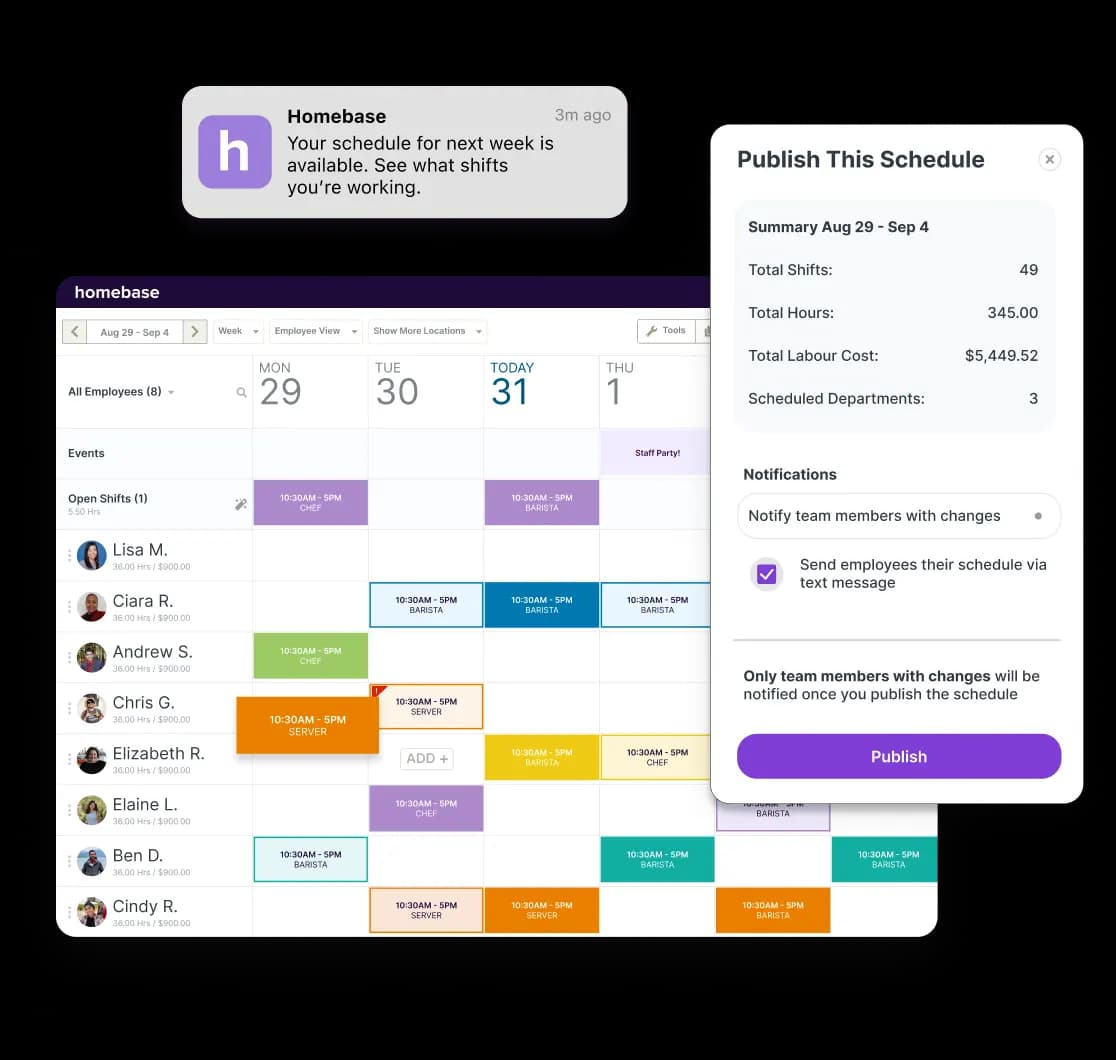
Homebase's employee scheduling is built for hourly teams. The drag-and-drop schedule builder lets managers create and edit shifts in minutes. The AI scheduling assistant builds an optimal schedule based on employee availability, roles, and labor cost targets, so you're not starting from scratch every week.
Homebase scheduling
- Instant publishing: Homebase publishes the schedule immediately and sends SMS notifications to every employee.
- Shift reminders: Automated alerts go out an hour before each shift starts, which cuts no-shows without any manager involvement.
- Shift trades: Employees initiate trades and coverage requests through the app. Managers approve, but don't have to coordinate.
- Labor cost tracking: The scheduling view shows your forecasted labor percentage in real time as you add shifts. Set a daily target, and Homebase flags you when you're over — before you publish, not after payday.
- Labor forecasting: Sales data pulls directly from Toast via the integration, so your schedule is built against what's actually happening in the business.
Homebase scheduling is free at the Basic plan for one location with up to 10 employees. Paid plans unlock AI auto-scheduling, advanced labor forecasting, PTO tracking, and compliance alerts.
Toast scheduling (Sling)
Toast's scheduling is powered by Sling, offered in two tiers.
Scheduling Lite is included at no charge with every Toast POS plan:
- Basic shift creation and publishing
- Time-off management and availability tracking
- Shift trade requests
- Team announcements and newsfeed
Scheduling Pro (paid add-on) adds:
- Mobile time clock and geofencing
- Bi-directional timesheet sync with Toast POS
- Labor cost budgeting and overtime tracking
- Projected sales syncing
- PTO management, payroll reports, and group messaging
Without Pro, time clock entries don't sync between Sling and Toast POS, and employees can't clock in on mobile. A restaurant that wants mobile time tracking, labor cost tools, or timesheet sync with Toast Payroll needs to be on Scheduling Pro.
Sling is also built specifically for Toast. It doesn't work with other POS systems, so if you run a second concept on Square or Clover, you'd need a separate scheduling solution for that location.
Time tracking: clocking in, timecard accuracy, and overtime
Clock-in flexibility is where Homebase and Toast diverge most on time tracking.
Homebase time tracking
Homebase lets employees clock in via:
- iPad kiosk — a shared tablet at your location
- Mobile app — from any smartphone, anywhere
- Web browser — from any computer
- Toast POS terminal — synced directly via the integration
In a restaurant where not every employee is near a terminal, that range matters. The prep cook in the back, the delivery driver, the manager closing up late: all of them can punch in without being at the register. Photo verification and GPS geofencing confirm employees are on-site without requiring a manager to be physically present. The schedule Homebase pushes to Toast also prevents early clock-ins at the POS, so front-of-house staff can't pad their hours.
Toast time tracking
With Toast, POS terminal clock-in is available on Scheduling Lite at no extra charge. But:
- Mobile clock-in requires Scheduling Pro
- GPS geofencing requires Scheduling Pro
- Bi-directional timesheet sync requires Scheduling Pro
For FOH staff who are always at the register, Lite works fine. For BOH, off-site, or remote staff, mobile clock-in depends on a Pro subscription.
Overtime and compliance
Both platforms flag overtime. Homebase sends alerts before an employee hits their threshold, during scheduling and in real time, so you can adjust shifts before it costs you. Both also handle multi-rate pay for employees who switch roles mid-week, which matters in restaurants where a server might also cover prep.
Homebase stores every timecard in full compliance with FLSA record-keeping requirements, including a complete audit trail of who edited what and when. That documentation is worth having if you're ever in a wage dispute. The U.S. Department of Labor recovered more than $27.1 million in back wages from food service workers in 2022, affecting more than 22,000 workers. FLSA requires employers to retain payroll records for three years and timecards for two years.
"Homebase is such an easy app. I own and operate several businesses, and Homebase helps me keep track of all businesses at all times. Knowing my payroll percentages from home is one of the amazing features it offers business owners. Making sure my employees are taking breaks, clocking in and out on time. It's changed my life." — Alexandra Ciotti, Owner, The Hamlet Diner
Payroll: running it, tips, taxes, and what it costs
Toast built its payroll module specifically for restaurants already running on its POS — so before comparing features, it helps to understand what that lock-in actually means.
Toast Payroll & Team Management
Toast Payroll's main advantage is its native POS connection. Hours, job codes, and tips flow directly from the register into payroll, with no manual data entry and no exports.
What Toast Payroll covers:
- Tip pooling and tip credit compliance
- Multiple pay rates and blended overtime across roles
- Direct deposit and tax filing
- Digital onboarding and W-4/I-9 collection
- Benefits enrollment
If your operation runs complex tip pools or service charges, the native POS-to-payroll connection means those calculations happen with the data exactly as it was captured, before it's been moved through another system.
Toast Payroll pricing is quote-based and varies by restaurant size, location count, and selected modules. Contact Toast directly at their pricing page for accurate figures.
Toast Payroll only runs inside the Toast ecosystem. Move off Toast POS, or run a second concept on a different system, and you'd need to re-platform payroll too.
Homebase Payroll
Homebase Payroll is an add-on to any Homebase plan, priced at $49 per month plus $6 per employee per month. See the full plan pricing here.
What Homebase Payroll covers:
- Automated wage and tax calculation
- Direct deposit and W-2/1099 filing
- Multi-state payroll and contractor payments
- AI Payroll Assistant that flags errors before you run
- Dedicated payroll onboarding specialist included at signup
Timesheets sync directly from Homebase, or from Toast POS via the integration, so converting an approved pay period to payroll is one click. Homebase Payroll is POS-agnostic: it runs the same way whether you're on Toast, Square, Clover, or anything else. Switch POS systems and payroll is unaffected.
Tip Manager is a separate paid add-on, priced at $25/month per location. It handles automatic tip pooling, distribution by role and shift, and pushes totals to payroll. It's not included in base Homebase Payroll pricing, so if tip management is central to your operation, factor that into your cost comparison.
On G2, Homebase holds a 4.5/5 overall rating vs. Toast's 4.2/5. Homebase leads on ease of setup (9.1 vs. 8.2) and quality of support (8.8 vs. 7.8). Toast scores higher on pure payroll metrics (8.1 vs. 7.0). Verified user reviews of Toast Payroll are also available on Capterra.
HR, hiring, and compliance: where they're most different
Homebase was built as an HR platform for hourly teams, then expanded into scheduling and payroll. Toast was built as a POS platform, then added HR modules through its acquisition of StratEx. That difference in origins shows up in what each product can do.
Homebase HR
Homebase covers the full hiring and onboarding cycle:
- Job posting: Post to Indeed, ZipRecruiter, Google, and Glassdoor with one click
- Applicant tracking: Every candidate from every source, managed in one pipeline
- Screening: Custom questions filter out poor fits before you spend time interviewing
- Background checks: Run and reviewed inside Homebase, no separate system needed
- Digital onboarding: New hires complete their packet before day one; e-signed documents stored automatically
Homebase HR Pro, included in All-in-One and available as an add-on on other plans, adds:
- On-demand HR advisors
- Custom employee handbook builder
- Proactive labor law alerts when state or local regulations change
"Homebase All-in-One allows me to spend more time on growing my business instead of all the frustrating back-end employee management issues. As a small business, we don't have financial resources for an HR department. The small investment of upgrading to Homebase All-in-One feels like it added our own human resources staff." — Kim Redeker, Owner, Sweet Granada
Toast HR
Toast Payroll & Team Management includes HR functionality inherited from StratEx: digital onboarding, I-9 and W-4 collection, benefits enrollment, and a basic applicant tracking system.
Limitations worth knowing:
- The ATS creates a careers page and manages applicants but does not post to external job boards like Indeed, ZipRecruiter, or Glassdoor
- Onboarding packets can't be customized by role
- Fillable PDFs can't be added to the onboarding flow
- No proactive compliance alerts when labor laws change
- Overall HR interface is harder to use than purpose-built HR tools
For a restaurant that hires frequently, which most small restaurants do given industry turnover rates, the job board gap is significant. Replacing a single hourly employee costs an estimated $1,056 for FOH roles and $1,491 for BOH. A hiring pipeline that posts to multiple job boards, tracks applicants in one place, and automates onboarding paperwork is a direct time and cost reduction.
Pricing: what you'll actually pay
Homebase makes this part easy. Unlike Toast, everything is public and listed in one place
Homebase pricing
Homebase publishes its pricing publicly. Plans run per location per month:
- Basic: Free — one location, up to 10 employees, scheduling and time clock included
- Essentials: $30/month/location
- Plus: $70/month/location
- All-in-One: $120/month/location
- Payroll add-on: $49 per month + $6/employee/month
- Tip Manager add-on: $25/month/location
Full details here.
Toast pricing
Toast doesn't publish a complete rate card:
- Base POS plans start at $0 for a hardware-light Starter Kit, with full software plans from $69/month for new customers at single locations
- Toast Payroll is quote-based — pricing varies by restaurant size and configuration
- Scheduling Pro is a paid add-on — also quoted separately
- Hardware is proprietary and non-transferable; replacement costs add up over time, and hardware can't move to a new POS platform if you ever switch
Contact Toast directly at their pricing page for accurate figures.
If you're trying to build a budget without a sales call, Homebase's public pricing is a real advantage. You can calculate your exact monthly cost before signing anything.
Who should use what
Choosing between these two comes down to what your restaurant actually needs from its people-ops stack. Here's how to think through it.
Use Homebase if:
- You want scheduling, HR, payroll, and team communication in one platform, with or without Toast POS.
- You're on Toast POS and want a stronger people-ops layer than Toast's built-in tools provide.
- You hire and onboard frequently, and need to post jobs to external boards. Homebase's hiring tools cover that end-to-end.
- You want to know exactly what you'll pay before getting on a sales call.
- You run multiple concepts or locations that don't all use the same POS.
- You're just getting started and want to begin on the free Basic plan before committing to paid features.
Use Toast Payroll & Team Management if:
- You're fully committed to the Toast ecosystem and want a single vendor for POS, payroll, and scheduling.
- Your restaurant runs complex tip pools, service charges, or multi-rate blended overtime, and you want that data flowing directly from the register without any middleware.
- You're a larger operator where Toast's bundled pricing becomes competitive with managing separate tools.
Use both (Toast POS + Homebase) if:
Many small restaurants run this combination, and Toast supports it through its partner directory. Toast handles the floor: POS, payment processing, online ordering, kitchen display. Homebase handles the team: scheduling, timesheets synced from Toast, payroll, HR, and hiring.
The integration is native, the data flows automatically, and you keep the strengths of both platforms without paying for features you don't need from either.
The bottom line
Toast and Homebase aren't competing for the same job. Toast runs the floor. Homebase manages the team. For many small restaurants, the answer isn't one or the other: it's connecting both so timecards, sales data, and schedules flow between them automatically.
If you're on Toast POS and looking for a better way to handle scheduling, payroll, or hiring, Homebase connects in a few minutes and starts free. To see exactly what you'd pay, no sales call required, check out Homebase pricing.
Our customers love us
"Homebase simplifies scheduling, payroll, and HR in a way that is easy to navigate and understand. We highly recommend it."
Mandana Shabani
Owner, Zood Restaurant
"As a small business I want to leverage tools that will help me with systems AND make things easier for my team."
Cadence Kidwell
Owner, Fuzzy Goat
"Our team members love using Homebase. It's user-friendly and has significantly improved communication and collaboration"
Jamila Wright
Owner, Brooklyn Tea
Related Posts


Top-rated app built for small business teams.
Best Payroll for Hourly Teams
2024

Best in Business for Best AI Implementation
2025

Best Employee Scheduling
2025

Best HR & Employee App
2025