Homebase vs. HotSchedules: Which Is Right for Your Business?


SMALL BUSINESS INTEL, IN YOUR INBOX
Table of contents
Picking the wrong scheduling tool doesn't just cost money. It costs time every single week. And when you're running a small business with an hourly team, that's time you don't have.
In a comparison of Homebase vs. HotSchedules, you'll find two tools that look similar on the surface: both handle scheduling and time tracking, both have mobile apps, and both are built for businesses that rely on shift workers. But the way they're built, and who they're built for, is where things get different.
This breakdown covers what each tool does, how they price it, and which one makes sense for your business.
Quick take: Homebase vs. HotSchedules
Homebase is an all-in-one tool for small businesses with hourly teams across industries including restaurants, retail, services, healthcare, beauty, and hospitality. HotSchedules is designed for restaurants and hospitality businesses, with AI-powered demand forecasting and tools that can support multi-location operations.
- Homebase offers an ongoing free Basic plan for one location with up to 10 employees, transparent per-location pricing, and connected scheduling, time tracking, messaging, payroll, and HR tools in one app.
- HotSchedules is geared toward restaurants and hospitality. Fourth does not publish standard subscription prices. As of July, 2026, Fourth was advertising a "one year on us" HotSchedules promotion. Eligibility, included features, and other terms should be confirmed directly with Fourth.
- If you want a broad set of hourly-team tools at a publicly listed price, Homebase is the stronger fit for most small businesses.
- If you run a restaurant or hospitality business that places a high value on demand forecasting and labor modeling, HotSchedules is worth evaluating.
Homebase vs. HotSchedules: Scheduling
Scheduling is where the two tools start to diverge. Here's how each one approaches building and managing shifts.
How Homebase scheduling works
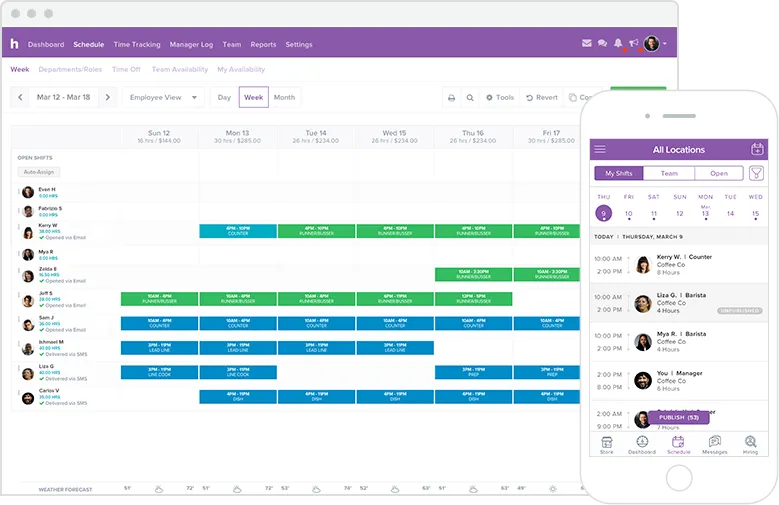
Homebase lets you build schedules using reusable templates or AI-assisted scheduling based on availability, roles, time-off requests, labor targets, and other rules. As you add shifts, you can see your labor cost update in real time, before you publish. That means you catch overtime and budget issues before they happen, not after.
When the schedule is ready, your team gets notified instantly via the app, text, or email. Employees can claim open shifts, request time off, and trade shifts directly with each other. Managers approve changes from the same app. No phone tag.
Note: the AI-powered Scheduling Assistant is available on the Plus plan and above.
How HotSchedules scheduling works
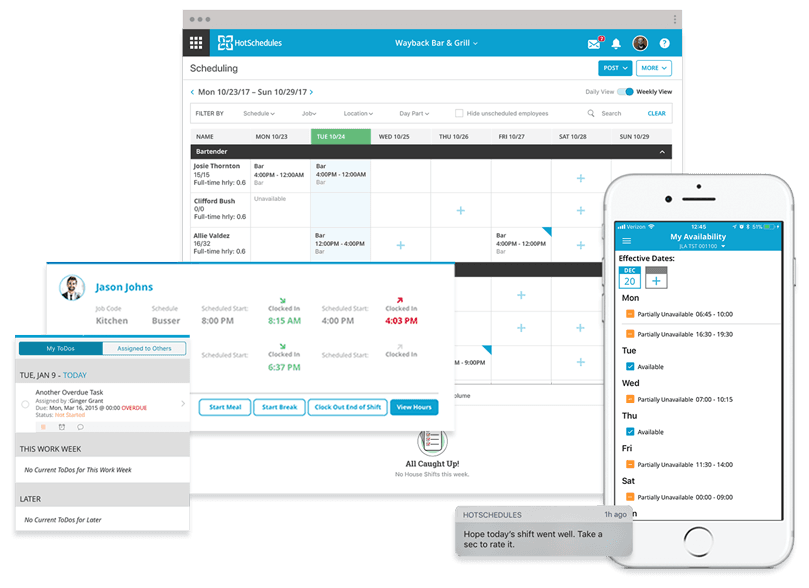
HotSchedules builds schedules using sales, labor, availability, skills, and operational data to help restaurants align labor with expected business volume. Its demand forecasting is a real advantage for high-volume restaurant operations where getting the headcount wrong is expensive.
HotSchedules also supports employee-led schedule changes. Employees can swap, release, and pick up shifts, with manager approval.
The bottom line: Homebase may be the more straightforward choice for a small business that wants publicly listed plans and scheduling, time tracking, messaging, and payroll in one app. HotSchedules' forecasting is a strong fit for restaurants where labor cost precision is a daily operational need.
If your schedule changes are costing you hours of back-and-forth every week, Homebase's real-time cost tracking and instant notifications give your team one less excuse to say they didn't know.
Homebase vs. HotSchedules: Time tracking
Once the schedule is set, tracking who actually showed up — and when — is where time tracking tools earn their keep.
Homebase time tracking

Homebase provides clearly documented clock-in options across mobile apps, shared tablets, browsers, and supported POS systems. GPS geofencing can restrict clock-ins to your job site. Clock-in photos can help managers verify who is clocking in and discourage buddy punching. On eligible plans, Homebase can automatically clock employees out at the end of their scheduled shifts.
Break and overtime tracking is built in. For configured California locations, Homebase can calculate an additional paid hour when applicable under missed meal break rules. Timesheets generate automatically and, when you use Homebase Payroll, the native workflow does not require exporting hours to a separate payroll provider.
HotSchedules time tracking

HotSchedules uses a browser-based tool called WebClock for time tracking. Employees can access it through a web browser on a computer or mobile device using a POS ID or assigned credentials. POS integration is available. Fourth's time and attendance suite includes these capabilities and can be configured around rest-break and overtime rules. Businesses should confirm which functions are included in their HotSchedules package.
The bottom line: Homebase clearly documents clock-in options across mobile devices, shared tablets, browsers, and supported POS systems. It also offers configurable break and overtime controls, which may be especially useful for businesses operating under detailed state labor rules.
Homebase vs. HotSchedules: Payroll and HR
Getting hours tracked accurately is only half the job. Here's how each tool handles turning those hours into paychecks and keeping your HR basics covered.
Homebase payroll and HR
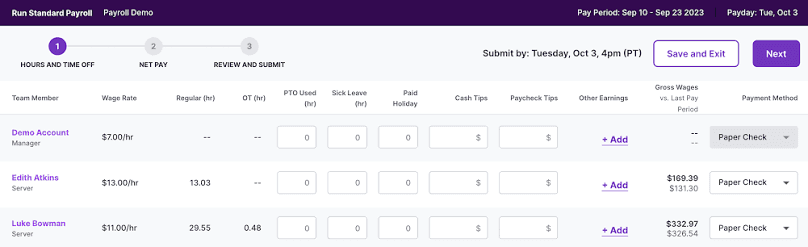
Homebase Payroll is a paid add-on: $49/month + $6/employee. It includes direct deposit, payroll tax filing, and year-end forms without per-payroll transaction fees. When you use Homebase Payroll, the native workflow connects directly to scheduling and time tracking, with no exporting hours to a separate provider needed.
Homebase also integrates with payroll providers you may already use, including QuickBooks, Gusto, ADP, and Paychex. Integration capabilities and plan requirements vary by provider.
On the HR side, Homebase gives account owners on the All-in-One plan access to certified HR Advisors for HR guidance. You can build an employee handbook, set up digital onboarding, collect e-signatures, and store employee documents securely. On paid plans, Homebase stores timesheets for four or more years.
HotSchedules payroll and HR
Fourth offers payroll as part of its broader HR and payroll product suite. Businesses considering HotSchedules should confirm which payroll, HR, and integration modules are included in their Fourth proposal. HotSchedules also offers end-of-shift pulse surveys to collect employee feedback and help managers identify workplace concerns. Applicant tracking is available through Fourth's talent acquisition tools.
The bottom line: If you want payroll in the same app as your schedule and time clock, and you don't have a dedicated HR person on your team, Homebase's all-in-one setup is the cleaner option. When a difficult HR question comes up, having access to a certified HR Advisor can be valuable for an owner without an in-house HR team.
Homebase vs. HotSchedules: Pricing
Features matter, but so does what you'll actually pay. Here's how the two tools compare on cost.
Homebase pricing
Homebase's Basic plan is free for one location with up to 10 employees. It includes core scheduling, time tracking, POS integration, mobile access, and basic team management.
Paid plans are priced per location per month:
- Essentials: $30/month (or $24/month with annual billing): advanced scheduling, advanced time tracking, team communication, and payroll integrations
- Plus: $70/month (or $56/month with annual billing): AI-powered Scheduling Assistant, PTO controls, departments and permissions
- All-in-One: $120/month (or $96/month with annual billing): HR and compliance, certified HR Advisor access, onboarding, labor cost controls
Annual billing reduces the effective monthly price of each paid plan by 20%.
Homebase Payroll is a separate add-on at $49/month + $6/employee.
HotSchedules pricing
Fourth does not publish standard HotSchedules subscription prices. Businesses must contact Fourth to discuss pricing based on their operation and the products they need.
As of July, 2026, Fourth was advertising a "one year on us" HotSchedules promotion. Eligibility, included features, and other terms should be confirmed directly with Fourth.
One pricing point that is public: the HotSchedules mobile app normally has a one-time $2.99 download fee through the Apple App Store or Google Play. Employees can also access schedule information through a browser.
The bottom line: Homebase publishes its standard plan prices before you sign up. HotSchedules buyers must contact Fourth to understand subscription pricing, package contents, and contract terms.
Which tool is right for your business?
The right pick depends on what your business actually needs. Here's a straightforward breakdown to help you decide.
Choose Homebase if:
- You run a small business with hourly workers in restaurants, retail, salons, healthcare, or similar industries
- You want to start for free and upgrade as you grow
- You need scheduling, time tracking, and payroll connected in one place
- You don't have an HR person on your team and want access to certified HR support when questions come up
- You want to know exactly what you'll pay before you sign up
Choose HotSchedules if:
- You operate a restaurant or hospitality business, particularly a multi-location operation, that places a high value on demand forecasting and labor modeling
- AI labor forecasting is essential for managing labor cost at scale
- You're already working within the Fourth ecosystem for payroll and HR
- You're comfortable evaluating a broader Fourth product package and confirming which integrations and modules your operation needs
HotSchedules is a legitimate option for restaurant and hospitality operations. Its forecasting tools are strong for that use case. But for many small businesses, Homebase covers more functions in one app at a publicly listed, predictable price.
Try Homebase free with no credit card required and start building your first schedule.
Frequently asked questions about Homebase vs. HotSchedules
Is Homebase or HotSchedules better for small businesses?
Homebase is likely the more accessible option for most small businesses. It offers a free plan for one location with up to 10 employees and publishes its per-location prices clearly. HotSchedules is designed primarily for restaurant and hospitality operations and uses custom pricing. As of July, 2026, Fourth was advertising a "one year on us" promotion, though eligibility and terms should be confirmed directly with Fourth. The better choice depends on your industry, forecasting requirements, and preferred product setup.
Does HotSchedules have a free plan?
Fourth does not advertise an ongoing free HotSchedules plan comparable to Homebase Basic. As of July, 2026, Fourth was advertising a "one year on us" promotion. Eligibility, included features, and other terms should be confirmed directly with Fourth. The HotSchedules mobile app normally has a one-time $2.99 download fee, though users can also access schedule information through a browser.
How much does Homebase cost?
Homebase's Basic plan is free for one location with up to 10 employees. When billed monthly, Essentials costs $30 per location, Plus costs $70, and All-in-One costs $120. Annual billing reduces those effective monthly prices to $24, $56, and $96. Homebase Payroll is a separate add-on at $49/month + $6/employee.
Which is better for restaurants: Homebase or HotSchedules?
It depends on your restaurant's size and what you need most. HotSchedules has a strong demand forecasting capability that's popular with larger chains and multi-unit operators. Homebase may be a better fit for independent restaurants and smaller operations that prefer transparent per-location pricing and a broader set of small-business tools in one app.
Does Homebase integrate with payroll software?
Yes. Homebase supports payroll integrations and exports for providers including QuickBooks, Gusto, ADP, and Paychex. Integration capabilities and plan requirements vary by provider. Homebase also offers its own built-in payroll add-on that connects directly to time tracking and scheduling within the same app.
How do Homebase and HotSchedules handle last-minute scheduling changes?
Both tools let employees participate in resolving schedule changes. Homebase allows employees to trade shifts, request coverage, and claim open shifts with manager oversight. HotSchedules allows employees to swap, release, and pick up shifts through its mobile tools, with manager approval.
Is HotSchedules suitable for non-restaurant businesses?
HotSchedules is designed primarily for restaurants, hospitality, and food service operations. Its forecasting and compliance tools are built around that industry. Homebase is built for small businesses with hourly teams across a range of industries, including restaurants, retail, healthcare, salons, and more.
Ready to find your fit?
Homebase's free plan covers core scheduling and time tracking for one location with up to 10 employees. It also includes mobile access and POS integration, with paid plans available when your team needs advanced scheduling, communication, onboarding, or HR tools.
Homebase says more than 150,000 small businesses use its tools. As of July, 2026, the Homebase iPhone app had a 4.8 out of 5 rating from approximately 93,000 ratings on the US Apple App Store. Homebase also had a 4.6 out of 5 rating from 1,151 reviews on Capterra.
Sign up free with no credit card required and see how Homebase fits your team.