How to Fill Out a Timesheet: A Step-by-Step Guide


SMALL BUSINESS INTEL, IN YOUR INBOX
Table of contents
Every payday, your team's hours need to be right. If someone has ever stared at a blank timesheet with no idea what goes in each field, you've seen what happens next: late submissions, math errors, and paychecks that don't match the hours worked. Those are fixable problems, but only once everyone on the team knows what they're actually doing.
There's also a legal dimension to this. Under the Fair Labor Standards Act (FLSA), employers are required to keep accurate time records for all non-exempt employees, and that obligation belongs to the business, not the individual filling out the form.
This guide covers how to fill out a timesheet from start to finish. You'll learn what fields every timesheet needs, a step-by-step walkthrough with images at each stage, how to handle the hours math, and which format fits your pay schedule.

What You Need to Know to Fill Out a Timesheet
Short on time? Here's the quick version.
- Know your fields. Every timesheet needs your name, the pay period dates, daily clock-in and clock-out times, break time, daily hour totals, and a manager signature.
- Get the math right. Subtract unpaid breaks from your total time. Convert minutes to decimals before adding up totals (45 minutes = 0.75 hours).
- Know your format. Weekly timesheets cover one seven-day period. Biweekly timesheets cover two, but overtime is still calculated per individual workweek.
- Submit on time. Late timesheets delay payroll. Know your deadline.
Common mistakes to avoid while filling out a timesheet:
- Forgetting to log unpaid breaks (overstates hours)
- Writing time in HH:MM instead of decimal format
- Using the wrong pay period dates
- Leaving days off blank instead of writing "0"
- Miscalculating overtime on biweekly timesheets by adding both weeks together
Employee timesheets—paper vs. digital. Paper timesheets work for teams of two or three with simple schedules. Digital time tracking calculates hours automatically, flags overtime in real time, and connects directly to payroll.
What Is a Timesheet?
A timesheet for work is a record of the hours an employee logs during a specific pay period. It captures when they started and stopped each day, how long their breaks were, and how many hours they worked in total. Employers use timesheets to run payroll, manage overtime, and document hours for legal compliance.
If you've heard "timesheet" and "time card" used interchangeably, here's the difference. A time card records only when an employee clocked in and out. A timesheet includes breaks, daily totals, and project details in some cases, plus a manager approval signature. The terms overlap a lot, but a timesheet gives payroll more to work with.
Employee timesheets come in three main formats: paper forms, spreadsheet templates, and digital time clock apps that fill in the data automatically.
Why Accurate Timesheets Matter
Accurate timesheets are how employees get paid correctly and how employers stay compliant with federal wage and hour law.
Tracking work hours accurately is both a practical and a legal requirement. Under the Fair Labor Standards Act (FLSA), employers are required to keep accurate time records for all non-exempt employees. Those records must be retained for at least two years. Inaccurate or missing timesheets can lead to payroll disputes, back wages, and potential penalties.
For employers, FLSA recordkeeping requirements make time tracking your legal obligation, even if your employees fill out their own timesheets. Retention minimums: payroll records must be kept for at least three years; wage computation records, including timesheets, for at least two years. Some states require longer.
What happens without records? If a wage dispute ends up in court and you don't have accurate time records, the employee's estimate of hours worked is typically used. That puts the burden squarely on you. Payroll errors are costly, and the consequences of violating labor law can extend well beyond a single paycheck dispute.
For employees, accurate timesheets protect you, too. Getting paid correctly, especially for overtime, depends on what's written down. A complete, manager-approved timesheet is documentation that you were at work and on time, which matters if questions ever arise under hourly employee labor laws.
What Goes on a Timesheet: Required Fields
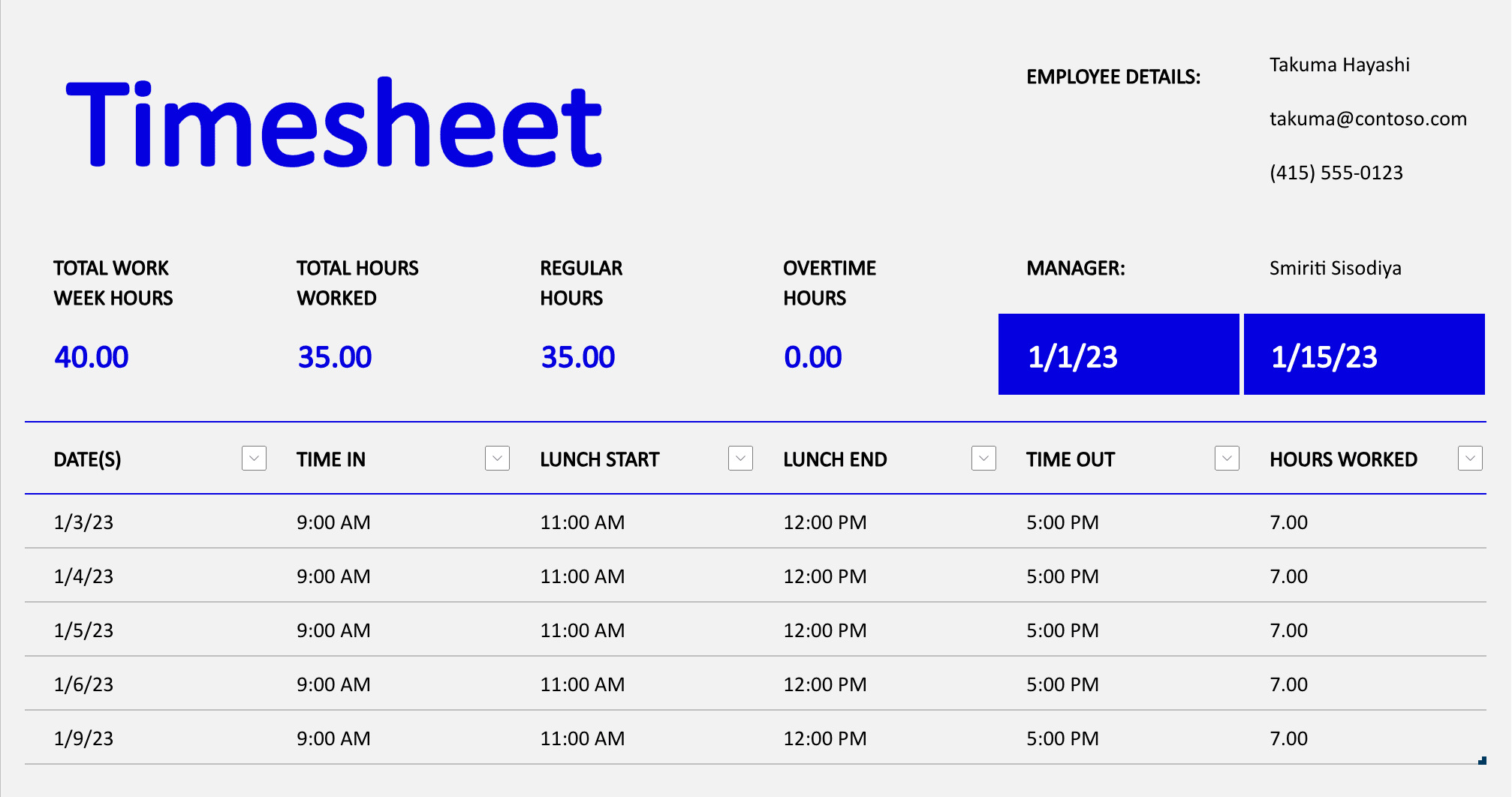
A basic timesheet includes the employee's name, the pay period dates, the specific date of each workday, clock-in time, clock-out time, unpaid break time, total hours worked per day, total hours for the pay period, overtime hours, and a manager approval signature. Some employers also add fields for employee ID, department, or project codes.
Here's what each field is for and why it matters.
- Employee name. Your full legal name, matching HR records. Nicknames create confusion when records are audited.
- Employee ID (if applicable). Useful when multiple employees share similar names.
- Pay period. The start and end date of the period being tracked (for example, Mon Oct 1 through Sun Oct 7).
- Date for each workday. Individual calendar dates, not just day names.
- Clock-in time. The time your shift started.
- Clock-out time. The time your shift ended.
- Unpaid break time. The duration of any meal break that wasn't compensated. Note: Under the FLSA, federal break time rules generally require that rest breaks of 20 minutes or fewer be counted as paid work time, so they shouldn't be deducted here.
- Total daily hours. Clock-out minus clock-in, minus unpaid breaks.
- Total pay-period hours. The sum of all daily totals.
- Overtime hours. Any hours over 40 in a workweek, compensated at 1.5x the regular rate.
- Manager approval. A signature or digital sign-off confirming the timesheet has been reviewed.
Below is an example of a free Excel timesheet template that includes most of these fields:
How to Fill Out a Timesheet: Step by Step
To fill out a timesheet for work, start by entering your name and the pay period dates. For each day you worked, record your clock-in time, clock-out time, and any unpaid break time. Calculate total hours for each day by subtracting break time from time worked. Add up your daily totals for the pay-period total, then submit for manager approval.
The process of filling out a time card follows the same basic steps, with one difference: a timesheet also captures break time and daily totals, not just clock-in and clock-out. Here's a closer look at each step.
Step 1: Enter your name and employee ID.
Write your full legal name, the name on your employment contract or HR file. If your employer uses employee ID numbers, add yours, too. This matters when records are pulled for payroll or compliance reviews.
Step 2: Add the pay period dates.
Write the start and end dates of the period you're recording. Your employer will tell you whether timesheets are weekly or biweekly. Enter the exact dates, not just the day names.
Step 3: Record your clock-in time for each day.
For each day you worked, write the time your shift started. Use consistent formatting: either 12-hour (9:00 am) or 24-hour (09:00), whichever your employer specifies. Round only if your employer has a formal time clock rounding policy. Otherwise, record the exact time.
Step 4: Record your clock-out time.
Write the time your shift ended. If you worked through midnight, note this clearly, either with a date notation or following your employer's convention for overnight shifts.
Step 5: Enter your break time.
Record any unpaid meal breaks you took. A common format is to note the break duration in minutes (for example, 30 min). For employers: short rest breaks of 20 minutes or fewer generally must be counted as paid work time and shouldn't appear here as deductions.
Step 6: Calculate your total hours for each day.
Subtract your unpaid break time from the time between clock-in and clock-out.
Formula: (Clock-out time minus clock-in time) minus unpaid break = daily total hours
Express totals in decimal format: 7 hours 45 minutes = 7.75 hours. More on decimal conversion in the section below.
Step 7: Add up your total hours for the pay period.
Sum all your daily totals to get your pay-period total. Check whether any individual workweek exceeds 40 hours. If it does, flag those hours as overtime. For employers: if any week's hours hit 40 or above, overtime pay at 1.5x is required under the FLSA regardless of the pay-period total. A free time card calculator can help verify your totals before you submit.
Step 8: Submit for manager review and approval.
Sign and date the timesheet, or submit digitally, and route it to your manager for review. They'll verify the hours, approve the timesheet, and forward it to payroll. Know your deadline. Late submissions delay paychecks.
How to Fill Out a Weekly Timesheet
A weekly timesheet covers one seven-day pay period, typically Monday through Sunday. Fill in your clock-in, clock-out, and break times for each day you worked. Calculate daily totals, then sum them for a weekly total. If your total exceeds 40 hours for the week, those extra hours need to be flagged as overtime.
A few things worth knowing:
- What to do on days off. Write "0" or "off" in those rows. Don't leave them blank. A blank row looks like a missing entry, not a day off.
- How overtime works. The 40-hour threshold resets at the start of each new workweek. You can't average across weeks.
- Why weekly timesheets are common for hourly teams. Weekly payroll schedules mean cleaner tracking, easier overtime management, and faster payroll cycles.
How to Fill Out a Biweekly Timesheet
A biweekly timesheet covers two consecutive seven-day workweeks in a single form. Fill it out the same way as a weekly timesheet: clock-in, clock-out, breaks, daily totals, but for 14 days. Add up each week's total separately before combining them, because overtime is calculated per workweek, not per pay period.
The most common mistake with biweekly timesheets is adding up all 14 days and checking whether the total exceeds 80 hours to find overtime. That's wrong. If Week 1 = 45 hours and Week 2 = 35 hours, Week 1 has five hours of overtime, even though the combined total is only 80. Overtime on biweekly payroll is always calculated per workweek, not across both weeks combined.
Most biweekly timesheets are structured with Week 1 rows and Week 2 rows in distinct sections, each with a subtotal row and a pay-period grand total at the bottom. Biweekly is the most common pay schedule for small businesses because it reduces administrative overhead compared to weekly payroll. For overtime laws by state, requirements vary, so it's worth checking what applies to your team.
How to Write Hours and Minutes on a Timesheet
Most timesheets require hours in decimal format, not hours-and-minutes. To convert, divide the minutes by 60. So 7 hours and 45 minutes becomes 7.75, because 45 / 60 = 0.75. Write it as 7.75 on the timesheet, not 7:45. This makes it possible to add up totals and calculate pay without converting back and forth.
Here are the most common conversions:
- 15 minutes = 0.25 hours (example: 8 hrs 15 min = 8.25)
- 30 minutes = 0.50 hours (example: 8 hrs 30 min = 8.50)
- 45 minutes = 0.75 hours (example: 7 hrs 45 min = 7.75)
To calculate any other conversion, divide the minutes by 60. For example: 20 minutes / 60 = 0.33. 50 minutes / 60 = 0.83. For a full walkthrough of the math, our posts on how to convert time to decimal and how to calculate work hours both go deeper on this.
One more thing to know: some employers round clock-in and clock-out times to the nearest quarter hour. At those employers, 9:07 rounds to 9:00 and 9:08 rounds to 9:15. If your employer has a rounding policy, apply it before calculating totals. If they don't, use exact times.
With a digital time clock app, the math happens automatically. Employees only manage decimal conversion on paper or spreadsheet timesheets.
How to Create a Simple Timesheet Template
To create a simple timesheet, build a table with columns for date, clock-in, clock-out, break time, and daily total hours. Add rows for each day of the workweek, a totals row at the bottom, and a signature line for manager approval. You can build this in Excel, Google Sheets, or download a free template.
How to fill out a timesheet on Excel or Google Sheets.
Set up columns for each field listed above. Use a SUM formula for daily totals and a weekly total row at the bottom. For a detailed walkthrough, how to track employee hours and how to track employee time both cover the spreadsheet approach step by step.
This works well for small teams with predictable schedules, but an employee time tracking spreadsheet still requires someone to collect, review, and manually enter hours into payroll, which is where errors tend to show up.
Free timesheet templates.
Skip the build entirely. Download a pre-formatted template and fill it in. We have a free timesheet template available to download and adapt right away.
A digital time clock app.
No template needed. With a free (or paid) timesheet tool, employees clock in and out on a phone or tablet. The app records every entry automatically, calculates totals, and exports hours to payroll. Nothing to fill out, nothing to collect.
Common Timesheet Mistakes (and How to Avoid Them)
The most common timesheet errors are forgetting to record break time, using the wrong pay period dates, calculating totals in hours:minutes instead of decimal format, and submitting late. Most are easy to fix once you know the correct format, and easier still to prevent with the right system in place.
Here's what to watch out for:
- Forgetting to log breaks. If you took a 30-minute unpaid lunch, it must be deducted. Skipping it overstates your hours and creates a payroll error.
- Recording time in HH:MM instead of decimal. Writing "7:45" means something different to a payroll system than "7.75." Always convert to decimal.
- Wrong pay period dates. Writing last week's dates on this week's timesheet means the record won't match payroll's schedule. Double-check before you start.
- Leaving blank days ambiguous. If you didn't work Monday, write "0" or "off." A blank row looks like a time card entry error, not a day off.
- Adding up two weeks to find overtime on a biweekly timesheet. Overtime is calculated per individual workweek, not per pay period. This one trips up even experienced managers.
- Missing the submission deadline. Late timesheets push payroll processing back. Know the deadline and treat it as a hard one.
- Rounding without a policy. Don't round your own times unless your employer has a formal rounding policy. Record exactly when you clocked in and out.
When timesheet issues go beyond honest mistakes into off-the-clock work or timesheet fraud, that's a different problem with its own set of solutions.
Paper Timesheets vs. Digital Time Tracking
Paper timesheets require no setup, no cost, and no learning curve. Every employee understands a form. What breaks down is the back end: someone has to manually collect, review, and re-enter every number into payroll. Errors are common. Records are physical and can be lost. There's no automatic overtime flag. Before your team outgrows paper, it helps to have a clock in and out policy in place.
With mobile time tracking, employees clock in and out on a phone or tablet. Hours are calculated automatically, overtime is flagged in real time, and records are stored securely in the cloud. A timesheet reminder system can help if late submissions are a recurring problem. Most of the best free time clock apps for small business time tracking include automatic overtime alerts, payroll exports, and a free time clock to get started.
For small business owners juggling scheduling, payroll, and compliance in one place, having time tracking built into the same tool changes how the back office works.
Roberto Bustillos, co-owner of Lombard Doggy Daycare, started using Homebase when he opened his first location and never separated the two functions. "We use the scheduling, the clocked in and clocked out to track the time of the employees, and it has the payroll built in," he said. "For me it's like — I want to have everything in just one platform."
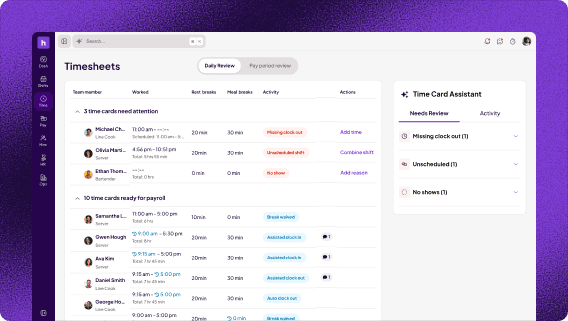
That shift from paper to digital usually happens when chasing timesheets becomes a weekly friction point, or when a payroll error is expensive enough to make the switch obvious.
If you're managing more than a few employees, the math errors and missed submissions add up fast. Homebase tracks hours automatically, so there's nothing to fill out. See how Homebase tracks hours automatically.
Frequently Asked Questions About Filling Out a Timesheet
How do you fill out a timesheet correctly?
To fill out a timesheet correctly: enter your name and the pay period dates, then record your clock-in time, clock-out time, and unpaid break time for each day worked. Calculate daily totals by subtracting break time from time worked, convert minutes to decimal format, then add up daily totals to get your pay-period total. Sign and submit before your employer's deadline.
Can an employer change an employee's timesheet?
Yes. Employers can correct timesheet errors, but only to reflect the actual hours worked. The FLSA requires accurate records, so an employer who knowingly adjusts a timesheet to reduce hours worked would be violating federal wage law. Any corrections should be documented, and the employee should typically be notified. Many digital time clock tools keep an audit trail of edits for exactly this reason.
How long do employers have to keep timesheets?
Under the FLSA, employers must keep wage computation records, including timesheets, for at least two years. Payroll records must be kept for at least three years. Some states require longer. Digital time tracking tools typically store records automatically. Paper timesheets should be scanned and filed or kept in secure physical storage.
What happens if a timesheet is filled out incorrectly?
If errors are caught before payroll runs, they can usually be corrected with minimal disruption. If they make it into payroll, fixing them requires a payroll correction, which takes time and creates additional paperwork. If records are inaccurate over a longer period and a wage dispute arises, missing or incorrect timesheets put the employer in a tough spot. Courts typically side with the employee's account of hours worked when employer records are incomplete.
Do salaried employees need to fill out timesheets?
Not always, but it's often a smart practice. The FLSA doesn't require employers to track hours for salaried exempt employees. That said, timesheets for salaried employees can still be useful for project management, labor cost tracking, PTO calculations, and documenting hours if an employee's exempt status is ever questioned. Some states have additional requirements worth reviewing.
The Habits That Keep Payroll Clean
Getting timesheets right comes down to a few consistent habits. Record every clock-in, clock-out, and break. Convert minutes to decimal. Know your pay period dates and your submission deadline.
For employers: the FLSA makes accurate record-keeping your responsibility, not just your employees'. And the more employees you have, the more the manual process compounds. Errors pile up. Submissions get missed. Paychecks run late. At a certain point, the friction costs more than any automation would.
Cherie Chua, co-founder of Luxe Bites, a catering and events business, put a number on what switching to Homebase saved across her team: "Across the board, everyone is saving at least a couple hours a day," she said. "If you collectively add it up, I would say it's at least 10 hours a week or more that we're saving. That doesn't sound like a lot but it's a big deal because there's not enough time in the day ever."
With a timesheet tool like Homebase, once your team is clocking in, there's nothing left to fill out. Try Homebase—our free plan covers your first location with up to 10 employees.