A complete, printable pay stub for hourly and salaried employees. Fill in your team's earnings, deductions, and taxes.
Pay stub template

What's Inside the template?
This ready-to-use pay stub template covers every line your team needs to see. Use it for hourly workers, salaried employees, and tipped teams.

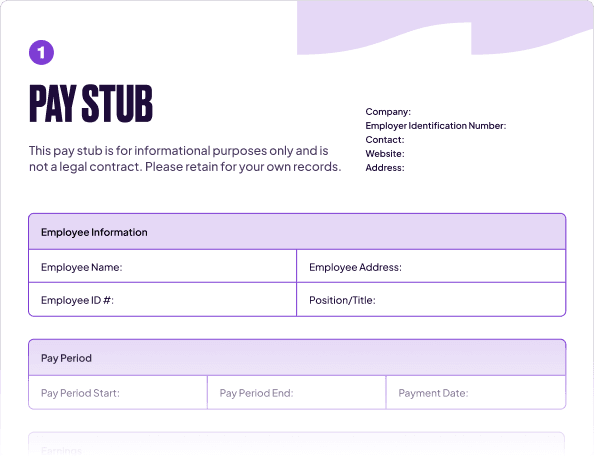
Earnings section for all pay types.
Regular hours, overtime, paid time off, sick days, tips, and non-hourly pay each have their own line, with current-period and year-to-date totals for each.
Deductions breakdown.
Pre-tax benefits, taxes withheld, and post-tax deductions are separated into their own sections so every number is accounted for.
Net pay summary.
Gross pay, total deductions, and take-home amount are laid out in one clean section. Current-period and year-to-date columns run throughout the fillable PDF template.

Did you know?
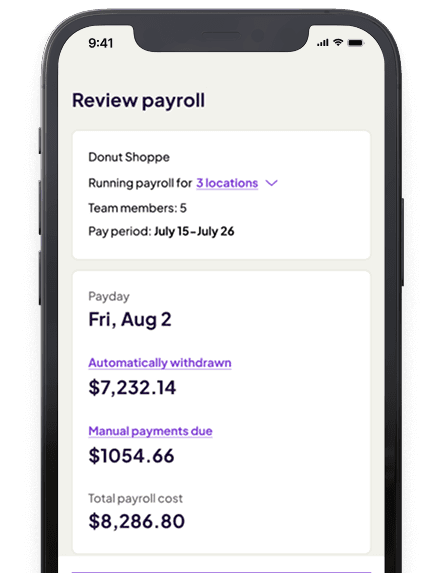
Homebase pulls your team's hours straight from their timesheets and calculates wages and deductions for you.

Wages, overtime, and tips are calculated automatically from your team's hours.

Set up direct deposit so your team gets paid automatically.

The AI Payroll Assistant flags errors, so mistakes get caught before pay day.

Small business intel, in
your inbox
Table of contents
What is a pay stub?
A pay stub is a document that shows how an employee's paycheck was calculated. It breaks down gross earnings, every deduction, and the net amount the employee takes home. Most employers provide one with every paycheck, either as a printed slip or a digital record. You may also see them called check stubs, paycheck stubs, or pay slips.
What should a pay stub include?
A complete pay stub covers employer and employee information, earnings, deductions, and year-to-date totals.
Here's a further breakdown:
- Employer information. Your business name, address, and Employer Identification Number (EIN).
- Employee information. The employee's name, address, job title, and ID number. Use an employee ID rather than a full Social Security Number to protect your team's personal information.
- Earnings. Gross wages for the pay period. For hourly workers, that's regular hours at the hourly rate plus overtime at 1.5x for hours over 40 in a workweek. The Homebase template includes rows for PTO, sick time, tips, bonuses, and non-hourly pay.
- Deductions. Every amount withheld, in three groups: pre-tax benefits (health insurance, 401(k)), taxes withheld (federal, state, local, Social Security at 6.2%, Medicare at 1.45%), and post-tax deductions (Roth IRA, garnishments).
- Year-to-date totals. Running totals since January 1. Your team uses these to verify their W-2 at tax time.
How to create a pay stub from a template
Here's how to go from a blank template to a completed pay stub.
- Enter your employer information. Business name, address, EIN, and contact info. Fill it in once and reuse the file.
- Add the employee's information. Name, address, employee ID, and job title. Save a separate copy for each employee if you're running stubs for a full team.
- Set the pay period and payment date. The pay period covers the dates worked. The payment date is when they get paid. Both go on the stub, and they're different dates.
- Calculate gross earnings. Multiply regular hours by the hourly rate. Add overtime at 1.5x for hours over 40, plus tips, PTO, or any bonuses. For salaried employees, enter fixed gross pay.
- Work through deductions in order. Pre-tax benefit deductions go first, then taxes withheld. Use IRS Publication 15-T for federal withholding, your state revenue department's tables for state tax, and 6.2%/1.45% for Social Security and Medicare. Post-tax deductions come last.
- Calculate net pay. Subtract total deductions from gross earnings. That's the take-home amount for the period.
Pay stubs for hourly employees and 1099 contractors
Most small businesses run a mix: hourly employees on the regular payroll and the occasional contractor brought in for a specific job. Pay stubs work differently for each.
For W-2 employees, a pay stub records gross wages, every deduction, and net pay each pay period. The year-to-date column on each stub ties everything to the W-2 at year-end.
1099 contractors are different. If you bring in a contractor for a specific job (a handyperson, a seasonal hire, a specialist you pay per project), they're not on your regular payroll. You don't withhold taxes from their pay. They handle their own.
That said, contractors sometimes ask for documentation of what you paid them, for their own recordkeeping, for a loan application, or to verify income. A 1099 contractor pay stub template gives you a straightforward way to provide that. It shows the payment amount, the pay period, and the relevant parties, without implying employment status or tax withholding.
One thing to keep straight: a pay stub and a 1099-NEC are different documents. The 1099-NEC is an annual IRS tax form you file for any contractor you paid $600 or more in a calendar year. A pay stub is a period-by-period record. Both can be useful. Neither replaces the other.
Do employers have to provide pay stubs?
It depends on your state. About half of U.S. states require employers to provide a pay stub with every paycheck, but the rules vary. Some require a written or printed wage statement meeting specific content requirements (California is among the most detailed). Others require only that employees can access their pay statement on request. A handful have no requirement at all.
Regardless, providing one every pay period is good practice. It answers pay questions before they become disputes and gives your team the records they need for loans, benefits verification, and tax filing. Check your state's Department of Labor website for the specific rules in your jurisdiction.
Frequently asked questions about pay stubs
What's the difference between a pay stub and a paycheck?
A paycheck is the actual payment. A pay stub is the document explaining how that payment was calculated. With paper checks, the stub is usually a perforated slip attached to the check. With direct deposit, employers typically make a digital stub available in a portal or app.
What is the best format for a pay stub?
PDF is the most practical for distribution. It preserves formatting and can't be accidentally edited by the recipient. Our template is available as a PDF, which you can fill in digitally and email, or print and hand over directly.
Can I create a pay stub in Word?
Yes. You can open the PDF in Word or Google Docs and edit it directly. The main limitation: Word doesn't calculate. You'll need to enter the math yourself. If you want totals to update automatically, use a spreadsheet version instead.
Is it legal to make your own pay stubs?
Yes. Employers create pay stubs all the time, and using a template is completely legal. What matters is accuracy: the numbers must reflect wages and deductions as paid and withheld. Falsifying pay stubs is fraud.
Can a 1099 form be used as a pay stub?
Not directly. A 1099-NEC shows the total paid to a contractor for the full year. A pay stub shows period-by-period detail. If a contractor needs to document income for a loan or lease application, the annual 1099 often isn't enough. A pay stub template that records individual payments fills that gap.
Beyond the template: how Homebase handles pay stubs
A template gets the job done when you have a small team and consistent hours. But every pay period, you're doing the same math: calculating hours, applying tax rates, adding up deductions, and repeating it for each person on the team.
Homebase payroll is a paid add-on that handles all of it automatically. It syncs directly with your team's timesheets, so hours flow straight to payroll without any re-entering. Wages, overtime, tips, and deductions are calculated for each employee. Taxes are filed and paid for you. Your team gets paid via direct deposit and can view their pay stubs right in the app.
Homebase is free to start for scheduling, time tracking, and team management. Add payroll when you're ready.
Related Templates
Check out moreSmall Business Tax Deductions
Starting a Small Business Checklist
Weekly Employee Schedule Template
Shift Report
Attendance Policy
Pay Stub Template

Manage your team better today.
Managers save 5+ hours a week with Homebase